Architectury API Needed by AAA Particles: World aaa_particles_world-neoforge-26.1.2-2.0.0.jar
requiredMatching file found Matched file: [NeoForge 26.1.2] v20.1.17
CurseForge · Minecraft mod
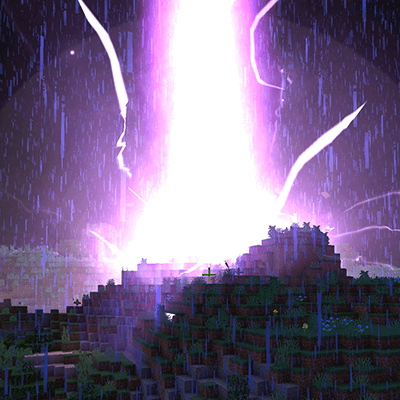
Replace certain VFX in Minecraft with Effekseer effects
Quick answer
AAA Particles: World aaa_particles_world-neoforge-26.1.2-2.0.0.jar targets 26.1.2 with NeoForge. The project page does not say whether this file belongs on the client, dedicated server, or both. All 2 required mods have matching files.
Where it goes
The project page does not say whether this file belongs on the client, dedicated server, or both.
The source does not explicitly classify this release as client-only or server-only.
aaa_particles_world-neoforge-26.1.2-2.0.0.jar. Change the file and its required mods may change too.
Install Architectury API, AAA Particles first. We found matching files for this game-version and loader setup. 10 come through another mod in the chain.
10 extra mods were pulled in by other dependencies. Indented rows show who needs each one. We only count dependency files that match this setup. A file for another loader does not fill the gap.
Before you install it
Built for AAA Particles: World aaa_particles_world-neoforge-26.1.2-2.0.0.jar. Pick another file and the loader, install side or required mods may change.
Use aaa_particles_world-neoforge-26.1.2-2.0.0.jar. It targets 26.1.2 with NeoForge; another release may have different loader, side or dependency requirements.
Install Architectury API, AAA Particles first. We found matching files for this game-version and loader setup. 10 come through another mod in the chain.
The project page does not say whether this file belongs on the client, dedicated server, or both.
Use the “Get this file” button beside aaa_particles_world-neoforge-26.1.2-2.0.0.jar. It opens that exact file at the source.
About this project
Adds back the lightning effect in older version of AAA Particles mod, and more! See the gallery for more previews
WARNING: Some effeks added in 2.0.0 may contain flash light, If you encounter uncomfort when doing a critical hit, please turn off that effek in the config file and restart the game!
Note; Users upgrading from versions before 1.0.2 will need to
manually enable explosion replacement in the mod config,
in order for the explosion replacement to take effect.
More in-world effeks coming soon!
Project description from CurseForge.
Pick your setup
Choose the version and loader you play, then open the matching release.
Check the dependencies, then try the file in a copied instance before changing a world you care about.
Recent files
19 Sept 2026
19 Jun 2026
19 Jun 2026
19 Jun 2026
19 Jun 2026
19 Jun 2026
19 Jun 2026
1 May 2026
29 Dec 2024
29 Dec 2024
29 Dec 2024
29 Dec 2024
Looking for an older file? The official CurseForge project page is in Resources.
 mod
A Modern falling Meteor mod, highly configurable, pretty and with spirt of the old ones!
 mod
Vanilla stone types in plenty of variations for all your building needs.
 mod
An addon for tacz, with extra support about throwable, melee weapons for gun packs