Vintage Story version
Back to mods 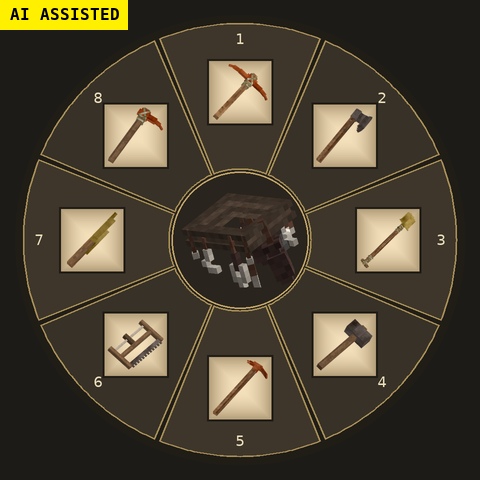
Vintage Story Mod DB · Vintage Story mod
Reinforced Tool Belt
Reinforced Tool Belt By Kokenbols · Version 0.2.0 · Vintage Story 1.22.7 Singleplayer & multiplayer · Required on both client and server Store up to eight tools in a wearable Reinforced Tool Belt and switch between them with a hotkey whe
Choose a version Pick your version below, then grab the matching file.
Quick answer
Which Reinforced Tool Belt release should I use?
Latest stable file 0.2.0
Game version 1.22.7
Loader Built-in Vintage Story mod system
Reinforced Tool Belt 0.2.0 targets 1.22.7. It must be installed on the client. Installation on the dedicated server is optional. No extra mods listed for this file.
Where it goes
Is Reinforced Tool Belt required on the client, server, or both?
It must be installed on the client. Installation on the dedicated server is optional.
Client Required
Dedicated server Optional
Loader for this release Built-in Vintage Story mod system
Required install it here Optional supported, not mandatory Not supported do not install here Source doesn’t say do not assume
This release supports both sides, but the source does not require it on the server.
What else does Reinforced Tool Belt 0.2.0 need?
0.2.0. Change the file and its required mods may change too.
This file does not list any required mods. Do not add a library just because a different file uses it.
This file does not list any required or optional mods.
Before you install it
Add Reinforced Tool Belt without breaking your instance.
Built for Reinforced Tool Belt 0.2.0. Pick another file and the loader, install side or required mods may change.
- 01
Stick to this file
Use 0.2.0. It targets 1.22.7; another release may have different loader, side or dependency requirements.
- 02
Bring the mods it needs
This file does not list any required mods. Do not add a library just because a different file uses it.
- 03
Put it on the correct side
It must be installed on the client. Installation on the dedicated server is optional.
- 04
Pick the file you checked
Use the “Get this file” button beside 0.2.0. It opens that exact file at the source.
About this project
What does Reinforced Tool Belt add?
Reinforced Tool Belt
By Kokenbols · Version 0.2.0 · Vintage Story 1.22.7
Singleplayer & multiplayer · Required on both client and server
Store up to eight tools in a wearable Reinforced Tool Belt and switch between them with a hotkey wheel. Hold your assigned key, point toward a tool, and release to equip it. The belt uses the waist clothing slot, leaving your backpack slots available.
These are real storage slots: placing a tool in the belt removes it from your ordinary inventory. Each slot holds one item, with its durability, tool mode, custom name, and other item attributes preserved during transfers.
Stable 0.2.0: Includes the compatibility fixes introduced in 0.2.0-pre.1, with no additional gameplay changes. Back up your world before updating; keep only one installed version and update both server and clients.
Features
- Up to eight tool slots, numbered clockwise from the top.
- Hold-and-release quick switching; pointing beyond the wheel's edge still selects that direction.
- Arrange mode for dragging tools directly from your hotbar or inventory and between wheel slots.
- Movable or fixed window, 75–100% wheel size, and a Recenter button.
- Configurable usable slots. All eight segments remain visible; disabled slots are grayed out.
- Tools only by default, with optional server settings for additional tools and specific weapons.
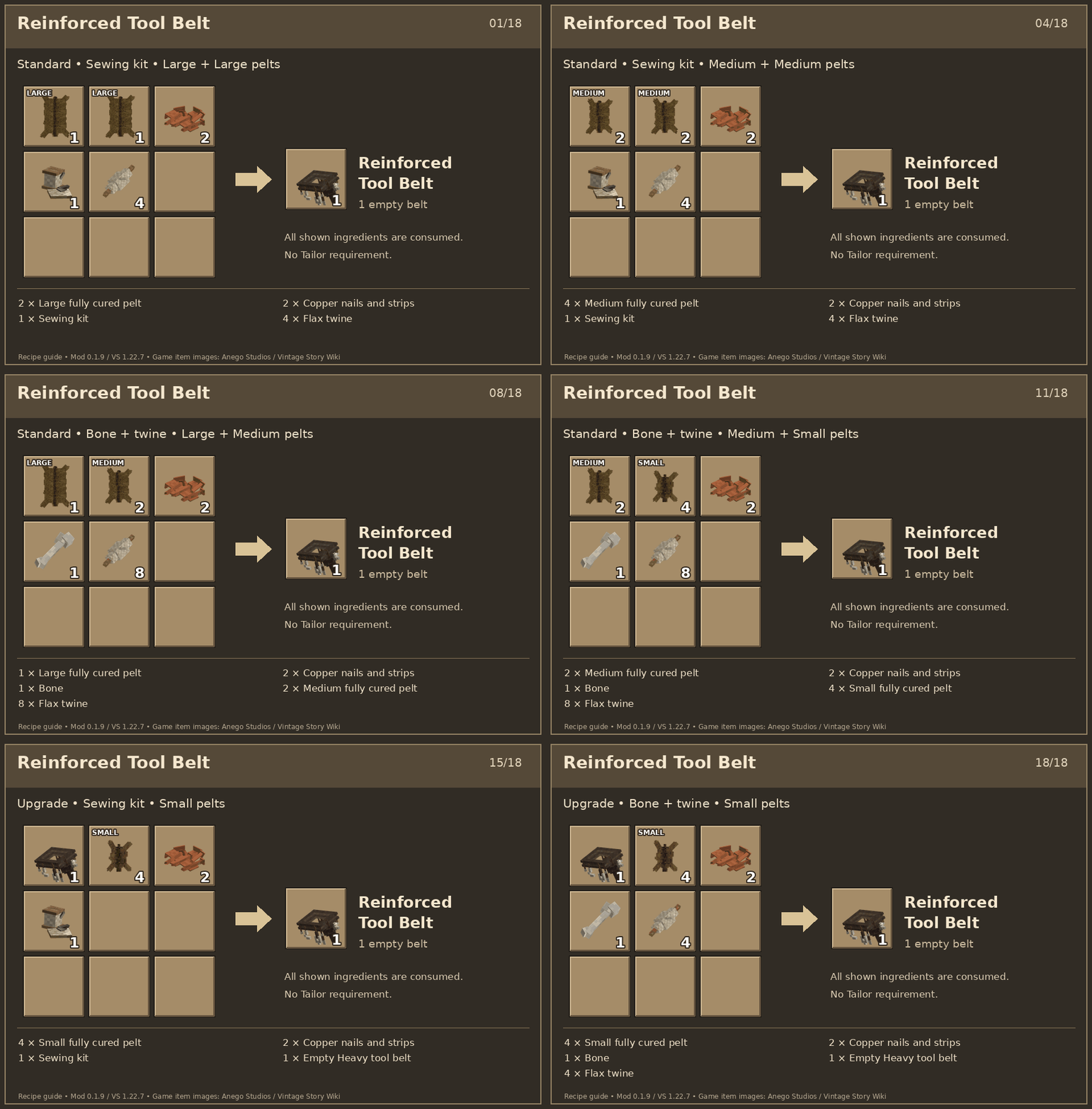
- 18 crafting recipes, including upgrades from an empty vanilla Heavy tool belt.
- Storage belongs to each belt item, rather than a shared player stash.
How-to Guides
Installation & updating
- Back up your world before updating. Fully close Vintage Story.
- Download the installable release ZIP and place it in your active Mods folder without extracting it. On Windows, the usual location is
%APPDATA%\VintagestoryData\Mods. Mod Manager can open the active folder. - Keep only one version installed. Do not install the SOURCE ZIP.
- Restart the game and check that Reinforced Tool Belt is enabled.
- In multiplayer, use the same version on the server and all clients.
Updating from the public 0.1.9 release does not require a new world or belt. Keep your existing configuration; the new slot setting is added on startup. Restart the entire game after replacing the ZIP, not just the world.
Crafting & equipping your belt
Search Reinforced Tool Belt in the in-game handbook for the exact recipes. Equip the finished item in your waist clothing slot.
| Recipe | Ingredients |
|---|---|
| Standard | 2 large fully cured pelts, 4 flax twine, 2 copper nails and strips items, and 1 sewing kit. |
| Standard without kit | 2 large fully cured pelts, 8 flax twine, 2 copper nails and strips items, and 1 bone. |
| Heavy tool belt upgrade | 1 empty vanilla Heavy tool belt, 1 large fully cured pelt, 2 copper nails and strips items, and 1 sewing kit. |
| Upgrade without kit | 1 empty vanilla Heavy tool belt, 1 large fully cured pelt, 2 copper nails and strips items, 4 flax twine, and 1 bone. |
Separate recipes allow each large pelt requirement to be replaced by two medium or four small fully cured pelts, including mixed-size alternatives for the standard recipe. Raw or partly cured hides do not qualify. All ingredients are consumed, and each recipe produces one empty belt.
The vanilla Heavy tool belt stays unchanged. These recipes have no Tailor requirement and do not change other vanilla class restrictions.
Controls & putting tools into the belt
Open Settings → Controls to check or change these bindings:
- Reinforced Tool Belt: default Ctrl+Shift+R. Hold for quick selection; release to equip and close. You can rebind it to T.
- Arrange Tool Belt: default Ctrl+Shift+T. Press to open or close the arrangement window.
- Cursor control: the game's own binding, normally Alt. Hold this in Arrange mode to interact with inventory.
If the initial quick-selection shortcut is occupied, the mod tries Ctrl+Shift+K, then Ctrl+Shift+Y. Check Controls for your actual binding. Existing custom bindings are retained.
- Equip the belt and open Arrange mode.
- Hold your cursor-control key and open your ordinary inventory if needed.
- Drag a tool from your hotbar or inventory onto an enabled wheel slot. You do not need to hold it in your hand first.
- Drag between enabled wheel slots to move or swap tools.
- Drag a tool back to ordinary inventory, or right-click its slot to retrieve it if space is available. Right-click retrieval keeps Arrange mode open so you can remove several tools without reopening the wheel.
Quick-selection mode is for equipping tools. Use Arrange mode to fill and organize the belt.
Quick switching, movement & window settings
Hold the quick-selection hotkey, move the pointer toward an enabled occupied slot, then release. The pointer starts at the wheel's center, including when the wheel has been moved. You can point beyond the outer edge without aiming precisely at the square.
- Empty hand: the selected tool moves into your hand.
- Eligible held tool: the held and selected tools swap places.
- Other held item: the entire held stack must fit into ordinary inventory first. If it cannot, nothing moves.
- Cancel: return to the center, choose an empty or disabled direction, or press Escape.
Your selected hotbar index and offhand remain unchanged. Tool-for-tool swaps work even when ordinary inventory is full.
In Arrange mode, hold Alt and use the title-bar menu to choose fixed or movable positioning. Drag the movable title bar to reposition the wheel. The −/+ buttons resize it from 75% to 100%; the buttons stay in place while resizing. Recenter returns the wheel's center to the crosshair. The red center X closes the window.
You can walk and jump with the wheel open. In Arrange mode, release Alt to look around and hold it to use the pointer. During quick selection, mouse movement controls the wheel until the hotkey is released. The wheel does not pause multiplayer.
Configuration
Choose usable slots — including a three-slot belt
After starting a world/server once, edit VintagestoryData/ModConfig/reinforcedtoolbelt.json. Stop the world/server before editing, save, and restart afterward. Edit the actual ModConfig file, not the example inside the ZIP.
Default configuration:
{
  "EnabledSlots": [1, 2, 3, 4, 5, 6, 7, 8],
  "AutoAcceptModdedTools": true,
  "AllowCodes": [],
  "WeaponCodes": [],
  "DenyCodes": []
}
For three usable slots, change only the EnabledSlots value to [1, 3, 6]. Keep your existing tool/weapon lists. Slot 1 is at the top; numbering continues clockwise. Numbers and positions do not rearrange when slots are disabled.
All eight segments stay visible. Disabled slots are gray, cannot accept items, and cancel quick selection when pointed at. An empty list [] disables every slot. Duplicate entries and numbers outside 1–8 are ignored; a missing or null setting defaults to all eight.
Already have tools in a disabled slot? They are retained and remain visible in both wheel modes, but cannot be quick-equipped. Open Arrange mode (Ctrl+Shift+T by default), hold the cursor-control key (normally Alt), and left-click a tool in a disabled slot to pick it up. Place it in an empty ordinary inventory or hotbar slot. You can also drag it out, move it to an enabled empty wheel slot, or right-click to retrieve it into available inventory space. Right-click retrieval keeps Arrange mode open so you can recover several tools. Disabled slots are removal-only and cannot accept new items. If there is insufficient inventory space, right-click retrieval changes nothing.
In singleplayer, edit your local file. In multiplayer, the server's settings control capacity for everyone.
Accepted tools & optional weapons
Default supported types recognized by the game's tool tag or supported tool category include pickaxes, prospecting picks, axes, shovels, hoes, hammers, knives, saws, chisels, scythes, shears, wrenches, cleavers, crowbars, tongs, and soldering irons.
Recognized weapons are disabled by default; knives and axes remain tools. Blocks, food, clothing and detectable storage are blocked. Tool heads and other unrecognized items are not automatically accepted. Custom classes and behaviors alone do not disqualify a tool.
AutoAcceptModdedTools: true by default; automatically recognize modded tools by their metadata. Set false to require explicit AllowCodes entries for non-vanilla tools.AllowCodes: exact codes declaring additional tools, including tools without recognized metadata.WeaponCodes: exact codes for weapons recognized by weapon tag/category; empty by default.DenyCodes: exact codes to block. These take priority over allowed entries.
Example enabling a copper spear and steel falx:
{
  "EnabledSlots": [1, 2, 3, 4, 5, 6, 7, 8],
  "AutoAcceptModdedTools": true,
  "AllowCodes": [],
  "WeaponCodes": ["game:spear-generic-copper", "game:blade-falx-steel"],
  "DenyCodes": []
}
Use exact, case-sensitive item codes including material/variant. Display names and wildcards are not accepted. These settings do not bypass nested-storage safeguards. Storage-like item state may require additional compatibility support even when listed. These checks cannot discover every possible third-party storage implementation. See CONFIGURATION.md in the ZIP for more details.
Recovery, FAQ & Compatibility
Emptying, updating & uninstalling safely
Empty a loaded belt before voluntarily removing or replacing it. The command /toolbelt-empty moves all its contents, including tools in disabled slots, into ordinary inventory only if everything fits. Otherwise nothing moves.
Belt condition does not reduce capacity or add a durability cost to switching. Tool attributes are retained when moved. Death and grave behavior with other mods is not universally verified.
Before uninstalling: empty every belt and back up your world. Removing a storage mod while custom items still contain tools is not guaranteed to preserve them.
Troubleshooting & known reports
The hotkey does nothing: fully restart the game, confirm the belt is equipped, keep only one mod version installed, and check Settings → Controls for conflicts.
I cannot add tools: use Arrange mode, hold the cursor-control key, check that the slot is enabled, and confirm that the item is an accepted tool.
My config did not apply: check the active ModConfig folder, save valid JSON without a trailing comma after the last list entry, then restart the world/server. Multiplayer uses the server's config.
Wayland: use Arrange mode; quick-mode cursor positioning is unavailable.
Modded-tool compatibility: Recognized tools from any mod can qualify automatically, including custom-coded tools. QP's Chisel Tools pantograph, simple pantograph and megapantograph families are explicitly recognized; transfers were checked with 1.17.9. The official Toolsmith 1.2.17 and 1.2.19 embedded-part formats retain reviewed handling. These are eligibility and data-preservation improvements, not universal compatibility certification. Graphical rendering, actual tool use and full multiplayer combinations still need player testing.
Need help with an item? Hold it and run /toolbelt-check. Share the reported item code, reason, tool category, class and behaviors with your game/mod versions on Discord or in the ModDB comments. No Discord account is required. Existing allow/deny settings remain in effect, and nested storage stays blocked.
Built for Vintage Story 1.22.7. Compatibility with every inventory, clothing, tool, or grave mod is not guaranteed. Please include game/mod versions, relevant error logs, and steps to reproduce problems in your report. Remove personal information before posting logs.
Changelog
0.2.0 — Stable compatibility release
- Promote the compatibility beta to stable 0.2.0. No gameplay changes from 0.2.0-pre.1.
- Includes the fix for world-loading failures triggered by tool-eligibility assertions when another mod changes tools, including the reported Toolsmith issue.
- Includes automatic recognition of eligible modded tools and recognition of Chisel Tools pantograph variants.
- Retains configurable slots, disabled-slot item recovery, optional weapon codes, storage safeguards and /toolbelt-check diagnostics.
- Keep the same mod ID, recipes, belt storage format and existing configuration.
- Update player documentation and add the Kokenbols Discord for support and bug reports.
Updating: Back up your world, fully close the game and replace the old ZIP with 0.2.0. Keep your configuration. Update the server and all clients. Compatibility with every mod is not guaranteed.
0.1.9 was the first public release. Earlier entries document the original test builds; historical features may have been replaced by later versions.
0.2.0-pre.1 (Beta 1) — Broader tool compatibility beta
- Fix world-loading failures caused by fatal vanilla-tool eligibility assertions when another mod changes tools.
- Accept modded tools automatically when they carry the tool tag or a supported hand-tool category; custom classes and behaviors alone no longer cause rejection.
- Add default recognition for the Chisel Tools pantograph, simple pantograph and megapantograph families, checked against Chisel Tools 1.17.9.
- Preserve pantograph copied-design attributes and tool mode during transfers; retain reviewed embedded-component handling for official Toolsmith 1.2.17 and 1.2.19 builds.
- Add AutoAcceptModdedTools, enabled by default. Server owners can disable automatic recognition and use exact AllowCodes entries instead.
- Allow server owners to declare untagged tools through AllowCodes and optional weapons through WeaponCodes. Recognized weapons remain disabled by default.
- Keep blocks, food, clothing, detectable storage and unsupported embedded item stacks blocked. Item-code overrides cannot bypass these checks.
- Expand storage checks to custom inventory/item-stack fields and properties, nested storage markers and embedded items without invoking custom property getters.
- Add /toolbelt-check to report item code, eligibility reason, tool category, class and behaviors.
- Treat changes to the default recipe count as a warning rather than a startup failure; stop treating a rendering-only interface as storage.
- Keep the existing eight-slot wheel, hotkeys, recipes, item ID, belt storage schema and saved configuration lists.
Updating: Beta for Vintage Story 1.22.7. Back up your world before testing. Fully exit the game before replacing an earlier 0.2.0-pre.1 ZIP. Install only one copy; all clients and the server must use this revised build. Keep your existing JSON configuration.
Automatic eligibility is not a guarantee of compatibility with every mod. Unusual storage implementations, custom renderers and inventory integrations may need further support. Graphical gameplay, real pantograph copy/paste use and full multiplayer testing remain necessary.
0.1.12 — Disabled-slot recovery fixes
- Aligned wheel item rendering with vanilla inventory depth, clipping and frame-time handling to address scythe rendering and improve consistency for supported tools and configured weapons. Item GUI transforms are preserved.
- Added disabled-slot hover messages explaining how to retrieve tools through Arrange mode. Attempts to add items to disabled slots now show the EnabledSlots setting and configuration file path.
- Fixed stored tools being hidden in the quick wheel after their slots were disabled in the JSON configuration. Tools now remain visible in grayed-out slots, but cannot be quick-equipped.
- Fixed cursor pickup from occupied disabled slots in Arrange mode. Left-click a tool to pick it up, then place it in an empty inventory or hotbar slot.
- Improved dragging tools back to inventory when the movable wheel overlaps inventory slots.
- Fixed right-click retrieval closing Arrange mode after every tool. The window now stays open so you can retrieve multiple tools.
- Disabled slots remain removal-only. Existing tools, durability and item attributes are preserved.
Updating: Back up your world, fully close the game, and replace the old mod ZIP with version 0.1.12. Keep your existing JSON settings. Multiplayer clients and servers must both update.
Recovering tools: Open Arrange mode with Ctrl+Shift+T (or your custom binding), hold Alt to use the cursor, then left-click to pick up a tool or right-click to retrieve it into available inventory space. Disabled slots cannot accept new items.
0.1.11 — Full wheel with grayed-out disabled slots
- Keep all eight wheel segments and square slot backgrounds visible.
- Gray out disabled slots instead of hiding them.
- Keep disabled slots unavailable for quick selection or deposits, with stored tools recoverable in Arrange mode.
0.1.10 — Configurable usable slots
- Add EnabledSlots to server configuration, with all eight enabled by default.
- Prevent items from entering disabled slots and preserve existing contents for removal.
- Initially hide disabled slots from the quick wheel; 0.1.11 replaces this with gray segments.
- Retain existing recipes, controls, item settings, and saved belt data.
0.1.9 — First public release
- Package the eight-slot waist belt, hold-and-release wheel, inventory dragging, and 18 recipes for public release.
- Add optional WeaponCodes configuration while keeping tools-only storage as the default.
- Retain deny rules and nested-storage checks for configured items.
- Include installation, controls, crafting, and configuration guides with example settings.
0.1.8 — Recenter button
- Add Recenter beside the Arrange window's size controls.
- Center the wheel on the crosshair at its current size and save that position for quick selection.
0.1.7 — Easier selection, resizing & positioning
- Keep size buttons stationary while resizing the wheel.
- Allow quick selection by direction beyond the outer edge.
- Use the saved Arrange position for the quick wheel and center its pointer on opening.
- Change the default Arrange shortcut to Ctrl+Shift+T while retaining other custom bindings.
0.1.6 — Hold-and-release quick selection
- Add holding the hotkey, pointing to a tool, and releasing to equip and close.
- Separate quick selection from persistent Arrange mode.
- Cancel selection for empty slots, the center, or no pointer movement; outside-edge cancellation was later changed in 0.1.7.
- Use a smaller center circle with a centered red X and a more balanced header.
0.1.5 — Vanilla-style controls & tools-only storage
- Standardize the mod ID and assets under reinforcedtoolbelt, with migration support for 0.1.2–0.1.4 belt data.
- Use the game's Fixed/Movable/Close title bar and native-size square inventory slots.
- Improve movement and free-look handling with the game's cursor-control key.
- Require the game's tool tag, removing earlier weapon and untagged-item exceptions while allowing stored items to be retrieved.
- Move compact size controls to the top, replace the occupied count with a center X, and improve rejection feedback.
0.1.4 — Moving, resizing & wheel-to-wheel transfers
- Adopt the Reinforced Tool Belt display name.
- Add direct moves and swaps between wheel slots.
- Improve opacity and text contrast for bright and dark scenes.
- Add movable/locked positioning, 75–100% sizing, and saved preferences.
- Add early movement/camera handling and spear support; later releases revised movement and item eligibility.
0.1.3 — Direct inventory dragging
- Remove the extra inventory panel and restore the wheel-only layout.
- Accept tools through the game's real inventory cursor.
- Allow direct dragging from belt slots to ordinary inventory slots.
- Improve input routing, independent slot targeting, and rejected-item feedback.
0.1.2 — Hotkey-open crash fix
- Fix the crash when opening the wheel before the first server inventory snapshot arrived.
- Reset inventory layout on opening and validate inventory counts and page indices.
- Update the early internal mod naming; later releases standardized it as reinforcedtoolbelt.
0.1.1 — Durability display & early drag-and-drop
- Introduce an inventory panel for direct drag-and-drop and click-to-place interaction.
- Use filled durability bars and smaller tool icons.
- Introduce 50% background opacity, later revised for readability.
- Reference the vanilla Heavy tool belt model, texture, and display transforms.
- Expand early item support and update the belt-and-tools artwork; later versions revised accepted items.
0.1.0 — First experimental build
- Introduce a nonstacking waist belt with eight item-backed tool slots and a radial interface.
- Add server-authorized transfers, tool swaps, full-stack relocation, right-click retrieval, and an all-or-nothing empty-belt action.
- Add 18 recipes with cured-pelt alternatives and no Tailor requirement.
- Introduce loaded-belt removal safeguards, condition-independent storage, and death handling.
- Build against Vintage Story 1.22.7 using .NET 10.
Feedback, Future Ideas & Support
I now have a Kokenbols Discord server! Join to chat, share suggestions, and submit bug reports. Use #bug-reports for public reports or click the ticket button in #get-support for help. Include your game/mod versions, affected item and steps to reproduce the issue. Remove personal information from logs. Comments on this ModDB page are still welcome; Discord is optional.
I will try my best to make improvements when I can, but updates and support for future game versions are not guaranteed.
I am working toward broader tool compatibility while keeping this a tool belt by default. Future ideas include optional tools displayed on the character and, potentially, a separate opt-in approach to building supplies. Blocks and stacked building materials are not supported in this release. These are ideas, not promised features or release dates.
I would also like to try making other simple mods. One idea is Reinforced Heavy leather gloves that let you handle hot items without keeping tongs in your offhand. This is only a plan, not a feature of this mod or a promised release.
*FUTURE KOKENBOLS HERE. I made the Reinforced Heavy Leather Gloves! And also made Purposeful Pouches!*
If you enjoy the mod and would like to leave an optional tip, you can support Kokenbols on Ko-fi. Tips are appreciated but never required and do not guarantee updates.
Credits & Permissions
Created by Kokenbols. Thanks to everyone who tests the mod and shares feedback. Vintage Story and its base-game assets belong to Anego Studios. This unofficial mod references the existing Heavy tool belt assets.
Permission is granted to download, install, and use the mod in singleplayer and on multiplayer servers. Other rights remain with the author; see LICENSE.txt in the download.
AI Disclosure
I am a casual Vintage Story player with no modding experience. I had an idea for a tool belt and used AI to help write the code, documentation, and some promotional materials, while testing the mod in my game and sharing feedback to improve it.
This started as a personal mod, but I wanted to share it with anyone else who might enjoy it. AI assistance does not mean the mod is free of bugs or compatible with every setup. Thank you for giving it a try—I hope you enjoy using it!
Project description from Vintage Story Mod DB.
Pick your setup
Reinforced Tool Belt releases for each Vintage Story version.
Choose the version and loader you play, then open the matching release.
Check the dependencies, then try the file in a copied instance before changing a world you care about.
Recent files
Reinforced Tool Belt versions and loaders
0.2.0
Reinforced-Tool-Belt-0.2.0.zip
20 Oct 2026
Client Required Server Optional Dependencies No extras listed Listed on Release listing
Check the 1.22.7 setup 1.22.7 release
0.2.0-pre.1
Reinforced-Tool-Belt-0.2.0-pre.1.zip
19 Oct 2026
Client Required Server Optional Dependencies No extras listed Listed on Release listing
Check the 1.22.7 setup 1.22.7 release
0.1.12
Reinforced-Tool-Belt-0.1.12.zip
18 Oct 2026
Client Required Server Optional Dependencies No extras listed Listed on Release listing
Check the 1.22.7 setup 1.22.7 release
0.1.11
Reinforced-Tool-Belt-0.1.11.zip
17 Oct 2026
Client Required Server Optional Dependencies No extras listed Listed on Release listing
Check the 1.22.7 setup 1.22.7 release
0.1.9
Reinforced-Tool-Belt-0.1.9.zip
16 Oct 2026
Client Required Server Optional Dependencies No extras listed Listed on Release listing
Check the 1.22.7 setup 1.22.7 release
Looking for an older file? The official Vintage Story Mod DB project page is in Resources.
mod
Vintage Story
NoForwardDodge
Disables the forward dodge of Dodge Master, leaving only the side and back dodges
 mod
Vintage Story
Insulated Japanese Architecture
The same Japanese Archictecture but with insolation and more wood types.
mod
Vintage Story
Stamina
Adds a stamina bar, making sprinting, swimming, jumping and Combat Overhaul actions cost stamina