Minecraft version
Back to modpacks 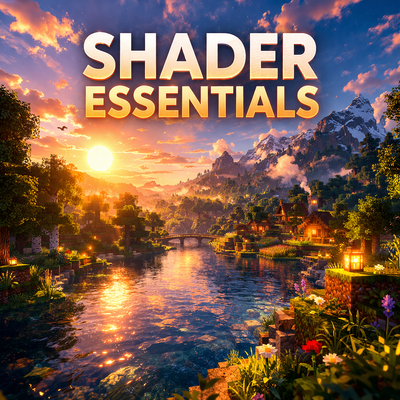
CurseForge · Minecraft modpack
Shader Essentials 2
Enhance your Minecraft adventures with a modpack that optimizes performance, streamlines inventory management, aids exploration, and provides essential crafting information for a smoother gameplay experience.
Choose a version Pick your version below, then grab the matching file.
Quick answer
Which Shader Essentials 2 release should I use?
Latest stable file Shader Essentials 1.21.10.zip
Game version 1.21.10
Loader NeoForge 21.10.64
Shader Essentials 1.21.10.zip is a complete pack release for 1.21.10 with NeoForge 21.10.64. Install it as its own launcher instance. If the creator publishes a separate server file, make sure it names this exact pack release. For this loader, use Java 21. 11 mods in this pack file.
Pack setup
How should I set up Shader Essentials 2 for players and a server?
Use Shader Essentials 1.21.10.zip as the pack version. Install the pack as its own launcher instance. The creator’s listing does not name a separate server file, so check the release notes before setting up a dedicated server. Do not upload the ordinary client folder blindly.
Client instance Install Shader Essentials 1.21.10.zip
Dedicated server setup Match Shader Essentials 1.21.10.zip
Pack loader NeoForge 21.10.64
Java version Java 21
A pack is a matched client and server setup, not one mod with an install-side label. Keep its release, loader, manifest and overrides together.
Referenced mods 11
Client only 5
Server only 0
Not labelled 6
These numbers come from the pack file you chose. “Not labelled” means we don’t know which side it belongs on—not that it is safe everywhere. The file count is not a RAM estimate.
What are the server requirements for Shader Essentials 2?
Shader Essentials 1.21.10.zip. Change the pack release and its contents or setup may change too.
The selected pack release is Shader Essentials 1.21.10.zip. That file is for Minecraft 1.21.10 with NeoForge 21.10.64. This NeoForge setup needs Java 21. It contains 11 mod projects. The creator’s listing does not name a separate server file. Check their notes before using one, and do not upload an ordinary client folder or rebuild the pack mod by mod. A file count cannot tell us the right RAM, CPU or storage; size the server for the players and world you actually run.
About this project
What kind of pack is Shader Essentials 2?
Modpack Name: Shader Essentials 2
Focus: Enhanced Exploration, Convenience, and Performance
Description:
Embark on your Minecraft adventures with a curated collection of mods designed to elevate your gameplay experience. This modpack is tailored for Minecraft and features a selection of Forge mods that streamline your inventory, optimize performance, and make exploration more enjoyable.
Key Features:
- Optimized Performance: Enjoy ultra-smooth gameplay with Sodium and its companion mods — Embeddium Extras, Dynamic Lights, and Options API — all designed to enhance rendering, boost FPS, and minimize lag for a seamless experience.
- Customizable Graphics: Experience breathtaking visuals with Iris Shaders and Complementary Shaders – Unbound & Reimagined, delivering realistic lighting, shadows, and vibrant colors that bring your world to life.
- Inventory Management: Organize your items effortlessly with Inventory Sorting, and speed up crafting and building with Mouse Tweaks’ intuitive mouse controls.
- Crafting Knowledge at Your Fingertips: Just Enough Items (JEI) gives you instant access to every crafting recipe and item detail you need, making crafting easier than ever.
- Enhanced Search & Control: Find what you need faster with Searchables and Controlling — easily search keybindings and settings for a smoother, more intuitive gameplay experience.
- Core Mod Support: Fabric API and TxniLib ensure stability and compatibility, keeping your modpack running efficiently and reliably.
- Exploration Made Easy: JourneyMap provides a detailed minimap and waypoint system so you’ll never lose your way while exploring vast worlds.
Target Audience:
This modpack is perfect for players who want a smoother, more convenient, and exploration-focused Minecraft experience without drastically changing the core gameplay.
Additional Notes:
- This modpack is designed for single-player and multiplayer use.
- It is recommended to allocate at least 4GB of RAM to Minecraft for optimal performance.
Project description from CurseForge.
Mods in Shader Essentials 1.21.10.zip
Open any mod on Modpacks.ch to check its files and dependencies.
balm-neoforge-1.21.10-21.10.11.jar SHA-1
ef32bcd2a997d8d34fa3356cec7116094619e929 · CurseForge file 7468078 · Project link unavailable Side not labelledComplementaryReimagined_r5.7.1.zip SHA-1
b560f646a124d5204b1fb7321fec373b9c346fa5 · CurseForge file 7574259 · Project link unavailable Side not labelledComplementaryUnbound_r5.7.1.zip SHA-1
95883b516298ff4cf1a67ff512086eb67aeedd98 · CurseForge file 7574260 · Project link unavailable Side not labelledinventorysorter-1.21.10-24.0.26.jar SHA-1
d4a2c93a1f820a14fef9a284a8b60521c2dc29cb · CurseForge file 7382852 · Project link unavailable Side not labellediris-neoforge-1.9.7+mc1.21.10.jar SHA-1
b0a5bf1099bda0055e9509be9ba0307862ad95ad · CurseForge file 7351307 · Project link unavailable Client onlyjei-1.21.10-neoforge-26.2.0.30.jar SHA-1
902641093c2dbd60591d511a013f286ae32e1b9e · CurseForge file 7361873 · Project link unavailable Side not labelledjourneymap-neoforge-1.21.10-6.0.0-beta.58.jar SHA-1
8cbc403954849e7b537e86de0c40387670394aa3 · CurseForge file 7630647 · Project link unavailable Side not labelledMouseTweaks-neoforge-mc1.21.9-2.29.jar SHA-1
c7fbeed7d8a686846f2e795033759f75df498977 · CurseForge file 7071300 · Project link unavailable Client onlyreeses-sodium-options-neoforge-1.8.6+mc1.21.10.jar SHA-1
bf458e075d44f5c2aba8699f430739bf26eb31f5 · CurseForge file 7249826 · Project link unavailable Client onlysodium-extra-neoforge-0.7.1+mc1.21.10.jar SHA-1
6d137a9b3e2dbe5f1a64180655b7f21bbae0a173 · CurseForge file 7249734 · Project link unavailable Client onlysodium-neoforge-0.7.3+mc1.21.10.jar SHA-1
bc7c0fb985908a5ee84ce12e46e04afa7ece935e · CurseForge file 7207595 · Project link unavailable Client onlyPick your setup
Shader Essentials 2 by Minecraft version and loader
Choose the version and loader you play, then open the matching release.
Minecraft version
1.21.1
1 loader buildMade local changes? Try them in a copied instance before touching a world you care about.
Recent files
Shader Essentials 2 versions and loaders
NeoForge 21.10.641.21.108.0.312+7 release
Fabric1.21.1 release
Looking for an older file? The official CurseForge project page is in Resources.
 modpack
 CurseForge · Minecraft
Kasianverse
Official modpack for Kasian MC server!
 modpack
 CurseForge · Minecraft
DrunkenFun
Custom serverpack for df server
 modpack
 CurseForge · Minecraft
The Tabletop Experience
A modpack designed to help player create their own TTRPG world and environments inside of Minecraft, allowing for friends to gather around and play their favorite roleplaying or casual games.