Minecraft version
Back to modpacks 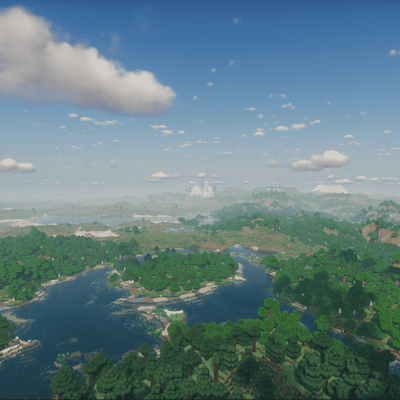
CurseForge · Minecraft modpack
Voxy with Shaders(ultra optimization modpack)
Voxy with Shaders is a multi-version, ultra-optimized graphics modpack engineered to deliver breathtaking cinematic Minecraft experiences across different game versions. Enjoy massive voxel-based render distances combined with stunning shader
Choose a version Pick your version below, then grab the matching file.
Quick answer
Which Voxy with Shaders(ultra optimization modpack) release should I use?
Latest stable file Voxy with Shaders v3.5
Game version 26.1.1
Loader Fabric 0.19.3
Voxy with Shaders v3.5 is a complete pack release for 26.1.1 with Fabric 0.19.3. Install it as its own launcher instance. If the creator publishes a separate server file, make sure it names this exact pack release. 42 mods in this pack file.
Pack setup
How should I set up Voxy with Shaders(ultra optimization modpack) for players and a server?
Use Voxy with Shaders v3.5 as the pack version. Install the pack as its own launcher instance. The creator’s listing does not name a separate server file, so check the release notes before setting up a dedicated server. Do not upload the ordinary client folder blindly.
Client instance Install Voxy with Shaders v3.5
Dedicated server setup Match Voxy with Shaders v3.5
Pack loader Fabric 0.19.3
A pack is a matched client and server setup, not one mod with an install-side label. Keep its release, loader, manifest and overrides together.
Referenced mods 42
Client only 22
Server only 0
Not labelled 20
These numbers come from the pack file you chose. “Not labelled” means we don’t know which side it belongs on—not that it is safe everywhere. The file count is not a RAM estimate.
What are the server requirements for Voxy with Shaders(ultra optimization modpack)?
Voxy with Shaders v3.5. Change the pack release and its contents or setup may change too.
The selected pack release is Voxy with Shaders v3.5. That file is for Minecraft 26.1.1 with Fabric 0.19.3. It contains 42 mod projects. The creator’s listing does not name a separate server file. Check their notes before using one, and do not upload an ordinary client folder or rebuild the pack mod by mod. A file count cannot tell us the right RAM, CPU or storage; size the server for the players and world you actually run.
About this project
What kind of pack is Voxy with Shaders(ultra optimization modpack)?
hello guys Voxy with Shaders** is a multi-version, ultra-optimized graphics modpack engineered to deliver breathtaking cinematic Minecraft experiences. It completely eliminates the old, tedious methods of manual world pre-generation and replaces them with a modern, fully automated system. Enjoy massive voxel-based render distances combined with stunning shaders and rock-solid performance.
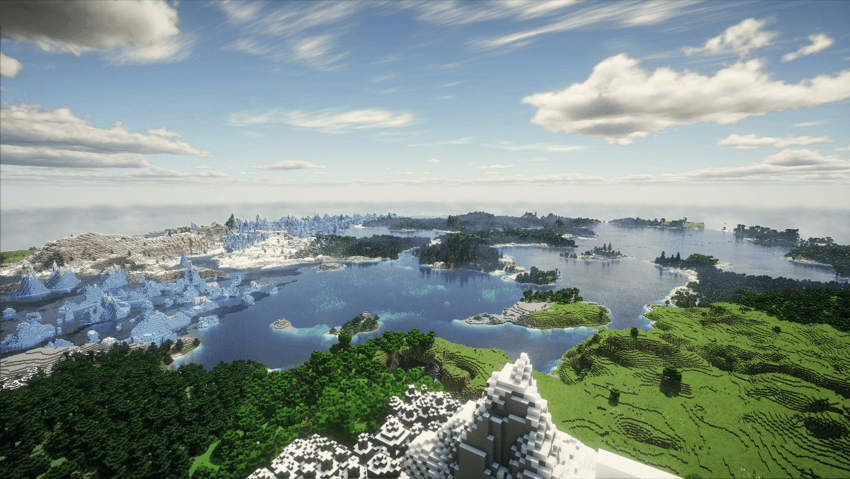
| Requirement Level | Target Performance | Recommended GPU | Recommended VRAM | Voxy Render Distance |
|---|---|---|---|---|
| Minimum | 1080p / 60 FPS (Light Shader) | GTX 1060 / GTX 1650 Super / RX 580 | 4 GB VRAM | 32 - 64 Chunks |
| Recommended | 1080p / 90+ FPS (Medium Shader) | RTX 3050 / RTX 2060 / RX 5500 XT | 6 GB VRAM | 64 - 128 Chunks |
| High-End | 1080p/1440p / 120+ FPS (Ultra Shader) | RTX 3060 / RTX 4060 / RX 6600 / RX 6700 XT | 8 GB VRAM | 128 - 256 Chunks |
| Extreme | 1440p / 4K Ultra LOD (Extreme Shader) | RTX 4070 / RX 7800 XT & above | 12 GB+ VRAM | 256+ Chunks |
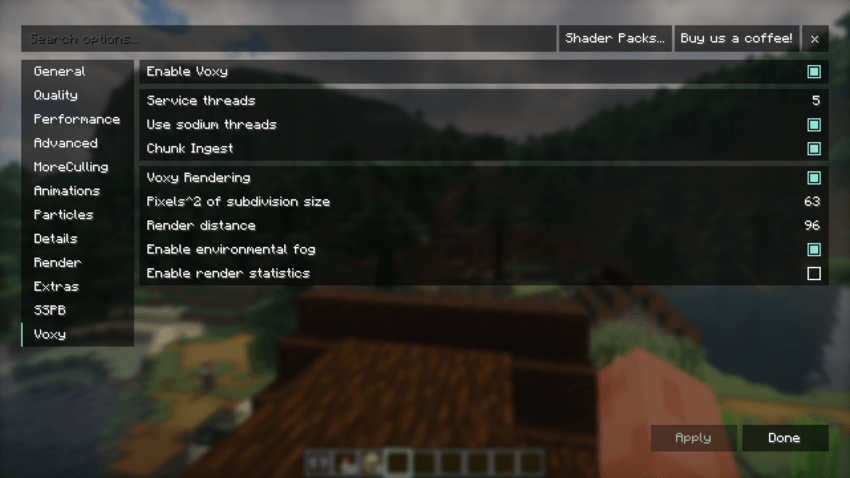
- Optimal Voxy Core Rendering Settings (Pre-Configured)
The core Voxy rendering settings in this pack are carefully balanced to maximize LOD distance while protecting your GPU VRAM and preventing micro-stutters during shader rendering.
⚙️ Setting Explanations & Tweaking Guide
Enable Voxy (On): Toggles the primary Voxy LOD rendering engine.
📈 On: Enables distant terrain rendering beyond vanilla limits.
📉 Off: Disables Voxy completely, reverting back to standard Minecraft rendering.
Service Threads (5): Sets the number of background CPU threads allocated for Voxy processing.
📈 Increase (e.g., 6-8): Speeds up background mesh building if you have a high-end processor.
📉 Decrease (e.g., 3-4): Frees up CPU threads for lower-tier processors to prevent system lag.
Use Sodium Threads (On): Synchronizes Voxy's threading pipeline with Sodium's chunk update threads.
📈 On: Recommended. Improves CPU efficiency and keeps chunk updates harmonious.
📉 Off: May cause uneven chunk updates or minor stuttering.
Chunk Ingest (On): Handles the active transfer of newly loaded chunk data into Voxy's LOD system.
📈 On: Essential for real-time LOD updates as you explore new areas.
📉 Off: Pauses LOD generation for new chunks.
Pixels^2 of Subdivision Size (63): Controls the geometric detail/density of distant Voxy chunks.
📈 Increase (e.g., 100+): Lowers visual detail, significantly reducing GPU/VRAM load and boosting FPS.
📉 Decrease (e.g., 32-16): Increases mesh detail for sharper landscapes, but heavily taxes VRAM and GPU power.
Render Distance (96): Sets the absolute boundary in chunks for Voxy's distant terrain rendering.
📈 Increase (e.g., 128+): Pushes horizons further out, requiring significantly more VRAM.
📉 Decrease (e.g., 64-32): Saves massive amounts of GPU memory and ensures stability on GPUs with 6GB or less VRAM.
Enable Environmental Fog (On): Blends the edge of Voxy LOD chunks smoothly into the atmosphere.
📈 On: Creates a seamless, immersive transition to the horizon.
📉 Off: Sharp cutoffs at distant edges, slightly lighter on GPU.
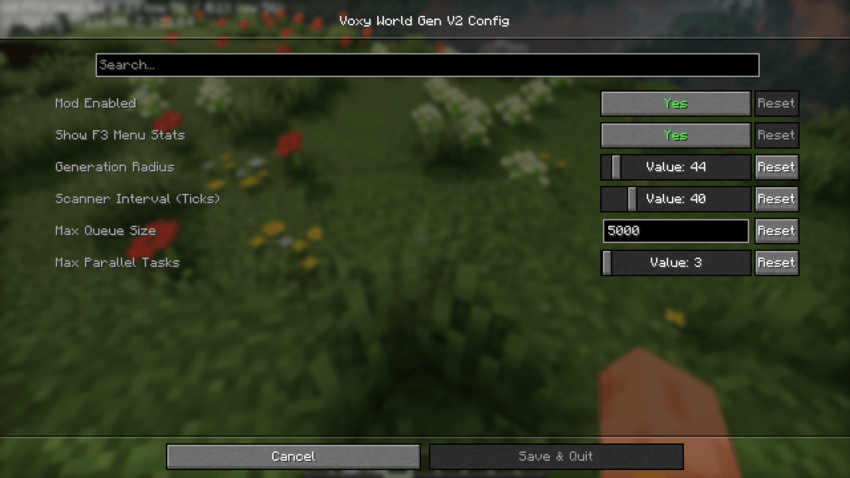
- Optimal Voxy World Gen Settings (Pre-Configured)
The Voxy World Gen V2 configuration in this pack comes pre-tuned with optimized, lower values out of the box. High generation settings cause heavy CPU spikes and severe micro-stutters when moving through new terrain. These presets ensure a 100% stutter-free and smooth experience across all hardware configurations.
⚙️ Setting Explanations & Tweaking Guide
Generation Radius (44): Determines how far away from the player new terrain chunks will be generated.
📈 Increase: Generates terrain further ahead so distant landscapes appear sooner, but increases CPU load.
📉 Decrease: Reduces load on your processor, ideal if you experience lag while flying or riding fast.
Scanner Interval in Ticks (40): Controls how frequently the mod checks for missing chunks that need generating (20 ticks = 1 second).
📈 Increase (e.g., 60-80): Makes checks less frequent, freeing up CPU resources for smoother FPS.
📉 Decrease (e.g., 10-20): Scans more rapidly for faster chunk loading, but can cause CPU lag spikes.
Max Queue Size (5000): Limits the number of chunks waiting in line to be generated.
📈 Increase: Keeps large generation tasks stacked during fast travel, but consumes more RAM/VRAM.
📉 Decrease: Prevents memory buildup on lower-tier systems.
Max Parallel Tasks (2): Sets the maximum number of CPU threads used simultaneously for world generation.
📈 Increase (e.g., 4 or 12): Dramatically speeds up world loading if you have a powerful multi-core CPU.
📉 Decrease (1 or 2): Prevents CPU overloading and eliminates lag spikes on mid-to-entry-level processors.
📊 Official Developer Performance & FPS Benchmark
The modpack has been thoroughly tested on the developer's official hardware configuration, delivering highly stable performance:
RTX 3050 6gb vram - i5 12450 h test Allocate 6 GB to Minecraft
🚀 Vanilla Mode (No Shaders): 350+ FPS (Ultra-smooth, zero-lag gameplay. Very lightweight on the GPU!)
🌌 Photon Shaders Enabled: 105+ FPS (Stunning cinematic visual quality while maintaining high fluid performance)
Project description from CurseForge.
Mods in Voxy with Shaders v3.5
Open any mod on Modpacks.ch to check its files and dependencies.
AmbientSounds_FABRIC_v6.3.5_mc26.1.jar SHA-1
7b7ad6ed2c3837795ea1046475eb4ab7812baa61 · CurseForge file 7816651 · Project link unavailable Client onlyBadOptimizations-2.4.1-26.1-fabric.jar SHA-1
9636073ca8f378ea796b5d13bffac146a7f2f0f3 · CurseForge file 7833102 · Project link unavailable Client onlyc2me-fabric-mc26.1.1-0.3.7+alpha.0.63.jar SHA-1
19f4bedeb5fbfe1be295c653288b4d38a7a84576 · CurseForge file 7855743 · Project link unavailable Side not labelledcloth-config-26.1.154.jar SHA-1
832f9047bc4af13587709c74f7c37e1c8579d1eb · CurseForge file 7817582 · Project link unavailable Side not labelledCreativeCore_FABRIC_v2.14.13_mc26.1.jar SHA-1
7b463ca10cdb0e1bc4435c04253107bf8a106547 · CurseForge file 7844573 · Project link unavailable Side not labelleddynamic-fps-3.11.7+minecraft-26.1.0-fabric.jar SHA-1
2ed66a7f5cf81c8f4b17a551a1f7371ef99a45f7 · CurseForge file 8159041 · Project link unavailable Client onlye4mc-fabric-6.2.1-modern.jar SHA-1
18b44097b20896e665f239d6df27842df8e16894 · CurseForge file 8526343 · Project link unavailable Client onlyentity_model_features-3.3.6-26.1-fabric.jar SHA-1
e2653e48efb61afca44c9b55ed2012ed0fefcfcc · CurseForge file 8892072 · Project link unavailable Client onlyentity_texture_features-7.2.2-26.1-fabric.jar SHA-1
9d2ac25b07a70ce1e62052f74fa34b5be59fce02 · CurseForge file 8891826 · Project link unavailable Client onlyentityculling-fabric-1.10.5-mc26.1.jar SHA-1
62ac7ed3bbc0b920428bcfc18d1962836b84c391 · CurseForge file 8287120 · Project link unavailable Client onlyfabric-api-0.155.3+26.1.2.jar SHA-1
16c30dfcceaed1ac3b6ac84cbd348a906dc5093e · CurseForge file 8831744 · Project link unavailable Side not labelledfabric-language-kotlin-1.14.1+kotlin.2.4.20.jar SHA-1
62ae40a31b689b52fde399f2143d547a631e942c · CurseForge file 8829788 · Project link unavailable Side not labelledfabrishot-1.17.0.jar SHA-1
cabc7f77ce10fd58cf33cbfd04eeda3ef33167c8 · CurseForge file 7965832 · Project link unavailable Side not labelledferritecore-9.0.0-fabric.jar SHA-1
eac76ff0f3753422c61b2c44487d0d195d88d4bc · CurseForge file 7806040 · Project link unavailable Side not labelledgraphics-presets-3.0(voxy edition).jar SHA-1
63b95a727ac548eaaf0aa22acfec2f43a914a8b9 · CurseForge file 8898849 · Project link unavailable Client onlyImmediatelyFast-Fabric-1.15.3+26.1.jar SHA-1
0bc5865bcb7f2f09d85559a58fccddcfd335f44d · CurseForge file 8348738 · Project link unavailable Client onlyiris-fabric-1.10.9+mc26.1.1.jar SHA-1
c30e04509a1b284372cb9037b07714d4223ae91a · CurseForge file 7867943 · Project link unavailable Client onlyIxeris-4.6.5+26.1.2-fabric.jar SHA-1
a40fb9887a68e911a47d8333d3a8ae0cce67cc0c · CurseForge file 8651203 · Project link unavailable Client onlyKsyxis-1.4.4.jar SHA-1
c4e4282d80322d5d41f1f1cdb4811ded6ab97b11 · CurseForge file 8891330 · Project link unavailable Side not labelledlithium-fabric-0.24.7+mc26.1.2.jar SHA-1
7959f418969ee8bfe50c0f21f352ed08b382f133 · CurseForge file 8533267 · Project link unavailable Side not labelledmodernfix-5.27.19-build.1-26.1.jar SHA-1
9f68fd82da95582bd27fb97b90015ce268296132 · CurseForge file 8362826 · Project link unavailable Side not labelledmodmenu-18.0.1.jar SHA-1
fa3fda3ed7941200190e146ecd39485166b01773 · CurseForge file 8854447 · Project link unavailable Client onlymoreculling-fabric-26.1.2-1.7.3.jar SHA-1
1155f693ca85a925f790cabac2ef9b1f5984283d · CurseForge file 8563681 · Project link unavailable Client onlyMouseTweaks-fabric-mc26.1-2.31.jar SHA-1
d81b34b76b8885f637e1a253810a78bee772a346 · CurseForge file 7840791 · Project link unavailable Client onlynotenoughanimations-fabric-1.12.4-mc26.1.jar SHA-1
618f419d3c98dd0fe0a42996973b14839ce12575 · CurseForge file 8274926 · Project link unavailable Client onlyoptigui-2.3.0-beta.10+26.1.jar SHA-1
e1f7a1897762baec94f580d9a558127da485f5fd · CurseForge file 7857131 · Project link unavailable Client onlypacketfixer-fabric-3.3.5-26.1.2.jar SHA-1
d6effea605b3d0435dc9abf592891b9806ca245f · CurseForge file 7967153 · Project link unavailable Side not labelledplaceholder-api-3.0.0+26.1.jar SHA-1
c1ce548549ec4517b9393985cefc65389e6f36d8 · CurseForge file 7908941 · Project link unavailable Side not labelledPresenceFootsteps-1.13.0+26.1.jar SHA-1
22e0bc75558f91bf29e6771173b521d904177b75 · CurseForge file 7926743 · Project link unavailable Client onlyreeses-sodium-options-fabric-2.1.0+mc26.1.2.jar SHA-1
7f4d2ba57b8f73699d5534191e8ee33daf8eab89 · CurseForge file 8292044 · Project link unavailable Client onlyResourcefulConfig-4.0.1.jar SHA-1
96c6afabeec4f7c0468bb17b3c29fb1bb6aa0125 · CurseForge file 7872555 · Project link unavailable Side not labelledResourcefulLib-4.0.1.jar SHA-1
19fb06aedf203a67887e648e1d0202339bc8b2f4 · CurseForge file 7927298 · Project link unavailable Side not labelledResourcify (26.1-fabric)-1.8.6.jar SHA-1
c376c6e7816eb903c7b87ca0ce86a7db809c7107 · CurseForge file 8860081 · Project link unavailable Client onlyScalableLux-0.2.0+fabric.2b63825-all.jar SHA-1
3875a697a9bb014c06aa3a62d72e8bec3de23160 · CurseForge file 7799735 · Project link unavailable Side not labelledservercore-fabric-1.5.16+26.1.jar SHA-1
e276f34ae9ded682a084da79849356a14b3f84b6 · CurseForge file 7828299 · Project link unavailable Side not labelledsodium-extra-fabric-0.8.7+mc26.1.1.jar SHA-1
457ea5643de4e537eb44fc117d88886d52cdebf9 · CurseForge file 7902833 · Project link unavailable Client onlysodium-fabric-0.8.9+mc26.1.1.jar SHA-1
48b949ec71365788dfd4e89d489f7abd504aa709 · CurseForge file 7867826 · Project link unavailable Client onlysodium-shadowy-path-blocks-fabric-7.0.0.jar SHA-1
1399156a64c7bfbc38fa21af935495cfb74923c3 · CurseForge file 7854083 · Project link unavailable Client onlystructure_layout_optimizer-1.1.4+26.1-fabric.jar SHA-1
4a0fc84879fe358bdfd395af9238e14950dca748 · CurseForge file 7808376 · Project link unavailable Side not labelledyet_another_config_lib_v3-3.9.4+26.1-fabric.jar SHA-1
c167cc420d29af5d30a23ce9feb1330a25ce06db · CurseForge file 8196582 · Project link unavailable Side not labelledzfastnoise-1.0.27+26.1.1.jar SHA-1
6849a4dc108d537e5c876f4cdadc4cf20ac6a88e · CurseForge file 7866073 · Project link unavailable Side not labelledzoomify-2.16.1+26.1.jar SHA-1
c180ae8cf90da1abd67c26b5c5e7bf5d795c3b1d · CurseForge file 8301184 · Project link unavailable Side not labelledPick your setup
Voxy with Shaders(ultra optimization modpack) by Minecraft version and loader
Choose the version and loader you play, then open the matching release.
Minecraft version
26.1.1
1 loader buildMinecraft version
26.1
1 loader buildMinecraft version
1.21.11
1 loader buildMinecraft version
1.21.10
1 loader buildMinecraft version
1.21.9
1 loader buildMade local changes? Try them in a copied instance before touching a world you care about.
Recent files
Voxy with Shaders(ultra optimization modpack) versions and loaders
Fabric 0.19.326.1.18.0.312+7 release
Fabric26.1.1 release
Fabric26.1 release
Fabric26.1 beta
Fabric1.21.10 release
Fabric1.21.11 release
Fabric1.21.10 release
Fabric1.21.9 release
voxy with shader 1.21.10-v1.0.zip(read changelog)!!!!!!!
22 Jun 2026
Check the 1.21.10 · Fabric setupFabric1.21.10 beta
Fabric1.21.11 release
Fabric26.1.2 alpha
Fabric26.1.1 beta
Looking for an older file? The official CurseForge project page is in Resources.
 modpack
 CurseForge · Minecraft
Adventures Together 27
Many New Dungeons / Bosses / Items and very nice new optics
 modpack
 CurseForge · Minecraft
Autumn Leveling
Autumn Leveling is a modpack designed for a Minecraft experience focused on exploration, combat, automation, and progression. A dynamic economy and leveling system ties everything together, making every action feel meaningful.
 modpack
 CurseForge · Minecraft
Attack on Titan - The Hunter Becomes the Hunted
Enter the world of Attack on Titan with your friends, complete quests, master unique skills, and fight for survival in a world where humanity is the prey!