Minecraft version
Back to modpacks 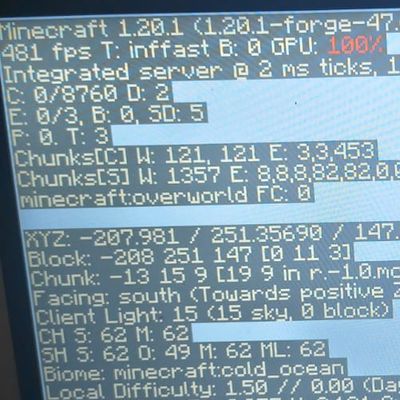
CurseForge · Minecraft modpack
Simple Performance optimizer
An ultra-lightweight Forge performance pack focused on pure FPS boost and system stability
Choose a version Pick your version below, then grab the matching file.
Quick answer
Which Simple Performance optimizer release matches 26.2 Fabric?
Best match for your filters 26.2 optimization-1.0.0
Game version 26.2
Loader Fabric 0.19.3
26.2 optimization-1.0.0 is a complete pack release for 26.2 with Fabric 0.19.3. Install it as its own launcher instance. If the creator publishes a separate server file, make sure it names this exact pack release. 24 mods in this pack file.
Pack setup
How should I set up Simple Performance optimizer for players and a server?
Use 26.2 optimization-1.0.0 as the pack version. Install the pack as its own launcher instance. The creator’s listing does not name a separate server file, so check the release notes before setting up a dedicated server. Do not upload the ordinary client folder blindly.
Client instance Install 26.2 optimization-1.0.0
Dedicated server setup Match 26.2 optimization-1.0.0
Pack loader Fabric 0.19.3
A pack is a matched client and server setup, not one mod with an install-side label. Keep its release, loader, manifest and overrides together.
Referenced mods 24
Client only 10
Server only 0
Not labelled 14
These numbers come from the pack file you chose. “Not labelled” means we don’t know which side it belongs on—not that it is safe everywhere. The file count is not a RAM estimate.
What are the server requirements for Simple Performance optimizer?
26.2 optimization-1.0.0 on 26.2 Fabric. The pack contents and setup notes below stay tied to that release.
The selected pack release is 26.2 optimization-1.0.0. That file is for Minecraft 26.2 with Fabric 0.19.3. It contains 24 mod projects. The creator’s listing does not name a separate server file. Check their notes before using one, and do not upload an ordinary client folder or rebuild the pack mod by mod. A file count cannot tell us the right RAM, CPU or storage; size the server for the players and world you actually run.
About this project
What kind of pack is Simple Performance optimizer?
🚀 Intel UHD & Low RAM Extreme Optimizer forge/fabric
An ultra-lightweight, high-performance optimization modpack built specifically for low-end PCs, school laptops (like ASUS Vivobook), and integrated graphics (Intel UHD / Iris Xe). Fully tested, fine-tuned, and proven to deliver an astonishing **400+ FPS in the air** and **120+ stable FPS in dense forests** using only 6 GB of RAM allocation!
Unlike other performance packs that cause graphical glitches or flashing screens, this pack focuses on **pure stability and smoothness**. Every single mod has been carefully selected to eliminate background stuttering and chunk-loading bugs completely.
📸 PERFORMANCE PROOF (400+FPS!)
Check the **Images / Screenshots** tab to see the official proof! The modpack achieves **505 FPS** running on a standard Intel UHD graphics card with only 6 GB of total system RAM. No tricks, just pure, extreme optimization.
✨ Key Features & Enhancements:
* **Next-Gen Graphical Render:** Powered by Embeddium and ImmediatelyFast to completely replace OptiFine, offering massive FPS gains and smooth menus.
* **Smart CPU Distribution:** Thread Tweaks and Radium Reforged optimize mob AI, physics, and world logic, spreading the workload perfectly across your processor cores.
* **Extreme Memory Protection:** ModernFix, FerriteCore, and Smooth Boot (Reloaded) slash RAM consumption in half, preventing "Not Responding" freezes when launching the game.
* **Flawless Chunk Loading:** Features advanced background optimizations (Noisium & Chunk Sending) to load terrain smoothly, keeping your game lag-free (85+ FPS) even when moving at high speeds!
⚙️ MANDATORY LAUNCHER SETUP (For 6 GB RAM Systems):
To prevent "Out of Memory" crashes and ensure your Intel UHD card functions at maximum efficiency, you **MUST** paste these exact JVM Arguments into your launcher settings:
-Xmx3G -Xms3G -XX:+UseG1GC -XX:+ParallelRefProcEnabled -XX:MaxGCPauseMillis=20 -XX:+UnlockExperimentalVMOptions -XX:+AlwaysPreTouch -XX:G1NewSizePercent=30 -XX:G1MaxNewSizePercent=40 -XX:G1ReservePercent=20 -XX:G1HeapRegionSize=8m -XX:G1TargetsToGrid=true
💡 Recommended In-Game Settings for Maximum FPS:
- **Render Distance:** Set manually between **9 and 11 Chunks** (the sweet spot for 120+ FPS).
- **Simulation Distance:** Set to **5 or 6 Chunks**.
- **Mipmap Levels:** Turn **OFF (0)** to instantly free up VRAM on your integrated graphics.
- **Clouds:** Turn **OFF** or set to **Fast**.
- **Background Apps:** Close Google Chrome, Discord, or Spotify before clicking Play to save your precious RAM!
Project description from CurseForge.
Mods in 26.2 optimization-1.0.0
Open any mod on Modpacks.ch to check its files and dependencies.
almanac-fabric-26.2-1.26.7.3.jar SHA-1
d78aff5043bfce7b692b9075fdae87f4e20c6ea0 · CurseForge file 8471560 · Project link unavailable Side not labelledappleskin-fabric-mc26.2-3.0.10.jar SHA-1
03a635bae2c5a5e66825a35ff130242752054b32 · CurseForge file 8271985 · Project link unavailable Side not labelledBadOptimizations-2.4.1-26.2-fabric.jar SHA-1
b36b001f869d04245523807d9ccb26a085f243b4 · CurseForge file 8260341 · Project link unavailable Client onlycloth-config-26.2.155.jar SHA-1
babcf16dbd15e09d326e21ffe85ab3f7d843ef9e · CurseForge file 8269699 · Project link unavailable Side not labelledClumps-fabric-26.2-26.2.1.jar SHA-1
98e368bacc9d1a607be81d02f78f9afe913e7cfe · CurseForge file 8262615 · Project link unavailable Side not labelledcullleaves-fabric-4.1.2+26.2.jar SHA-1
1df64a439a6cf79b785882c94b39ac04e67c63bd · CurseForge file 8439801 · Project link unavailable Client onlycupboard-fabric-26.2-4.0.jar SHA-1
6184582d8070263d76f0f7997c228a64dbb4e45c · CurseForge file 8623566 · Project link unavailable Side not labelleddynamic-fps-3.11.9+minecraft-26.2.0-fabric.jar SHA-1
e8cd9e4fbc6d42091faffc873b0801f1189ed6a5 · CurseForge file 8260227 · Project link unavailable Client onlyentityculling-fabric-1.10.5-mc26.2.jar SHA-1
f66f9d8cbb1f76466aaf45e46fb11b18207e3aef · CurseForge file 8287118 · Project link unavailable Client onlyfabric-api-0.157.0+26.2.jar SHA-1
0deb9d110def35ebcaf5f15a9e6c8b8e85685319 · CurseForge file 8616085 · Project link unavailable Side not labelledfast-ip-ping-v1.0.11-mc26.1.2.jar SHA-1
6b69eaa6323da9f7933206d55cdb09ea3299cde3 · CurseForge file 7936378 · Project link unavailable Side not labelledfastquit-3.1.5+mc26.2.jar SHA-1
0977eb0a35e1a1602bc9306ddbbb9177734131f0 · CurseForge file 8537736 · Project link unavailable Client onlyferritecore-9.0.0-fabric.jar SHA-1
eac76ff0f3753422c61b2c44487d0d195d88d4bc · CurseForge file 7806040 · Project link unavailable Side not labelledFpsReducer2-fabric-26.2-2.17.jar SHA-1
eefcd13945c8651d9007be317b9cea4f9c8c641d · CurseForge file 8262381 · Project link unavailable Side not labelledgpumemleakfix-fabric-26.2-1.9.jar SHA-1
866cdc58d383f7efb83fb2b3cb989a53e5b6f147 · CurseForge file 8377430 · Project link unavailable Client onlyImmediatelyFast-Fabric-1.16.2+26.2.jar SHA-1
2d1cd27b0b570f908b665c02a35b49381b4c5ec1 · CurseForge file 8415228 · Project link unavailable Client onlykrypton-0.3.1.jar SHA-1
c83ed92c0f9f8523d7e6096151e74222fea91e96 · CurseForge file 8433993 · Project link unavailable Side not labelledKsyxis-1.4.3.jar SHA-1
6f4b2ea7827da8136bdf436457a2ba3fcdb2120e · CurseForge file 7979747 · Project link unavailable Side not labelledletmedespawn-fabric-26.2-1.26.7.3.jar SHA-1
0c6b6a82af052e36cf0090693b872fc9ff40e882 · CurseForge file 8471614 · Project link unavailable Side not labelledmodernfix-5.27.19-build.1.jar SHA-1
77b073d56b7be0d11cf915bd0e764463ee22dcea · CurseForge file 8362829 · Project link unavailable Side not labelledMouseTweaks-fabric-mc26.2-2.31.jar SHA-1
ad5b7e4ad6dc734152d41f05902b65aedb448d64 · CurseForge file 8260318 · Project link unavailable Client onlynoisium-fabric-2.8.5+mc26.2-pre-2.jar SHA-1
c90f03eedd49b1906bf74e0412fc23500936c00b · CurseForge file 8264767 · Project link unavailable Side not labelledsodium-fabric-0.9.1+mc26.2.jar SHA-1
14f3388694fa77f870d28262f74562de67eabcbe · CurseForge file 8396428 · Project link unavailable Client onlyThreads-1.3.1-26.2.jar SHA-1
c727a0b8cd07bda314697c232a05c8c35968fbd5 · CurseForge file 8311495 · Project link unavailable Client onlyPick your setup
Simple Performance optimizer by Minecraft version and loader
Choose the version and loader you play, then open the matching release.
Minecraft version
26.1
1 loader buildMinecraft version
1.21.11
1 loader buildMinecraft version
1.20.1
2 loader buildsMinecraft version
1.19.1
1 loader buildMinecraft version
1.18.2
1 loader buildMinecraft version
1.16.5
2 loader buildsMade local changes? Try them in a copied instance before touching a world you care about.
Recent files
Simple Performance optimizer versions and loaders
Fabric 0.19.326.28.0.312+7 release
Looking for an older file? The official CurseForge project page is in Resources.
 modpack
 CurseForge · Minecraft
Matcha Sweetened
A casual take on minecraft to play with my wife
 modpack
 CurseForge · Minecraft
- 4N0VA SMP -
The official client-side modpack for the 4nova SMP. A lightweight survival pack featuring proximity voice chat and essential quality-of-life additions.
 modpack
 CurseForge · Minecraft
Essential Origin
Explore Minecraft with beautiful shaders and textures.