Minecraft version
Back to modpacks 
CurseForge · Minecraft modpack
Academy 101
Learn Minecraft from scratch with guided quests, beginner-friendly tutorials, helpful tools, and support for 18 languages!
Choose a version Pick your version below, then grab the matching file.
Quick answer
Which Academy 101 release should I use?
Latest stable file Minecraft Academy 101 - v1.2.2
Game version 26.1.2
Loader NeoForge 26.1.2.109
Minecraft Academy 101 - v1.2.2 is a complete pack release for 26.1.2 with NeoForge 26.1.2.109. Install it as its own launcher instance. If the creator publishes a separate server file, make sure it names this exact pack release. 30 mods in this pack file.
Pack setup
How should I set up Academy 101 for players and a server?
Use Minecraft Academy 101 - v1.2.2 as the pack version. Install the pack as its own launcher instance. The creator’s listing does not name a separate server file, so check the release notes before setting up a dedicated server. Do not upload the ordinary client folder blindly.
Client instance Install Minecraft Academy 101 - v1.2.2
Dedicated server setup Match Minecraft Academy 101 - v1.2.2
Pack loader NeoForge 26.1.2.109
A pack is a matched client and server setup, not one mod with an install-side label. Keep its release, loader, manifest and overrides together.
Referenced mods 30
Client only 7
Server only 0
Not labelled 23
These numbers come from the pack file you chose. “Not labelled” means we don’t know which side it belongs on—not that it is safe everywhere. The file count is not a RAM estimate.
What are the server requirements for Academy 101?
Minecraft Academy 101 - v1.2.2. Change the pack release and its contents or setup may change too.
The selected pack release is Minecraft Academy 101 - v1.2.2. That file is for Minecraft 26.1.2 with NeoForge 26.1.2.109. It contains 30 mod projects. The creator’s listing does not name a separate server file. Check their notes before using one, and do not upload an ordinary client folder or rebuild the pack mod by mod. A file count cannot tell us the right RAM, CPU or storage; size the server for the players and world you actually run.
About this project
What kind of pack is Academy 101?
🎓 Minecraft Academy 101
Your Minecraft adventure starts here!
Minecraft Academy 101 is a beginner-friendly educational modpack designed to help new players learn Minecraft step by step through interactive quests, practical tutorials, and hands-on exploration.
Whether you are playing Minecraft for the first time or want to understand its mechanics better, Minecraft Academy 101 will guide you from your first wooden tools to advanced adventures.
Learn at your own pace, complete quests, discover new mechanics, and enjoy Minecraft without feeling overwhelmed!
📖 Learn Minecraft Step by Step
The interactive Quest Book guides you through different aspects of Minecraft with simple explanations, practical objectives, and helpful tips.
Explore topics such as:
- Getting Started: Controls, game modes, world settings, and essential gameplay mechanics.
- Your First Steps: Gathering resources, crafting tools, building shelters, and surviving your first adventures.
- Farming & Animals: Growing crops, breeding animals, taming pets, and exploring different food sources.
- Exploration & Adventure: Discovering biomes, structures, villages, oceans, and hidden treasures.
- Villages & Trading: Understanding villagers, professions, trading, and village mechanics.
- Redstone & Crafting: Learning how to use Redstone components, metals, and useful mechanisms.
- Enchanting & Potions: Improving your equipment, discovering enchantments, and brewing potions.
- Building & Storage: Organizing your resources, decorating your home, and experimenting with construction.
- Advanced Adventures: Exploring the Nether, preparing for greater challenges, and progressing toward the End.
Each chapter helps you discover Minecraft through practical activities rather than overwhelming you with complicated instructions.
🧭 Helpful Tools for Beginners
Minecraft Academy 101 includes carefully selected quality-of-life mods to make learning easier and more enjoyable.
Some of these tools include:
- Minimap & World Map: Explore your surroundings, find your way home, and mark important locations.
- JEI: Discover crafting recipes and learn how to obtain different items.
- Jade: Identify blocks, creatures, and other objects you encounter.
- AppleSkin: Better understand food, hunger, and saturation.
- Inventory Management: Organize your items more conveniently.
These tools are included to help beginners understand Minecraft without unnecessarily changing its core gameplay.
The Quest Book explains which features belong to vanilla Minecraft and which are provided by additional mods.
🛡️ A Beginner-Friendly Experience
Minecraft Academy 101 is designed to make the learning process more comfortable.
Keep Inventory is enabled by default when creating a new world, allowing beginners to keep their items after death.
Players can change this setting if they prefer the traditional Minecraft experience.
The modpack also includes helpful explanations, accessible progression, and quality-of-life improvements to make your first Minecraft adventures easier to understand.
Learn the mechanics, explore the world, and play at your own pace!
🚀 Start Your Adventure!
Create a new world, open your Quest Book, and begin your journey through Minecraft Academy 101.
From your very first crafting table to your greatest adventures, every quest brings you one step closer to mastering Minecraft.
Have fun learning, building, and exploring!
🌍 Play in Your Language!
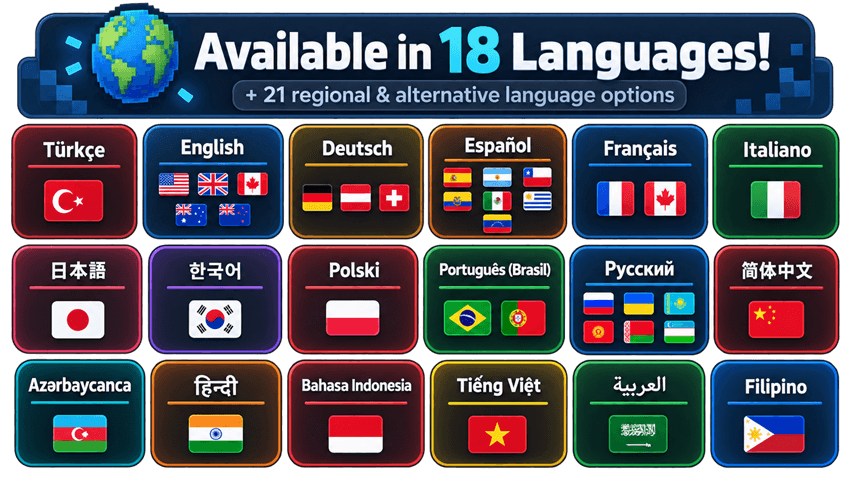
Minecraft Academy 101 supports 18 fully translated languages + 21 additional regional and alternative language options!
Supported Languages
Arabic (العربية) · Azerbaijani (Azərbaycanca) · Chinese (简体中文) · English · Filipino · French (Français) · German (Deutsch) · Hindi (हिन्दी) · Indonesian (Bahasa Indonesia) · Italian (Italiano) · Japanese (日本語) · Korean (한국어) · Polish (Polski) · Portuguese (Português do Brasil) · Russian (Русский) · Spanish (Español) · Turkish (Türkçe) · Vietnamese (Tiếng Việt)
🌐 Regional & Alternative Language Support
English (UK, Australia, Canada, New Zealand) → English · Spanish (Argentina, Chile, Ecuador, Mexico, Uruguay, Venezuela) → Spanish · French (Canada, Switzerland) → French · German (Austria, Switzerland) → German · Portuguese (Portugal) → Portuguese (Brazil) · Ukrainian, Kazakh, Kyrgyz, Belarusian, Uzbek → Russian · Tagalog → Filipino
Regional options reuse existing Quest Book translations without changing Minecraft's original interface language. Unsupported languages fall back to English.
👥 The Academy 101 Team
Minecraft Academy 101 is created with the goal of making Minecraft easier to learn and more enjoyable for new players around the world.
Thank you for supporting the project and being part of our community!
Project description from CurseForge.
Mods in Minecraft Academy 101 - v1.2.2
Open any mod on Modpacks.ch to check its files and dependencies.
appleskin-neoforge-mc26.1-3.0.9.jar SHA-1
a9837dd537524a4b6a78ec17be41f5af1fc59f92 · CurseForge file 7854456 · Project link unavailable Side not labelledbalm-neoforge-26.1.2-26.1.2.14.jar SHA-1
3184731e20eaa203cb9c5d2283441aeb58af4464 · CurseForge file 8837452 · Project link unavailable Side not labelledControlling-neoforge-26.1.2-26.1.2.7.jar SHA-1
d63391a9343d7e7d1fe7448830197bff6faa37de · CurseForge file 8925599 · Project link unavailable Side not labelleddefaultoptions-neoforge-26.1.2-26.1.2.2.jar SHA-1
7f8ad08bcdaedfdf8ffab8d25427213c6511be63 · CurseForge file 8498224 · Project link unavailable Client onlydynamic-fps-3.11.7+minecraft-26.1.0-neoforge.jar SHA-1
2ebba7ae4153f168b056db885898fdda3d8af1eb · CurseForge file 8159043 · Project link unavailable Client onlyenhanced-world-creation-1.3.2-neoforge+26.1.jar SHA-1
5aead5180a20d9057efc27bfc0152be1c3a3886a · CurseForge file 8777372 · Project link unavailable Client onlyentityculling-neoforge-1.11.1-mc26.1.2.jar SHA-1
5db551517d023b7143c97a767711498579718733 · CurseForge file 8929288 · Project link unavailable Client onlyfancymenu_neoforge_3.9.12_MC_26.1.2.jar SHA-1
939ec61ccd1b61be27ca05e1912b4281ead029fc · CurseForge file 8752311 · Project link unavailable Side not labelledferritecore-9.0.0-neoforge.jar SHA-1
b8bfb14ba6ce7068aae08c3a132ca40bda6bd143 · CurseForge file 7806039 · Project link unavailable Side not labelledftb-filter-system-neoforge-26.1.2.2.jar SHA-1
5cb35e2192f62f5421e2093106e0a78eb3d1d68f · CurseForge file 8300191 · Project link unavailable Side not labelledftb-library-neoforge-26.1.2.8.jar SHA-1
61d76c04db77a1c964e1c60507fac2d1d77642c1 · CurseForge file 8858835 · Project link unavailable Side not labelledftb-quests-neoforge-26.1.2.8.jar SHA-1
85dcccfe1df4614d5c0dd7ecf45268917474f970 · CurseForge file 8884951 · Project link unavailable Side not labelledftb-teams-neoforge-26.1.2.4.jar SHA-1
4dbb1323eeff1d6a1a534e8f0c44924206bb6982 · CurseForge file 8074003 · Project link unavailable Side not labelledftb-xmod-compat-neoforge-26.1.2.4.jar SHA-1
1b58353a504b08ccc7c483bd6f2c75045d22d6a6 · CurseForge file 8678090 · Project link unavailable Side not labelledgamerule_manager-2.0-beta.3-26.1.2-universal.jar SHA-1
23937d7f5c103eabf4fca76b0c25ef58f7a3a904 · CurseForge file 8602084 · Project link unavailable Side not labelledImmediatelyFast-NeoForge-1.15.3+26.1.jar SHA-1
bb10bdde4199da3cb7a2a64f9e3274a46218c9f1 · CurseForge file 8348737 · Project link unavailable Client onlyinventorysorter-26.1.2-24.0.31.jar SHA-1
8370e88f67de8b8d7956bed06e1f82f72abb62fb · CurseForge file 7940779 · Project link unavailable Side not labelledJade-mc26.1-NeoForge-26.1.10.jar SHA-1
9bd6f50f88688a2d524763d2362505e412785fc1 · CurseForge file 8651070 · Project link unavailable Side not labelledjei-26.1.2-neoforge-29.34.0.90.jar SHA-1
87bd5031cc9d274fb665d1cb75a68bea917b8df0 · CurseForge file 8771077 · Project link unavailable Side not labelledkonkrete_neoforge_1.10.1_MC_26.1.1.jar SHA-1
9d7c67fbb015296236dcc56816ae604815721379 · CurseForge file 7891762 · Project link unavailable Side not labelledmelody_neoforge_1.0.16_MC_26.1.1.jar SHA-1
293746acacd4bab10a429d157f248116872b2b5c · CurseForge file 7875755 · Project link unavailable Side not labelledMouseTweaks-neoforge-mc26.1-2.31.jar SHA-1
e171c7b91ab9ab3b0f7b63aa5b0337f578588b5c · CurseForge file 7840778 · Project link unavailable Client onlyPaxi-26.1.2-NeoForge-6.1.0.jar SHA-1
cf0d513fe3310052de56a860398f6be9ebc21e92 · CurseForge file 8313930 · Project link unavailable Side not labelledSearchables-neoforge-26.1.2-1.0.2.jar SHA-1
1733d2af5cc00ff2eef566666a29ec5bfdca7407 · CurseForge file 8218526 · Project link unavailable Side not labelledserver_i18n_api-1.5.2-26.1.2-universal.jar SHA-1
5770783866809f0d607386962932bf6f002c437f · CurseForge file 8328775 · Project link unavailable Side not labelledsimple-config-lib-2.0-neoforge+26.1.2.jar SHA-1
07d8ec870a34e6a6b7a0a0a482fc7e1ce06fd8b6 · CurseForge file 8919137 · Project link unavailable Side not labelledsodium-neoforge-0.9.2+mc26.1.2.jar SHA-1
e03e21bf6553fc517241d59c2c116b8e5cc882f8 · CurseForge file 8859590 · Project link unavailable Client onlyxaerominimap-neoforge-26.1.2-26.5.0.jar SHA-1
4f7bc996c172a96648f23301879294bcefb85e90 · CurseForge file 8849900 · Project link unavailable Side not labelledxaeroworldmap-neoforge-26.1.2-1.46.0.jar SHA-1
cb9f9a57d3a3b8dc9e06a634c0c7086e97b178c4 · CurseForge file 8850008 · Project link unavailable Side not labelledYungsApi-26.1.2-NeoForge-6.1.3.jar SHA-1
cdbb07baa0e99178d95a85e23ad1d443c2230808 · CurseForge file 8850510 · Project link unavailable Side not labelledPick your setup
Academy 101 by Minecraft version and loader
Choose the version and loader you play, then open the matching release.
Made local changes? Try them in a copied instance before touching a world you care about.
Recent files
Academy 101 versions and loaders
NeoForge 26.1.2.10926.1.28.0.312+7 release
NeoForge26.1.2 release
NeoForge26.1.2 release
Minecraft Academy 101 - v1.1.0 - English Language Update
19 Sept 2026
Check the 26.1.2 · NeoForge setupNeoForge26.1.2 beta
NeoForge26.1.2 release
NeoForge26.1.2 beta
Looking for an older file? The official CurseForge project page is in Resources.
 modpack
 CurseForge · Minecraft
Unbound! - Create + Aeronautics
Rethinking the vanilla experience with more ways to create, explore, build and survive
 modpack
 CurseForge · Minecraft
Palm Tree Sunrise
A Modpack meant to encourage exploration and building. Adds several dungeon/artifact related mods, as well as create in order to automate resource gathering. Made for the PTE Community Server, also works fine standalone.
 modpack
 CurseForge · Minecraft
Basic QoL Mods
Quality of Life mods such as Map + Minimap + Storage Management + Mining. Also the Mod Menu is included.