Minecraft version
Back to modpacks 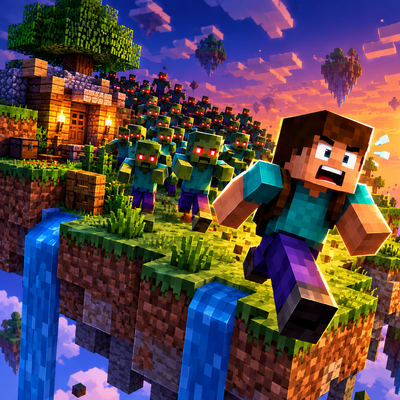
CurseForge · Minecraft modpack
Zombie Island - 7 Days
Survive the zombie apocalypse on a floating island with escalating seven-day hordes, strategic bunker building, resource gathering, and intense survival challenges.
Choose a version Pick your version below, then grab the matching file.
Quick answer
Which Zombie Island - 7 Days release should I use?
Latest stable file Zombie Island - 7 Days-1.0.2.zip
Game version 1.20.1
Loader Forge 47.4.10
Zombie Island - 7 Days-1.0.2.zip is a complete pack release for 1.20.1 with Forge 47.4.10. Install it as its own launcher instance. If the creator publishes a separate server file, make sure it names this exact pack release. 23 mods in this pack file.
Pack setup
How should I set up Zombie Island - 7 Days for players and a server?
Use Zombie Island - 7 Days-1.0.2.zip as the pack version. Install the pack as its own launcher instance. The creator’s listing does not name a separate server file, so check the release notes before setting up a dedicated server. Do not upload the ordinary client folder blindly.
Client instance Install Zombie Island - 7 Days-1.0.2.zip
Dedicated server setup Match Zombie Island - 7 Days-1.0.2.zip
Pack loader Forge 47.4.10
A pack is a matched client and server setup, not one mod with an install-side label. Keep its release, loader, manifest and overrides together.
Referenced mods 23
Client only 0
Server only 0
Not labelled 23
These numbers come from the pack file you chose. “Not labelled” means we don’t know which side it belongs on—not that it is safe everywhere. The file count is not a RAM estimate.
What are the server requirements for Zombie Island - 7 Days?
Zombie Island - 7 Days-1.0.2.zip. Change the pack release and its contents or setup may change too.
The selected pack release is Zombie Island - 7 Days-1.0.2.zip. That file is for Minecraft 1.20.1 with Forge 47.4.10. It contains 23 mod projects. The creator’s listing does not name a separate server file. Check their notes before using one, and do not upload an ordinary client folder or rebuild the pack mod by mod. A file count cannot tell us the right RAM, CPU or storage; size the server for the players and world you actually run.
About this project
What kind of pack is Zombie Island - 7 Days?
🏝️ Floating Island: Zombie Survival
The world is gone. You're stranded on a floating island in the void. The undead are coming, and every seven days, they get stronger. How long can you survive?
Floating Island: Zombie Survival is a Minecraft survival experience focused on resource management, base building, and defending against increasingly dangerous zombie hordes. Build your bunker, gather precious resources, craft better equipment, and prepare for the next attack. Every day counts, and standing still is not an option.
⚠️ IMPORTANT: How to Start Your World
You must select the custom island map during world creation!
Create a new world.
Open the World Generation settings.
Find the world preset or map selection list.
Select the Floating Island map.
Create your world and prepare to survive!
Do not start a standard world if you want the intended floating-island survival experience.
🧟 Survive the Horde
The undead won't stay weak forever. As the days pass, the threat grows.
Escalating Difficulty: Horde stats increase by 5% every seven in-game days.
Increasing Destruction: Zombie block-breaking abilities become more dangerous as you progress.
Daily Announcements: Keep track of the passing days and prepare for what's coming.
Atmospheric Sound Effects: Unsettling sounds and warnings signal important difficulty milestones.
The longer you survive, the more dangerous the undead become. A defense that works today might not save you tomorrow.
🏝️ Survive on a Floating Island
Your home is a small island suspended above the void. Space and resources are limited, so every decision matters.
Manage your available space and resources carefully.
Expand your base and create a defensible stronghold.
Explore the void for valuable materials.
Locate and gather resources from generated structures scattered throughout the void.
Every resource counts. Waste too much, and you may not have what you need when the next horde arrives.
🏰 Build and Defend Your Bunker
Your island is your home, and your bunker is your lifeline.
Reinforce your walls, plan your defenses, and prepare for zombies that become increasingly capable of breaking through your fortifications. Think ahead, build strategically, and always have a backup plan.
A strong bunker is built before the horde arrives, not during the attack.
⚒️ Gather Resources and Progress
Scavenge for materials, craft equipment, and turn your limited resources into a sustainable survival base.
Structures generated throughout the void offer opportunities to discover valuable materials, but finding and collecting them is up to you.
Choose carefully what to craft, what to recycle, and what to save for the next attack. Your long-term survival depends on making the most of what you find.
🎒 Loot, Recycle, and Recover
Every encounter can help you prepare for the next one.
Collect useful drops from enemies.
Improve your equipment as you progress.
Recycle unwanted armor and tools for additional materials.
Recover your belongings after death.
Even valuable equipment can have a second life. Furnaces can recycle armor and tools, including diamond gear, to help you recover useful resources.
📖 Learn as You Play
The in-game survival guidebook is planned for a future update.
For now, check the Survival Tips section below for useful controls and gameplay mechanics.
🎯 Your Goal
Survive as long as possible.
Build your defenses. Gather resources. Explore the void. Prepare for the next horde.
Every seven days, the undead grow stronger. Their stats increase, their ability to break through your defenses escalates, and your island becomes harder to protect.
How long can you last before the horde overwhelms you?
Build smart. Gather wisely. Defend your island. Survive the horde!
🧭 Survival Tips
This section will be expanded as the modpack develops.
📦 Quick Item Storage
Press R to quickly deposit items into chests.
🎒 Inventory Sorting
Click the middle mouse button to sort your inventory.
♻️ Recycle Your Equipment
Furnaces can break down armor and tools into useful resources. Higher returns may be possible, and this includes diamond gear and other valuable equipment.
🧟 Use the Zombies' Tracking Against Them
Zombies can detect and track you from farther away than you might expect. Use this to your advantage by luring them toward traps, defensive positions, and areas where you're prepared to fight.
🛡️ Prepare Before Every Seventh Day
The horde's stats increase by 5% every seven in-game days. Use the time between milestones to gather materials, reinforce your bunker, improve your equipment, and stockpile supplies.
Never assume your current defenses will be enough for the next horde!
Project description from CurseForge.
Mods in Zombie Island - 7 Days-1.0.2.zip
Open any mod on Modpacks.ch to check its files and dependencies.
architectury-9.2.14-forge.jar SHA-1
a52918a500ff421180a1cbd1a0cabee712134ec4 · CurseForge file 5137938 · Project link unavailable Side not labelledbalm-forge-1.20.1-7.3.44.jar SHA-1
b3f8a6a5823d3b4f2dce19c8aea9373e24bcb443 · CurseForge file 8969708 · Project link unavailable Side not labelledcollective-1.20.1-8.58.jar SHA-1
5a08e31b502bfffa1439e36924fde2b4d3e51b8a · CurseForge file 9233761 · Project link unavailable Side not labelledcopper_spikes-2.0.0.jar SHA-1
abfb14cc76cdb17be0997c668f0a659d91faaa21 · CurseForge file 5097038 · Project link unavailable Side not labelledcorpse-forge-1.20.1-1.0.23.jar SHA-1
843b16ca88bc5c390bb22a2a84437e6bffdd43dd · CurseForge file 7018272 · Project link unavailable Side not labelleddiabloloot-1.3.1.jar SHA-1
3af5b2d3c0cf2b97da2fa5505e8bf871bd6131ad · CurseForge file 8636305 · Project link unavailable Side not labelledeasy_paper-forge-1.20.1.jar SHA-1
d3ee7654a6a01874f232ed1028bbb617924d8cf4 · CurseForge file 7330049 · Project link unavailable Side not labelledFallingTree-1.20.1-4.3.4.jar SHA-1
44d15ae2074b761597e8b8de5846cb2f98f64d25 · CurseForge file 5010620 · Project link unavailable Side not labelledforgivingvoid-forge-1.20.1-10.0.3.jar SHA-1
f5a37657eabf996da59b1caa07e8c9611ea90eeb · CurseForge file 7214476 · Project link unavailable Side not labelledguide-1.7.1.jar SHA-1
1af41686eca237709dace9b57df1bffbcaa83732 · CurseForge file 9021481 · Project link unavailable Optional Side not labelledInfiniteLava-Forge-1.20.1-v1.0.1.jar SHA-1
1a26c3896830c685f991cc90d0b5156bce18b147 · CurseForge file 5511218 · Project link unavailable Side not labelledinventorysorter-1.20.1-23.0.11.jar SHA-1
fe77bda0f98df034f00ecdcb9537b31bf3800477 · CurseForge file 7188685 · Project link unavailable Side not labelledjei-1.20.1-forge-15.56.0.205.jar SHA-1
7f64b7f8fde7f001ef054dabe3618a8780ba2650 · CurseForge file 8778011 · Project link unavailable Side not labelledkubejs-forge-2001.6.5-build.26.jar SHA-1
8b0cc9797d4ed00fd2d1002d58960af8b32012ae · CurseForge file 8020595 · Project link unavailable Side not labelledloot_bags-v2.1.0-1.20.1.jar SHA-1
f4f49b0d9bb1219cc14105ed4bc58db5a005472f · CurseForge file 7915154 · Project link unavailable Side not labelledproximitycrafting-1.1.0+forge-1.20.1.jar SHA-1
1d6a3bcfa1ca2cfba14315e5c304854b9d738291 · CurseForge file 7717740 · Project link unavailable Side not labelledrecycle-1.0.2-forge-1.20.1.jar SHA-1
a2effb9d7e0ee4a2dbc6e76a383a856efe6b7945 · CurseForge file 6517275 · Project link unavailable Side not labelledrhino-forge-2001.2.3-build.10.jar SHA-1
c83c9b719a6bab33fbd2b3f2f680eb3adbfc1aa1 · CurseForge file 6186971 · Project link unavailable Side not labelledsimply_traps-1.7-forge-1.20.1.jar SHA-1
8d549b3c83fdcfcf43c09828499eb65e2bf01a6c · CurseForge file 6980501 · Project link unavailable Side not labelledskyisland-1.0.0.jar SHA-1
1a7b71957e6f732666c310d5b30571df898e5cda · CurseForge file 9030202 · Project link unavailable Side not labelledsorttochests-1.0.4.jar SHA-1
c2ca64b8e5b0c6487600ebfcb947a6890589fbbf · CurseForge file 8485325 · Project link unavailable Side not labelledstarterkit-1.20.1-8.4.jar SHA-1
9cede8f30b47e3ce6d596ca0469ee41dedd02b0c · CurseForge file 9223153 · Project link unavailable Side not labelledUndeadNights-2.3.0-Forge-mc1.20.1.jar SHA-1
0780b0c9b591922c6a376ea7d50901e6a19deb26 · CurseForge file 8715049 · Project link unavailable Side not labelledPick your setup
Zombie Island - 7 Days by Minecraft version and loader
Choose the version and loader you play, then open the matching release.
Made local changes? Try them in a copied instance before touching a world you care about.
Recent files
Zombie Island - 7 Days versions and loaders
Forge 47.4.101.20.18.0.312+7 release
1.20.1Forge release
Looking for an older file? The official CurseForge project page is in Resources.
 modpack
 CurseForge · Minecraft
hakan's horror
Horror modpack with stalker mods, shaders and Resource packs
 modpack
 CurseForge · Minecraft
Cactus Ball Z
Welcome to the world of Cactus Ball Z! Grow stronger! Make friends! Participate in raids!
 modpack
 CurseForge · Minecraft
A christmas Pressent
An early christmas pressent for me friends :)