Minecraft version
Back to modpacks 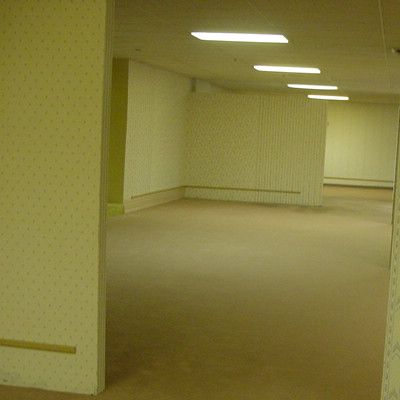
CurseForge · Minecraft modpack
no signal
vhs backrooms experience
Choose a version Pick your version below, then grab the matching file.
Quick answer
Which no signal release should I use?
Latest stable file no signal
Game version 1.20.1
Loader Fabric 0.20.1
no signal is a complete pack release for 1.20.1 with Fabric 0.20.1. Install it as its own launcher instance. If the creator publishes a separate server file, make sure it names this exact pack release. 10 mods in this pack file.
Pack setup
How should I set up no signal for players and a server?
Use no signal as the pack version. Install the pack as its own launcher instance. The creator’s listing does not name a separate server file, so check the release notes before setting up a dedicated server. Do not upload the ordinary client folder blindly.
Client instance Install no signal
Dedicated server setup Match no signal
Pack loader Fabric 0.20.1
A pack is a matched client and server setup, not one mod with an install-side label. Keep its release, loader, manifest and overrides together.
Referenced mods 10
Client only 4
Server only 0
Not labelled 6
These numbers come from the pack file you chose. “Not labelled” means we don’t know which side it belongs on—not that it is safe everywhere. The file count is not a RAM estimate.
What are the server requirements for no signal?
no signal. Change the pack release and its contents or setup may change too.
The selected pack release is no signal. That file is for Minecraft 1.20.1 with Fabric 0.20.1. It contains 10 mod projects. The creator’s listing does not name a separate server file. Check their notes before using one, and do not upload an ordinary client folder or rebuild the pack mod by mod. A file count cannot tell us the right RAM, CPU or storage; size the server for the players and world you actually run.
About this project
What kind of pack is no signal?
"No Signal" is a very, very small modpack based on Kane Parsons' sci-fi (though leaning more toward horror) short film, *The Backrooms*. The modpack was designed to evoke the feeling that, while playing, you are watching a lost VHS tape from someone's camera—focusing on realism and aesthetics. Enjoy!
Project description from CurseForge.
Mods in no signal
Open any mod on Modpacks.ch to check its files and dependencies.
Essential_1-5-2_fabric_1-20-1.jar SHA-1
dcd89a1cc07ffca1a908ec3f987b309c3bba1dbc · CurseForge file 9408305 · Project link unavailable Client onlyfabric-api-0.92.12+1.20.1.jar SHA-1
3e9cdd3e2f827ca9a259df9eb8e31949437b6bd4 · CurseForge file 8784061 · Project link unavailable Side not labelledfirstperson-fabric-2.7.3-mc1.20.1.jar SHA-1
f685dbdf86c0356ed3e10a84d4e20bcac02de6d2 · CurseForge file 8990467 · Project link unavailable Client onlygeckolib-fabric-1.20.1-4.8.6.jar SHA-1
71a2e848724d8445d60cced5439e40155ce6d23b · CurseForge file 9842832 · Project link unavailable Side not labelledjacobsvideo-fabric-1.3.1.jar SHA-1
d78f4992f07e89510fe5bc5c9eb8f1162b1b3c25 · CurseForge file 9720526 · Project link unavailable Client onlynotenoughanimations-fabric-1.12.7-mc1.20.1.jar SHA-1
5e31920726dbf8a6d6427de0b7775bbc1f9d0d27 · CurseForge file 9396175 · Project link unavailable Client onlysound-physics-remastered-fabric-1.20.1-1.5.1.jar SHA-1
b06a2eb31bcfe3d98463d1323e4787ac2b378bff · CurseForge file 7032237 · Project link unavailable Side not labelledspb-revamped-1.20.1-1.2.0.jar SHA-1
ba5278db307e3e86703bd4def3830684cf0a4f2b · CurseForge file 8137148 · Project link unavailable Side not labelledvivecraft-1.20.1-1.3.15-fabric.jar SHA-1
c226a6951db386438158f5acf4f753db552b5101 · CurseForge file 8447971 · Project link unavailable Side not labelledvoicechat-fabric-1.20.1-2.6.22.jar SHA-1
389d1b23340cb3ef547b021cfd6378b1bb1bd22a · CurseForge file 8601190 · Project link unavailable Side not labelledPick your setup
no signal by Minecraft version and loader
Choose the version and loader you play, then open the matching release.
Made local changes? Try them in a copied instance before touching a world you care about.
Recent files
no signal versions and loaders
Fabric 0.20.11.20.18.0.312+7 release
Fabric1.20.1 release
Fabric1.20.1 release
Looking for an older file? The official CurseForge project page is in Resources.
 modpack
CurseForge · Minecraft
Züge [1.20.1]
A Modpack about German Trains for 1.20.1
 modpack
CurseForge · Minecraft
Empire Great war
Join a game like this from Empire Great war RPG
 modpack
CurseForge · Minecraft
Immersive Horror EXP
A highly terrifying horror modpack, well-optimized for a great gaming experience