Minecraft version
Back to modpacks 
Modrinth · Minecraft modpack
SlimLine
A lightweight modpack for Legacy Fabric 1.8.9 that aims to simplify, optimize, and refine the vanilla experience
Choose a version Pick your version below, then grab the matching file.
Quick answer
Which SlimLine release should I use?
Latest stable file SlimLine 1.8.9 - v1.1.1
Game version 1.8.9
Loader Fabric 0.18.4
SlimLine 1.8.9 - v1.1.1 is a complete pack release for 1.8.9 with Fabric 0.18.4. Install it as its own launcher instance. If the creator publishes a separate server file, make sure it names this exact pack release. 11 mods in this pack file.
Pack setup
How should I set up SlimLine for players and a server?
Use SlimLine 1.8.9 - v1.1.1 as the pack version. Install the pack as its own launcher instance. The creator’s listing does not name a separate server file, so check the release notes before setting up a dedicated server. Do not upload the ordinary client folder blindly.
Client instance Install SlimLine 1.8.9 - v1.1.1
Dedicated server setup Match SlimLine 1.8.9 - v1.1.1
Pack loader Fabric 0.18.4
A pack is a matched client and server setup, not one mod with an install-side label. Keep its release, loader, manifest and overrides together.
Referenced mods 11
Client only 7
Server only 1
Not labelled 3
These numbers come from the pack file you chose. “Not labelled” means we don’t know which side it belongs on—not that it is safe everywhere. The file count is not a RAM estimate.
What are the server requirements for SlimLine?
SlimLine 1.8.9 - v1.1.1. Change the pack release and its contents or setup may change too.
The selected pack release is SlimLine 1.8.9 - v1.1.1. That file is for Minecraft 1.8.9 with Fabric 0.18.4. It contains 11 mod projects. The creator’s listing does not name a separate server file. Check their notes before using one, and do not upload an ordinary client folder or rebuild the pack mod by mod. A file count cannot tell us the right RAM, CPU or storage; size the server for the players and world you actually run.
About this project
What kind of pack is SlimLine?
SlimLine 1.8.9
SlimLine is a lightweight modpack for Legacy Fabric 1.8.9 that aims to simplify, optimize, and refine the vanilla experience.
It is designed to be as unobtrusive and stable as possible, while offering notable performance improvements (especially for older machines), together with some quality-of-life enhancements.
Due to its nature, SlimLine should be fully interoperable with vanilla, allowing servers and clients to connect with each other seamlessly.
Made and tested with Prism Launcher. Compatibility with other launchers wasn't tested.
Feature List
Performance Optimization
Through Alternate Current, Phosphor-Legacy, Ksyxis, and SleepBackground, the performance of the game is optimized while conserving behavior and compatibility.
Mipmaplevel and Language Fix makes changing language nearly instant.
Ksyxis can be disabled if you need to use the spawn chunks functionality (e.g. for automatic mob farms that require it).
Note: Optifine could be added to the modpack (through Legacy Optifabric), but it was left out to better preserve vanilla behavior and interface.
Bug Fixes
Legacy VanillaFix, legacy-crash-fix, and MouseDelayFix-fabric are used to fix small bugs within the game, such as the hand glitching when riding minecarts, and cursor inaccuracies when moving the mouse quickly with low fps.
Improvements
- TabFocus brings keyboard control to select and click buttons in the game menus;
- Realms Button Remover helps to clear up the title screen;
- Legacy Better Ping Display adds ping values in the multiplayer tab menu;
- legacy chunk borders brings the modern chunk border view with F3 + G;
- Show My Hunger makes the hunger bar visible when riding a boat or minecart.
- Extra Options backports the distortion effects and FOV effects accessibility settings.
- Don't Clear Chat History makes it so chat history isn't cleared after disconnecting and relogging to a server.
- MenuFPSUnlocker raises the frame rate of the main menu from 30fps to 120fps.
Title Screen Preview
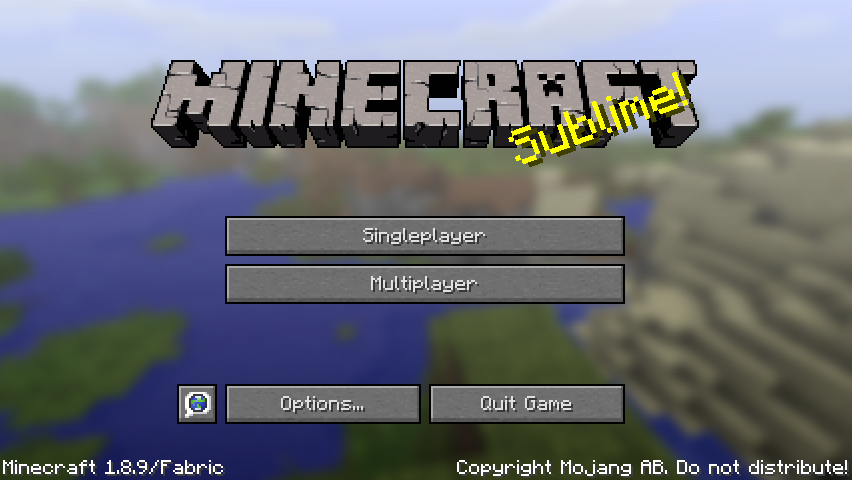
As stated, no Realms button, as well as no mod menu button, to keep the interface clean ;)
Icon created with TextStudio and GIMP
Project description from Modrinth.
Mods in SlimLine 1.8.9 - v1.1.1
Open any mod on Modpacks.ch to check its files and dependencies.
BetterPingDisplay-Fabric-1.1.1.jar SHA-1
d4da695502fab96e6e77d6a4730186a9caf6955f · Modrinth version uUNcjhcy · Project link unavailable Client onlyDCCH-2.0+1.8.9.jar SHA-1
950b4ebbe3c29f632ddf24efaca85e799268413c · Modrinth version kAhTG6ED · Project link unavailable Client onlyKsyxis-1.3.4.jar SHA-1
143fe088170e5777d3ccf5b488d61ee3635ebffe · Modrinth version vCQj9Ui7 · Project link unavailable Server onlylanguagefix-1.0.0+1.8.9_to_1.12.2(1).jar SHA-1
9776f5c6763a54a312d397b2ac88347422f173ec · Modrinth version aWmzozf8 · Project link unavailable Client onlylegacy-chunk-borders-1.0.0+1.8.2-1.8.9.jar SHA-1
89cb70915470cd108b4334461394147c96a71786 · Modrinth version hp3oZxHx · Project link unavailable Client onlylegacy-fabric-api-1.13.3.jar SHA-1
9d24f25ac6ed5c14020443aaafa86e636f67c85c · Modrinth version dwTGmOTs · Project link unavailable Side not labelledlegacy-vanillafix-1.0.9+1.8.9.jar SHA-1
e6c8caef5c46228837b883e8d103e82984658f12 · Modrinth version CASpOXB7 · Project link unavailable Side not labelledMenuFPSUnlocker-LegacyFabric-1.1.0.jar SHA-1
91ef5d33f498cc4d6e38f163540ed716097096b2 · Modrinth version qcEKR94s · Project link unavailable Client onlyphosphor-legacy-0.1.5+1.8.9.jar SHA-1
54c259b7a0a5065dcc439b3cf45b82db003a9dc2 · Modrinth version UdBfSdpd · Project link unavailable Side not labelledrealmsfix-2.0.7.jar SHA-1
5e6dae3b52569544d6903720018b70b374d30ddf · Modrinth version W5lv2N12 · Project link unavailable Client onlyshowmyhunger+1.8_to_1.10.2-1.0.0.jar SHA-1
e0b18041b49c794db036f1bb5d74edd5ddec8a36 · Modrinth version 3vB0ZF3L · Project link unavailable Client onlyPick your setup
SlimLine by Minecraft version and loader
Choose the version and loader you play, then open the matching release.
Made local changes? Try them in a copied instance before touching a world you care about.
Recent files
SlimLine versions and loaders
Fabric 0.18.41.8.98.0.312+7 release
Fabric1.8.9 release
Fabric1.8.9 release
Looking for an older file? The official Modrinth project page is in Resources.
 modpack
 Modrinth · Minecraft
Pix Android Boost
Optimization Integration for ZalithLauncher/Fold Craft Launcher Please go to QQ Channel PixABoost1798 to report issues or suggestions.
 modpack
 Modrinth · Minecraft
Fox's Ultimate MacBook Modpack
This modpack is the ultimate perfect combination of QoL mods and performance mods for the best minecraft experience on macbooks.
 modpack
 Modrinth · Minecraft
Optimization Q
Optimizations and Quality mods/settings for your minecraft client and internal server