Minecraft version
Back to modpacks 
CurseForge · Minecraft modpack
PwrDown's Zombie Apocalypse
This modpack creates a post-apocalyptic world, filled with different zombies.
Choose a version Pick your version below, then grab the matching file.
Quick answer
Which PwrDown's Zombie Apocalypse release should I use?
Latest stable file PwrDown's Zombie Apocalypse-1.1.zip
Game version 1.16.5
Loader Forge 36.1.0
PwrDown's Zombie Apocalypse-1.1.zip is a complete pack release for 1.16.5 with Forge 36.1.0. Install it as its own launcher instance. If the creator publishes a separate server file, make sure it names this exact pack release. 31 mods in this pack file.
Pack setup
How should I set up PwrDown's Zombie Apocalypse for players and a server?
Use PwrDown's Zombie Apocalypse-1.1.zip as the pack version. Install the pack as its own launcher instance. The creator’s listing does not name a separate server file, so check the release notes before setting up a dedicated server. Do not upload the ordinary client folder blindly.
Client instance Install PwrDown's Zombie Apocalypse-1.1.zip
Dedicated server setup Match PwrDown's Zombie Apocalypse-1.1.zip
Pack loader Forge 36.1.0
A pack is a matched client and server setup, not one mod with an install-side label. Keep its release, loader, manifest and overrides together.
Referenced mods 31
Client only 0
Server only 0
Not labelled 31
These numbers come from the pack file you chose. “Not labelled” means we don’t know which side it belongs on—not that it is safe everywhere. The file count is not a RAM estimate.
What are the server requirements for PwrDown's Zombie Apocalypse?
PwrDown's Zombie Apocalypse-1.1.zip. Change the pack release and its contents or setup may change too.
The selected pack release is PwrDown's Zombie Apocalypse-1.1.zip. That file is for Minecraft 1.16.5 with Forge 36.1.0. It contains 31 mod projects. The creator’s listing does not name a separate server file. Check their notes before using one, and do not upload an ordinary client folder or rebuild the pack mod by mod. A file count cannot tell us the right RAM, CPU or storage; size the server for the players and world you actually run.
About this project
What kind of pack is PwrDown's Zombie Apocalypse?
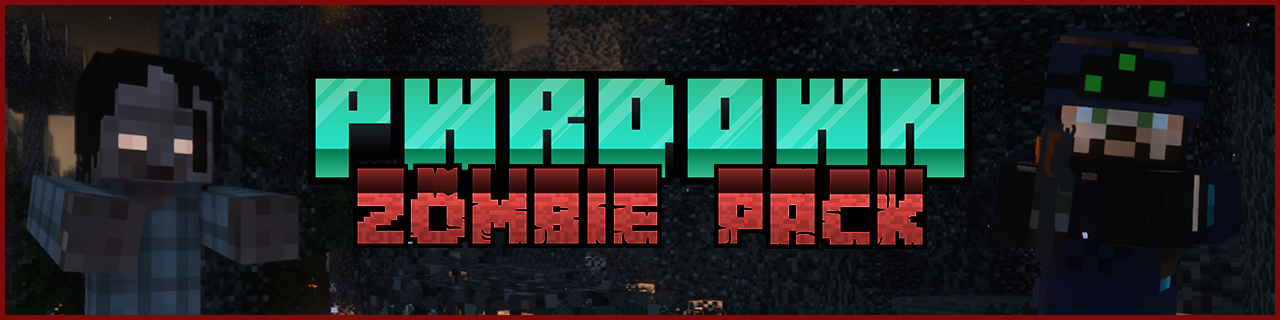
Governments around the world competed against eachother, trying to be the first to reverse the damage of climate change. By releasing chemicals into the atmosphere without thorough research and testing, a new world was created, one which is roamed by the infected. Their brains have rotted away, and they roam the world aimlessly. All but around 1% of the global population were infected, and the number of survivors grows thinner each day. You're a police officer, a remnant of the past just trying to survive.
This pack features hundreds of new Zombie types, which all have different stats. Some interesting world generation, as you'll find abandoned cities, homes, shops etc which can all be looted. As you work your way up, you'll switch from melee weapons to ranged ones, which involve pistols, rifles and shotguns. There's lots of new items, recipes and mechanics, and it's an interesting, but intense and difficult pack overall.
The pack is going to be very difficult, tweak your own settings, and add/remove mods to your liking!

Villages are spawning inside walls
This seems to be an issue with the Lost Cities mod, and will cause Villages to spawn inside the Cities, and underground which will kill Villagers. It's a better idea to look for Villages that are naturally spawning in standard biomes.
**World creation tips?**On the World Creation screen, go into 'More World Options', select the 'Cities' button in the top right corner and change the 'Profile' option in the top left to an option of your choice, such as Default, Rare etc. That way, Lost Cities will be able to spawn in your world.
**This pack is way too hard!**Yeah, this pack is quite difficult, I used all Zombie related mods I could find for Minecraft 1.16.5. The Crafting Dead is what makes this pack most difficult, as the Zombies can pass on diseases and run faster than you at the start of the game. Unfortunately, there's no proper configuration options for the mod. So if you want to make it a bit easier, you could remove the Crafting Dead, but you'd lose a lot of cool items like guns, armor and more. You could remove Improved Mobs, which disables the option for mobs to have increased stats as time goes on. One option is to go into the Bad Mobs config, and disable the likes of Fast Zombies, Weak Zombies and Tank Zombies provided by the Crafting Dead, as these Zombies completely ignore spawn rules and will spawn out of nowhere on your island even during the day in large packs.
**What is the lore?**You're heading into the world as a cop, so you're equipped with some police gear, a shield and baton which should give you a nice head start. Zombies early on will cause you to bleed out too, which is when you should use the medical kits provided with the starter gear mod.
How do I equip items?
Some items, especially those from the Crafting Dead have their own interface in which you can equip stuff. To open it, press the Z key by default, then you can equip masks, outfits etc.
How do I set waypoints?
You can access your minimap options by pressing the Y key. You can select the Waypoints option from this menu, or press the U key to open it quickly.
Cloudy Weather?
This is incorporated with the Better Weather mod, which also adds Seasons. You can wait for it to spawn naturally, or use the command /betterweather setweather betterweather-CLOUDED and then do /gamerule doDaylightCycle false which will keep your sky looking dark and gloomy.
How to Replenish Thirst?
Thirst comes from the Crafting Dead. There are multiple items which can hydrate you, including: Apple, Rabbit Stew, Carrot, Beetroot, Honey Bottles, Chorus Fruit, Sweet Berries, Enchanted Golden Apples, Golden Apples, Mushroom Stew, Suspicious Stew, Beetroot Soup, Melon Slices, Golden Carrots and Water Bottles.
What else is worth noting
Vending Machines can be found in Villages, and the stock will refresh daily. In the Overworld, all hostile mobs apart from Zombies and their different variations are disabled, the Nether has been left alone. Make sure to install Optifine, so that you can use Tissou's Zombie Pack which will bring in hundreds of new and unique textures for Vanilla Zombies. If you want to use the same shaders that I'm using on the images tab, as well as in my video, it's Complementary Shaders , SecurityCraft is also included so that you can setup landmines, CCTV cameras and other useful tech items. The Travelers Backpack can be crafted to allow you to have a sleeping bag and crafting table built in, you can find all the recipes with the included Just Enough Items mod.

- Vending Machine (by MacTso)
- Improved Mobs (by flemmli97)
- First Join Message (by Serilum)
- Mob Sunscreen (by Kreezxil)
- Jade 🔍 (by Snownee_)
- Zombie Extreme (by pyroplay_twitch)
- Guard Villagers (by almightytallestred)
- Zombie Horse Spawn (by Serilum)
- More Zombie Villagers (by Serilum)
- Enhanced Celestials - Blood Moons & Harvest Moons (by Corgi_Taco)
- Tissou's Zombie Pack (by Tissou)
- Valhelsia Structures (by ValhelsiaTeam)
- Villagers Leashed! (by gentworm)
- Bad Mobs (by DarkhaxDev)
- Collective (by Serilum)
- TenshiLib (by flemmli97)
- ToroHealth Damage Indicators (by ToroCraft)
- The Lost Cities (by McJty)
- Security Craft (by Geforce132)
- Dynamic Surroundings (by OreCruncher)
- Xaero's Minimap (by xaero96)
- Crafting Dead Core (by nexusnode)
- Corpse (by henkelmax)
- Just Enough Items (JEI) (by mezz)
- Villagers Follow Emeralds (by rosy162)
- Better Weather - Seasons, Blizzards, and more! (by Corgi_Taco)
- Traveler's Backpack (by Tiviacz1337)
- Desolation (Forge) (by y4z0n)
- Cloth Config API (Forge) (by shedaniel)
- Starter Kit (by Serilum)
- Stoneholm, Underground Villages (Forge) (by TheGrimsey)
Project description from CurseForge.
Mods in PwrDown's Zombie Apocalypse-1.1.zip
Open any mod on Modpacks.ch to check its files and dependencies.
[1.16.5] SecurityCraft v1.8.21.1.jar SHA-1
7302067eb6b953dc162b0114c3077a9acccfab5c · CurseForge file 3205009 · Project link unavailable Side not labelledBadMobs-1.16.5-9.0.3.jar SHA-1
409f535100462931b3f204b59a7d37aa30655438 · CurseForge file 3242368 · Project link unavailable Side not labelledbetterweather-1.2.9.jar SHA-1
b802303584264d7109d38d581e16fa85348417f0 · CurseForge file 3197360 · Project link unavailable Side not labelledcloth-config-4.11.19-forge.jar SHA-1
7c10bcbae8665811cc7e298c0dcfa9b9422f3fd7 · CurseForge file 3261152 · Project link unavailable Side not labelledcollective-1.16.5-2.25.jar SHA-1
5e3318fdd6c26e182e7c6b83f03b6332749397d7 · CurseForge file 3248140 · Project link unavailable Side not labelledcorpse-1.16.5-1.0.2.jar SHA-1
de37d22c6986868359320522c48ec1d07d6c25f9 · CurseForge file 3234439 · Project link unavailable Side not labelledcrafting-dead-core-1.16.5-1.3.0-alpha.jar SHA-1
b170b900a2f24dec50cd345d370e4489e697c316 · CurseForge file 3224144 · Project link unavailable Side not labelledDesolation 1.0.5b 1.16.5.jar SHA-1
1c54ff25aaa670b78e1132a5a05ad469e5a938c9 · CurseForge file 3235156 · Project link unavailable Side not labelledDynamicSurroundings-1.16.4-4.0.4.1.jar SHA-1
e38db1b54a51540886d4f7e260fa2a18c387a1b1 · CurseForge file 3248516 · Project link unavailable Side not labelledenhancedcelestials-1.0.2-1.16.4.jar SHA-1
079c757c141764ce80e421f582f2fef981658ddc · CurseForge file 3250471 · Project link unavailable Side not labelledfirstjoinmessage_1.16.5-1.2.jar SHA-1
c6aa90895a8b720c9f669afd1d5ead468c7ce1ac · CurseForge file 3220630 · Project link unavailable Side not labelledguardvillagers-1.16.5.1.2.1.jar SHA-1
31ba492a8c366a072e8e825711a7734b2ae900bd · CurseForge file 3251245 · Project link unavailable Side not labelledImprovedMobs-1.16.3-1.7.3.jar SHA-1
c7706ccd4ea88005aa90efb89c2af3b405f43aa1 · CurseForge file 3084126 · Project link unavailable Side not labelledJade-1.16.4-2.5.1.jar SHA-1
a09f9c49f07eb46df145b29c74e826c132e3967a · CurseForge file 3228325 · Project link unavailable Side not labelledjei-1.16.5-7.6.1.75.jar SHA-1
007f4c1818be6b7a6624b75639461cd801aabb20 · CurseForge file 3245079 · Project link unavailable Side not labelledlostcities-1.16-4.0.7-beta.jar SHA-1
be035b7e6002faf7a98f58538c1c7486ab772148 · CurseForge file 3217617 · Project link unavailable Side not labelledmobsunscreen-1.16.4-2.1.3.jar SHA-1
b4b6d34ba91b88ff0b52834db47a2d568e16b079 · CurseForge file 3105852 · Project link unavailable Side not labelledmorezombievillagers_1.16.5-1.3.jar SHA-1
85f8b3eddffa1745beb66c8cde44234552f3fc17 · CurseForge file 3245144 · Project link unavailable Side not labelledstarterkit_1.16.5-2.4.jar SHA-1
f48c4e27509b59154340df7f8889af0ec58fbcb1 · CurseForge file 3222154 · Project link unavailable Side not labelledstoneholm-1.1.jar SHA-1
4145e162ac6a6910054306928abe52b5ba89eef6 · CurseForge file 3253967 · Project link unavailable Side not labelledTenshiLib-1.16.3-1.3.0.jar SHA-1
bc7de0012d2372bd23a1e2d5d0b26eaca483dab5 · CurseForge file 3067125 · Project link unavailable Side not labelledtorohealth-1.16.4-forge-4.jar SHA-1
51c64e724ee276cee1d04398261f80aacf635ab4 · CurseForge file 3144151 · Project link unavailable Side not labelledTravelersBackpack-1.16.5-5.4.0.jar SHA-1
3fab5e36bc7d19d8c4839bf72c26deeb0649a7c8 · CurseForge file 3243518 · Project link unavailable Side not labelledTZP 1.16.zip SHA-1
1ea57407300bfe34ce44632c6ca5e2d4b02f8574 · CurseForge file 3228588 · Project link unavailable Side not labelledvalhelsia_structures-16.0.5.jar SHA-1
fda823bf8ebafd3a85b3b64ecf12772232ee3fe0 · CurseForge file 3089925 · Project link unavailable Side not labelledVendingMachine-1.16.2-1.0.0.4.jar SHA-1
0f78854e946b4b54d65846fa665aee97856fb8ea · CurseForge file 3225693 · Project link unavailable Side not labelledVillagersFollowEmeralds-1.16.5-1.0.0.jar SHA-1
1a6214a31bbedcb7d5d805d84ce2b2bf0b906e4c · CurseForge file 3205612 · Project link unavailable Side not labelledvillagersleashed-1.1.0-1.16.5.jar SHA-1
79cd4a044df5d6f5f514729d2c739da3b66def1e · CurseForge file 3256103 · Project link unavailable Side not labelledXaeros_Minimap_21.4.4_Forge_1.16.5.jar SHA-1
9e8de5ff5b544799d32b932b9df1285bd555f41c · CurseForge file 3249722 · Project link unavailable Side not labelledZombie Extreme 1.16.5 1.7.5.jar SHA-1
1a6e71a8786501dcff12e2db869d7e4ff80616de · CurseForge file 3238134 · Project link unavailable Side not labelledzombiehorsespawn_1.16.5-2.7.jar SHA-1
97821e45244b157ecd568dda32f05fd3bc5048fd · CurseForge file 3238056 · Project link unavailable Side not labelledPick your setup
PwrDown's Zombie Apocalypse by Minecraft version and loader
Choose the version and loader you play, then open the matching release.
Made local changes? Try them in a copied instance before touching a world you care about.
Recent files
PwrDown's Zombie Apocalypse versions and loaders
Forge 36.1.01.16.58.0.312+7 release
Looking for an older file? The official CurseForge project page is in Resources.
 modpack
 CurseForge · Minecraft
Skinstalkers All of Them Wendigos skinwalkers
A horror modpack featuring all kinds of Skinstalkers, Wendigos, and Skinwalkers! Face terrifying creatures, creepy encounters, and monsters lurking in the darkness. Stay alert and survive the horrors waiting for you!
 modpack
 CurseForge · Minecraft
sgenie's V
A modpack for sgenie's SMP
 modpack
 CurseForge · Minecraft
Echoes of Infinity
Echoes of Infinity has arrived! Jampacked with Tech / Magic and Exploration Mods, Designed to last well... Infinitely