




Minecraft version
Back to modpacks 
CurseForge · Minecraft modpack
Light Craft - FPS Boost Max
Boost your in-game performance as much as possible while keeping all the extra features of OptiFine. 26.3 version is now available ✔
Choose a version Pick your version below, then grab the matching file.
Quick answer
Which Light Craft - FPS Boost Max release should I use?
Latest stable file Light Craft - 26.3 - 9.1.1
Game version 26.3
Loader Fabric 0.19.5
Light Craft - 26.3 - 9.1.1 is a complete pack release for 26.3 with Fabric 0.19.5. Install it as its own launcher instance. If the creator publishes a separate server file, make sure it names this exact pack release. 47 mods in this pack file.
Pack setup
How should I set up Light Craft - FPS Boost Max for players and a server?
Use Light Craft - 26.3 - 9.1.1 as the pack version. Install the pack as its own launcher instance. The creator’s listing does not name a separate server file, so check the release notes before setting up a dedicated server. Do not upload the ordinary client folder blindly.
Client instance Install Light Craft - 26.3 - 9.1.1
Dedicated server setup Match Light Craft - 26.3 - 9.1.1
Pack loader Fabric 0.19.5
A pack is a matched client and server setup, not one mod with an install-side label. Keep its release, loader, manifest and overrides together.
Referenced mods 47
Client only 31
Server only 0
Not labelled 16
These numbers come from the pack file you chose. “Not labelled” means we don’t know which side it belongs on—not that it is safe everywhere. The file count is not a RAM estimate.
What are the server requirements for Light Craft - FPS Boost Max?
Light Craft - 26.3 - 9.1.1. Change the pack release and its contents or setup may change too.
The selected pack release is Light Craft - 26.3 - 9.1.1. That file is for Minecraft 26.3 with Fabric 0.19.5. It contains 47 mod projects. The creator’s listing does not name a separate server file. Check their notes before using one, and do not upload an ordinary client folder or rebuild the pack mod by mod. A file count cannot tell us the right RAM, CPU or storage; size the server for the players and world you actually run.
About this project
What kind of pack is Light Craft - FPS Boost Max?
⚠️ Requires launcher that supports CurseForge Modpacks » Download CurseForge App
Light Craft | The best FPS Boost Modpack by MoonPlay Team
Increase your FPS in-game (more FPS than OptiFine & other modpacks) and add useful extras!
Latest Version » 26.3 - 9.1.1 (Recommended)
We are working on creating the most optimized client with various add-ons based on Light Craft.
Don't need OptiFine add-ons for LightCraft? Do you only care about a basic FPS Boost? You can download the Light Craft Lite!
Do you want to set up your own server? Try our Server Pack! Fabric Server optimized as much as possible.




Why should you choose Light Craft instead of OptiFine and other modpacks?
» That modpack is much faster than OptiFine 📈
» Support for capes (including OptiFine capes), which you can also get for FREE!
» All major features from OptiFine such as Shaders, Zoom, Dynamic Lights, Resource Packs, etc. are included in this Modpack.
» Bug Fixes 🐞
» Weekly Updates
» You can play using a Controller 🎮
» You can add mods by yourself (for ex. in game voice chat, map, essentials etc.)
» Clean UI
» Huge FPS Boost !

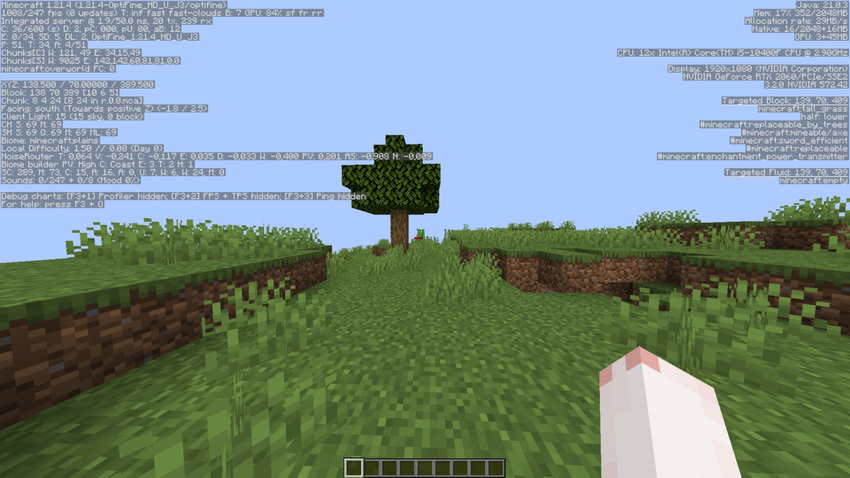
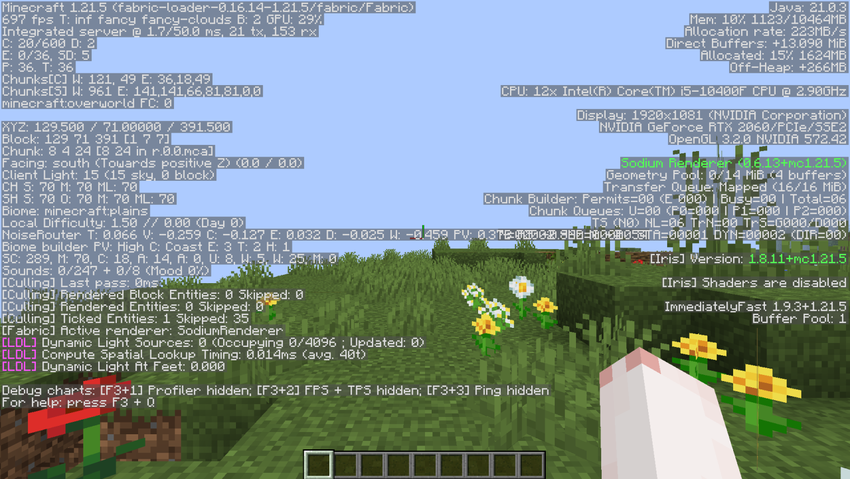
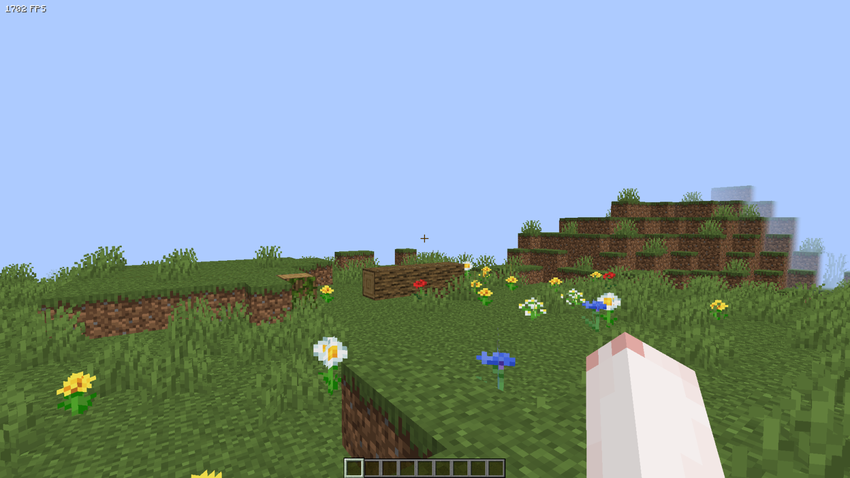
NVIDIA RTX 2060 - Intel Core I5 10400F - SEED: "test" - 2 chunks - (Test date: 13.05.2025)
⚠️Please remember that the results may vary for each individual depending on drivers version, the graphics card brand and its version, the installed operating system, processor, etc.⚠️
Vanilla » 984 FPS
Optifine (HD_U_J3) » 1008 FPS
Fabously Optimized (9.0.0-beta.1) » 697 FPS (Probably a bug in the modpack?)
Light Craft (6.1.0) » 1702 FPS <- WINNER
Q: Why does Light Craft disable features like Dynamic Lights, Particles, Better Grass by default?
A: To maximize FPS. You can enable them anytime in the settings.
Q: Do I need OptiFine?
A: No! Light Craft is powered by a modern Fabric/Sodium base - no OptiFine needed.
Q: Can I add other mods?
A: Yes. Light Craft is compatible with most popular utility mods. You can also create your own modpack for yourself based on Light Craft.
| Minimum Server RAM: 2GB | Recommended Server RAM: 3GB | Minimum Allocated RAM: 1GB |

Enjoy Minecraft to the fullest by hosting your game server with BisectHosting. Not only do they offer servers in 20 different locations worldwide, but their decade of expertise guarantees an exceptional gaming experience. Their automated modpack installer and updater makes setting up and maintaining your server a breeze. Plus, their 24/7 support is always there to help you with any inquiries. Use promo code FPS and get 25% off your first month as a new customer!
Project description from CurseForge.
Mods in Light Craft - 26.3 - 9.1.1
Open any mod on Modpacks.ch to check its files and dependencies.
animatica-0.6.2+26.3.jar SHA-1
65fbee1197fcd342d88b34c33856da5c04fa7fed · CurseForge file 8898137 · Project link unavailable Client onlyBadOptimizations-2.4.1-26.3-fabric.jar SHA-1
4cc25ce6217326ff14169f5358921773297e9475 · CurseForge file 8891658 · Project link unavailable Client onlybalm-fabric-26.3-26.3.0.3.jar SHA-1
1b44d97048c1c2e9cc7e0a03c00f5cb117463a60 · CurseForge file 9035245 · Project link unavailable Side not labelledbbe-fabric-1.3.9+mc26.3-mod.jar SHA-1
151330c3ea5a1c93e841ea4cda0788c93b5b986d · CurseForge file 8888869 · Project link unavailable Client onlybettermounthud-1.3.1.jar SHA-1
f86040d5010c7aad1c677c7a7fefe52d3b386abd · CurseForge file 8280974 · Project link unavailable Client onlyc2me-fabric-mc26.3-0.4.2-alpha.0.90.jar SHA-1
dc8666e40bb04cef88628f66964130890ad44488 · CurseForge file 9087028 · Project link unavailable Side not labelledcape-provider-5.6.1.jar SHA-1
d8cac4f307fb41a2b8c66d5f4ba17d49ac08bc99 · CurseForge file 8889268 · Project link unavailable Client onlychat_heads-1.3.2-fabric-26.3.jar SHA-1
cf4eec23f6bc4b3ce7c3c20308694beb5f4c5edf · CurseForge file 9060723 · Project link unavailable Client onlycloth-config-26.3.158.jar SHA-1
af17510e82adc4ce8bd82c8239f890b5bae8ac45 · CurseForge file 8884063 · Project link unavailable Side not labelledClumps-fabric-26.3-26.3.2.jar SHA-1
86d6618f772320bb5e66b4696396a450d5cb845e · CurseForge file 8897016 · Project link unavailable Side not labelledcontinuity-3.0.1+26.3.jar SHA-1
63d51781b2c87e3b4b4ca98a133db8c98d3f2afb · CurseForge file 8892594 · Project link unavailable Client onlycontrolify-3.5.3+mc26.3-universal.jar SHA-1
9df91163e9a325c83215df29bf743bd0e4aa544f · CurseForge file 8958797 · Project link unavailable Client onlyCrashAssistant-fabric-26.2-26.3-1.11.14.jar SHA-1
dea53a10e5fbfaacd18e212a0eb0fe328b3e9467 · CurseForge file 8934748 · Project link unavailable Client onlydefaultoptions-fabric-26.3-26.3.0.1.jar SHA-1
b2a8ceea8bbf13b9e2531ba08bc8fc8028eae675 · CurseForge file 8893535 · Project link unavailable Client onlyentity_model_features-3.3.11-26.3-fabric.jar SHA-1
9c11805cc34153fd89cb9fecf78be2b5a803b373 · CurseForge file 9064964 · Project link unavailable Client onlyentity_texture_features-7.2.5-26.3-fabric.jar SHA-1
c4d8d0f47a2ab15091f47a1d74336a119ab5f1b1 · CurseForge file 9055242 · Project link unavailable Client onlyentityculling-fabric-1.11.2-mc26.3.jar SHA-1
f2196e803fe77cfbb62c4a2acb64803d98b4f61c · CurseForge file 8942325 · Project link unavailable Client onlyfabric-api-0.162.0+26.3.jar SHA-1
273cd2dcbd92d1559edcc91c9f23fee47f6ff93f · CurseForge file 9078180 · Project link unavailable Side not labelledfabric-language-kotlin-1.14.1+kotlin.2.4.20.jar SHA-1
62ae40a31b689b52fde399f2143d547a631e942c · CurseForge file 8829788 · Project link unavailable Side not labelledferritecore-9.0.0-fabric.jar SHA-1
eac76ff0f3753422c61b2c44487d0d195d88d4bc · CurseForge file 7806040 · Project link unavailable Side not labelledGnetum-4.6.3+26.3-fabric.jar SHA-1
d6237dced5a4a92a295872d3077ebc786d394471 · CurseForge file 9074600 · Project link unavailable Client onlyImmediatelyFast-Fabric-1.17.1+26.3.jar SHA-1
f565bbeb201f2305e81761429d3f1f47e1c3a321 · CurseForge file 8905047 · Project link unavailable Client onlyiris-fabric-1.11.7+mc26.3.jar SHA-1
fa03640ba1e4ef2f7ae3619c6373a06e46d0ba2c · CurseForge file 9015108 · Project link unavailable Client onlyIxeris-4.6.8+26.3-fabric.jar SHA-1
c38a65adc0f1cb4a7e4f493ab32f908f5ee4742e · CurseForge file 8939552 · Project link unavailable Client onlylambdynamiclights-4.13.0+26.3.jar SHA-1
18c8ab40f03219bfcf809a83db6e3958ed8bb866 · CurseForge file 8890400 · Project link unavailable Client onlylithium-fabric-0.26.2+mc26.3.jar SHA-1
dd5a4ec2c68d7601d8bce9076f789c55a5f8bef3 · CurseForge file 8996662 · Project link unavailable Side not labelledMCE_fabric_26.3.jar SHA-1
124a07394ad81cf93c6af2aae03673481ffae3c3 · CurseForge file 8975678 · Project link unavailable Client onlymodernfix-5.27.20-build.2.jar SHA-1
b63337e801fbf2cb420a049d69220c56e083f514 · CurseForge file 8973698 · Project link unavailable Side not labelledmodmenu-21.0.0.jar SHA-1
66ec40f1cd0c037ddca2b5fc6b4b976d479c18e8 · CurseForge file 8958984 · Project link unavailable Side not labelledmorechathistory-2.0.0.jar SHA-1
6ce97845f93090dd7556b6e64bb7d63e126b83b4 · CurseForge file 7807306 · Project link unavailable Client onlymoreculling-fabric-26.3-1.9.0.jar SHA-1
7308b0b0b6fffb0e076cabf97db7fc889d9ada68 · CurseForge file 9045562 · Project link unavailable Client onlyMouseTweaks-fabric-mc26.3-2.31.jar SHA-1
65c0f5588900e7ade476164ec4915bfab52c129a · CurseForge file 8887995 · Project link unavailable Client onlyNoChatReports-FABRIC-26.3-v2.21.0.jar SHA-1
ed49e6780f20fcad080a211f8163c9d130ebdd34 · CurseForge file 9017226 · Project link unavailable Side not labelledobe+26.3-1.1.50.jar SHA-1
ee840202aef02cdfea8cd1a918672cf78b75debd · CurseForge file 9019165 · Project link unavailable Client onlyok_zoomer-19.0.0-beta.2.jar SHA-1
ad77ff239ebee559f46d78f45faf86c4738a47c7 · CurseForge file 8899781 · Project link unavailable Client onlyoptigui-2.3.0-beta.10+26.3.jar SHA-1
e788a22a46fa3cf40078e1b794a37c0684da76ac · CurseForge file 8912084 · Project link unavailable Client onlyplaceholder-api-3.1.0-beta.1+26.2.jar SHA-1
99b57ccc1d4323c4ef71887828dac25ce4ce2103 · CurseForge file 8271471 · Project link unavailable Side not labelledpuzzle-fabric-2.3.1+26.3.jar SHA-1
323a50c8f8385d366985d1e67f73d3c595199448 · CurseForge file 9011931 · Project link unavailable Client onlyreeses-sodium-options-fabric-2.2.5+mc26.3.jar SHA-1
305aa813172358eb5e95d0a7af02a44326261226 · CurseForge file 8966771 · Project link unavailable Client onlyResourcefulConfig-6.0.2.jar SHA-1
c66b02799463e57baf8c9fa8979b2cf167e284b8 · CurseForge file 9086227 · Project link unavailable Side not labelledskyboxify-3.4+26.3-fabric.jar SHA-1
b24b18f87c6301aef4812f6d0e769b2d7c7bbd1f · CurseForge file 8908345 · Project link unavailable Client onlysodium-extra-fabric-0.9.4+mc26.3.jar SHA-1
ff2056f222b751fe161123e71e55afd5b2f41da4 · CurseForge file 8892474 · Project link unavailable Client onlysodium-fabric-0.9.2+mc26.3.jar SHA-1
9acfe851e36f4fb27d7c5baa224e8bd4e0334283 · CurseForge file 8888037 · Project link unavailable Client onlystructure_layout_optimizer-1.1.4+26.3-fabric.jar SHA-1
ce6a03a927297a5441dfa239bf2d6d804931530a · CurseForge file 8891986 · Project link unavailable Side not labelledyet_another_config_lib_v3-3.9.7+26.3-fabric.jar SHA-1
e54d86dd4a78f95cd6ec0309d96fae01e661c00d · CurseForge file 8935498 · Project link unavailable Client onlyzconfig-1.0.0+26.x.jar SHA-1
91dab4f25559cf79d493177fbe0a50c4083a27cb · CurseForge file 8569705 · Project link unavailable Side not labelledzfastnoise-1.1.1+26.3.jar SHA-1
f440a683630858b8d4d69a170eae4428e0e5af51 · CurseForge file 9026898 · Project link unavailable Side not labelledPick your setup
Light Craft - FPS Boost Max by Minecraft version and loader
Choose the version and loader you play, then open the matching release.
Minecraft version
26.2
1 loader buildMinecraft version
26.1.2
1 loader buildMinecraft version
26.1.1
1 loader buildMinecraft version
26.1
1 loader buildMinecraft version
1.21.11
1 loader buildMinecraft version
1.21.10
1 loader buildMade local changes? Try them in a copied instance before touching a world you care about.
Recent files
Light Craft - FPS Boost Max versions and loaders
Fabric 0.19.526.38.0.312+7 release
Fabric26.3 release
Fabric26.3 release
Fabric26.3 release
Fabric26.2 release
Fabric26.2 release
Fabric26.2 release
Fabric26.2 release
Fabric26.2 release
Fabric26.2 release
Fabric26.2 release
Fabric26.2 release
Looking for an older file? The official CurseForge project page is in Resources.
 modpack
 CurseForge · Minecraft
The Bonkers
The Official Modpack for the Bonkers Minecraft server
 modpack
 CurseForge · Minecraft
Bosses World-All The bosses
A modpack about defeating bosses, there are more than 50 of them, wow...swag!
 modpack
 CurseForge · Minecraft
Nightreign - Tarnished legacy
A medium weight modpack that aims to keep minecrafts blocky style while adding a little bit of... Pizazz