Minecraft version
Back to modpacks 
Modrinth · Minecraft modpack
OptiMized
A modpack that adds the OptiFine features for maximum speed.
Choose a version Pick your version below, then grab the matching file.
Quick answer
Which OptiMized release matches 26.1 Fabric?
Best match for your filters OptiMized 4.0.0
Game version 26.1
Loader Fabric 0.18.6
OptiMized 4.0.0 is a complete pack release for 26.1 with Fabric 0.18.6. Install it as its own launcher instance. If the creator publishes a separate server file, make sure it names this exact pack release. 20 mods in this pack file.
Pack setup
How should I set up OptiMized for players and a server?
Use OptiMized 4.0.0 as the pack version. Install the pack as its own launcher instance. The creator’s listing does not name a separate server file, so check the release notes before setting up a dedicated server. Do not upload the ordinary client folder blindly.
Client instance Install OptiMized 4.0.0
Dedicated server setup Match OptiMized 4.0.0
Pack loader Fabric 0.18.6
A pack is a matched client and server setup, not one mod with an install-side label. Keep its release, loader, manifest and overrides together.
Referenced mods 20
Client only 7
Server only 1
Not labelled 12
These numbers come from the pack file you chose. “Not labelled” means we don’t know which side it belongs on—not that it is safe everywhere. The file count is not a RAM estimate.
What are the server requirements for OptiMized?
OptiMized 4.0.0 on 26.1 Fabric. The pack contents and setup notes below stay tied to that release.
The selected pack release is OptiMized 4.0.0. That file is for Minecraft 26.1 with Fabric 0.18.6. It contains 20 mod projects. The creator’s listing does not name a separate server file. Check their notes before using one, and do not upload an ordinary client folder or rebuild the pack mod by mod. A file count cannot tell us the right RAM, CPU or storage; size the server for the players and world you actually run.
About this project
What kind of pack is OptiMized?


Moving to only Vulkan from version 7.0.0 | Won't work with OpenGL (Prefer Vulkan preset)
Please, consider not using ADBlocker for viewing my modpack, this is a small project that needs attention for building and updating.
OptiMized Modpack – Faster than Optifine, Supercharged ⚡
A modpack that brings you the best vanilla experience | but at six times the speed!
For what use OptiMized
Use OptiMized if you want a total vanilla experience but you want high FPS even on potato machines.
OptiMized is compatible with every type of mod and machine from a potato CPU with integrated graphics to the most powerful PC on earth.
Use this modpack if you want to increase your FPS or simply not lagging.
The modpack brings to Minecraft all the high, hidden power of NVIDIA GPUs and multi-core CPUs.
Why use OptiMized and not Fabolously OptiMized or other modpacks?
Other modpacks include unnecessary mods that devrease your game FPS increasing lag.
With OptiMized you got only some mods, tested, without crashes etc.
📦 Features
🔝 High FPS boost View the gallery for more.
[Detailed benchmark soon!!]
Testing mods
Give me mods to try at eliopico13@outlook.it.
Help me test this mods giving me a feedback on eliopico13@outlook.it.
⤵️ Installation
Default (help me more with this installation!)
- Download the modpack's .mrpack.
- Open your favorite MC launcher
- Find the button for importing from .mrpack files (New Istance -> Import from file
- Upload the .mrpack file
- Play Minecraft and enjoy the modpack!!!
Modrinth App (help me more with installation, but is better to try the first method)
- Open the Modrinth App
- Create an instance -> from modpack -> search OptiMized
- Install the modpack
- Play Minecraft and enjoy the modpack!!!
Other launchers (no monetization)
- Open your favorite MC launcher
- Create an istance
- Select "Modrinth"
- Search OptiMized
- Install the modpack with confirm
- Play Minecraft and enjoy the modpack!!!
Best Lifesteal server for me | ADV
KryonLS.mooo.com:25683
🖼️ Branding
The OptiMized logo is property of EpicoGamer_. ©2025-2026 EpicoGamer_. All rights reserved.
🔃 Comparing
OptiMized 26.2 (Vulkan)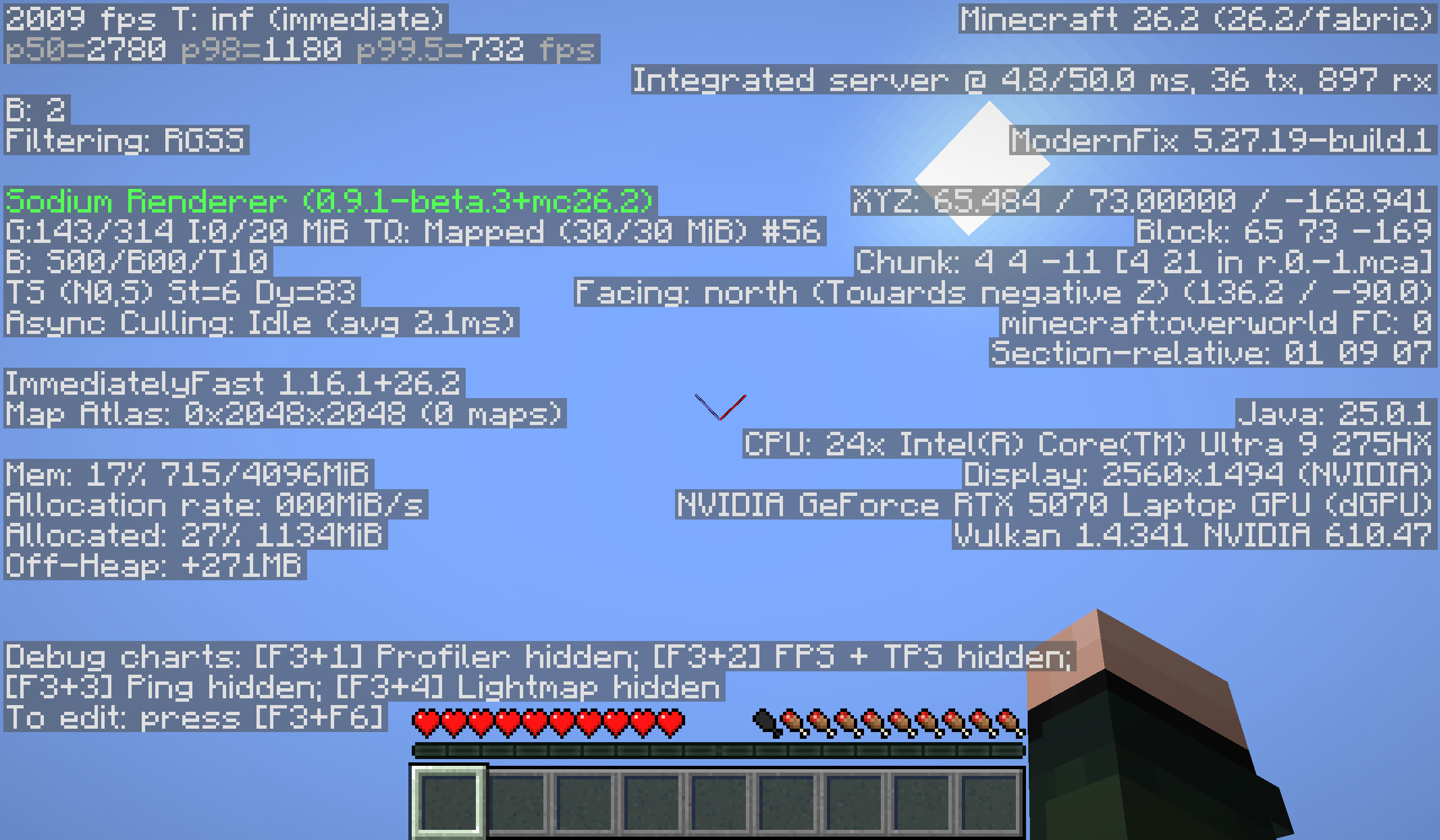
Vanilla 26.2 (OpenGL)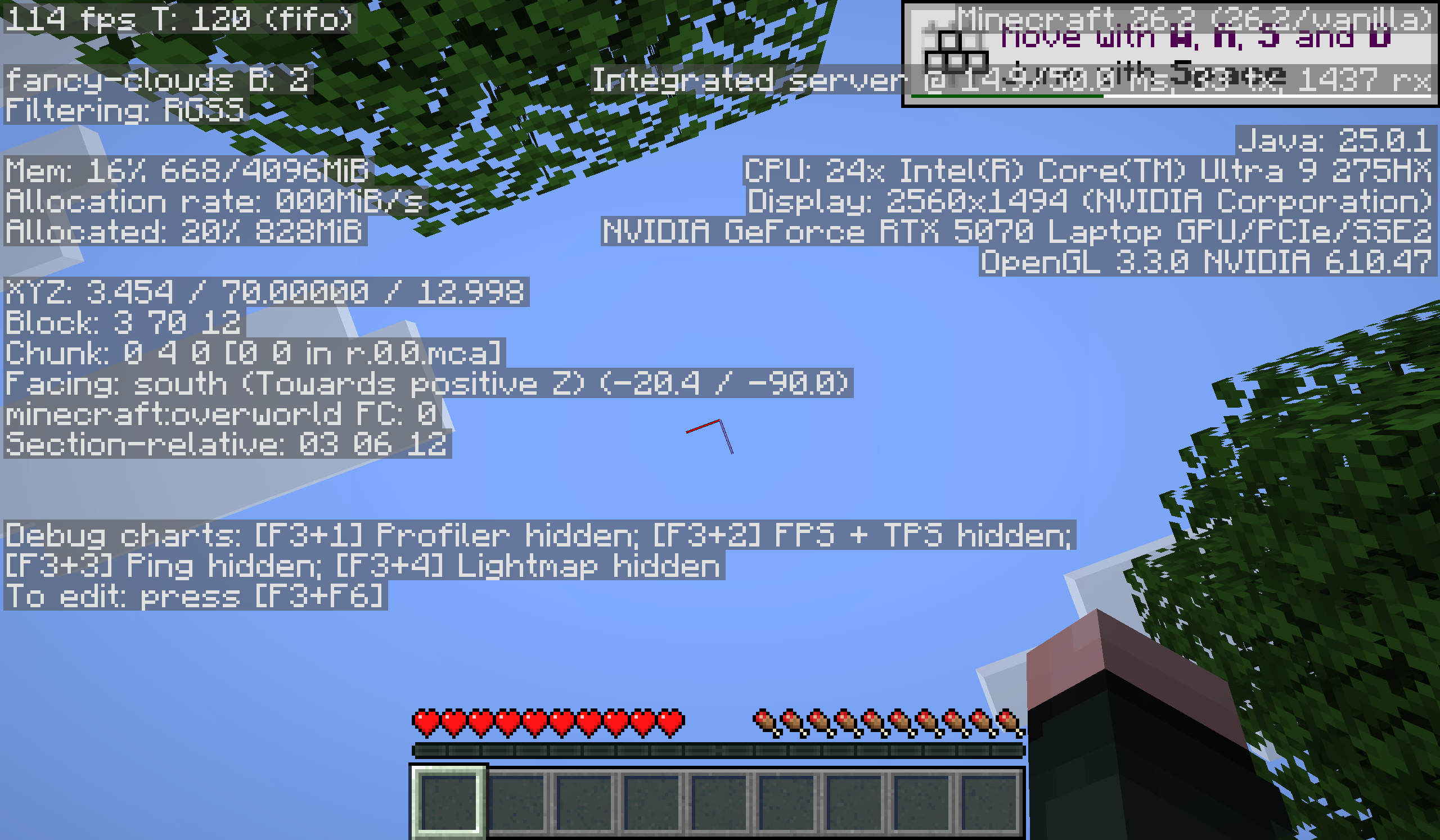
Simply Optimized Reloaded 26.1.2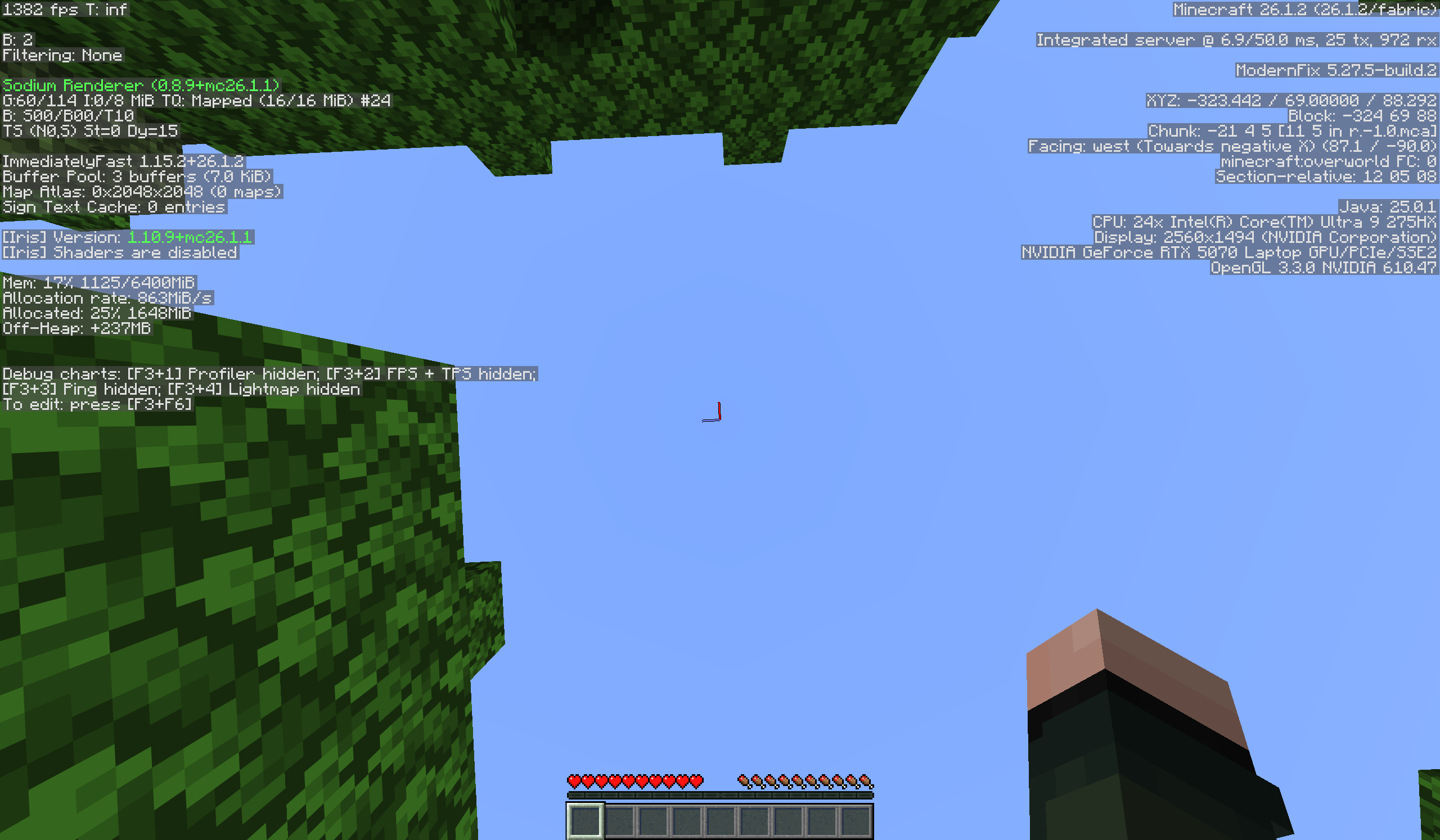
Want the look and feel of OptiFine without the performance hit? OptiMized is your go-to solution. Better than Simply Optimized and Adrenaline. Perfect for players who want shaders, zoom, and dynamic lighting — all running smoother than ever.
Enjoy the speed. Enjoy the style. Get OptiMized!
Did you like this modpack? Then I invite you to recommend it to your friends, relatives and acquaintances.
📦 Complete Mod List (v7.0.2) — Click to expand
- BadOptimizations
- ImmediatelyFast
- Ksyxis
- ScalableLux
- OBE
- C2ME
- Cloth Config API
- Dynamic FPS
- EntityCulling
- Fabric API
- Fabric Language Kotlin
- FerriteCore
- Fzzy Config
- Iris Shaders
- Krypton
- LibJF
- Lithium
- Mod Menu
- More Culling
- Nvidium
- Placeholder API
- Sodium
- Sodium Extra
- ZConfig (con night-config)
- Z Fast Noise
If you are searching for a modpack with OptiFine features, try modrinth.com/modpack/optifine-for-fabric.
Give me your experience with DeskOS with a simple form: https://forms.cloud.microsoft/Pages/ResponsePage.aspx?id=DQSIkWdsW0yxEjajBLZtrQAAAAAAAAAAAANAAXncBqhUQkRBSkpUU0pQMUlUVTdLV0FRNFFHVUoyMy4u
Visit our site: https://epicigamer.gitlab.io/optimized-site/.
Project description from Modrinth.
Mods in OptiMized 4.0.0
Open any mod on Modpacks.ch to check its files and dependencies.
BadOptimizations-2.4.1-26.1-fabric.jar SHA-1
9636073ca8f378ea796b5d13bffac146a7f2f0f3 · Modrinth version gjIvugXc · Project link unavailable Client onlyChunky-Fabric-1.4.58.jar SHA-1
b9f543978ce12507be369320b6bf5bb7c9e342cc · Modrinth version DCgX52a5 · Project link unavailable Side not labelledcloth-config-26.1.154.jar SHA-1
832f9047bc4af13587709c74f7c37e1c8579d1eb · Modrinth version GFM8zh9J · Project link unavailable Side not labelleddynamic-fps-3.11.6+minecraft-26.1.0-fabric.jar SHA-1
66f8cc53a00be11374fc4cdd33ac909e90eb54f3 · Modrinth version zGhSzRSB · Project link unavailable Client onlyentity-view-distance-1.8.0+26.1.jar SHA-1
3dd683874cc218c64781205fb0e13130f9d3765a · Modrinth version yIEyxDlN · Project link unavailable Side not labelledentityculling-fabric-1.10.0-mc26.1.jar SHA-1
6b83d2cadbdb67d0c05e56cb62e0ccb24409890a · Modrinth version YSbzFHRt · Project link unavailable Client onlyfabric-api-0.144.4+26.1.jar SHA-1
3002eb45eccca8f81c620ceed4155a08c3f12120 · Modrinth version Xsmcjuhk · Project link unavailable Side not labelledfabric-language-kotlin-1.13.10+kotlin.2.3.20.jar SHA-1
9873294abf498f509453d37b0a5ba019f4570ffb · Modrinth version 21TRTKmh · Project link unavailable Side not labelledferritecore-9.0.0-fabric.jar SHA-1
eac76ff0f3753422c61b2c44487d0d195d88d4bc · Modrinth version d5ddUdiB · Project link unavailable Side not labelledfzzy_config-0.7.6+26.1.jar SHA-1
dabdfb956438fc9526ec0794fcf4ff0261a75870 · Modrinth version EzFtPUO0 · Project link unavailable Side not labelledImmediatelyFast-Fabric-1.15.1+26.1.1.jar SHA-1
25780ccb6f42d49280223f6aeb6603f8b624c9e5 · Modrinth version UM3jWaXo · Project link unavailable Client onlylithium-fabric-0.22.1+mc26.1.jar SHA-1
4075ade8217564086bfb46555c8e0858d202a073 · Modrinth version W0ZXKJy9 · Project link unavailable Side not labelledmodernfix-5.26.2-build.1.jar SHA-1
d99980a3213293ade61f6cca109b8eeb87cc5a05 · Modrinth version dqQ7mabN · Project link unavailable Side not labelledmoreculling-fabric-26.1-1.7.0-beta.3.jar SHA-1
b9002400d0a49a5640ca1688988b7549c67edb5e · Modrinth version PMO5hamO · Project link unavailable Client onlynoisium-fabric-2.8.4+mc26.1-pre-2.jar SHA-1
3ca0f8a504a80dcd084a5c6f801beda50d67db08 · Modrinth version QWyo5TsS · Project link unavailable Server onlyplaceholder-api-3.0.0-beta.2+26.1.jar SHA-1
01afdd9eab5ae1b11acfa90266fc6d4f1cea1fa2 · Modrinth version MQX6V6Qi · Project link unavailable Side not labelledScalableLux-0.2.0+fabric.2b63825-all.jar SHA-1
3875a697a9bb014c06aa3a62d72e8bec3de23160 · Modrinth version gYbHVCz8 · Project link unavailable Side not labelledsodium-extra-fabric-0.8.5+mc26.1.jar SHA-1
4f3d7db59727f6aafa1d3c0f1c0d6a795f6d3e8b · Modrinth version T1L05OBl · Project link unavailable Client onlysodium-fabric-0.8.7+mc26.1.jar SHA-1
ef8e9c3571e601427716de38b8b1ec11f09dfa06 · Modrinth version Amr4VcZo · Project link unavailable Client onlyvmp-fabric-mc26.1-0.2.0+beta.7.232-all.jar SHA-1
d6d5d4e4805c178fba85961e861cc0f1e4f7ceec · Modrinth version npN4YjdD · Project link unavailable Side not labelledPick your setup
OptiMized by Minecraft version and loader
Choose the version and loader you play, then open the matching release.
Minecraft version
26.2
1 loader buildMinecraft version
26.1.1
1 loader buildMinecraft version
26.1
1 loader buildMinecraft version
1.21.11
1 loader buildMinecraft version
1.21.10
1 loader buildMade local changes? Try them in a copied instance before touching a world you care about.
Recent files
OptiMized versions and loaders
Fabric 0.18.626.18.0.312+7 release
Fabric26.1 release
Looking for an older file? The official Modrinth project page is in Resources.
 modpack
Modrinth · Minecraft
Oxygen
One of the BEST optimization modpacks! It offers maximum performance with shaders, fullbright and zoom!
 modpack
Modrinth · Minecraft
Optimized Core
This is a modpack core that optimizes the game. Mainly meant as a base for your own modpack/instance. It only contains optimization mods and for this reason it achives the BEST performance of any modpack!
 modpack
Modrinth · Minecraft
Thunder
[26.3 available] Boost FPS, reduce lag, speed up load times, and save resources with this modpack! Perfect for low-end computers. No extra mods, just pure performance improvement.