Minecraft version
Back to modpacks 
Modrinth · Minecraft modpack
OptiFine for Fabric
OptiFine features for Fabric — powered by Fabric optimization and modern Minecraft performance mods. High FPS even on low‑end systems. 26.2 alpha!
Choose a version Pick your version below, then grab the matching file.
Quick answer
Which OptiFine for Fabric release matches 26.2 Fabric?
alpha file OptiFine for Fabric v4.1 • 26.2 • Alpha 1
Game version 26.2
Loader Fabric
OptiFine for Fabric v4.1 • 26.2 • Alpha 1 is a complete pack release for 26.2 with Fabric. Install it as its own launcher instance. If the creator publishes a separate server file, make sure it names this exact pack release. Could not safely read this pack file.
Pack setup
How should I set up OptiFine for Fabric for players and a server?
Use OptiFine for Fabric v4.1 • 26.2 • Alpha 1 as the pack version. Install the pack as its own launcher instance. The creator’s listing does not name a separate server file, so check the release notes before setting up a dedicated server. Do not upload the ordinary client folder blindly.
Client instance Install OptiFine for Fabric v4.1 • 26.2 • Alpha 1
Dedicated server setup Match OptiFine for Fabric v4.1 • 26.2 • Alpha 1
Pack loader Fabric
A pack is a matched client and server setup, not one mod with an install-side label. Keep its release, loader, manifest and overrides together.
What are the server requirements for OptiFine for Fabric?
OptiFine for Fabric v4.1 • 26.2 • Alpha 1 on 26.2 Fabric. The pack contents and setup notes below stay tied to that release.
The selected pack release is OptiFine for Fabric v4.1 • 26.2 • Alpha 1. That file is for Minecraft 26.2 with Fabric. We could not safely count the mods in this release. The creator’s listing does not name a separate server file. Check their notes before using one, and do not upload an ordinary client folder or rebuild the pack mod by mod. A file count cannot tell us the right RAM, CPU or storage; size the server for the players and world you actually run.
About this project
What kind of pack is OptiFine for Fabric?


OptiFine for Fabric v5 is in alpha testing!
OptiFine for Fabric v5 brings many exciting new features to the pack. During the alpha stage, v4 will continue to be supported and updated to the newest versions, rather than v5. Please report any bugs you find!
Looking for a modpack that has all the features OptiFine does? You're in the right place!
OptiFine for Fabric is a Fabric optimization modpack designed to being OptiFine-style features to Fabric, powered by modern Minecraft performance mods like Sodium, Iris, and more. Perfect for players searching for modern OptiFine alternatives.
⚡ Insane Performance Boost
- 🧠 Lightweight optimization for smoother gameplay
- 🖥️ Runs great even on low-end systems
- ⚡ 8x FPS compared to Vanilla
- 💻 No stuttering frames
- 📶 Less lag
🎨 Graphics Enhancements
- 🌈 HD textures and resource pack support
- 🔍 Built-in zoom functionality (just like OptiFine - but with more customibility!)
- 🧊 Connected textures for seamless visuals
- 🧥 Support for capes and custom models
- 🔦 Dynamic lighting and shader compatibility
- 🧪 Includes block & entity model enhancements
- 🧵 Smooth animations and visual polish
✅ Better Than OptiFine
- 🧩 Fabric compatibility
- 🧠 More reliable and modular
- 🧪 Actively maintained and updated for latest Minecraft versions
🛠️ Modding Flexibility
- 🔧 Compatible with additional mods for custom setups
- 🧭 Working on Lunar Client compatibility
FPS Comparison Chart
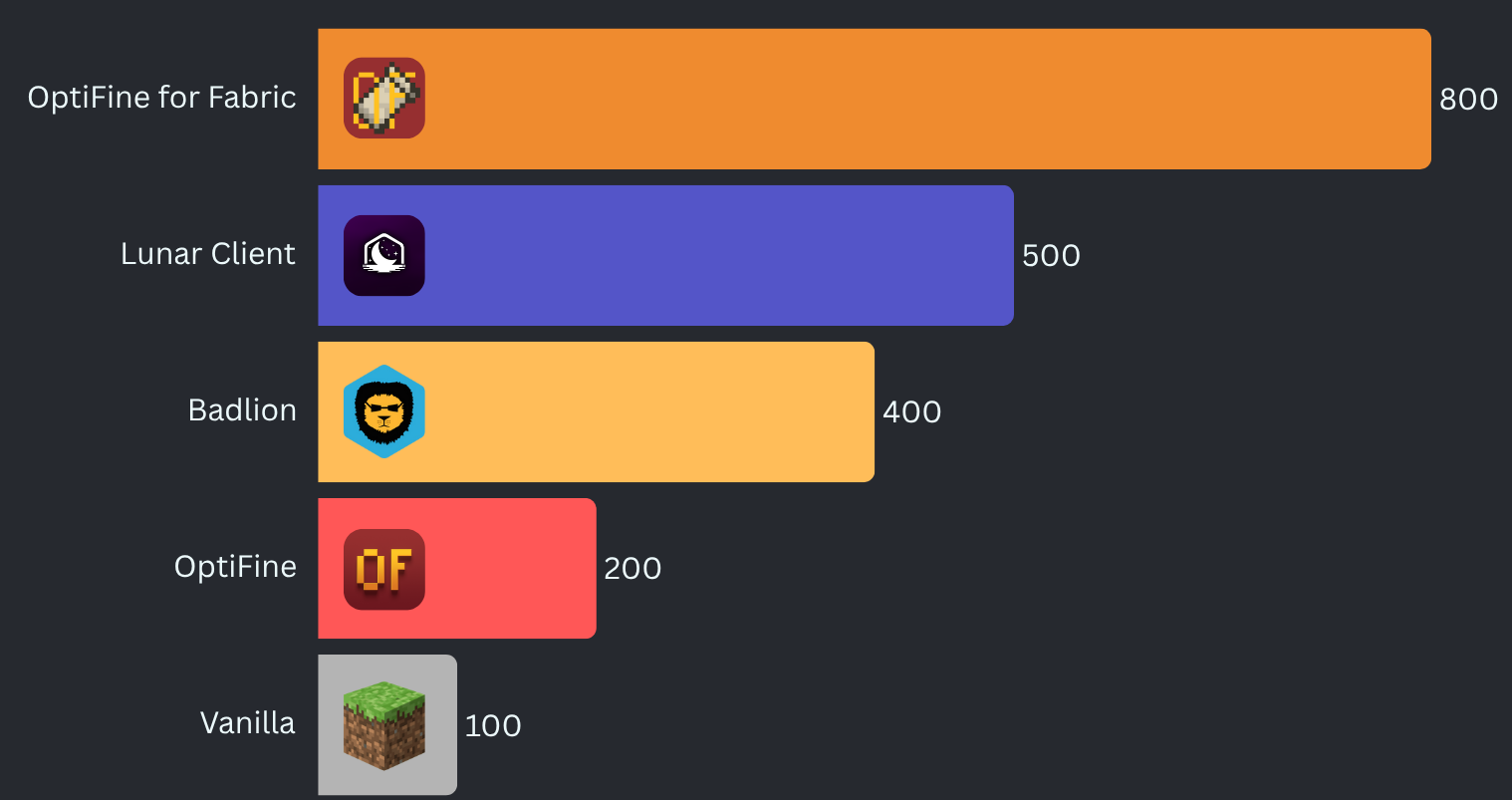
Benchmarked on a mid-range desktop computer.
What version should I use?
To get the correct version of OptiFine for Fabric for your setup:
- Open the Download page: optifineforfabric.com/download
- Choose your Minecraft version from the dropdown.
- Select the latest stable release shown for that Minecraft version.
- Stable releases have no suffix (no
-alpha,-beta,-dev). - The selector automatically filters versions so you don’t need to interpret compatibility badges.
- Stable releases have no suffix (no
How to compare versions:
Pick the version with the highest numbers from left to right.
Examples:
3.4.1is newer than2.5.33.5.2is newer than3.4.1
If no stable releases exist for your Minecraft version, you may use an alpha, beta, or dev build. These appear clearly labeled in the selector.
Detailed Version Guide
OptiFine for Fabric uses a structured versioning system. Every release follows this format:
<major>[.<minor>[.<build>]][-channel[.<channelBuild>]]
Examples:
2.5— stable2.5.1— hotfix for2.52.6-alpha.1— first alpha release for a seperate Minecraft version
The version number describes the pack itself, not the Minecraft version. Minecraft compatibility is shown separately on Modrinth.
Version Number Breakdown
Major — <major>
Large updates to the pack.
This number only increases when the pack undergoes a significant redesign or major feature shift.
Minor — <minor>
Normal updates within a major version.
This increases when the pack receives meaningful improvements, mod additions, compatibility changes, etc.
Build — <build>
A patch‑level counter within the same Minecraft version.
This number increases when the pack receives bug fixes or small adjustments for that specific Minecraft version.
This number resets when Minecraft updates, because each Minecraft version starts its own patch sequence.
Examples:
2.5→ Minecraft 1.21.1 (stable release)2.5.1→ Minecraft 1.21.1 (first patch)j2.5-alpha.1→ Minecraft 1.21.2 (first alpha build)2.5-beta.2→ Minecraft 1.20.1 (second beta build)
Build numbers simply indicate bug fixes and other minor changes tied to Minecraft versions.
Release Channels
Channels appear after a dash.
-dev— Experimental development builds. Unstable and incomplete, highly likely to not even work.-alpha— Early testing builds. Features may be missing or broken.-beta— Feature‑complete testing builds. Mostly stable.- No suffix — Stable release and/or hotfix. Fully tested and recommended.
Recency is shown by the dot and the number.
- A channel followed by
.<number>indicates the senority of the build. For example:-alpha.1indicates the first alpha build-dev.3indicates the third dev build-beta.4indicates the fourth beta build
Choosing the Right Version
- Use the latest stable version for your Minecraft version.
- Only use alpha, beta, or dev builds if you need early access or want to help test.
Minecraft compatibility is shown on Modrinth, while the version number reflects the evolution of the pack itself.
Project description from Modrinth.
Pick your setup
OptiFine for Fabric by Minecraft version and loader
Choose the version and loader you play, then open the matching release.
Minecraft version
26.2
1 loader buildMinecraft version
26.1.2
1 loader buildMinecraft version
26.1.1
1 loader buildMinecraft version
26.1
1 loader buildMinecraft version
1.21.11
1 loader buildMinecraft version
1.21.10
1 loader buildMinecraft version
1.21.9
1 loader buildMinecraft version
1.21.8
1 loader buildMinecraft version
1.21.7
1 loader buildMinecraft version
1.21.6
1 loader buildMinecraft version
1.21.5
1 loader buildShowing the newest 12 of 32 game versions. Older files are in the list below.
Made local changes? Try them in a copied instance before touching a world you care about.
Recent files
OptiFine for Fabric versions and loaders
Fabric26.2 alpha
Fabric26.2 alpha
Fabric26.2 alpha
Fabric26.2 alpha
Looking for an older file? The official Modrinth project page is in Resources.
 modpack
 CurseForge · Minecraft
Cubscribers' SMP Tool Box
A simple modpack for members to be able to use the extended features of The Cubscribers' SMP
 modpack
 CurseForge · Minecraft
FPSCraft for More FPS
This modpack is designed to provide a smoother vanilla Minecraft experience through performance optimization mods. Depending on your hardware and settings, it can significantly improve FPS and overall game performance.
 modpack
 CurseForge · Minecraft
VPureMW
A lightweight but comfortable vanilla+ modpack for Minecraft Great performance. Perfect for solo play and with friends.