Minecraft version
Back to modpacks 
Modrinth · Minecraft modpack
AxiomMC Modpack
Just the modpack for the server
Choose a version Pick your version below, then grab the matching file.
Quick answer
Which AxiomMC Modpack release should I use?
Latest stable file AxiomMC Modpack 1.4.0
Game version 1.21.11
Loader Fabric 0.18.4
AxiomMC Modpack 1.4.0 is a complete pack release for 1.21.11 with Fabric 0.18.4. Install it as its own launcher instance. If the creator publishes a separate server file, make sure it names this exact pack release. 44 mods in this pack file.
Pack setup
How should I set up AxiomMC Modpack for players and a server?
Use AxiomMC Modpack 1.4.0 as the pack version. Install the pack as its own launcher instance. The creator’s listing does not name a separate server file, so check the release notes before setting up a dedicated server. Do not upload the ordinary client folder blindly.
Client instance Install AxiomMC Modpack 1.4.0
Dedicated server setup Match AxiomMC Modpack 1.4.0
Pack loader Fabric 0.18.4
A pack is a matched client and server setup, not one mod with an install-side label. Keep its release, loader, manifest and overrides together.
Referenced mods 44
Client only 0
Server only 0
Not labelled 44
These numbers come from the pack file you chose. “Not labelled” means we don’t know which side it belongs on—not that it is safe everywhere. The file count is not a RAM estimate.
What are the server requirements for AxiomMC Modpack?
AxiomMC Modpack 1.4.0. Change the pack release and its contents or setup may change too.
The selected pack release is AxiomMC Modpack 1.4.0. That file is for Minecraft 1.21.11 with Fabric 0.18.4. It contains 44 mod projects. The creator’s listing does not name a separate server file. Check their notes before using one, and do not upload an ordinary client folder or rebuild the pack mod by mod. A file count cannot tell us the right RAM, CPU or storage; size the server for the players and world you actually run.
About this project
What kind of pack is AxiomMC Modpack?
AxiomMC Server Modpack
The AxiomMC Server Modpack is a lightweight, performance-focused modpack designed to enhance the server experience while improving FPS, stability, and overall quality of life. It includes a curated set of optimization, visual, and utility mods to ensure smooth gameplay without unnecessary bloat.
⚠️ Lunar Client Notice
Due to a known issue with Lunar Client, resource packs included in theModpackmay not automatically load when installing this modpack.If the resource packs do not appear in-game, you can manually download them using the resource pack links provided below and add them to your resource packs folder.
Lunar Client Install Tutorial
How to install the Modpack on Lunar Client
After downloading the modpack, open Lunar Client and go to the Versions page.
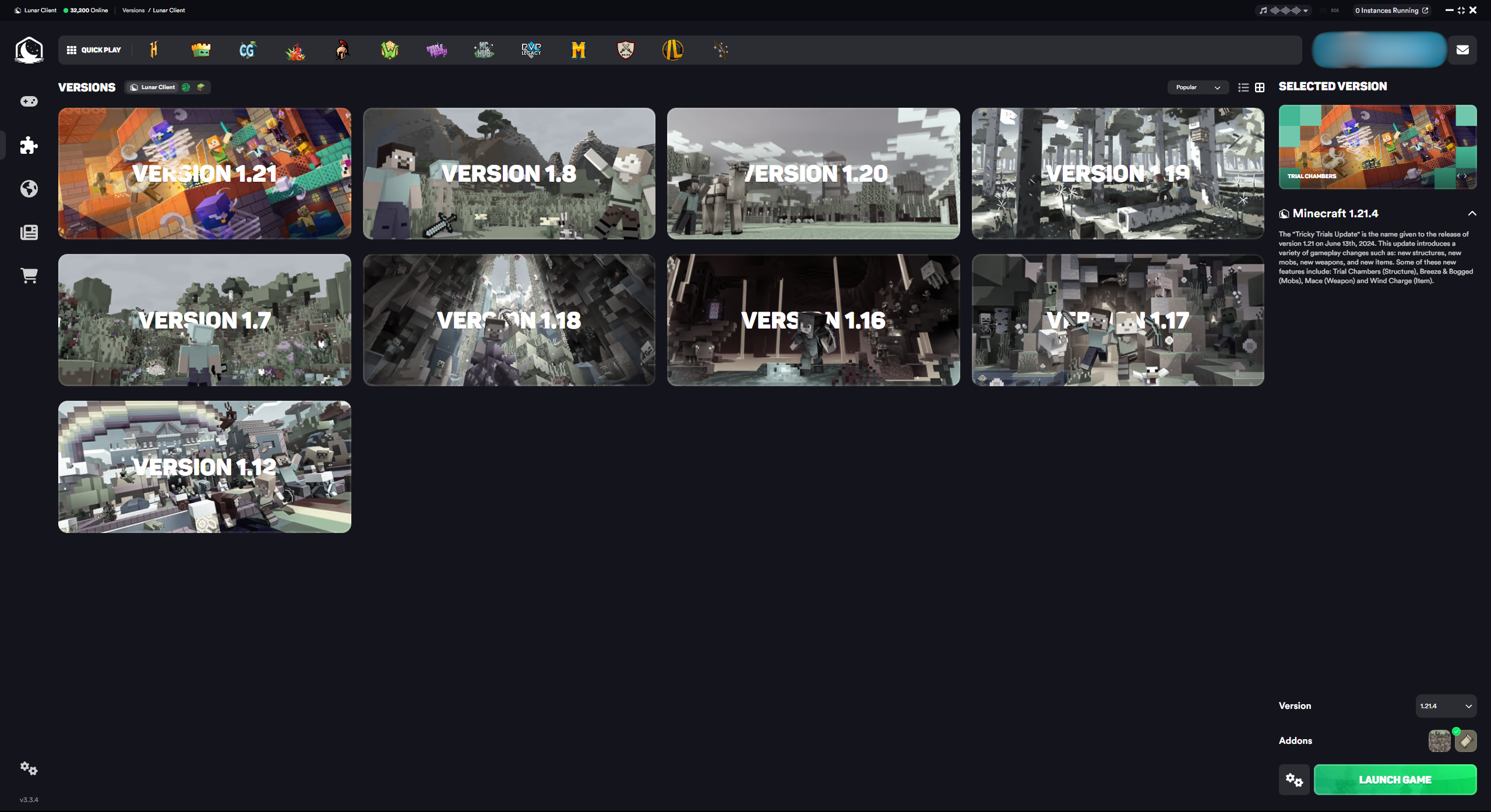
Then navigate to the Modpacks section.
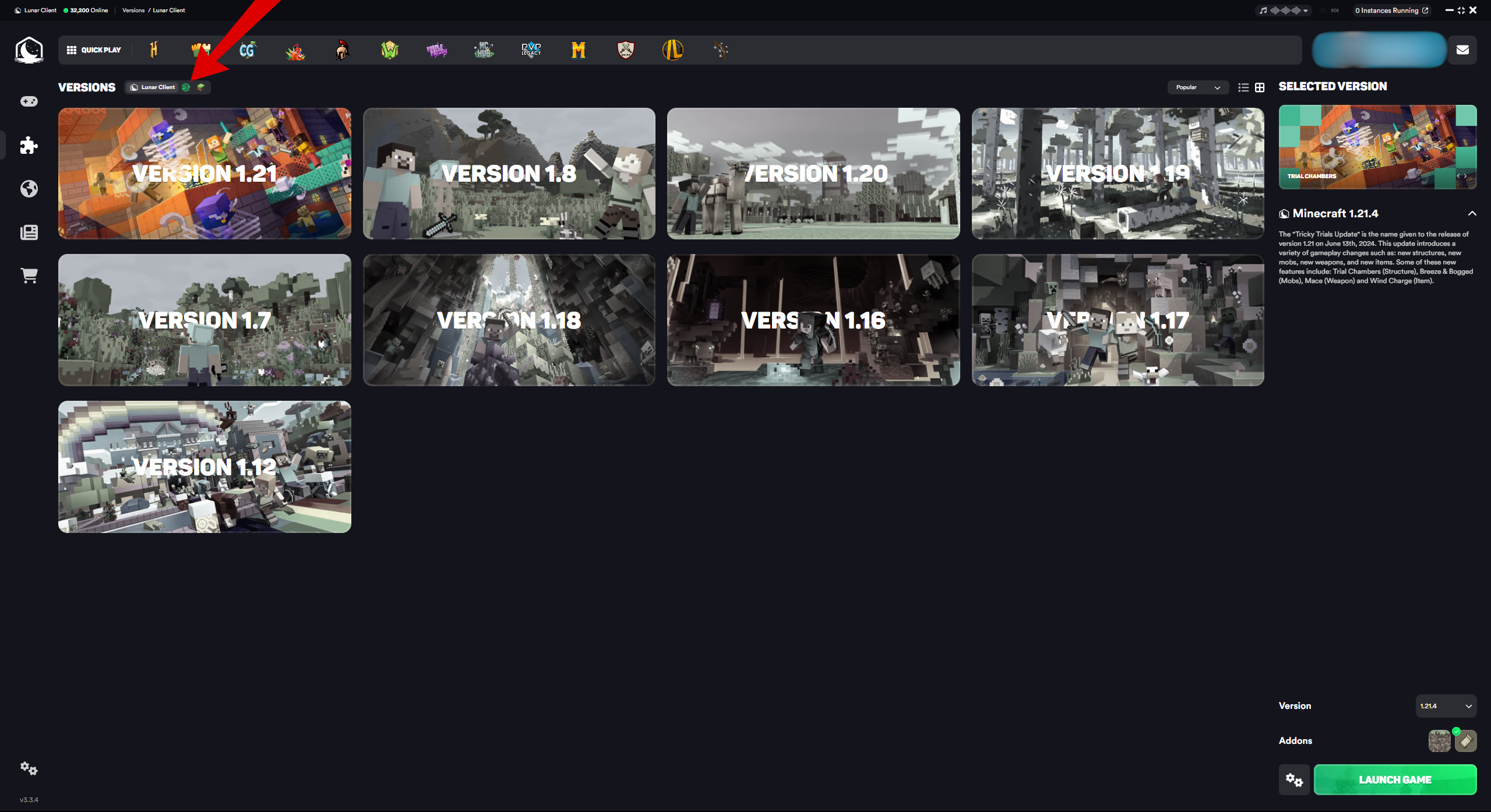
Drag the .mrpack file into the modpack area and launch the game.

Once installed, press play and join the server.
⚠️ If the resource packs do not appear in-game on Lunar Client, download them manually using the links below and enable them in the resource packs menu.
Project description from Modrinth.
Mods in AxiomMC Modpack 1.4.0
Open any mod on Modpacks.ch to check its files and dependencies.
alternate-current-mc1.21.11-1.9.0.jar SHA-1
f35f95c653c0ec99fa2aa5f993306922d00e59e9 · Modrinth version XdouG8YV · Project link unavailable Side not labelledappleskin-fabric-mc1.21.11-3.0.8.jar SHA-1
441fdbf4e9c34fb61517ceb8e15618950dc4d314 · Modrinth version 59ti1rvg · Project link unavailable Side not labelledarchitectury-19.0.1-fabric.jar SHA-1
2d40563f7e36f7a03f094031aeaacb175117928e · Modrinth version uNdfrcQ8 · Project link unavailable Side not labelledbbe-1.3.0+1.21.11.jar SHA-1
5183aaa17cfa49d8ddef2ce9fb77827929f07dc9 · Modrinth version POqeY8nL · Project link unavailable Side not labelledc2me-fabric-mc1.21.11-0.3.7+alpha.0.9.jar SHA-1
8ba48c81c03c5287b7dd1e39e66603c64a1bf3a0 · Modrinth version vsiqVtu6 · Project link unavailable Side not labelledcloth-config-21.11.153-fabric.jar SHA-1
4c224606a963bce223db5b27edb4959ecf40d4ee · Modrinth version xuX40TN5 · Project link unavailable Side not labelledClumps-fabric-1.21.11-29.0.0.1.jar SHA-1
626fde9e970030cfc8cb64cd0a1abfc03d37ecc2 · Modrinth version OgBE8Rz4 · Project link unavailable Side not labelledcullleaves-fabric-4.1.1.1+1.21.11.jar SHA-1
1688609730252ca33c2ccfa568a82afff3871215 · Modrinth version yrL6pwHZ · Project link unavailable Side not labelledday-counter--94.1.jar SHA-1
5313eb7e42b6bab91ffbac25080890bb2340ac05 · Modrinth version HHz5nybB · Project link unavailable Side not labelleddynamic-fps-3.11.4+minecraft-1.21.11-fabric.jar SHA-1
966c7f4018ef34f469bbf54d7e6b64b686a727ab · Modrinth version PUe5Asxs · Project link unavailable Side not labelledentity_model_features_1.21.11-fabric-3.0.12.jar SHA-1
047820c78e7ca8c4ba60eab337c891375612d9ac · Modrinth version uvlfzqyo · Project link unavailable Side not labelledentity_texture_features_1.21.11-fabric-7.0.9.jar SHA-1
5e553413076d4ee587ea1c7aae62a328d3856598 · Modrinth version 3uFr0jys · Project link unavailable Side not labelledentityculling-fabric-1.9.5-mc1.21.11.jar SHA-1
e2e88c0b2286148e9547eb23d95d2e30e60ad753 · Modrinth version Dx3xsUER · Project link unavailable Side not labelledfabric-api-0.141.3+1.21.11.jar SHA-1
50de67eb221f0b38216da8668b09ca311327040e · Modrinth version i5tSkVBH · Project link unavailable Side not labelledfastquit-3.1.3+mc1.21.11.jar SHA-1
9ba127357e1fc9ff800496250fb510f70f394714 · Modrinth version ip2tVKLp · Project link unavailable Side not labelledferritecore-8.2.0-fabric.jar SHA-1
c2e2f5e008f5bc9f401dfad8ca94909917006b65 · Modrinth version Ii0gP3D8 · Project link unavailable Side not labelledForgeConfigAPIPort-v21.11.1-mc1.21.11-Fabric.jar SHA-1
61aa1b5fafd75afc44552d0213cac39bc938bc2d · Modrinth version uXrWPsCu · Project link unavailable Side not labelledGamma-Utils-2.5.10+mc1.21.11.jar SHA-1
3f06271ea2c87634c23a37c97608b38fb78e015d · Modrinth version aVJkWMQl · Project link unavailable Side not labelledImmediatelyFast-Fabric-1.14.2+1.21.11.jar SHA-1
4f17c6b7388f0afc5d24075dc2a294963f78c712 · Modrinth version QwkfUKSj · Project link unavailable Side not labelledinventoryhud.fabric.1.21.11-3.4.29.jar SHA-1
36ff4f8a05c0f7d66b7c4bdc4778da49ff8205c5 · Modrinth version mZy4fW0C · Project link unavailable Side not labellediris-fabric-1.10.6+mc1.21.11.jar SHA-1
9a4dd8518bbad9e6be9edd443cfc6da74b1bb26b · Modrinth version TSXvi2yD · Project link unavailable Side not labelledkrypton-0.2.10.jar SHA-1
94ddaeeae6ca7fecc79e54a0aa02a5438a775a99 · Modrinth version O9LmWYR7 · Project link unavailable Side not labelledlithium-fabric-0.21.4+mc1.21.11.jar SHA-1
203bdcb26e97b3217b045e1182651a7d7b6462ec · Modrinth version Ow7wA0kG · Project link unavailable Side not labelledmalilib-fabric-1.21.11-0.27.7.jar SHA-1
81d84f56ba463e91b257c646b719f85326a7a1bb · Modrinth version 5Ywu5uMw · Project link unavailable Side not labelledMarlow's Crystal Optimizer-1.21.11-1.0.5.jar SHA-1
e8e1866db684c1f6fab8c6b67ebf1f4f57a6de22 · Modrinth version TamXUoou · Project link unavailable Side not labelledmidnightlib-fabric-1.9.2+1.21.11.jar SHA-1
b9617fa5722a8cdc321781a2b6dd97217fcfdc2a · Modrinth version OeTayxh3 · Project link unavailable Side not labelledmodernfix-5.26.2-build.1.jar SHA-1
959efa1690550b4e09616f808d5a5ee52c47477f · Modrinth version 6q6pkhVP · Project link unavailable Side not labelledmodmenu-17.0.0-beta.2.jar SHA-1
632c7565ba0fbc033aa4574e1ae6919f277fe03b · Modrinth version JWQVh32x · Project link unavailable Side not labelledmorechathistory-1.3.1.jar SHA-1
b4337ef9dc0a6cdf31d8f3df68a6542f64f3625e · Modrinth version 3siYJiWG · Project link unavailable Side not labelledmoreculling-fabric-1.21.11-1.6.2.jar SHA-1
11a929de62650cc536244d4c2ba889fa84c1c0f2 · Modrinth version wOzykoLV · Project link unavailable Side not labelledMouseTweaks-fabric-mc1.21.11-2.30.jar SHA-1
86515de45fe960bd717deea0954055106e857b81 · Modrinth version i1duwnJl · Project link unavailable Side not labellednoisium-fabric-2.8.3+mc1.21.11.jar SHA-1
2851c7824664bc970367f89710ffd569f49a761c · Modrinth version VyMvRQKq · Project link unavailable Side not labelledplaceholder-api-2.8.2+1.21.10.jar SHA-1
bbdc920ecff993148cd6e81a208536132245ce40 · Modrinth version qxjzQ9xY · Project link unavailable Side not labelledreeses-sodium-options-fabric-2.0.3+mc1.21.11.jar SHA-1
fb452b122fd72e8540d32fbe3df01cc34a45ce41 · Modrinth version yIgAFMna · Project link unavailable Side not labelledrrlsFabric-5.1.15+mc.1.21.11.jar SHA-1
7101fc7a030925eb22781320476515f408bbe5f4 · Modrinth version TCSbq6jC · Project link unavailable Side not labelledShieldFixes-2.0.1-1.21.11.jar SHA-1
f0d0f0b4ac5a36ae24dc7ce799d9515690eff3ad · Modrinth version 1iwKoNx9 · Project link unavailable Side not labelledShieldStatus-4.1.2-1.21.11.jar SHA-1
2ac1a80c798cae662b91efa3387cdeac36a1bfa2 · Modrinth version TceBEtTK · Project link unavailable Side not labelledsodium-extra-fabric-0.8.3+mc1.21.11.jar SHA-1
e8fd1eae0d589393189f64062ca1e46fc03f4ced · Modrinth version yqY1efrC · Project link unavailable Side not labelledsodium-fabric-0.8.6+mc1.21.11.jar SHA-1
fa686304c63efea0456af91a0b6352f032e61e66 · Modrinth version ZPWbiWXz · Project link unavailable Side not labelledvoicechat-fabric-1.21.11-2.6.12.jar SHA-1
28d5556d892eafcbf8da6dab7284879b61aeb1b4 · Modrinth version pFTZ8sqQ · Project link unavailable Side not labelledWalksyLib-0.9.992+1.21.11.jar SHA-1
a8040f6c3e094f19ce45d1743140362f6f977cad · Modrinth version 1l5Wvg5J · Project link unavailable Side not labelledxaerominimap-fabric-1.21.11-25.3.10.jar SHA-1
4cb5a1d9121f7b1cd03fd17e901c002ba9cac62b · Modrinth version avSqR3vF · Project link unavailable Side not labelledxaeroworldmap-fabric-1.21.11-1.40.11.jar SHA-1
ff88b8f04532202d2dcc7d4919bae648b1d7fbe8 · Modrinth version CkZVhVE0 · Project link unavailable Side not labelledyet_another_config_lib_v3-3.8.2+1.21.11-fabric.jar SHA-1
f99cda70903f16dd6927a276150b2762b4d5ab66 · Modrinth version pHWDw3Vc · Project link unavailable Side not labelledPick your setup
AxiomMC Modpack by Minecraft version and loader
Choose the version and loader you play, then open the matching release.
Made local changes? Try them in a copied instance before touching a world you care about.
Recent files
AxiomMC Modpack versions and loaders
Fabric 0.18.41.21.118.0.312+7 release
Fabric1.21.11 release
Fabric1.21.11 release
Fabric1.21.11 release
Fabric1.21.11 release
Fabric1.21.11 release
Looking for an older file? The official Modrinth project page is in Resources.
 modpack
 CurseForge · Minecraft
Exosphere 2
Versatile pack on unique sky islands, full of quests and new movement!
 modpack
 CurseForge · Minecraft
Medieval Season III
Mods for a roleplay-project in a medieval setting
 modpack
 CurseForge · Minecraft
Dragon Den colony and automation
A Modpack intended to combine MineColonies and Create into one!