Minecraft version
Back to modpacks 
Modrinth · Minecraft modpack
The Necessary
Optimize Minecraft, add utilities and tools to improve QoL
Choose a version Pick your version below, then grab the matching file.
Quick answer
Which The Necessary release matches Forge?
beta file The Necessary 1.0.0 Beta for Forge 1.12.2
Game version 1.12.2
Loader Forge 14.23.5.2864
The Necessary 1.0.0 Beta for Forge 1.12.2 is a complete pack release for 1.12.2 with Forge 14.23.5.2864. Install it as its own launcher instance. If the creator publishes a separate server file, make sure it names this exact pack release. 24 mods in this pack file.
Pack setup
How should I set up The Necessary for players and a server?
Use The Necessary 1.0.0 Beta for Forge 1.12.2 as the pack version. Install the pack as its own launcher instance. The creator’s listing does not name a separate server file, so check the release notes before setting up a dedicated server. Do not upload the ordinary client folder blindly.
Client instance Install The Necessary 1.0.0 Beta for Forge 1.12.2
Dedicated server setup Match The Necessary 1.0.0 Beta for Forge 1.12.2
Pack loader Forge 14.23.5.2864
A pack is a matched client and server setup, not one mod with an install-side label. Keep its release, loader, manifest and overrides together.
Referenced mods 24
Client only 11
Server only 4
Not labelled 9
These numbers come from the pack file you chose. “Not labelled” means we don’t know which side it belongs on—not that it is safe everywhere. The file count is not a RAM estimate.
What are the server requirements for The Necessary?
The Necessary 1.0.0 Beta for Forge 1.12.2 on Forge. The pack contents and setup notes below stay tied to that release.
The selected pack release is The Necessary 1.0.0 Beta for Forge 1.12.2. That file is for Minecraft 1.12.2 with Forge 14.23.5.2864. It contains 24 mod projects. The creator’s listing does not name a separate server file. Check their notes before using one, and do not upload an ordinary client folder or rebuild the pack mod by mod. A file count cannot tell us the right RAM, CPU or storage; size the server for the players and world you actually run.
About this project
What kind of pack is The Necessary?
The Necessary
What does this modpack do ?
This modpack adds 50+ mods (20+ for 1.12.2) to optimize Minecraft and improve the HUD, recipe viewing, tooltips, and more, making Minecraft smoother, more convenient, and easier to manage.
Features (for Major versions)
Note : These features aren't for Snapshot, Pre-release or Release Candidate versions of Minecraft. If you want to see features of them, go to Features (for Minor versions) section.
Core features
Optimization
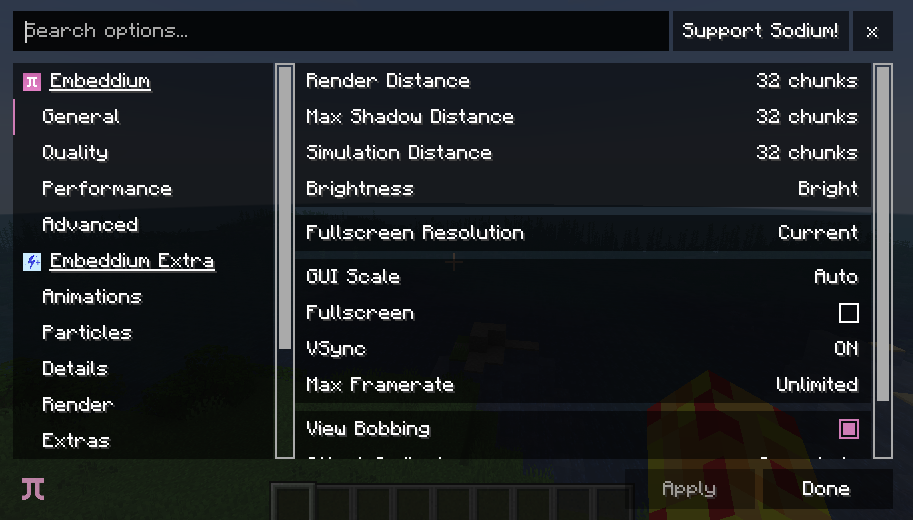
Render: Sodium (Fabric + Neoforge), Embeddium (Forge)
Mob AI: Lithium (Fabric + Neoforge), Radium (Forge)
Chunk Loading: C2ME (Fabric + Neoforge), C2MEF (Forge)
Culling: Entity Culling, More Culling
Reduce Memory Usage: FerriteCore
Block Entity Rendering (Fabric): BBE
Light Optimization: ScalableLux, Starlight
Worldgen Optimization: FastNoise
Optimize immediate mode rendering: ImmediatelyFast
Reduce resource usage whie game in background: Dynamic FPS
Fast language switching: Language Reload
Optimize Minecraft server: ServerCore
Decrease Datapack-loading time - 26.1+: quick pack
Optimize Structures Jigsaw and NBT pieces: Structure Layout Optimizer
Fix memory leaks (older): Memory Leak Fix
Misc Optimizations and Bug fixes: ModernFix/ModernFix-mVus, BadOptimizations, PacketFixer
HUD improvement
Hunger and Saturation viewing: AppleSkin
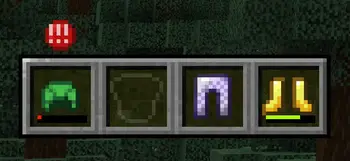
View armor durability: uku's Armor HUD
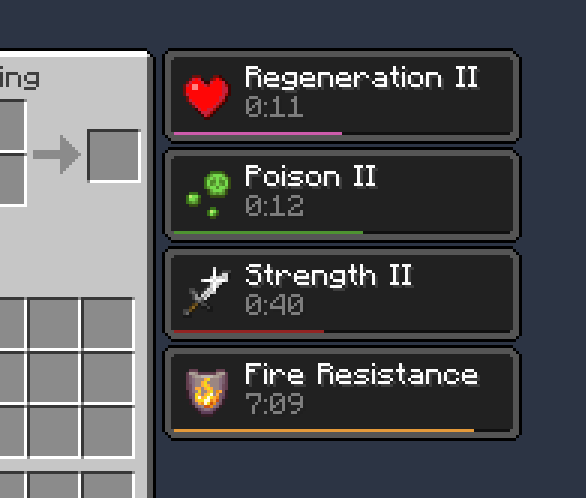
Effect timing: Status Effect Bar (Fabric), Effect Timer Plus (Neoforge + Forge)
Show Hotbar, Hunger Bar, etc. while riding mobs: Better Mount HUD (Fabric), Leave My Bar Alone (Neoforge + Forge)
Player appearance improvement
OptiFine Cape (Fabric): Capes
3D Skin: 3D Skin Layers
Tooltip improvement
Shulker Box item preview: Shulker Box Tooltip
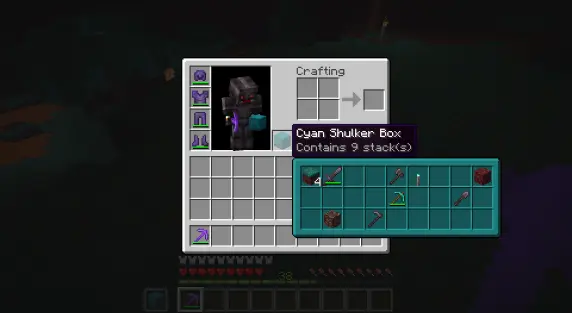
Item durability viewing: Durability Tooltip
Inventory Sorting
Inventory Profiles Next: Inventory sorting
Crafting Tweaks: Arrange items more easily while crafting
Mouse Tweaks (Fabric + Neoforge): Arrange items with mouse clicks
Other features
Zoom: Zoomify (Fabric), Just Zoom (Neoforge), Zume (Forge)

Dynamic Lights: LambDynamicLights
Shader: Iris Shaders (Fabric + Neoforge), Oculus (Forge)
Fullbright: Gamma Utils (Fabric), Fullbright UB + Clear Lava, Water Resourcepacks (Neoforge + Forge)
LAN server (Fabric + Neoforge): e4mc
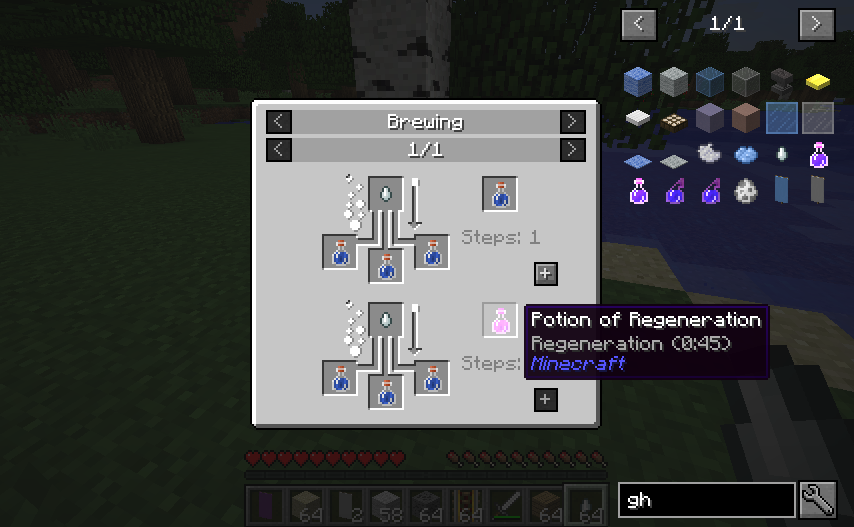
Recipe manager: JEI
Better visibility when on fire: Low on Fire (Resourcepack)
Sodium/Embeddium Support: Translations for Sodium (Resourcepack), Sodium Extra (Fabric + Neoforge) / Embeddium Extra (Forge), Reese's Sodium Options (Fabric + Neoforge)
View items while on a boat: Boat Item View
Mod management/config: Mod Menu (Fabric), Forge Config Screens (Forge)
Download Resourcepacks in-game without using a web browser (Fabric + Forge): Resourcify

Quit to the main screen without waiting: fastquit
Remove outdated resourcepacks/datapacks warning: No Resource Pack Warnings
Disable Chat Reports: No Chat Reports
No (Re)loading screen: Remove Reloading Screen
Increase maximum length of chat history: More Chat History
Move Deleted Worlds to Trash: Delete Worlds To Trash
Play in Borderless Full Screen: Cubes Without Borders
Statistics Screen Improvement: Better Statistics Screen
Features (for Minor versions)
Minor versions here are the Snapshot, Pre-release and Release Candidate of Minecraft, the number of mod supporting minor versioners is small, so there will be not too much features.
Optimization
C2ME: Chunk loading optimization
Ksyxis: Disable spawn chunk loading to save FPS
Resource pack (skip the resource pack warings, most of them may run well)
Fast Better Grass: Grass Decoration
Low on Fire: Better view when on fire
FullBright UB: Full Bright
Some versions will lack of mods in list above, and there will be some extra mods for some version, for full features of versions, go to the version of Modrinth to see mod lists.
Bugs and Issues
Report bugs and issues
Please report issues here: https://github.com/break08/The-Necessary/issues
Many versions may have bugs in one or more mods included in this modpack, and I do not have enough time to test every version thoroughly. Please report any issues so I can remove the problematic mod and replace it if possible.
Solve the issues by yourself
If there are bugs/issues and you can solve them yourself, choose some solutions:
Remove the mods causing the issue
Install its required dependencies mod (if required)
Note: Fabric loader will always open a window to report to you the issue when Minecraft crash (except when you install a mod like Crash Assistant), read them to know how to solve the problem.If you can't read crash reports from logs/mod loaders/console, copy them and send to ChatGPT or other AI, they may be able to help you
Finally, open an issue in project site on GitHub.
Some Notices:
Overall
The mods listed above are not all the mods in this modpack; they are only the core mods
Some versions may lack some of the features above because they are too old, outdated, or too new to receive updates immediately
Some features above may exist in a version, but the mods providing them may be different from the ones listed here
The features above are for the latest or near-latest versions. Therefore, backported versions of the modpack may not include all of them
On Tlauncher
- Tlauncher Capes conflicts with some mods in this pack: Entity Culling, Capes, ...
Image Attribution
Some images used in this modpack description are screenshots taken from the original pages or repositories of mods included in this modpack. These images remain the property of their respective authors unless otherwise stated. They are used here only to illustrate features of the included mods and to help explain the contents of the modpack.
Project description from Modrinth.
Mods in The Necessary 1.0.0 Beta for Forge 1.12.2
Open any mod on Modpacks.ch to check its files and dependencies.
_MixinBootstrap-1.1.0.jar SHA-1
f9173708d3d2850ab8df778b9594b81cb94b1df8 · Modrinth version hOGSWOX8 · Project link unavailable Side not labelled!mixinbooter-10.7.jar SHA-1
3fdfffe4fd446461ea9c3cb044484588997b9dbc · Modrinth version PZYBy1vc · Project link unavailable Side not labelled3dSkinLayers-forge-mc1.12.2-1.2.0.jar SHA-1
332db9675de67c5f84b1b0e4f398b5fbe9b6ed56 · Modrinth version 9MFKDRpJ · Project link unavailable Client onlyAIImprovements-1.12-0.0.1b3.jar SHA-1
ef4b64cd4fc10522ead1f659b81e471af455c3fe · Modrinth version kOyZhvg3 · Project link unavailable Server onlyAppleSkin-mc1.12-1.0.14.jar SHA-1
d798af79de48be0f00c772943e5ec5a2fb5659fa · Modrinth version Tsz4BT2X · Project link unavailable Side not labelledBorn In A Barn 1.8-1.12-1.2.jar SHA-1
2a19c174eb4989d7ca33e6fcc543f44158ae8949 · Modrinth version 40q9Yeit · Project link unavailable Server onlycherishedworlds-1.12.2-1.0.1.jar SHA-1
ea5fd7e61fb7c8ab6a546e2a17a6f4929e904ec0 · Modrinth version NKPlBLC1 · Project link unavailable Client onlyClumps-3.1.2.jar SHA-1
6ea78bea8006e3924bc37c2aef0115134c8af07b · Modrinth version nZvGITpT · Project link unavailable Side not labelledCraftingTweaks_1.12.2-8.1.9.jar SHA-1
be42bf244d4864f6832890ef2a2ade59f44a3f8b · Modrinth version wTjRHejU · Project link unavailable Side not labelleddurabilitytooltip-1.1.6-forge-mc1.12.jar SHA-1
857006c87d47d7029104fbba136e0dba38a05ae6 · Modrinth version OAPqeQvp · Project link unavailable Client onlyentityculling-1.12.2-1.6.3.jar SHA-1
fb22f03b297ca7b1bb7c6d5948e46c12e0a24446 · Modrinth version knltv3Vh · Project link unavailable Client onlyfastquit-3.0.1+1.12.2forge.jar SHA-1
01de49a880bc47b5b19fc23c46124748bffa4ab0 · Modrinth version toC9TbAp · Project link unavailable Client onlyfoamfix-0.10.15-1.12.2.jar SHA-1
b179ee981e06e396cb060045cb076c857985494a · Modrinth version oEGIQQnQ · Project link unavailable Side not labelledgetittogetherdrops-1.12.2-v1.0.2.jar SHA-1
dbf4143e35baa4eec8d3dfebee341bba3afab7dc · Modrinth version WJuCpwMZ · Project link unavailable Server onlyIdleTweaks-1.0.5.jar SHA-1
4970034bcc8e1b7adaf8bcb903b8179d36738824 · Modrinth version j9icIEF1 · Project link unavailable Client onlyjei_1.12.2-4.16.1.1013.jar SHA-1
91767806d0329ef91b9277142a359b078c57e92d · Modrinth version MO021mIp · Project link unavailable Side not labelledKsyxis-1.3.4.jar SHA-1
143fe088170e5777d3ccf5b488d61ee3635ebffe · Modrinth version vCQj9Ui7 · Project link unavailable Server onlyPacketFixer-forge-2.1.0-1.12.2.jar SHA-1
87300e503c045fbf93ec1de6574e9b1c34f87293 · Modrinth version z8AimD45 · Project link unavailable Side not labelledparticleculling-1.12.2-v1.4.3.jar SHA-1
2c4847ca6c7cf1d41ff320943394ff61028c7e72 · Modrinth version kwzcEeSC · Project link unavailable Client onlyrelictium-1.2.0.jar SHA-1
b4a9cf768f4893cef3abb1b884de5f2c8a14791e · Modrinth version tZMrs1hh · Project link unavailable Client onlyResourcify (1.12.2-forge)-1.6.1.jar SHA-1
51e0a4c06b1620025e85b20d031299bc38a17f78 · Modrinth version zAxnfASn · Project link unavailable Client onlyscreenshot_viewer-1.1.1-forge-mc1.12.2.jar SHA-1
9ff99989c64f2e12fb9770b1407bff100996015f · Modrinth version dMkfnDRl · Project link unavailable Client onlysupermartijn642configlib-1.1.8-forge-mc1.12.jar SHA-1
49f6b461ff22ad8e23bb99679c1f64eee85ee958 · Modrinth version IJL4TGRd · Project link unavailable Side not labelledzume-1.2.1.jar SHA-1
433406987269d89cf4fc0170a1f1d1c9b8ddd504 · Modrinth version xWYY0WPk · Project link unavailable Client onlyPick your setup
The Necessary by Minecraft version and loader
Choose the version and loader you play, then open the matching release.
Minecraft version
26.3-snapshot-8
1 loader buildMinecraft version
26.3-snapshot-7
1 loader buildMinecraft version
26.3-snapshot-5
1 loader buildMinecraft version
26.3-snapshot-4
1 loader buildMinecraft version
26.3-snapshot-3
1 loader buildMinecraft version
26.3-pre-2
1 loader buildMinecraft version
26.3-pre-1
1 loader buildMinecraft version
26.2
2 loader buildsMinecraft version
26.1.2
2 loader buildsMinecraft version
26.1
1 loader buildMinecraft version
1.21.11
2 loader buildsShowing the newest 12 of 32 game versions. Older files are in the list below.
Made local changes? Try them in a copied instance before touching a world you care about.
Recent files
The Necessary versions and loaders
Forge 14.23.5.28641.12.28.0.312+7 beta
Forge1.20.1 alpha
Looking for an older file? The official Modrinth project page is in Resources.