Minecraft version
Back to modpacks 
Modrinth · Minecraft modpack
FPS++
This modpack gives you a big fps boost.
Choose a version Pick your version below, then grab the matching file.
Quick answer
Which FPS++ release should I use?
Latest stable file FPS++ 2.0.0
Game version 1.21.8
Loader Fabric 0.17.2
FPS++ 2.0.0 is a complete pack release for 1.21.8 with Fabric 0.17.2. Install it as its own launcher instance. If the creator publishes a separate server file, make sure it names this exact pack release. 20 mods in this pack file.
Pack setup
How should I set up FPS++ for players and a server?
Use FPS++ 2.0.0 as the pack version. Install the pack as its own launcher instance. The creator’s listing does not name a separate server file, so check the release notes before setting up a dedicated server. Do not upload the ordinary client folder blindly.
Client instance Install FPS++ 2.0.0
Dedicated server setup Match FPS++ 2.0.0
Pack loader Fabric 0.17.2
A pack is a matched client and server setup, not one mod with an install-side label. Keep its release, loader, manifest and overrides together.
Referenced mods 20
Client only 10
Server only 2
Not labelled 8
These numbers come from the pack file you chose. “Not labelled” means we don’t know which side it belongs on—not that it is safe everywhere. The file count is not a RAM estimate.
What are the server requirements for FPS++?
FPS++ 2.0.0. Change the pack release and its contents or setup may change too.
The selected pack release is FPS++ 2.0.0. That file is for Minecraft 1.21.8 with Fabric 0.17.2. It contains 20 mod projects. The creator’s listing does not name a separate server file. Check their notes before using one, and do not upload an ordinary client folder or rebuild the pack mod by mod. A file count cannot tell us the right RAM, CPU or storage; size the server for the players and world you actually run.
About this project
What kind of pack is FPS++?
INFO
This modpack is made to boost your fps, so you can use it to boost your fps. The only mod that doesn't contribute to more fps or is dependency is iris shaders. This pack is client side, but some of its mods will work on the server side as well. Use this if you want better performance in minecraft. It also contains a shader and a nice texture pack. You can use this as a base for your modpack. More mc versions will be added in the future.
PERFORMANCE
This modpack boosts the performance by a ton. In a big storage room, my fps without any mods was 200-300(with default settings and 16 chunks). With the modpack it increased by ~640%, going to around 1700-1950 fps. Because I have a decent pc, I can use shaders, and with shaders my pc gets around 120-180 fps with 12 chunks and 80-110 with 16 chunks(with complementary unbound ultra preset).
Without the modpack here I get 314 fps: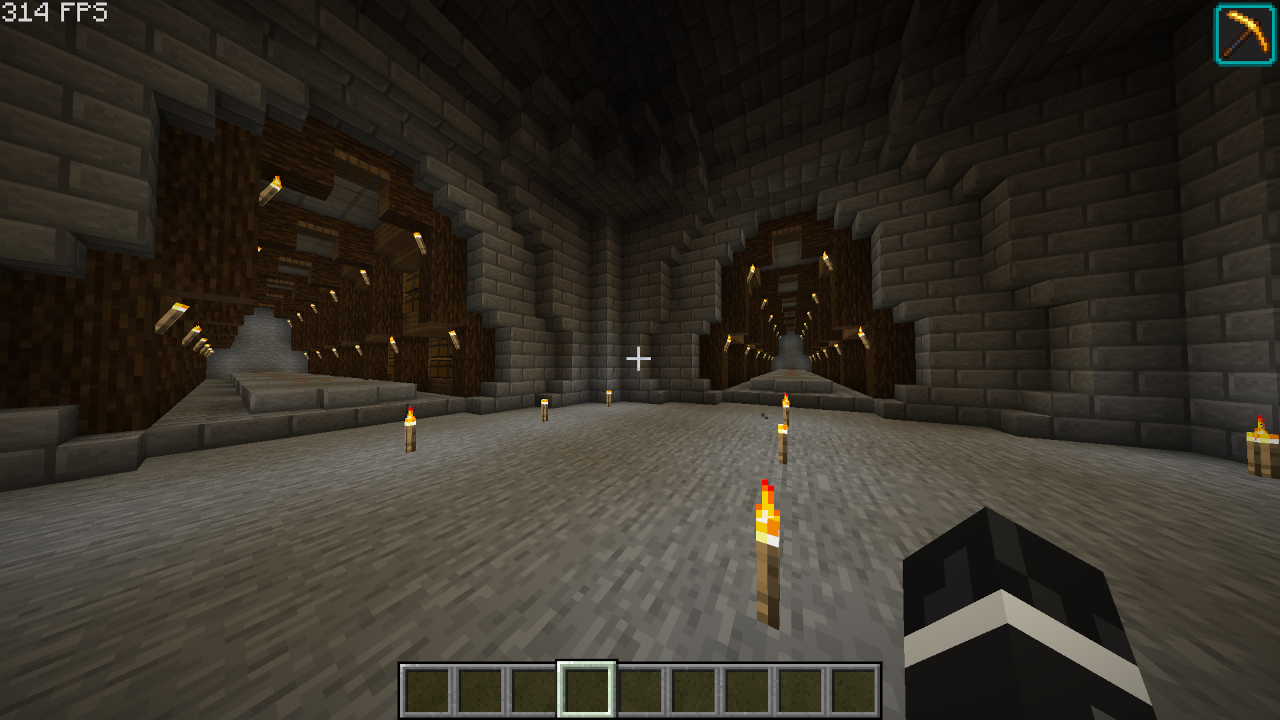
With the modpack here I get 2277 fps(624% fps increase):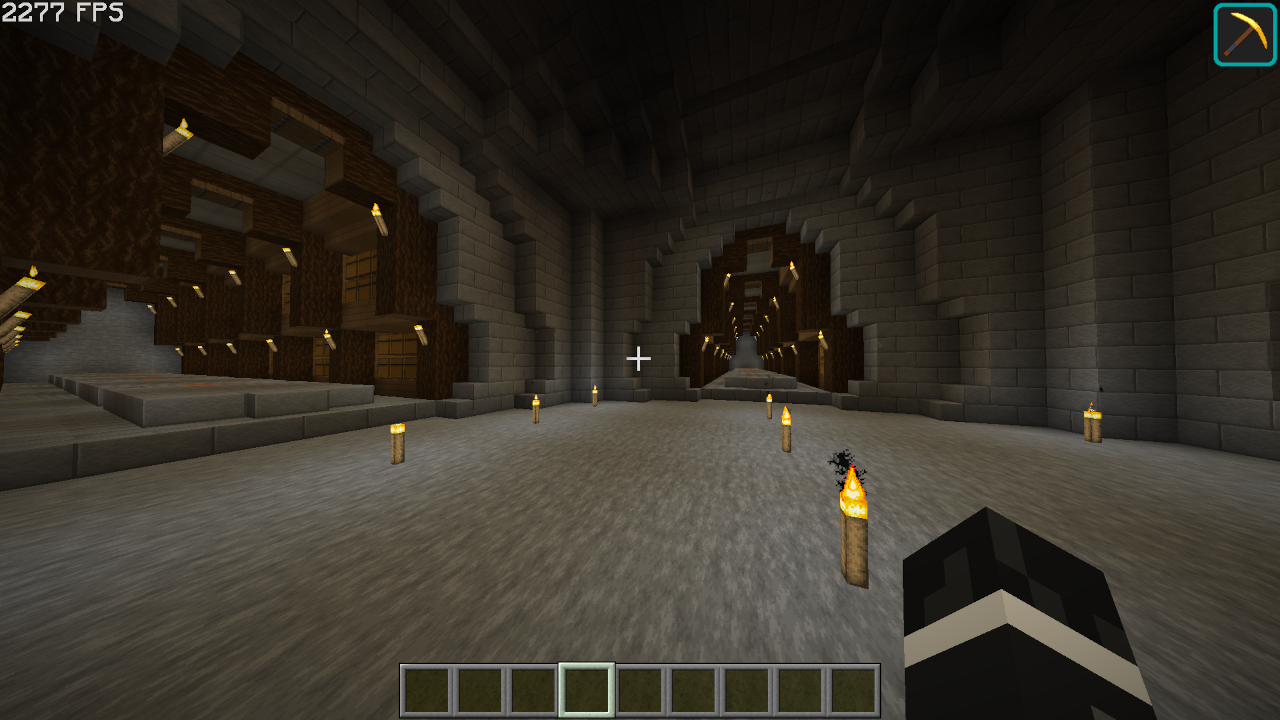
MODS
Optimization Mods
Alternate Current - Optimizes redstone so it reduces performance less.
BadOptimizations - Adds a few micro optimizations.
Bedrodium - Hides the invisible sides of bedrock, increasing performance.
Concurrent Chunk Management Engine - Boosts chunk performance.
Cull Less Leaves - Hides inner(almost unnoticeable) layers of leaves, increasing performance
Enhanced Block Entities - Increases block entity performance
Entity Culling - Doesn't render entities that you can't see, increasing performance
FastAnim - Speeds up entity animation calculations
Faster Random - Speeds up getting random numbers, unnoticiable differences in world gen.(check note)
FerriteCore - Optimizes memory usage
ImmediatelyFast - Speeds up immediate mode rendering
Lithium - No-compromises game logic/server optimizations
More Culling - Culls a lot of things
Noisium - Optimizes worldgen
Reese's Sodium Options - Adds an alternative options menu for sodium
ServerCore - Optimizes the server
Sodium - Replaces the rendering engine with a better one
Sodium Extra - Adds more settings for sodium
Starlight - Rewrites the light engine, making it better
Methane - Replacement for Starlight for 1.20.6+
Other Mods
Cloth Config API
Fabric API
Iris Shaders
Mod Menu
YetAnotherConfigLib
Shaders/Texture Packs
Complementary Shaders - Unbound (Shader)
Faithful 64x (Texture Pack)
Note: Feel free to remove this if you want don't want slightly different world gen.
SUPPORT
if you have any problems with the modpack, dm me(legoaggelos) on discord.
Project description from Modrinth.
Mods in FPS++ 2.0.0
Open any mod on Modpacks.ch to check its files and dependencies.
alternate-current-mc1.21.5-1.9.0.jar SHA-1
2c2d60d73ef7d0f2adf1304f8df31b0fa65ffe34 · Modrinth version eTNKfjl1 · Project link unavailable Server onlyBadOptimizations-2.3.0-1.21.6-21.7.jar SHA-1
6ca1457a183266af76099c382b926f56c7e5d007 · Modrinth version Zkvk6pH6 · Project link unavailable Client onlyBedrodium-0.3.0.jar SHA-1
be7f55a7423287c80bfeb9eafb2609482fd240f2 · Modrinth version cIEzF9HL · Project link unavailable Client onlyc2me-fabric-mc1.21.8-0.3.5+alpha.0.8.jar SHA-1
f340861d8501a83e4dfb99ddacd3e442040245e1 · Modrinth version 7lwPGYpL · Project link unavailable Side not labelledcloth-config-19.0.147-fabric.jar SHA-1
d3bd78860580da556990726af3bed1169e69933e · Modrinth version cz0b1j8R · Project link unavailable Side not labelledentityculling-fabric-1.8.2-mc1.21.6.jar SHA-1
56c5a0617863c53cf7e338d6ff862d02801a1f75 · Modrinth version 5wVZFo2d · Project link unavailable Client onlyfabric-api-0.133.4+1.21.8.jar SHA-1
84f003e075b7b7a4b3dbeffdf1796d3668db8f1c · Modrinth version CF23l2iP · Project link unavailable Side not labelledfasterrandom-5.1.0.jar SHA-1
440720daaf51d5ad88a96ed59e1f59c63fad3f73 · Modrinth version BbFqiKvi · Project link unavailable Side not labelledferritecore-8.0.0-fabric.jar SHA-1
53d76354587cd1965b842fdce7cff965b5c52fe5 · Modrinth version CtMpt7Jr · Project link unavailable Side not labelledImmediatelyFast-Fabric-1.12.1+1.21.8.jar SHA-1
318608e466371772a4b0d2a6cd3fe86cf983e718 · Modrinth version XxwOC2sk · Project link unavailable Client onlyiris-fabric-1.9.1+mc1.21.7.jar SHA-1
99263e7d7ae31b4eda6fb66c9790bc2763f9ec3d · Modrinth version l77DAK6U · Project link unavailable Client onlylithium-fabric-0.18.0+mc1.21.8.jar SHA-1
7c1a4af48ef242d59209052cc684afd089ed11bb · Modrinth version pDfTqezk · Project link unavailable Side not labelledmodmenu-15.0.0.jar SHA-1
b22a1a02a13642ec707d01bb8b14a21188d6d6fa · Modrinth version am1Siv7F · Project link unavailable Client onlymoreculling-fabric-1.21.6-1.4.0-beta.1.jar SHA-1
1e9b9ec184470aa5d52e0d968b5e87cf087efae2 · Modrinth version ESxkwc6w · Project link unavailable Client onlyreeses-sodium-options-fabric-1.8.4+mc1.21.6.jar SHA-1
5d83119a31fd6da0c55682a113788e9b6b848142 · Modrinth version AgGRyydH · Project link unavailable Client onlyScalableLux-0.1.5.1+fabric.abdeefa-all.jar SHA-1
c8871a354138763af96e96b1792ffa81a82e8289 · Modrinth version Bi5i8Ema · Project link unavailable Side not labelledservercore-fabric-1.5.14+1.21.8.jar SHA-1
1506b1288370c3c92793f8dc1194d2da0c9fcb9e · Modrinth version CdJJdZ39 · Project link unavailable Server onlysodium-extra-fabric-0.6.6+mc1.21.6.jar SHA-1
768ca85d3a016adb6a4d302ad341ad8944fd3706 · Modrinth version v7JHUEiF · Project link unavailable Client onlysodium-fabric-0.6.13+mc1.21.6.jar SHA-1
2d635c3d938aa3f75b0ec61c7402eeea2f9c30a9 · Modrinth version ND4ROcMQ · Project link unavailable Client onlyyet_another_config_lib_v3-3.7.1+1.21.6-fabric.jar SHA-1
932e1011a9ddef31fb4f4d7934f16a091aa5004b · Modrinth version WxYlHLu6 · Project link unavailable Side not labelledPick your setup
FPS++ by Minecraft version and loader
Choose the version and loader you play, then open the matching release.
Minecraft version
1.21.1
1 loader buildMinecraft version
1.20.6
1 loader buildMinecraft version
1.20.1
1 loader buildMade local changes? Try them in a copied instance before touching a world you care about.
Recent files
FPS++ versions and loaders
Fabric 0.17.21.21.88.0.312+7 release
Fabric1.21.1 beta
Fabric1.20.6 beta
Fabric1.20.6 beta
Fabric1.20.1 release
Fabric1.20.1 release
Looking for an older file? The official Modrinth project page is in Resources.
 modpack
 Modrinth · Minecraft
Enhanced FPS
This modpack maximizes FPS using optimization mods like Sodium, Lithium, Iris, FerriteCore, and EntityCulling.
 modpack
 Modrinth · Minecraft
Simply Optimized ReForked
Is A Reloaded Version of Everyones Beloved Simply Optimized
 modpack
 Modrinth · Minecraft
OptimisticMC Lycoris Pack
Created specifically for the server "Lycoris" Створений спеціально для сервера "Lycoris"