Minecraft version
Back to modpacks 
Modrinth · Minecraft modpack
LabyModpack
Performance mods for LabyMod
Choose a version Pick your version below, then grab the matching file.
Quick answer
Which LabyModpack release matches 1.20.2?
Best match for your filters LabyModpack 1.20.2-3.0.0
Game version 1.20.2
Loader Fabric 0.15.5
LabyModpack 1.20.2-3.0.0 is a complete pack release for 1.20.2 with Fabric 0.15.5. Install it as its own launcher instance. If the creator publishes a separate server file, make sure it names this exact pack release. 14 mods in this pack file.
Pack setup
How should I set up LabyModpack for players and a server?
Use LabyModpack 1.20.2-3.0.0 as the pack version. Install the pack as its own launcher instance. The creator’s listing does not name a separate server file, so check the release notes before setting up a dedicated server. Do not upload the ordinary client folder blindly.
Client instance Install LabyModpack 1.20.2-3.0.0
Dedicated server setup Match LabyModpack 1.20.2-3.0.0
Pack loader Fabric 0.15.5
A pack is a matched client and server setup, not one mod with an install-side label. Keep its release, loader, manifest and overrides together.
Referenced mods 14
Client only 7
Server only 1
Not labelled 6
These numbers come from the pack file you chose. “Not labelled” means we don’t know which side it belongs on—not that it is safe everywhere. The file count is not a RAM estimate.
What are the server requirements for LabyModpack?
LabyModpack 1.20.2-3.0.0 on 1.20.2. The pack contents and setup notes below stay tied to that release.
The selected pack release is LabyModpack 1.20.2-3.0.0. That file is for Minecraft 1.20.2 with Fabric 0.15.5. It contains 14 mod projects. The creator’s listing does not name a separate server file. Check their notes before using one, and do not upload an ordinary client folder or rebuild the pack mod by mod. A file count cannot tell us the right RAM, CPU or storage; size the server for the players and world you actually run.
About this project
What kind of pack is LabyModpack?
If you having issues with the modpack, please let me know: Bug Report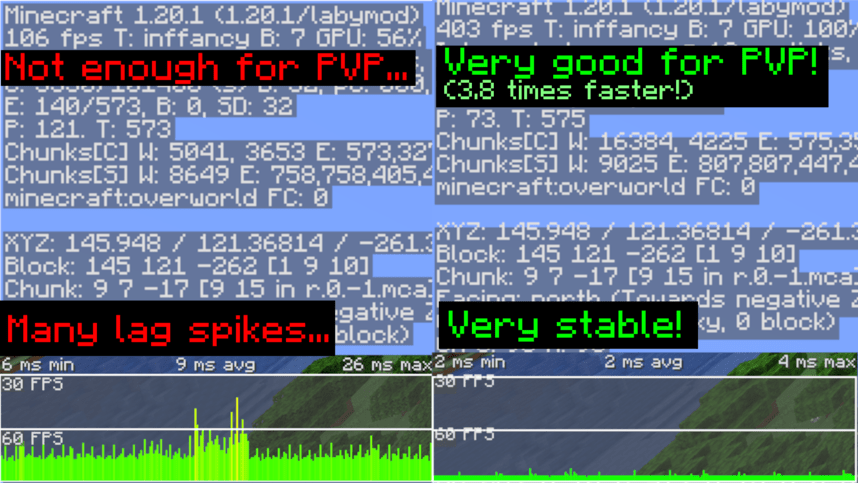
LabyModpack
A modpack specially designed to run LabyMod 4 Client smootly without having multiple issues & crashes.
📥 Installation
To install LabyModpack, You will need to use LabyMod Launcher.
- Press "CTRL + Shift + M" in LabyMod Launcher.
- Click on "Fabric Mods" next to "LabyMod Addons"
- Click on filter button.
- Uncheck "Show Installed" and "Only Show Recommended"
- Check "Show Modpacks"
- Search "LabyModpack"
- Install LabyModpack
📈 Test Results
Tested on Ryzen 7 5800X, RTX 3060 and 32GB RAM.
32 Chunks Singleplayer Superflat world
Tested with Minecraft Performance Flags Benchmark
- Outdated. will update it.
| LabyMod Vanila | With LabyModpack | |
|---|---|---|
| Average FPS (Higher is better) | 817.94 FPS | 1518.73 FPS |
| Average 1% Frametime (Lower is better) | 2.96ms | 1.55ms |
| Avg FPS Variance (Lower is better) | 2563.06 | 201.41 |
❓ FAQ
Q: I can't see texts on signs when I'm far away from sign!
A: This is because of FeyTweaks mod's default settings. Go to options menu, click on icon next to Online option, click on FeyTweaks and disable "Hide text in distance"
Project description from Modrinth.
Mods in LabyModpack 1.20.2-3.0.0
Open any mod on Modpacks.ch to check its files and dependencies.
BadOptimizations-1.6.3.jar SHA-1
a96ae2466c6165d849f90839f900fcc830af7dbe · Modrinth version O6GYJnvX · Project link unavailable Client onlyc2me-fabric-mc1.20.2-0.2.0+alpha.10.126.jar SHA-1
fef69c623f5bfc6c10c86f2790a7c1ac2da3cf32 · Modrinth version ilKwGRiJ · Project link unavailable Side not labelledcloth-config-12.0.119-fabric.jar SHA-1
2407c417c60a44b7f3a790480a0f4be222f8ef66 · Modrinth version NPcjyMhi · Project link unavailable Side not labelledenhancedblockentities-0.9.1+1.20.2.jar SHA-1
7d40ccbc5355602325ad3e633592441a63a3999a · Modrinth version eIFo7wvq · Project link unavailable Client onlyfabric-api-0.91.3+1.20.2.jar SHA-1
4003ac2597805b19b81697dd225f5531d288828e · Modrinth version E43lIzib · Project link unavailable Side not labelledferritecore-6.0.1-fabric.jar SHA-1
8fa3b84fc5860dbc30fdf8cced02af68dffcf3fa · Modrinth version unerR5MN · Project link unavailable Side not labelledfeytweaks-1.20.2-1.2.8.jar SHA-1
6fa2e7a49c558e27170b5c762d902a45c1d1891a · Modrinth version IGnWnbNs · Project link unavailable Client onlyindium-1.0.28+mc1.20.4.jar SHA-1
58dd40a3047dc9539996258a884fc92a0cced2e7 · Modrinth version tD2IqHXC · Project link unavailable Client onlyiris-mc1.20.2-1.6.14.jar SHA-1
aac3c343192ab77e5d3ede702151a0155a1712cc · Modrinth version Cjwm9s3i · Project link unavailable Client onlylithium-fabric-mc1.20.2-0.12.0.jar SHA-1
9b713d4909582d900274dcd7ca01abd195b53520 · Modrinth version qdzL5Hkg · Project link unavailable Side not labelledmoreculling-1.20.4-0.21.0.jar SHA-1
8d0dbf74e8500fd4279b5b0be11ee898208ce07a · Modrinth version jv96n9er · Project link unavailable Client onlynoisium-1.0.2+mc1.20.x.jar SHA-1
509c144a11659c638267fe5090fe5923c019f7d7 · Modrinth version 7p5BqRHp · Project link unavailable Server onlysodium-fabric-mc1.20.2-0.5.5.jar SHA-1
febadd3d2e225cdef9054dfecca167d92406a85b · Modrinth version pmgeU5yX · Project link unavailable Client onlyvmp-fabric-mc1.20.2-0.2.0+beta.7.122-all.jar SHA-1
3464e0ffe1bcf1fe1206fabe2fe11eafa14dbc96 · Modrinth version HkkjZIkA · Project link unavailable Side not labelledPick your setup
LabyModpack by Minecraft version and loader
Choose the version and loader you play, then open the matching release.
Minecraft version
1.20.2
1 loader buildMinecraft version
1.20.1
1 loader buildMade local changes? Try them in a copied instance before touching a world you care about.
Recent files
LabyModpack versions and loaders
Fabric 0.15.51.20.28.0.312+7 release
Fabric1.20.2 release
Fabric1.20.2 release
Looking for an older file? The official Modrinth project page is in Resources.