Minecraft version
Back to modpacks 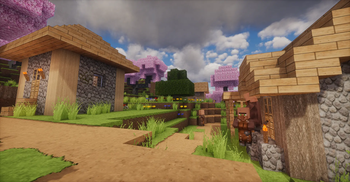
Modrinth · Minecraft modpack
Looks Nice
A high-end Minecraft graphics overhaul merging photorealistic textures, cinematic shaders, and hyper-detailed animations for next-level visuals.
Choose a version Pick your version below, then grab the matching file.
Quick answer
Which Looks Nice release should I use?
Latest stable file Looks Nice 1.0.0
Game version 1.21.11
Loader Fabric 0.19.2
Looks Nice 1.0.0 is a complete pack release for 1.21.11 with Fabric 0.19.2. Install it as its own launcher instance. If the creator publishes a separate server file, make sure it names this exact pack release. 25 mods in this pack file.
Pack setup
How should I set up Looks Nice for players and a server?
Use Looks Nice 1.0.0 as the pack version. Install the pack as its own launcher instance. The creator’s listing does not name a separate server file, so check the release notes before setting up a dedicated server. Do not upload the ordinary client folder blindly.
Client instance Install Looks Nice 1.0.0
Dedicated server setup Match Looks Nice 1.0.0
Pack loader Fabric 0.19.2
A pack is a matched client and server setup, not one mod with an install-side label. Keep its release, loader, manifest and overrides together.
Referenced mods 25
Client only 17
Server only 0
Not labelled 8
These numbers come from the pack file you chose. “Not labelled” means we don’t know which side it belongs on—not that it is safe everywhere. The file count is not a RAM estimate.
What are the server requirements for Looks Nice?
Looks Nice 1.0.0. Change the pack release and its contents or setup may change too.
The selected pack release is Looks Nice 1.0.0. That file is for Minecraft 1.21.11 with Fabric 0.19.2. It contains 25 mod projects. The creator’s listing does not name a separate server file. Check their notes before using one, and do not upload an ordinary client folder or rebuild the pack mod by mod. A file count cannot tell us the right RAM, CPU or storage; size the server for the players and world you actually run.
About this project
What kind of pack is Looks Nice?
Looks Nice
Looks Nice is a tightly curated Fabric modpack built for one purpose alone: to push Minecraft's graphical fidelity to its absolute limit. By combining hyper-detailed resource packs, advanced rendering technologies, and a suite of performance-focused mods, we deliver a stunning, next-generation visual experience that's as smooth as it is beautiful.
With Looks Nice, you will explore a Minecraft world that feels more immersive, dynamic, and cinematic than ever before.
🔥 Ultimate Visual Overhaul
Experience Minecraft at its breathtaking best. We have meticulously selected and configured every mod to ensure a seamless visual upgrade.
🖼️ Breathtaking Shaders & Graphics
Complementary Shaders v4 is the shader pack for Minecraft Java Edition with exceptional attention to detail, high standards of quality, and top-tier optimisation. It offers a ton of high quality effects, two default visual style choices, custom effects for almost every block in the game, with profiles ranging from Potato to Ultra. The Unbound style is designed for people looking for a more realistic experience, while the Reimagined style is made to reimagine Minecraft while preserving its unique visual elements.
This modpack uses Iris as the shader loader, together with Sodium (and Sodium Extra) and Lithium for extreme rendering performance, while ImmediatelyFast and FerriteCore ensure near-instant loading times and drastically reduced memory usage.
🌌 Infinite View Distances
One of the most revolutionary features in the pack is Voxy, a revolutionary LoD rendering mod that extends your render distance far beyond vanilla limits by rendering distant terrain at lower detail levels, view distant mountains and structures without the lag of traditional chunk loading.
✨ Cinematic Animations & Details
This pack brings Minecraft to life with fluid and custom animations:
- The Fresh Animations and Fresh Animations: Extensions resource packs completely overhaul creature and character animations.
- Fresh Moves transforms how your character moves in Minecraft, adding smooth, dynamic, and immersive movement variations to idle, walking, and swimming animations while keeping the classic vanilla style.
- Visuality adds a wide mix of new particles – things like crystal sparkles, extra hit particles, and subtle environmental visuals that make the world feel less static.
- For the player, 3d-Skin-Layers and Capes add realistic volumetric layers, and Chat Heads show facial expressions in chat.
🔍 Photorealistic World Textures
We use the high-resolution RCG (x64) resource pack, a high-definition realistic texture pack designed to enhance every block and item feel more immersive and captivating. This, combined with Continuity for connected textures, Entity Texture Features for expanded data-driven entity textures, and Entity Model Features for custom animated entity models, makes every surface look hyper-detailed.
⚡ Smooth & Optimised Performance
While offering extreme graphics, Looks Nice is designed to be highly performant. It includes a full suite of optimisation mods:
- EntityCulling: Stop rendering entities that aren't visible, significantly improving FPS in crowded areas.
- More Culling: Improves performance by aggressively culling air blocks, leaves, and other transparent content outside the player's view.
- Remove Reloading Screen: Makes resource pack reloading instant, removing that annoying black screen.
- FerriteCore & Lithium: Aggressively reduce memory usage and improve general game physics and AI performance.
📦 Complete Package
⚙️ Included Mods
- Rendering:
3d-Skin-Layers, Capes, Chat Heads, Cloth Config v20, Continuity, Entity Model Features, Entity Texture Features, EntityCulling, Fabric API, Fabric Language Kotlin, FerriteCore, Forge Config API Port, ImmediatelyFast, Iris, Lithium, Mod Menu, More Culling, Placeholder API, Remove Reloading Screen, Sodium, Sodium Extra, Visuality, Voxy, YetAnotherConfigLib, Zoomify
🎨 Resource Packs
- Fresh Animations + Extensions
- Fresh Moves
- RCG (x64)
📜 Credits & Permissions
This is a private modpack created for fun and shared under fair use for the community's enjoyment. All rights belong to their respective mod and resource pack authors. If any author wishes for their content to be removed, please contact us directly.
Project description from Modrinth.
Mods in Looks Nice 1.0.0
Open any mod on Modpacks.ch to check its files and dependencies.
capes-1.5.10+1.21.11-fabric.jar SHA-1
8fcdc9940621070ebfb2cb387beae142fa8b42d4 · Modrinth version GAQAG80Q · Project link unavailable Client onlychat_heads-1.2.1-fabric-1.21.11.jar SHA-1
17ba8126f1953fc9eb059ca8c82b5b72b3f907d3 · Modrinth version AAR2TTo3 · Project link unavailable Client onlycloth-config-21.11.153-fabric.jar SHA-1
4c224606a963bce223db5b27edb4959ecf40d4ee · Modrinth version xuX40TN5 · Project link unavailable Side not labelledcontinuity-3.0.1-beta.1+1.21.11.jar SHA-1
51d34c3f2035db0c7fca321b2d94f01b5167707c · Modrinth version mX1iknM1 · Project link unavailable Client onlyentity_model_features_1.21.11-fabric-3.2.2.jar SHA-1
7ff1ece98ef40ad0221aed9ea38c4ed215b4e4f5 · Modrinth version wbSSx6vc · Project link unavailable Client onlyentity_texture_features_1.21.11-fabric-7.1.jar SHA-1
1d26dbb21dd4f17adbdb54f077334634f708a3d4 · Modrinth version rAQimlSn · Project link unavailable Client onlyentityculling-fabric-1.10.1-mc1.21.11.jar SHA-1
4e595b6162d24c3d8d65bc6417cf79daac5bde0d · Modrinth version WORDhU8n · Project link unavailable Client onlyfabric-api-0.141.3+1.21.11.jar SHA-1
50de67eb221f0b38216da8668b09ca311327040e · Modrinth version i5tSkVBH · Project link unavailable Side not labelledfabric-language-kotlin-1.13.11+kotlin.2.3.21.jar SHA-1
b6190b247c557c493dc4204121744f289a1d1837 · Modrinth version 2i87JpYj · Project link unavailable Side not labelledferritecore-8.2.0-fabric.jar SHA-1
c2e2f5e008f5bc9f401dfad8ca94909917006b65 · Modrinth version Ii0gP3D8 · Project link unavailable Side not labelledForgeConfigAPIPort-v21.11.1-mc1.21.11-Fabric.jar SHA-1
61aa1b5fafd75afc44552d0213cac39bc938bc2d · Modrinth version uXrWPsCu · Project link unavailable Side not labelledImmediatelyFast-Fabric-1.14.2+1.21.11.jar SHA-1
4f17c6b7388f0afc5d24075dc2a294963f78c712 · Modrinth version QwkfUKSj · Project link unavailable Client onlyiris-fabric-1.10.7+mc1.21.11.jar SHA-1
aae8567bd9ea397d50aff1d0b680a82ffe67040c · Modrinth version fDpuVzVr · Project link unavailable Client onlylithium-fabric-0.21.4+mc1.21.11.jar SHA-1
203bdcb26e97b3217b045e1182651a7d7b6462ec · Modrinth version Ow7wA0kG · Project link unavailable Side not labelledmodmenu-17.0.0.jar SHA-1
544a8b340ac3918d85bcc7d02eaff5372814354b · Modrinth version Tyk71iSw · Project link unavailable Client onlymoreculling-fabric-1.21.11-1.6.2.jar SHA-1
11a929de62650cc536244d4c2ba889fa84c1c0f2 · Modrinth version wOzykoLV · Project link unavailable Client onlyplaceholder-api-2.8.2+1.21.10.jar SHA-1
bbdc920ecff993148cd6e81a208536132245ce40 · Modrinth version qxjzQ9xY · Project link unavailable Side not labelledrrlsFabric-5.1.15+mc.1.21.11.jar SHA-1
7101fc7a030925eb22781320476515f408bbe5f4 · Modrinth version TCSbq6jC · Project link unavailable Client onlyskinlayers3d-fabric-1.11.1-mc1.21.11.jar SHA-1
a95c49c23db05d98d88e6a225894ca93e4e86b3c · Modrinth version ntxaPFv3 · Project link unavailable Client onlysodium-extra-fabric-0.8.3+mc1.21.11.jar SHA-1
e8fd1eae0d589393189f64062ca1e46fc03f4ced · Modrinth version yqY1efrC · Project link unavailable Client onlysodium-fabric-0.8.7+mc1.21.11.jar SHA-1
e8865210ba9a926fc206ab9e73f9d4988a81ff69 · Modrinth version UddlN6L4 · Project link unavailable Client onlyvisuality-0.7.13+1.21.11.jar SHA-1
1b40880769e72a419562bc072ac1bccf152275e6 · Modrinth version 6vzUj4RD · Project link unavailable Client onlyvoxy-0.2.13-alpha.jar SHA-1
ee8b260ef01a02f699795e31bfa1d398473f106f · Modrinth version k5PZxsfL · Project link unavailable Client onlyyet_another_config_lib_v3-3.8.2+1.21.11-fabric.jar SHA-1
f99cda70903f16dd6927a276150b2762b4d5ab66 · Modrinth version pHWDw3Vc · Project link unavailable Side not labelledzoomify-2.15.2+1.21.11.jar SHA-1
e1f738a9026e9f087d96861935f994b010b8131a · Modrinth version gI5KZI8V · Project link unavailable Client onlyPick your setup
Looks Nice by Minecraft version and loader
Choose the version and loader you play, then open the matching release.
Made local changes? Try them in a copied instance before touching a world you care about.
Recent files
Looks Nice versions and loaders
Fabric 0.19.21.21.118.0.312+7 release
Looking for an older file? The official Modrinth project page is in Resources.