Minecraft version
Back to modpacks 
Modrinth · Minecraft modpack
project: untitled alpha
description removed
Choose a version Pick your version below, then grab the matching file.
Quick answer
Which project: untitled alpha release should I use?
Latest stable file project: untitled alpha 0.0.1
Game version 1.20.1
Loader Forge 47.4.1
project: untitled alpha 0.0.1 is a complete pack release for 1.20.1 with Forge 47.4.1. Install it as its own launcher instance. If the creator publishes a separate server file, make sure it names this exact pack release. 17 mods in this pack file.
Pack setup
How should I set up project: untitled alpha for players and a server?
Use project: untitled alpha 0.0.1 as the pack version. Install the pack as its own launcher instance. The creator’s listing does not name a separate server file, so check the release notes before setting up a dedicated server. Do not upload the ordinary client folder blindly.
Client instance Install project: untitled alpha 0.0.1
Dedicated server setup Match project: untitled alpha 0.0.1
Pack loader Forge 47.4.1
A pack is a matched client and server setup, not one mod with an install-side label. Keep its release, loader, manifest and overrides together.
Referenced mods 17
Client only 1
Server only 1
Not labelled 15
These numbers come from the pack file you chose. “Not labelled” means we don’t know which side it belongs on—not that it is safe everywhere. The file count is not a RAM estimate.
What are the server requirements for project: untitled alpha?
project: untitled alpha 0.0.1. Change the pack release and its contents or setup may change too.
The selected pack release is project: untitled alpha 0.0.1. That file is for Minecraft 1.20.1 with Forge 47.4.1. It contains 17 mod projects. The creator’s listing does not name a separate server file. Check their notes before using one, and do not upload an ordinary client folder or rebuild the pack mod by mod. A file count cannot tell us the right RAM, CPU or storage; size the server for the players and world you actually run.
About this project
What kind of pack is project: untitled alpha?
Description removed
The project aims to create a mysterious alpha version of Minecraft, filled with secrets, fear, a sense of persecution and liminality. Feel the experience of a corrupted Minecraft, filled with cliched yet still disturbing folklore of old creepypastas. And remember: you are not alone here.
NECESSARILY:
- Requires Optifine to install shaders and ensure correct operation of resource packs and some mods.
Recommendations:
- Use alpha/beta resource pack:
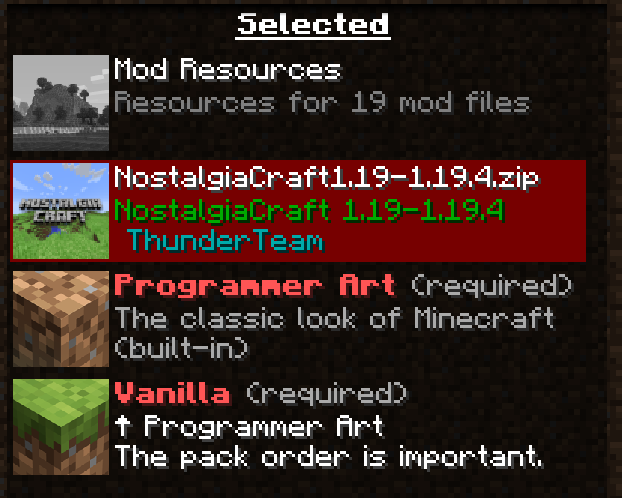
This mod pack includes the resource pack "Golden Days". It is optimal, but if for some reason you do not like it - you can install "NostalgiaCraft" from the author ThunderTeam. "NostalgiaCraft" is NOT in the modpack.
Correct installation of resource pack
"Golden Days Base" is mandatory, "Golden Days Alpha" is optional.
- Use shaders for atmosphere:
There are several shaders in the mod pack. You can also choose to your taste, but I can recommend "MC VHS". Ignore shader errors such as "gbuffers". This does not affect the game in any way. This also applies to OpenGL errors. They can be disabled in the Optifine settings.
- Play singleplayer:
The pack is designed for singleplayer. However, if you really want, you can play multiplayer, but mods may have various errors and some scenarios may not work.
- Turn off the "smooth lighting" in the graphics settings;
- Render distance from 8 to 12:
The smaller, the more authentic;
- Installing The Broken Script is at your own risk:
TBS is a standalone mod that doesn't like to interact with other mods. In my opinion, it's redundant in this collection, but if you really want it, try it!
- Play!
Play a lot, go through Minecraft, because mods do not interfere with the game. Develop, study, be afraid, be scared and be surprised!
Project description from Modrinth.
Mods in project: untitled alpha 0.0.1
Open any mod on Modpacks.ch to check its files and dependencies.
000.jar -1.20.1-2.0.jar SHA-1
04d1dd7d9cd20d6023975c93384dc763f9bb598c · Modrinth version DV9tnNjG · Project link unavailable Side not labelledarchitectury-9.2.14-forge.jar SHA-1
a52918a500ff421180a1cbd1a0cabee712134ec4 · Modrinth version 1MKTLiiG · Project link unavailable Side not labelledDistantFriends-forge-1.20.1-0.5.5.jar SHA-1
a785aa8ea45225d87a0ddea5c6928d843dd52ee7 · Modrinth version Tl179Gko · Project link unavailable Side not labelledendofherobrine-1.20.1-1.0.8.2.jar SHA-1
fb46ea23c722b46f2e698fdab239606ba9282016 · Modrinth version wiIYbfpo · Project link unavailable Side not labelledentityculling-forge-1.7.4-mc1.20.1.jar SHA-1
f68ae39bd2a78d405a193757fd328a60ceea0323 · Modrinth version kMC7OLoZ · Project link unavailable Client onlyError404-1.3.8-forge-1.20.1.jar SHA-1
ae524bcdaee650881406d6a11f4ad97b1c973189 · Modrinth version FJwwDdE9 · Project link unavailable Side not labelledfarlands-1.0.0.jar SHA-1
51de2145912f1fa65ff60dabb402f9fbf25e059b · Modrinth version hxoA5Orl · Project link unavailable Server onlyferritecore-6.0.1-forge.jar SHA-1
417fb6ce8f52abf40bd9d0390371790f9576f8ba · Modrinth version DG5Fn9Sz · Project link unavailable Side not labelledFrom-The-Fog-1.20-v1.9.2-Forge-Fabric.jar SHA-1
8508868b645b4c8bcdfef1437f0278173eaadbbb · Modrinth version JTd3TFcc · Project link unavailable Side not labelledgeckolib-forge-1.20.1-4.7.1.2.jar SHA-1
6235e9406a9715df15210779e1ed19a419a540bb · Modrinth version e72SjmmI · Project link unavailable Side not labelledhim-2.0.1-forge-1.20.1.jar SHA-1
d1944e5cd1e0a79c127b407464165928fb3805bd · Modrinth version axpp5l1z · Project link unavailable Side not labelledin_your_world-1.20.1-2.0 (1).jar SHA-1
6037ae774d8ea04976da63bd06a8a89d789e8674 · Modrinth version RVrkpZG8 · Project link unavailable Side not labelledNeruina-2.1.1-forge+1.20.1.jar SHA-1
eb1b12d781ea619b5483a3d9330e2e0c9f28b243 · Modrinth version 3dEDxcSK · Project link unavailable Side not labelledNostalgicTweaks-mc1.20.1-Forge-2.0.0-beta.910.jar SHA-1
6568f705a6d1e4e7961d171949694e4be0e6e1c0 · Modrinth version GGXacBOa · Project link unavailable Side not labelledTrueHerobrine_1.1+1.20.1.jar SHA-1
b266adeb6fc50f7086abdf446555667fd444780f · Modrinth version SQkr6joO · Project link unavailable Side not labelledWhisperingSpirits-forge-1.20.1-v1.4.0.jar SHA-1
6807911d5f2f8389a6a2f208a52a18c64b574f03 · Modrinth version ioBc3VxB · Project link unavailable Side not labelledwhos_there-1.2-forge-1.20.1.jar SHA-1
a3e39d5ff72024fa04b4a27b54721f0a1878aff9 · Modrinth version rf6TqFVl · Project link unavailable Side not labelledPick your setup
project: untitled alpha by Minecraft version and loader
Choose the version and loader you play, then open the matching release.
Made local changes? Try them in a copied instance before touching a world you care about.
Recent files
project: untitled alpha versions and loaders
Forge 47.4.11.20.18.0.312+7 release
Looking for an older file? The official Modrinth project page is in Resources.
 modpack
 Modrinth · Minecraft
AsguhoClient
Simply a really optimized Client with the tools you need to build awesome contraptions, farms and extraordinary looking builds. This modpack include mods such as litematica etc.
modpack
Modrinth · Minecraft
NEOM MTR
A modpack for everyone and those who use my Minecraft server , it comes with everything you need to join, no hassle, just download and play MTR mod to the fullest
 modpack
 Modrinth · Minecraft
Rose Client
Performance perfected.