Minecraft version
Back to modpacks 
Modrinth · Minecraft modpack
old and optimized
Optimises minecraft to run on older computers.
Choose a version Pick your version below, then grab the matching file.
Quick answer
Which old and optimized release should I use?
Latest stable file old and optimized for 1.21.5
Game version 1.21.5
Loader Fabric 0.16.14
old and optimized for 1.21.5 is a complete pack release for 1.21.5 with Fabric 0.16.14. Install it as its own launcher instance. If the creator publishes a separate server file, make sure it names this exact pack release. 10 mods in this pack file.
Pack setup
How should I set up old and optimized for players and a server?
Use old and optimized for 1.21.5 as the pack version. Install the pack as its own launcher instance. The creator’s listing does not name a separate server file, so check the release notes before setting up a dedicated server. Do not upload the ordinary client folder blindly.
Client instance Install old and optimized for 1.21.5
Dedicated server setup Match old and optimized for 1.21.5
Pack loader Fabric 0.16.14
A pack is a matched client and server setup, not one mod with an install-side label. Keep its release, loader, manifest and overrides together.
Referenced mods 10
Client only 4
Server only 2
Not labelled 4
These numbers come from the pack file you chose. “Not labelled” means we don’t know which side it belongs on—not that it is safe everywhere. The file count is not a RAM estimate.
What are the server requirements for old and optimized?
old and optimized for 1.21.5. Change the pack release and its contents or setup may change too.
The selected pack release is old and optimized for 1.21.5. That file is for Minecraft 1.21.5 with Fabric 0.16.14. It contains 10 mod projects. The creator’s listing does not name a separate server file. Check their notes before using one, and do not upload an ordinary client folder or rebuild the pack mod by mod. A file count cannot tell us the right RAM, CPU or storage; size the server for the players and world you actually run.
About this project
What kind of pack is old and optimized?
this modpack aims to make minecraft run as fast as possible on low end/old systems. It should only be used on older pcs.
it's recommended to choose the 1.16.5 version, as it runs better and has more mods.
mods included (1.16.5)
- Better Beds [1.1.0] by Motschen, TeamMidnightDust
- Dynamic FPS [3.9.4] by juliand665, LostLuma
- Enhanced Block Entities [0.4] by FoundationGames
- EntityCulling-Fabric [1.5.2] by tr7zw
- FPS Reducer [1.24-mc1.16.5] by bre2el
- Fabric API [0.42.0+1.16] by FabricMC
- FerriteCore [2.1.1] by malte0811
- Krypton [0.1.2] by tuxed
- LazyDFU [0.1.2] by tuxed
- Let Me Despawn [1.3.2c] by frikinjay
- Lithium [0.6.6] by JellySquid
- Memory Leak Fix [1.1.5] by FX - PR0CESS
- ModernFix [5.18.0+mc1.16.5] by embeddedt
- Phosphor [0.8.0] by JellySquid, PhiPro
- Sodium [0.2.0+build.4] by JellySquid
- retiNO [1.0.1] by juliand665
mods included (1.21.4)
- Almanac [1.4.4] by frikinjay
- Better Beds [1.4.1] by Motschen, TeamMidnightDust
- Dynamic FPS [3.9.4] by juliand665, LostLuma
- Enhanced Block Entities [0.11.3+1.21.4] by FoundationGames
- EntityCulling [1.7.4] by tr7zw
- FPS Reducer [1.21.3-2.11] by bre2el
- Fabric API [0.119.2+1.21.4] by FabricMC
- FerriteCore [7.1.1] by malte0811
- Krypton [0.2.8] by tuxed
- Let Me Despawn [1.5.0] by frikinjay
- Lithium [0.15.3+mc1.21.4] by JellySquid, 2No2Name
- ModernFix [5.20.3+mc1.21.4] by embeddedt
- Sodium [0.6.13+mc1.21.4] by JellySquid (jellysquid3)
mods included (1.21.5)
- Almanac [1.4.5] by frikinjay
- Dynamic FPS [3.9.4] by juliand665, LostLuma
- EntityCulling [1.7.4] by tr7zw
- FPS Reducer [1.21.5-2.12] by bre2el
- Fabric API [0.124.2+1.21.5] by FabricMC
- FerriteCore [8.0.0] by malte0811
- Krypton [0.2.9] by tuxed
- Let Me Despawn [1.5.1] by frikinjay
- Lithium [0.16.2+mc1.21.5] by JellySquid, 2No2Name
- Sodium [0.6.13+mc1.21.5] by JellySquid (jellysquid3)
how do I install?
to install this modpack (or any modpack on modrinth), you'll need
- a launcher which can install .mrpack files (most modern launchers)
- that's basically it
here is the full image tutorial (for prism launcher/multimc)
guide
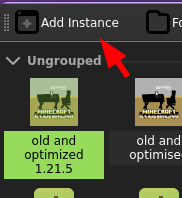
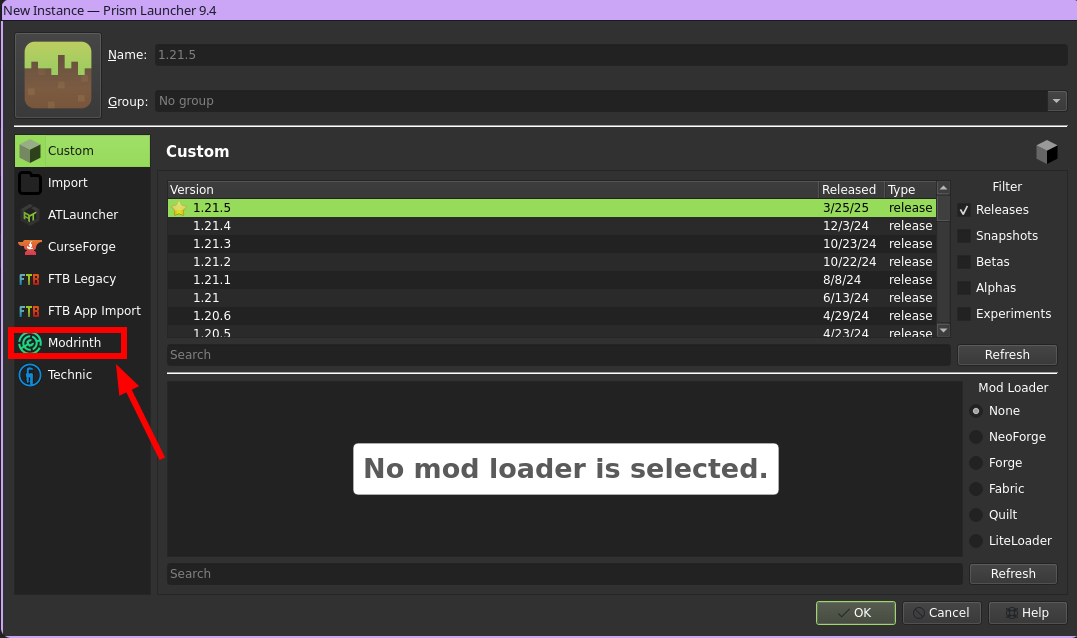
and then search for the modpack, and click download!
Project description from Modrinth.
Mods in old and optimized for 1.21.5
Open any mod on Modpacks.ch to check its files and dependencies.
Almanac-1.21.5-fabric-1.4.5.jar SHA-1
414a764b967bf28fd866d9705378c12169c345d2 · Modrinth version mzFZuKaS · Project link unavailable Server onlydynamic-fps-3.9.4+minecraft-1.21.5-fabric.jar SHA-1
317fa92e11ff83bdda2dce899c1d096ef16fca9f · Modrinth version wrSjf4ld · Project link unavailable Client onlyentityculling-fabric-1.7.4-mc1.21.5.jar SHA-1
fbe1f45c60abb5e9e586cbfe13e761da1831d3cb · Modrinth version 29GV7fju · Project link unavailable Client onlyfabric-api-0.124.2+1.21.5.jar SHA-1
501c7e6a5badeea15b266d25ca12b0a95e1e09ab · Modrinth version SQv5lrom · Project link unavailable Side not labelledferritecore-8.0.0-fabric.jar SHA-1
53d76354587cd1965b842fdce7cff965b5c52fe5 · Modrinth version CtMpt7Jr · Project link unavailable Side not labelledFpsReducer2-fabric-1.21.5-2.12.jar SHA-1
02d578e83ac47e61f372baa267378675b0928a0f · Modrinth version zDXdXvpu · Project link unavailable Client onlykrypton-0.2.9.jar SHA-1
45a1cba4e4fbd1e4885583699739bd8ad73ba5e6 · Modrinth version neW85eWt · Project link unavailable Side not labelledletmedespawn-1.21.5-fabric-1.5.1.jar SHA-1
c8cb1a8ed222229a76d68bd3cb463fa4889d08a7 · Modrinth version M9egl08c · Project link unavailable Server onlylithium-fabric-0.16.2+mc1.21.5.jar SHA-1
6216d899b7ba74838ada9be140aa743b39aa3193 · Modrinth version VWYoZjBF · Project link unavailable Side not labelledsodium-fabric-0.6.13+mc1.21.5.jar SHA-1
6a7132ea86653541fa53ef88c764c8ac0cde81cc · Modrinth version DA250htH · Project link unavailable Client onlyPick your setup
old and optimized by Minecraft version and loader
Choose the version and loader you play, then open the matching release.
Minecraft version
1.21.4
1 loader buildMinecraft version
1.16.5
1 loader buildMade local changes? Try them in a copied instance before touching a world you care about.
Recent files
old and optimized versions and loaders
Fabric 0.16.141.21.58.0.312+7 release
Fabric1.21.4 release
Fabric1.16.5 release
Looking for an older file? The official Modrinth project page is in Resources.
 modpack
 Modrinth · Minecraft
CreateCobble
A Modpack focused on the Create mod and Cobblemon
 modpack
 Modrinth · Minecraft
Camp Cobblemon Official Modpack
A lightly modded experience for the private server, Camp Cobblemon! Includes tools for builders, backpacks, drawers, and other quality-of-life mods.
 modpack
 Modrinth · Minecraft
All The Clients
"All the Clients" is a special modpack for Minecraft that was developed for the client so that it can be used on servers without mods. It offers a variety of improvements for players, especially on small vanilla servers.