Minecraft version
Back to modpacks 
Modrinth · Minecraft modpack
Immersive VR Essentials
A Minecraft Modpack Created Specifically for VR to be as Immersive and Realistic as Possible
Choose a version Pick your version below, then grab the matching file.
Quick answer
Which Immersive VR Essentials release should I use?
Latest stable file Immersive VR Essentials 1.1.1
Game version 1.20.1
Loader Forge 47.2.0
Immersive VR Essentials 1.1.1 is a complete pack release for 1.20.1 with Forge 47.2.0. Install it as its own launcher instance. If the creator publishes a separate server file, make sure it names this exact pack release. 62 mods in this pack file.
Pack setup
How should I set up Immersive VR Essentials for players and a server?
Use Immersive VR Essentials 1.1.1 as the pack version. Install the pack as its own launcher instance. The creator’s listing does not name a separate server file, so check the release notes before setting up a dedicated server. Do not upload the ordinary client folder blindly.
Client instance Install Immersive VR Essentials 1.1.1
Dedicated server setup Match Immersive VR Essentials 1.1.1
Pack loader Forge 47.2.0
A pack is a matched client and server setup, not one mod with an install-side label. Keep its release, loader, manifest and overrides together.
Referenced mods 62
Client only 21
Server only 8
Not labelled 33
These numbers come from the pack file you chose. “Not labelled” means we don’t know which side it belongs on—not that it is safe everywhere. The file count is not a RAM estimate.
What are the server requirements for Immersive VR Essentials?
Immersive VR Essentials 1.1.1. Change the pack release and its contents or setup may change too.
The selected pack release is Immersive VR Essentials 1.1.1. That file is for Minecraft 1.20.1 with Forge 47.2.0. It contains 62 mod projects. The creator’s listing does not name a separate server file. Check their notes before using one, and do not upload an ordinary client folder or rebuild the pack mod by mod. A file count cannot tell us the right RAM, CPU or storage; size the server for the players and world you actually run.
About this project
What kind of pack is Immersive VR Essentials?
A ModPack created Specifically for VR to be as realistic and Immersive as possible
Features
3D Inventory and Fullbody Tracking
This uses ImmersiveMC and Vivecraft, all menus and crafting are done in a 3D space in VR, Take a look at the Wiki for help on how to use it.
Vivecraft is also now Fullbody Tracking Compadable!
HAPTIC Feedback
If you have a Haptic Feedback Suit (bhaptics etc), you can feel rain on your body, getting punched by mobs, you'll feel every chop of a tree and every block you mine.
VR Only Server
There is now a VR Only server Included in this Modpack! Find it in the Server Menu! Locked to VR only, come join the fun of this growing server!
Textures and Resource Packs
The Primary Resource Pack in here is Patrix (edited so it works better with VR)
I included faithful x64 if you want a more classic look, so feel free to switch it out with that if you don't like the realistic feel of Patrix
There is also an optional lower quality version of Faithful included if you need more performance
Shaders
Primary shader in here is Sildurs on medium settings with it customized to look better in VR
I have Chopotic shaders on Low and Lite as options in the shader menu, feel free to switch it out with that as they run quite a bit better (there is a minor texture glitch on blocks with them though.. but your FPS will go up a ton if you're struggleing to run this at a stable fps)
Landscape, Structures, Biomes and Mobs
This has quite a bit more variety the vanilla game, You'll see better landscapes, more structures, more biomes, better dungeons ect. This is all done with vanilla blocks and doesn't have any annoying bloat or complicated crafting involved! It's just more variety and prettier views
In Game Voice Chat
Voice Chat is already pre installed. You can customize it in game using the B Button on your Controller (then go to voice chat Menu) So if you want to run this on a server you can already talk in game
No Complex crafting, No added Blocks
This Modpack is made to be Immersive and relaxing, not some complicated system where you have to craft a million things.
There are a few QOL Mods in here like waypoints, but no added blocks and all the crafting is the same as Vanilla
WORKS on Desktop(Flatscreen)
Although this is intended to be played in VR, it does work on flatscreen minecraft as well, so if you want to play with your friends on a server and they don't have VR, they can use this to see peoples Fullbody movement etc. Game is fully playable without a Headset, but you'll be missing out on some intended features.
Performance
This is going to largely depend on your System Specs..I do not lag at all.. but I have a fairly beefy system.
Specs:
RTX 4090
AMD 9950x
64GB 6000mhz RAM
I also use a Vive Pro eye with the Wireless adapter.. which tends to run better on PCVR apps then using a Quest over wifi. I have not tested this modpack with my Quest 3 yet, it should not make a huge difference as long as you have a decent system though.
Minimum System Requrements
I have no way to test this, It might work with lower system specs then this, but at a minimum I'm guessing you'll need:
RTX 3080
i9 or newier AMD Chip
32 GB RAM
This modpack needs at least 8GB Ram Dedicated to it.
Why no Distent Horizons?
The shader and landscape mods I'm using do not play well with Distent Horizon so thats why it's not included. You won't really notice it because of the fog and volumentirc lighting with the shader/landscape mods generating huge mountains and vistas, also Distent Horizons sort of wrecks preformance in VR
Installation
Download the modrinth App, download This this, then double click to install. Should be pretty strightforward
Important BEFORE you play, Make sure to set memory correctly. Go to the gear icon in the corner then Click on Java and Memory
Check on custom java Installation, custom Memory Allocation and **Set it to a minimum of 8192 **(you can also use more)
Click on Java arguments then Add this Line
-XX:+UseZGC
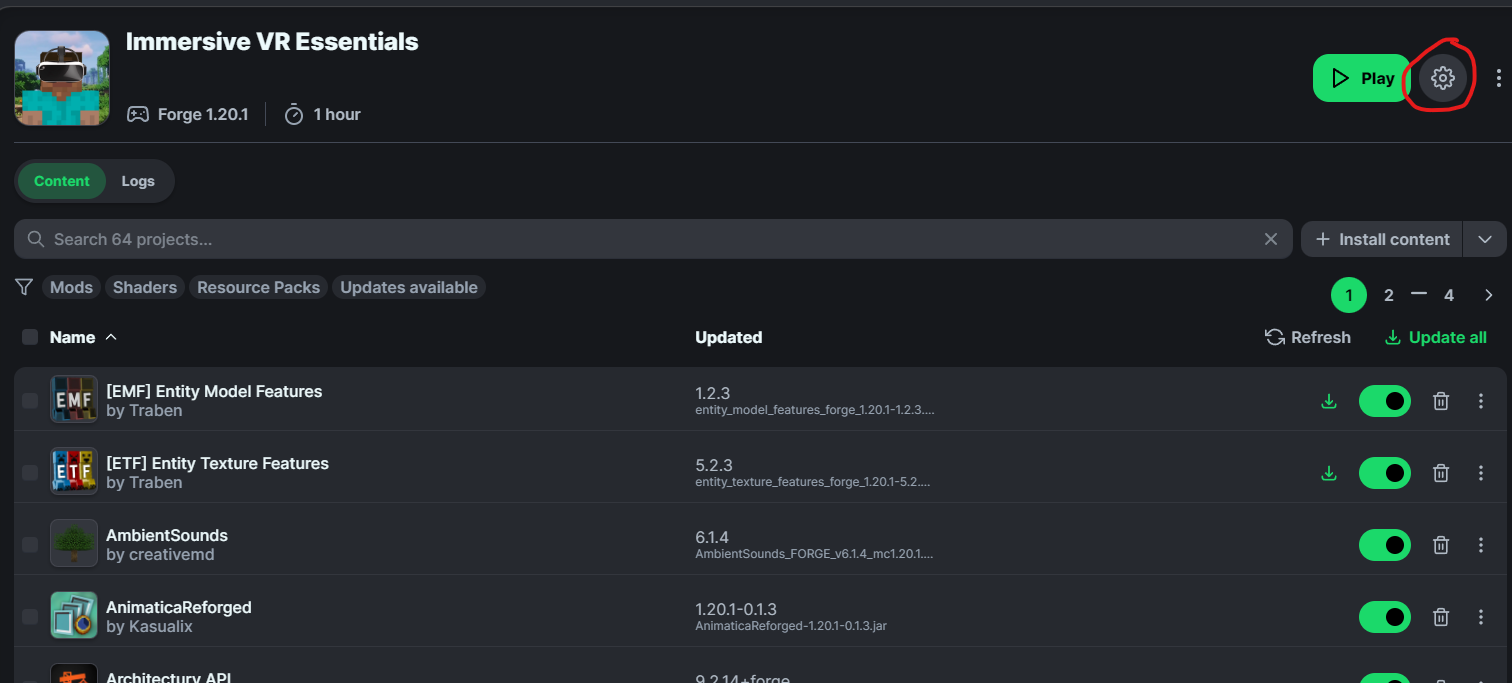
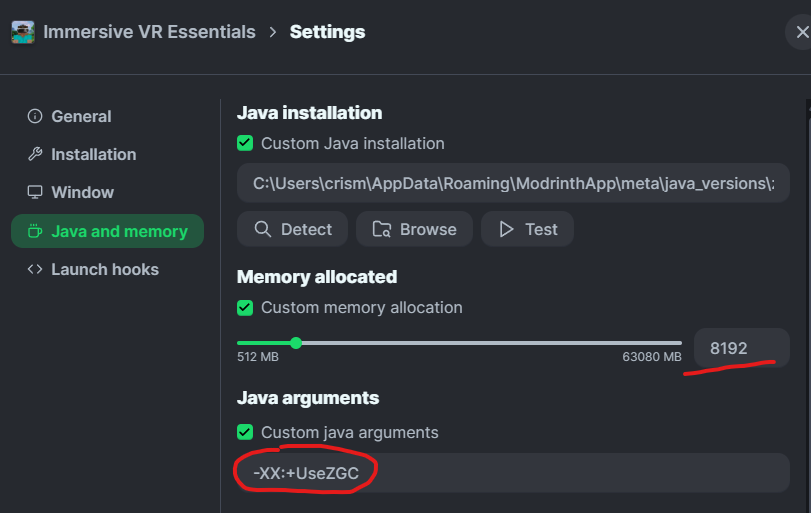
You should now be good to play this in VR
DO NOT UPDATE MODS IN THIS, YOUR GAME WILL BREAK
If there is an update out for a particular mod.. I'll update the pack, otherwise do not update individual mods. I'm using a couple of older versions of mods either because it didn't work well in VR.. or they were crashing with vivecraft.
Customization
To Customize Vivecraft settings you can find that in the VR Settings menu
To Customize Immersive MC (Change type of backpack, turn off features/bring back vanilla inventory etc) go to the mods Menu, then find ImmersiveMC and click on config, you can change and mess around with any settings here that you want
To customize the Waypoints Mod, go the mod menu, find waypoints and click on config, then find client
Voice Chat
To change voice chat settings, press the B button on your right controller, set your Mic and speakers to whatever (prob want to set speakers to your headset speakers and then mic to either headset or an external one if you're using that)
I would also recommend putting 3D Audio on Reduced otherwise you might notice it glitching out when close to other players as vivecraft already includes 3D audio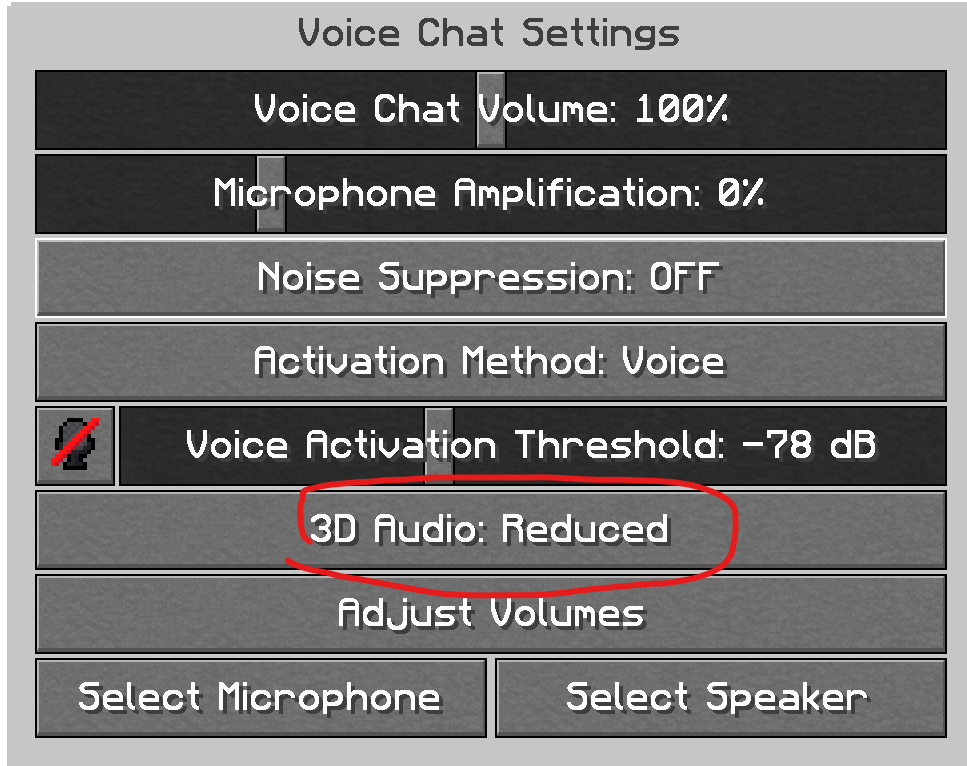
Time Control
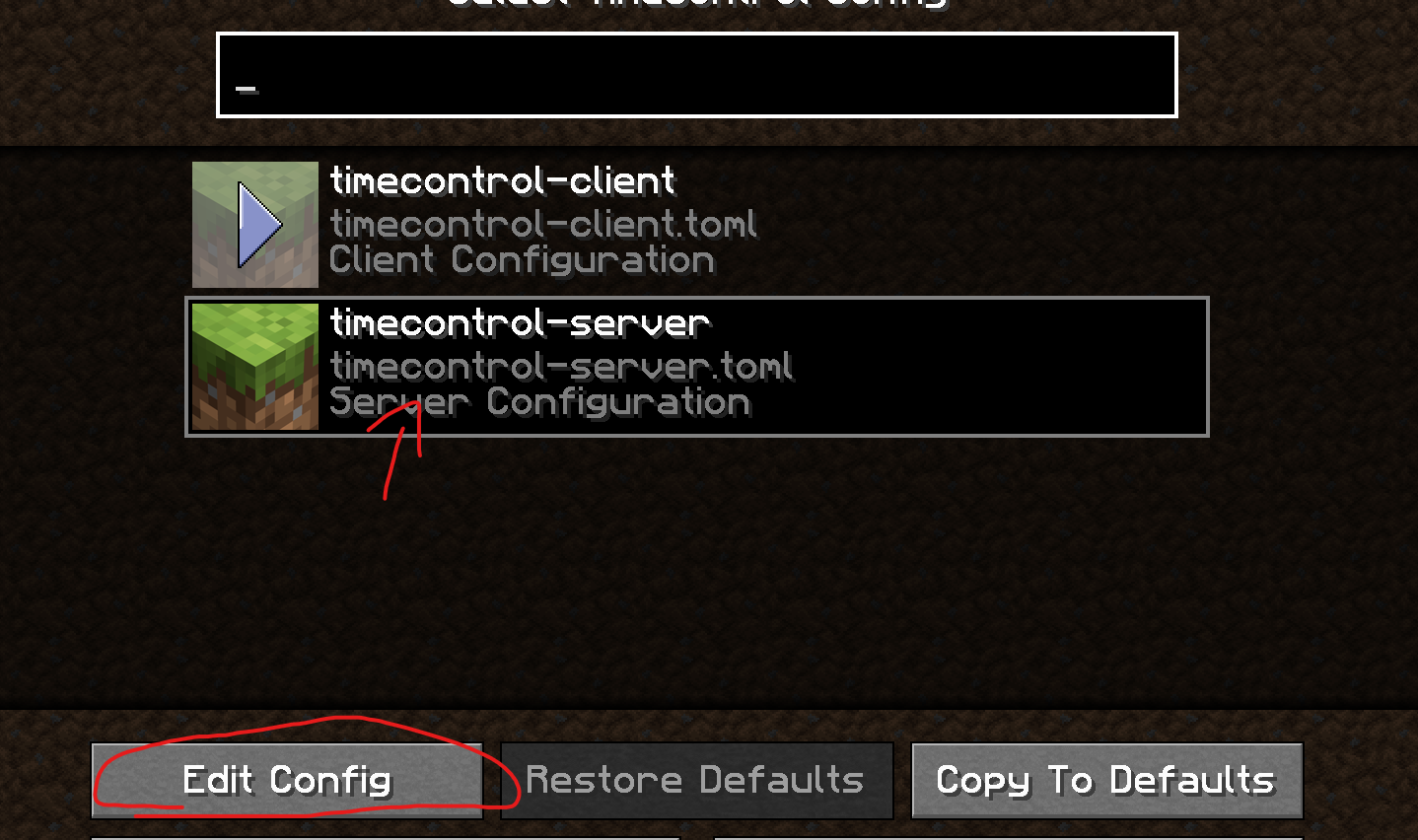
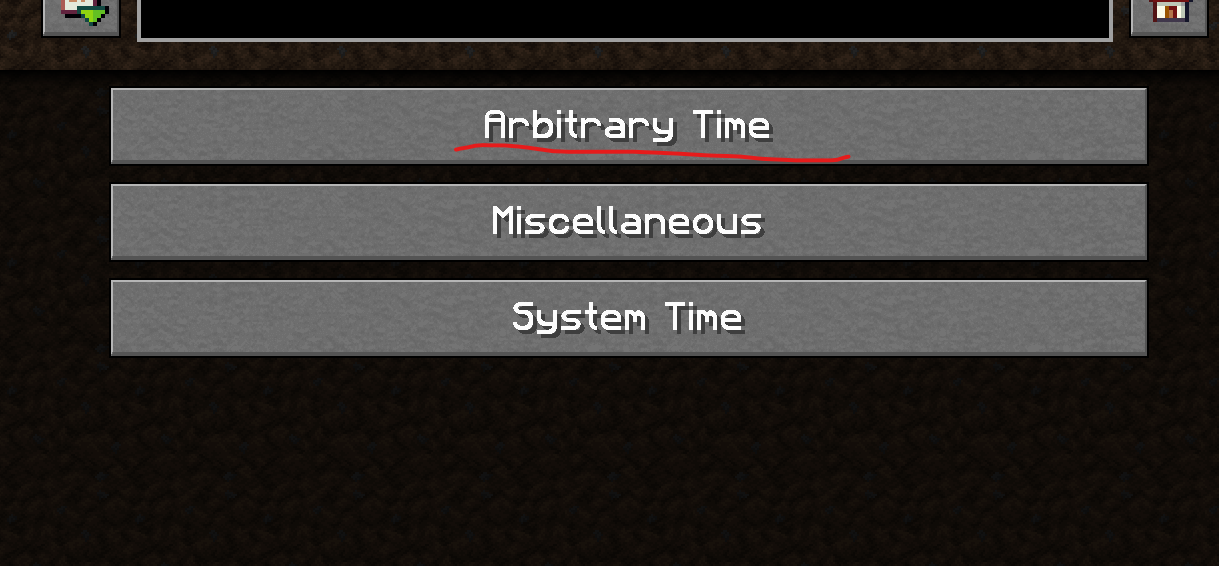
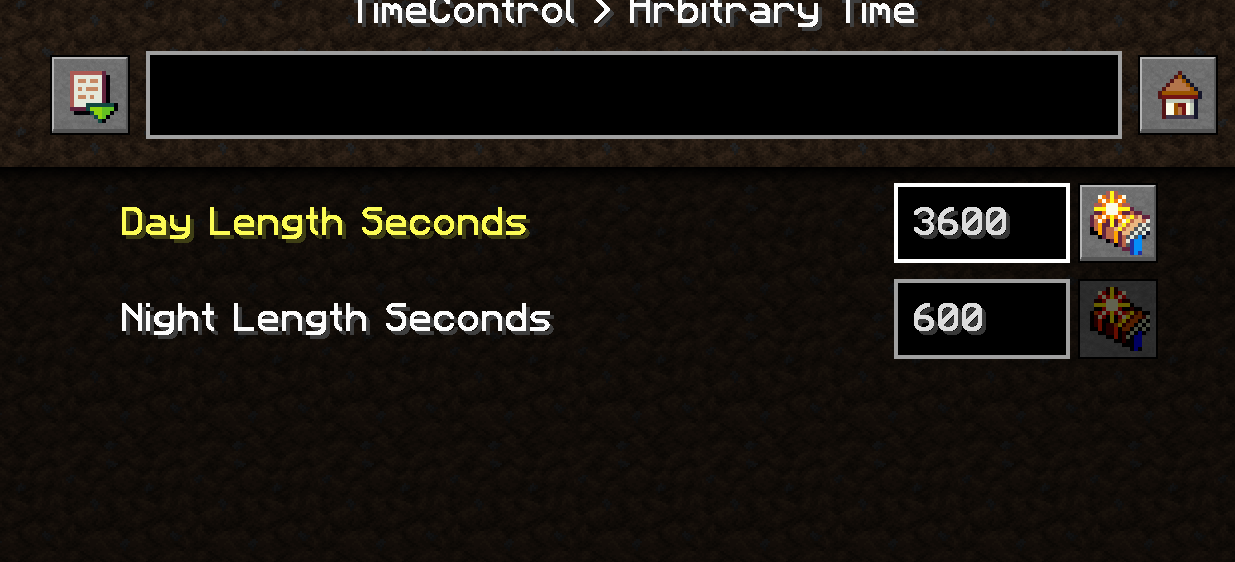
If you want to change How long the Day and Nights are, you need to make a new world, then go to the mods menu and find the time control mod, click on config, then go to server settings, you can change the amound of time in seconds each is.
I recommend putting day at 3600 (1 Hour IRL Time for Day) the Default value for each is 600 (10 Minute day 10 Minute Night) but feel free to customize this to whatever
Adding Mods
Feel free to add whatever you want, just keep in mind not every mod is going to work great in VR.
This is using Minecraft Forge 1.20.1 I AM using Sinytra Connector in this, so most fabric mods can also be installed.. but not every one will work.. if you're adding fabric mods just do some trial and error
FAQ
I'm not sure how to access the Backpack or setup Fullbody tracking on VR
Take a look at the help section for Vivecraft and ImmersiveMC
Does this work in Multiplayer?
Yes! This should be fully compadable with servers, it already includes voice chat, just add the modpack to any server you want to use. Clients will need to have this installed as well for this to work though.
In fact I recently launched a VR Only server! Find it in the server menu!
Why 1.20.1? Why not newier versions of Minecraft?
Some of the mods in here ONLY work on 1.20.1 or older.. so thats the main reason. At some point I may look into making an alternative version of this for newier versions of minecraft if there is enough interest.
Why are you using Forge and not Fabric/NeoForge
A large percentage of mods (and VR Specific Mods) in this are Forge Only. I'm using Sinytra connector in this so tons of Fabric Mods DO work. The connector ONLY works on forge... not the other way around. Until Fabric/NeoForge modding becomes more advanced, In my honest opnion there isn't a huge benefit to switching, you'll just be loosing out on the ability to use tons of mods for a tiny performance gain. If the mods that I'm using in this gets converted to Fabric or better alternatives become available, I'll consider switching.
Until then, Forge+Sinytra connector is currently the Best way to mod Minecraft IMHO, you're getting the ability to Install basically ANY mod for minecraft without having to worry about different loaders.
I'm having trouble getting this to work
This should work with other modloaders not just modrinth, but if you really can't get it to work properly, I have the loose files here. Just drop them into your .minecraft folder
https://drive.google.com/drive/u/1/folders/1eFAk8lgzWQ0AxxR8686FSMsOYb7IFbOE
Social Links
Project description from Modrinth.
Mods in Immersive VR Essentials 1.1.1
Open any mod on Modpacks.ch to check its files and dependencies.
AmbientSounds_FORGE_v6.1.11_mc1.20.1.jar SHA-1
af412170c07febfb5c611b7237d806230dc83584 · Modrinth version lDrRWaFm · Project link unavailable Client onlyAmplified_Nether_1.21.x_v1.2.11.jar SHA-1
8420d983790682d9cef42ecb86bcedaf26998dc0 · Modrinth version 9mHpIiie · Project link unavailable Side not labelledarchitectury-9.2.14-forge.jar SHA-1
a52918a500ff421180a1cbd1a0cabee712134ec4 · Modrinth version 1MKTLiiG · Project link unavailable Side not labelledbalm-forge-1.20.1-7.3.30-all.jar SHA-1
3feeff09618e4b897106ab2ca04687f91b7d97a3 · Modrinth version KQwDHwmX · Project link unavailable Side not labelledBetterAnimationsCollection-v8.0.0-1.20.1-Forge.jar SHA-1
06db0b9e79cd2b7df8501f51304e4c884b1e84a1 · Modrinth version IWYoMQYX · Project link unavailable Client onlyBetterF3-7.0.2-Forge-1.20.1.jar SHA-1
b65cba59e87dc6c6d1aa9c47f09b9996b4e5075d · Modrinth version xo6HmgWj · Project link unavailable Client onlycanary-mc1.20.1-0.3.3.jar SHA-1
898abd9e337ef1c677ce93f5589497a09c7e9850 · Modrinth version lauzXB0n · Project link unavailable Side not labelledCITResewn-1.1.3+1.20.jar SHA-1
53f036ebe51d7d97afaf44d541775c92c4470dad · Modrinth version c7Lo4vij · Project link unavailable Client onlycloth-config-11.1.118-forge.jar SHA-1
c46ca3fba95691873a765f4e79750c615f33e446 · Modrinth version nr1znv5v · Project link unavailable Side not labelledcollective-1.20.1-8.3.jar SHA-1
ec387c40637a330661d9f4c3e59d93efc17046a2 · Modrinth version P0uRrvF9 · Project link unavailable Side not labelledConnector-1.0.0-beta.36+1.20.1.jar SHA-1
affa578658dee306c7fc178cc825513ed5419eee · Modrinth version NN8d83mu · Project link unavailable Side not labelledcontinuity-3.0.0-beta.4+1.20.1.jar SHA-1
b662fd625ba1f06c6e4958eac373856047d0d2a9 · Modrinth version Z9FJWLMt · Project link unavailable Client onlyCreativeCore_FORGE_v2.12.28_mc1.20.1.jar SHA-1
1df4be91a66108003d71c1e5118b34327da83f57 · Modrinth version LmzdNFkt · Project link unavailable Side not labelledeatinganimation-1.20.1-5.1.0.jar SHA-1
d80502ca23195814f245bb8a4bffcb778ea4c02a · Modrinth version WqBpsYBv · Project link unavailable Client onlyembeddium-0.3.4+mc1.20.1.jar SHA-1
aee89a3a2ac2a56a8155225e9a7df63ee073a526 · Modrinth version pdLkrlJc · Project link unavailable Client onlyentity_model_features_forge_1.20.1-1.2.3.jar SHA-1
49c9a36207f4ce09fbf917bcb5b5579b4b1fd2af · Modrinth version uv7jW0CE · Project link unavailable Client onlyentity_texture_features_forge_1.20.1-5.2.3.jar SHA-1
f9191209fc54cc7fe5b9c8a4150823d500e4128d · Modrinth version DPuUdAbv · Project link unavailable Client onlyfabric-api-0.92.0+1.11.1+1.20.1.jar SHA-1
bee5ead0b58d1226d97269ba04e44f63ba7bed72 · Modrinth version 1SWYhNrt · Project link unavailable Side not labelledferritecore-6.0.1-forge.jar SHA-1
417fb6ce8f52abf40bd9d0390371790f9576f8ba · Modrinth version DG5Fn9Sz · Project link unavailable Side not labelledForgeConfigScreens-v8.0.2-1.20.1-Forge.jar SHA-1
e727fcba7efe04bc173211ba5cdf49eea768a9a3 · Modrinth version YUDLu26S · Project link unavailable Side not labelledfriendsandfoes-forge-mc1.20.1-3.0.9.jar SHA-1
f8c84d824c433e7e6e9f44ae6d4885925a08087f · Modrinth version ihFi4QrR · Project link unavailable Side not labelledgeckolib-forge-1.20.1-4.7.jar SHA-1
451226923e02ac708b8fe59d75a2f9a28cc7e467 · Modrinth version LwI6czff · Project link unavailable Side not labelledgml-4.0.9-all.jar SHA-1
a751a912844f37c84e4d37d273517221964504bb · Modrinth version qmwY0rKE · Project link unavailable Side not labelledhideexperimentalwarning-1.20.1-1.2.jar SHA-1
9ae7fa690a25fb809f12bc683412071f9d8a3405 · Modrinth version hJuIowdr · Project link unavailable Client onlyImmediatelyFast-Forge-1.5.1+1.20.4.jar SHA-1
f1687e57a835e44a9ecf2f343cba5817936f8ae0 · Modrinth version ShWk0wN3 · Project link unavailable Client onlyimmersivemc-1.5.8-1.20.1-forge.jar SHA-1
3aae476007733ae44621b0dac035397e9526e57d · Modrinth version zUESD62H · Project link unavailable Side not labelledlambdynamiclights-2.3.2+1.20.1.jar SHA-1
71b636fa74744e51ba2d248c81a38bdbfad5d43b · Modrinth version mYl4RvKg · Project link unavailable Client onlylazurite-1.0.3+mc1.20.1.jar SHA-1
3c9e8654a398c4dabf6c99cd0669d4659057d2f8 · Modrinth version 7XSkM0oe · Project link unavailable Client onlymemoryleakfix-forge-1.17+-1.1.5.jar SHA-1
9f60142dd94631800386a16a4ad70ad9e84cd78a · Modrinth version 3w0IxNtk · Project link unavailable Side not labelledmodelfix-1.15.jar SHA-1
5bdda0781bf9dfb5f992a7aa2bee64d5d3fe0b84 · Modrinth version og4A1nN8 · Project link unavailable Client onlymodernfix-forge-5.24.4+mc1.20.1.jar SHA-1
daeccb1fbe1d67d426fcc8135cfff463ff0f7e1d · Modrinth version CixO1IdG · Project link unavailable Side not labelledMyServerIsCompatible-1.20-1.0.jar SHA-1
a53abcabc6c3531667049be249b3fb165aad5468 · Modrinth version 7jEatFH8 · Project link unavailable Client onlyNullscape_1.20.x_v1.2.8.jar SHA-1
e4afd980e788f1861d8a8263bc700312667df977 · Modrinth version QsRKydVt · Project link unavailable Side not labelledoculus-mc1.20.1-1.6.15a.jar SHA-1
478a222cd6390353ba080b07fcac2b6301fbe3a2 · Modrinth version Bj8M79wL · Project link unavailable Client onlyPerfectAccuracy-1.3.jar SHA-1
f3686e3fbdb46c4505d10e7df1dc4ebfb6e7aded · Modrinth version fKB5AWzu · Project link unavailable Server onlyphysics-mod-3.0.13-mc-1.20.1-forge.jar SHA-1
2a64a64b72619d350b287b4d1ee3ff59258945b6 · Modrinth version AxYAYmmy · Project link unavailable Client onlypotacore-0.2.8-universal.jar SHA-1
d1b8c491456b94b372e45d631a9a0fa72011cd2b · Project link unavailable Side not labelledPresenceFootsteps-1.10.1+1.20.1.jar SHA-1
8f88195dea52509564fabc3dfac966b09290d905 · Modrinth version k0t6DSmw · Project link unavailable Client onlyPuzzlesLib-v8.1.25-1.20.1-Forge.jar SHA-1
89f824435c168d5156cd6aa9e90281bb72dc335c · Modrinth version 2qznQtPr · Project link unavailable Side not labelledrubidium-extra-0.5.4+mc1.20.1-build.116.jar SHA-1
f85427c5eea280b8d162367c0139eebfd661daff · Modrinth version zzQGTgOB · Project link unavailable Client onlysaturn-mc1.20.1-0.1.3.jar SHA-1
ad93f99d46714c46aaa6a4409aeca506e9fcac99 · Modrinth version Yx85DYaG · Project link unavailable Side not labelledsound-physics-remastered-forge-1.20.1-1.4.15.jar SHA-1
990bd9caa7c4394e66d379263139495a27147a67 · Modrinth version o4QlRA76 · Project link unavailable Side not labelledstarlight-1.1.2+forge.1cda73c.jar SHA-1
a915880c7834a0b0f9f300f0e3053deaa9a3205a · Modrinth version cNa0vkNj · Project link unavailable Side not labelledStructory_1.20.x_v1.3.5.jar SHA-1
4196a2fa68f755b46616f4071e84c72ec4d6dacc · Modrinth version FkaSuQb0 · Project link unavailable Side not labelledtalkbubbles-1.0.8.jar SHA-1
ff2b8f24eef416624a7773aba056d9e25efe4065 · Modrinth version BvZZmYcB · Project link unavailable Client onlyTerralith_1.20.x_v2.5.4.jar SHA-1
79e1409b8db4ce86df9d6d6730f09c4bd8860a30 · Modrinth version WeYhEb5d · Project link unavailable Side not labelledtextrues_embeddium_options-0.1.5+mc1.20.1.jar SHA-1
f35d0566e43cde0c4ffba9ecf893209b2b96b0c8 · Modrinth version r66v9j9a · Project link unavailable Client onlytimecontrol-1.20.1-1.6.0.jar SHA-1
955afd02aaf486dd5417f08e902584ddd954de1f · Modrinth version GZKokSlf · Project link unavailable Side not labelledtrashslot-forge-1.20-15.1.1.jar SHA-1
1b8bd0d11e18f1423c50183e9e040c4085817a9c · Modrinth version fugZlKHM · Project link unavailable Side not labelledvivecraft-1.20.1-1.2.5-forge.jar SHA-1
f52acc2e4293ca5bad35ef4de83f7868b14f3fec · Modrinth version lrjgB0IC · Project link unavailable Side not labelledvoicechat-forge-1.20.1-2.5.36.jar SHA-1
5d8ec5198d2c6ea0109aa4af8ff446c183ea3ff9 · Modrinth version r5eJrLh4 · Project link unavailable Side not labelledvrapi-3.0.12-1.20.1-forge.jar SHA-1
5a6e7327628fc23d7ea8f91ef0ed9abf0d52a86f · Modrinth version FGLWwHNg · Project link unavailable Side not labelledwaystones-forge-1.20.1-14.1.17.jar SHA-1
84ef91e24d19e8441a7e3b921012b2897f42e918 · Modrinth version WozH13dr · Project link unavailable Side not labelledyet-another-config-lib-forge-3.2.1+1.20.jar SHA-1
2f386ef01387be8268715350dbfa8386c8ddaeb2 · Modrinth version smEdHeFU · Project link unavailable Side not labelledYungsApi-1.20-Forge-4.0.6.jar SHA-1
af584b690f5646c6032002b58abc4591beed3833 · Modrinth version PJOYAmAs · Project link unavailable Side not labelledYungsBetterDungeons-1.20-Forge-4.0.4.jar SHA-1
67a9e1c2ff126ab54cea8e0709d178915243039e · Modrinth version kPiQ6v4q · Project link unavailable Server onlyYungsBetterJungleTemples-1.20-Forge-2.0.5.jar SHA-1
0b3c8556983895fea980247bb4d437ca535e7259 · Modrinth version CXQc6EnZ · Project link unavailable Server onlyYungsBetterMineshafts-1.20-Forge-4.0.4.jar SHA-1
e2cbc574807a994bb9610184eb4bbfe29a6c0774 · Modrinth version kVO57zxB · Project link unavailable Server onlyYungsBetterNetherFortresses-1.20-Forge-2.0.6.jar SHA-1
889cd16a93764d1d6af2e2dda5bbc286a2683e7a · Modrinth version 2nUEz0zq · Project link unavailable Server onlyYungsBetterOceanMonuments-1.20-Forge-3.0.4.jar SHA-1
d8e74ed19903752a97ed0e1d2b1a8bf378bc252f · Modrinth version SN4iZ7wf · Project link unavailable Server onlyYungsBetterStrongholds-1.20-Forge-4.0.3.jar SHA-1
3730238c56edca4bb5b2238e1314aec572ced385 · Modrinth version rwiShgsc · Project link unavailable Server onlyYungsBetterWitchHuts-1.20-Forge-3.0.3.jar SHA-1
71fee574f920c6b05004f100ba07e9b8d5844169 · Modrinth version mwlYB7rq · Project link unavailable Server onlyPick your setup
Immersive VR Essentials by Minecraft version and loader
Choose the version and loader you play, then open the matching release.
Made local changes? Try them in a copied instance before touching a world you care about.
Recent files
Immersive VR Essentials versions and loaders
Forge 47.2.01.20.18.0.312+7 release
Forge1.20.1 beta
Forge1.20.1 beta
Forge1.20.1 beta
Forge1.20.1 beta
Forge1.20.1 beta
Forge1.20.1 beta
Forge1.20.1 beta
Forge1.20.1 alpha
Forge1.20.1 alpha
Forge1.20.1 alpha
Forge1.20.1 alpha
Looking for an older file? The official Modrinth project page is in Resources.
 modpack
 Modrinth · Minecraft
PacPack Aroma
Vanilla enhanced: massive optimizations, fully client-side, shaders, immersive sounds, and infinite render distance (Voxy). 100% compatible with any Vanilla server!
 modpack
 Modrinth · Minecraft
PoCraft
Adds a little to the game for quality of life. This will work great on single-player worlds and private servers with certain support.
 modpack
 Modrinth · Minecraft
espania saison 2
This is the pack mode for the Spain series on the Minko YouTube channel, So this is for season 2, so if you haven't been able to see season 1, go to my YouTube channel.