Minecraft version
Back to modpacks 
Modrinth · Minecraft modpack
HOLY Optimized
Containts too much mods for optimize & for player mods like gamma utils, death finder, and etc...
Choose a version Pick your version below, then grab the matching file.
Quick answer
Which HOLY Optimized release should I use?
Latest stable file HOLY Optimized 0.0.1
Game version 1.20.4
Loader Fabric 0.15.10
HOLY Optimized 0.0.1 is a complete pack release for 1.20.4 with Fabric 0.15.10. Install it as its own launcher instance. If the creator publishes a separate server file, make sure it names this exact pack release. 21 mods in this pack file.
Pack setup
How should I set up HOLY Optimized for players and a server?
Use HOLY Optimized 0.0.1 as the pack version. Install the pack as its own launcher instance. The creator’s listing does not name a separate server file, so check the release notes before setting up a dedicated server. Do not upload the ordinary client folder blindly.
Client instance Install HOLY Optimized 0.0.1
Dedicated server setup Match HOLY Optimized 0.0.1
Pack loader Fabric 0.15.10
A pack is a matched client and server setup, not one mod with an install-side label. Keep its release, loader, manifest and overrides together.
Referenced mods 21
Client only 4
Server only 0
Not labelled 17
These numbers come from the pack file you chose. “Not labelled” means we don’t know which side it belongs on—not that it is safe everywhere. The file count is not a RAM estimate.
What are the server requirements for HOLY Optimized?
HOLY Optimized 0.0.1. Change the pack release and its contents or setup may change too.
The selected pack release is HOLY Optimized 0.0.1. That file is for Minecraft 1.20.4 with Fabric 0.15.10. It contains 21 mod projects. The creator’s listing does not name a separate server file. Check their notes before using one, and do not upload an ordinary client folder or rebuild the pack mod by mod. A file count cannot tell us the right RAM, CPU or storage; size the server for the players and world you actually run.
About this project
What kind of pack is HOLY Optimized?
HOLY Optimized Minecraft Client: Performance Released
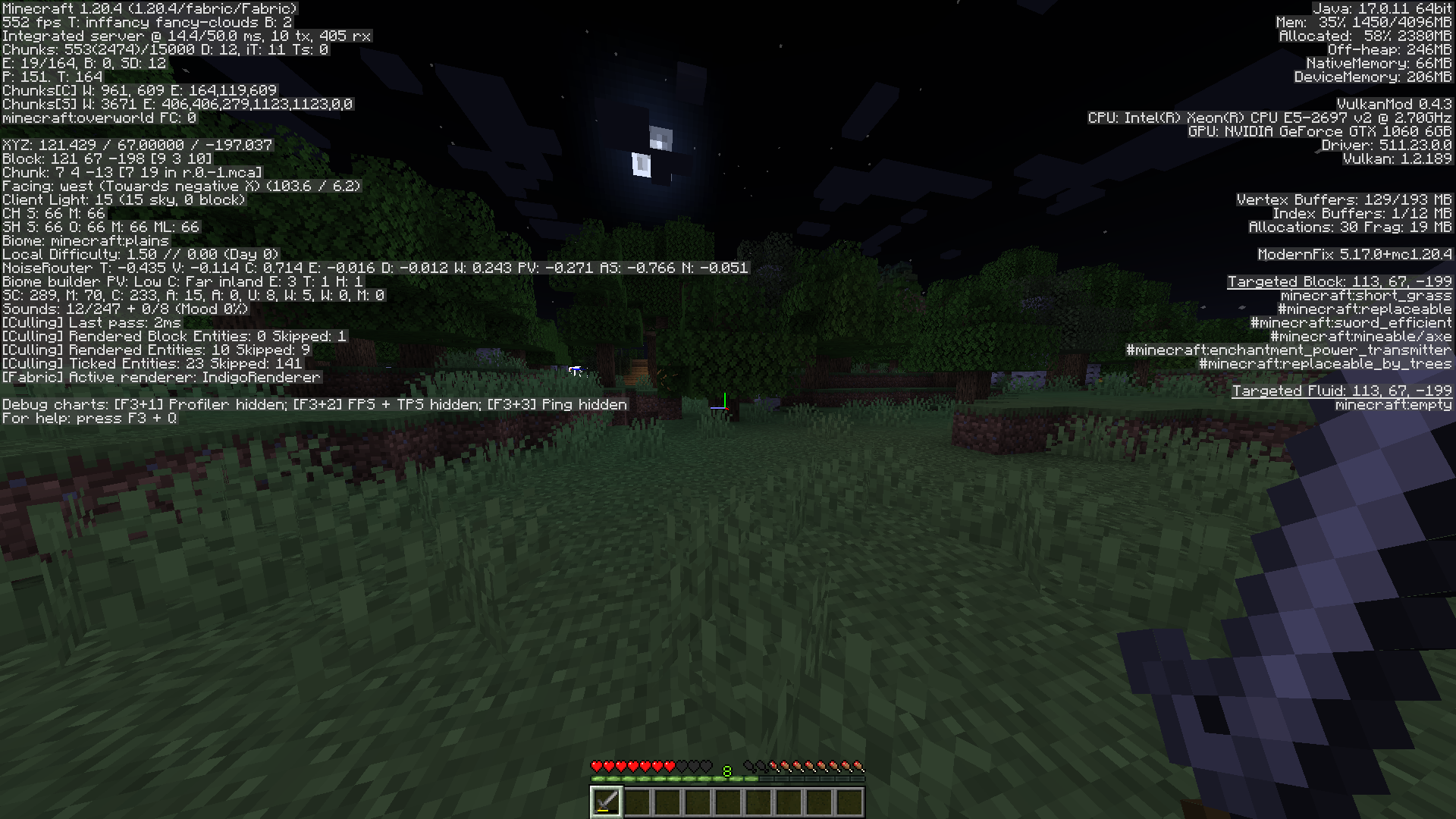
Built for version 1.20.4, this Minecraft client uses a powerful cloth modding platform to push the boundaries of performance. Built through careful optimization, this client consistently achieves average frame rates of 400-500 fps, delivering incredibly smooth and responsive gameplay.
Key optimization
Fabric Integration: By leveraging the efficiency of fabric, this client benefits from a streamlined and streamlined modding environment, maximizing performance potential.
- Optimized codebase: Every line of code is carefully analyzed and improved to eliminate bottlenecks and improve execution speed. This includes:
- Optimized Rendering Pipeline: Renders the game world efficiently for a seamless visual experience.
- Efficient resource management: Carefully handle memory allocation and resource usage to minimize overhead.
- Performance-oriented logic: Simplify gameplay to reduce processing requirements.
- Dedicated Performance Features: The client includes custom features designed to further improve performance:
- Dynamically Adaptive Settings: Automatically adjusts graphics and rendering settings based on system resources, ensuring optimal performance across a variety of hardware configurations.
- Preload Assets: Anticipates gameplay needs and preloads required assets, minimizing load times and reducing stuttering.
- Efficient Chunk Loading: Optimizes the way chunks are loaded and unloaded, minimizing the impact on overall framerate.
Result
This client gives players an unprecedented gaming experience, characterized by:
- Unparalleled Smoothness: Effortlessly navigate the Minecraft world at buttery-smooth frame rates, eliminating lag and stuttering.
- Improved Responsiveness: React instantly to in-game events and commands thanks to quick response times.
- Immersive Gameplay: Focus on the game world and enjoy a seamless experience without the distraction of performance limitations.
Besides numbers
Exceptional client performance isn't just about raw FPS; it's about creating an immersive and enjoyable gaming experience. Players can fully immerse themselves in the world of Minecraft, enjoying the beauty and intricacies of the game without the performance burden.
NOTE
While the client consistently achieves impressive frame rates, it is important to note that actual performance may vary depending on individual system specifications and game settings.
Project description from Modrinth.
Pick your setup
HOLY Optimized by Minecraft version and loader
Choose the version and loader you play, then open the matching release.
Made local changes? Try them in a copied instance before touching a world you care about.
Recent files
HOLY Optimized versions and loaders
Fabric 0.15.101.20.48.0.312+7 release
Looking for an older file? The official Modrinth project page is in Resources.
 modpack
 CurseForge · Minecraft
One Piece Liberation
This is a mod for my mine mine no mi/carts/ zitoen one piece server!
 modpack
 CurseForge · Minecraft
Eef Pack
Explore a fantastical world where ancient magic, cutting-edge machines, and epic adventures converge in this Minecraft mod pack for boundless creativity and discovery.
 modpack
 CurseForge · Minecraft
cobblemon catch and cook
A mixture of cobblemon and create mods