Minecraft version
Back to modpacks 
Modrinth · Minecraft modpack
OptiPack
Feature-rich Quality of Life pack, with OptiFine-like features and performance optimisations.
Choose a version Pick your version below, then grab the matching file.
Quick answer
Which OptiPack release should I use?
Latest stable file OptiPack 1.4.3
Game version 1.20.6
Loader Fabric 0.15.11
OptiPack 1.4.3 is a complete pack release for 1.20.6 with Fabric 0.15.11. Install it as its own launcher instance. If the creator publishes a separate server file, make sure it names this exact pack release. 35 mods in this pack file.
Pack setup
How should I set up OptiPack for players and a server?
Use OptiPack 1.4.3 as the pack version. Install the pack as its own launcher instance. The creator’s listing does not name a separate server file, so check the release notes before setting up a dedicated server. Do not upload the ordinary client folder blindly.
Client instance Install OptiPack 1.4.3
Dedicated server setup Match OptiPack 1.4.3
Pack loader Fabric 0.15.11
A pack is a matched client and server setup, not one mod with an install-side label. Keep its release, loader, manifest and overrides together.
Referenced mods 35
Client only 25
Server only 0
Not labelled 10
These numbers come from the pack file you chose. “Not labelled” means we don’t know which side it belongs on—not that it is safe everywhere. The file count is not a RAM estimate.
What are the server requirements for OptiPack?
OptiPack 1.4.3. Change the pack release and its contents or setup may change too.
The selected pack release is OptiPack 1.4.3. That file is for Minecraft 1.20.6 with Fabric 0.15.11. It contains 35 mod projects. The creator’s listing does not name a separate server file. Check their notes before using one, and do not upload an ordinary client folder or rebuild the pack mod by mod. A file count cannot tell us the right RAM, CPU or storage; size the server for the players and world you actually run.
About this project
What kind of pack is OptiPack?
OptiPack
QOL Optimisation Pack
OptiPack has long been a private pack of mods I have collected for my friends, most of whom play Minecraft on computers with processing power rivaling that of a potato (looking at you Wulfian!)
It is a pack that has been fine-tuned to fit our play style. I started making the pack as I wanted my friends to use the Fabric mod launcher, but still have all the features of OptiFine, but overtime was expanded to have other mods that would improve our gameplay experience, and deal with common gripes and problems we would encounter with the base game.
Keybinds
b: Build Guide Menuc: Zoomm: Toggle Block Metero: Manage ShadersF4: Custom HUD (Alternate/Better F3 Screen)F6: Cinematic zoomLeft Alt: Block Meter MenuRight Alt: Toggle FreecamEnd: Death LogCtrl + Click recipe in book: Quick craft
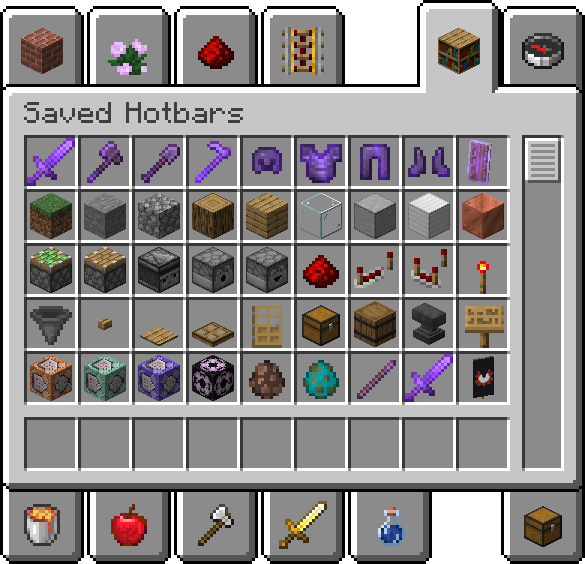
Helpful Saved Hotbars
Connected Textures
Make sure to enable the Resource Pack Default Connected Textures to see connected textures.
List of Mods
Mods not yet on 1.20.2
- Enhanced Block Entities (EBE)
Optimisation Mods
- C2ME: A Fabric mod designed to improve the chunk performance of Minecraft.
- Continuity: A Fabric mod that allows for efficient connected textures.
- Cull Less Leaves: Cull leaves while looking hot!
- Dynamic FPS: Improve performance when Minecraft is in the background.
- EBE: Reduce FPS lag with block entities, as well as customize them with resource packs.
- FeyTweaks: Mod for optimizing signs and beacons.
- Krypton: A mod to optimize the Minecraft networking stack.
- Lithium: No-compromises game logic/server optimization mod.
- Sodium: Modern rendering engine and client-side optimization mod for Minecraft.
- Indium: Sodium addon providing support for the Fabric Rendering API, based on Indigo.
- Reeses Options: Alternative Options Menu for Sodium.
- Sodium Extra: Features that shouldn't be in Sodium.
- Starlight: Rewrites the light engine to fix lighting performance and lighting errors.
Quality of Life Mods
- Auth Me: Authenticate yourself and re-validate your session.
- Capes: Lets you use capes from OptiFine, LabyMod and other cape mods.
- CustomHUD: A highly customizable variable-based text hud.
- Deathlog: Keeps track of the many embarrassing times you died.
- Freecam: A simple, standalone freecam mod for Minecraft. (Modrinth compliance edition)
- Iris: A modern shaders mod for Minecraft intended to be compatible with existing OptiFine shader packs.
- LambdaBetterGrass: A Minecraft mod which adds better grass and snow to the game.
- LambDynLights: A dynamic lights mod for Fabric.
- MidnightControls: Adds controller support and enhanced controls overall.
- ModMenu: Adds a mod menu to view the list of mods you have installed.
- No Chat Reports: Makes chat unreportable (where possible).
- Peek: Additional information in item tooltips
- Pick Block Pro: An advanced client side Block, Entity, NBT, Tool and ID picker (Fabric).
- Quickcraft: Craft recipes even faster!.
- Tooltip Fix: Fixes Tooltips from runnning off the screen.
- Zoomify: A zoom mod with infinite customizability.
Library Mods
- Fabric API: Lightweight and modular API providing common hooks and intercompatibility measures utilized by mods using the Fabric toolchain.
- Fabric Language Kotlin: Enables usage of the Kotlin programming language for Fabric mods.
- OwO Lib: A general utility, GUI and config library for modding on Fabric and Quilt.
- YetAnotherConfigLib: A builder-based configuration library for Minecraft.
License
I am not very sure how a modpack is meant to be licensed. I didn't make any of these mods, but I guess my particular configuration can be licensed? IDK. Each mod has it's own license, which can be found with the provided links above. As for my particular configuration, saved in this modpack, I just went with unlicense.
Project description from Modrinth.
Mods in OptiPack 1.4.3
Open any mod on Modpacks.ch to check its files and dependencies.
authme-8.0.0+1.20.5.jar SHA-1
d5ae0d1ad7656f353aa49a4c9e2218bad26e298e · Modrinth version KYWLxVNO · Project link unavailable Client onlybactromod-2.2.jar SHA-1
a4a02821478c1945102eaf55bfd09912a61d4ee8 · Modrinth version FXRupR83 · Project link unavailable Client onlyblockmeter-1.13.1-1.20.6.jar SHA-1
9b5f0fafda7f90f3f3d01fd5a25ff9d84fe0c35a · Modrinth version g0sFM0CU · Project link unavailable Client onlyBuildGuide-1.20.6-0.4.1.jar SHA-1
a3b72d7b36deb0c2c0983f3bc532540c7cac2446 · Modrinth version GnYV2oKR · Project link unavailable Client onlyc2me-fabric-mc1.20.6-0.2.0+alpha.11.95.jar SHA-1
a87c0ea0404c4ae98891252d09fbca05adb985bb · Modrinth version 1jjyJyVe · Project link unavailable Side not labelledcapes-1.5.4+1.20.5-fabric.jar SHA-1
b8a4d24d605f776040cb96ec7ec7b174ad5a15a4 · Modrinth version Kxmmmhs5 · Project link unavailable Client onlycloth-config-14.0.126-fabric.jar SHA-1
9af410a9cb959c639a351129a3bebb8e87a1fb42 · Modrinth version znhJLkCd · Project link unavailable Side not labelledcontinuity-3.0.0-beta.5+1.20.5.jar SHA-1
3ae0661c92d8b83d885496f1f54df50a494e94c2 · Modrinth version hI13Vg85 · Project link unavailable Client onlyCullLessLeaves-1.3.0.jar SHA-1
83380456dab54b8ac790b84a0f4f39a1404e6bc5 · Modrinth version TFvkv8XK · Project link unavailable Client onlycustom_hud-3.4.2+1.20.5.jar SHA-1
ce3180aefc071801ed7c7ff0cd1e00eab30d905d · Modrinth version 9fR21Wk6 · Project link unavailable Client onlydynamic-fps-3.4.3+minecraft-1.20.5-fabric.jar SHA-1
fd20a23bae25637e4be5013ada9d7bf9145c5b50 · Modrinth version y3LKh1gi · Project link unavailable Client onlyfabric-api-0.100.0+1.20.6.jar SHA-1
b5ae408855e08e91650b5791cdc6fee478494534 · Modrinth version IdbZAPPF · Project link unavailable Side not labelledfabric-language-kotlin-1.11.0+kotlin.2.0.0.jar SHA-1
4f5b3f0d773c4cc9e79d2f5ede3a637e78737f6d · Modrinth version afsFajDC · Project link unavailable Side not labelledFeyTweaks-1.20.6-1.2.8.jar SHA-1
5a9029a33100fa84e67672a07ebdf26693706f33 · Modrinth version NlEThsvA · Project link unavailable Client onlyfreecam-fabric-modrinth-1.2.4+mc1.20.5.jar SHA-1
db95db105ec3bc4baa0783f72e41a130cb886689 · Project link unavailable Client onlyindium-1.0.31+mc1.20.4.jar SHA-1
fe6d0513ac332d890f1bd9bb9354a8e240b8f0e5 · Modrinth version VlLxDisa · Project link unavailable Client onlyiris-1.7.0+mc1.20.6.jar SHA-1
345d0a37be9fd4a7ae6ae76e536c7efd7785655e · Modrinth version BvVRER1H · Project link unavailable Client onlykrypton-0.2.7.jar SHA-1
ad7554550eafa64f157cea3d03c00da73340e6f5 · Modrinth version PYi5mm1G · Project link unavailable Side not labelledlambdynamiclights-2.3.4+1.20.6-local.jar SHA-1
9bf29cf05833e848513ae337f2e11a061aab4a8a · Project link unavailable Side not labelledlithium-fabric-mc1.20.6-0.12.3.jar SHA-1
18bdca76040af406fd10b97d637d111fc12be9a6 · Modrinth version bAbb09VF · Project link unavailable Side not labelledmidnightcontrols-1.9.5+1.20.jar SHA-1
81d1ce35330f020984fb7763b7f94183623d1cad · Modrinth version HWizO7gR · Project link unavailable Client onlymodmenu-10.0.0-beta.1.jar SHA-1
c6407363a0564a149d3466c55f829895da6d7803 · Modrinth version NgnZx44E · Project link unavailable Client onlyNoChatReports-FABRIC-1.20.6-v2.7.0.jar SHA-1
5a9cbc46aa396a09e18942beea1d99b23c442208 · Modrinth version FMAZBsZw · Project link unavailable Side not labelledoffers-hud-1.20.6-1.5.0.jar SHA-1
1a20d78fdd1870ee47178b76ac1aa5bfc73f2817 · Modrinth version LCeMRJ26 · Project link unavailable Client onlyowo-lib-0.12.9+1.20.5.jar SHA-1
b2b6a8ca4aa1facbfe8ee17506a52ff2551294da · Modrinth version gizS7nlP · Project link unavailable Side not labelledpeek-fabric-1.20.6-1.3.2.jar SHA-1
14ab9b32fd12201c2642582427e856d84c8e6643 · Modrinth version FSfM7aPE · Project link unavailable Client onlyPick-Block-Pro-1.9.29-mc1.20.6.jar SHA-1
ef267d00fe228d03da2f4453f9c70c701dbcf130 · Modrinth version pxO0KdPL · Project link unavailable Client onlyquickcraft-1.2.5.jar SHA-1
fe4926a0966186a8f59f7aa9fb8e3b0d806f4600 · Modrinth version u0my88Iq · Project link unavailable Client onlyreeses_sodium_options-1.7.2+mc1.20.5-build.103.jar SHA-1
046af7eccb98e76b05887db26c54e049c895fc57 · Modrinth version JKZokbpT · Project link unavailable Client onlysodium-extra-0.5.5+mc1.20.6-build.118.jar SHA-1
e466637ff3c7cc4ee0873b97217630480baf8a76 · Modrinth version TJDWVdsb · Project link unavailable Client onlysodium-fabric-0.5.8+mc1.20.6.jar SHA-1
2f73c4a26c553bf0f0d2f921dd5a09ed90c515d8 · Modrinth version IZskON6d · Project link unavailable Client onlyspruceui-5.0.3+1.20.5.jar SHA-1
953585546111ad6f23655dccb1f8d7f005f7e6f8 · Project link unavailable Side not labelledtooltipfix-1.1.1-1.20.jar SHA-1
de704792c691e3d19316c87c21c9ad2bee6c66c3 · Modrinth version B2L4LeMV · Project link unavailable Client onlyYetAnotherConfigLib-3.5.0+1.20.6-fabric.jar SHA-1
59a60b79e27ec576875592a83e98a5af78a1d2cf · Modrinth version xiSmTJ03 · Project link unavailable Client onlyZoomify-2.13.5+1.20.6.jar SHA-1
b16a691fa1b17b9e6fb1518f7128353870996d71 · Modrinth version 8BIz17tA · Project link unavailable Client onlyPick your setup
OptiPack by Minecraft version and loader
Choose the version and loader you play, then open the matching release.
Minecraft version
1.20.4
1 loader buildMinecraft version
1.20.2
1 loader buildMinecraft version
1.20.1
1 loader buildMinecraft version
1.19.4
1 loader buildMinecraft version
1.19.2
1 loader buildMinecraft version
1.19
1 loader buildMade local changes? Try them in a copied instance before touching a world you care about.
Recent files
OptiPack versions and loaders
Fabric 0.15.111.20.68.0.312+7 release
Fabric1.20.4 release
Fabric1.20.2 release
Fabric1.20.1 release
Fabric1.19.4 release
Fabric1.19.4 release
Fabric1.19.4 release
Fabric1.19.2 release
Fabric1.19 release
Fabric1.19 release
Fabric1.19 release
Fabric1.19 release
Looking for an older file? The official Modrinth project page is in Resources.
 modpack
 Modrinth · Minecraft
Always Updated
[26.4 / April Fools] - Modpack that mainly tries to support snapshots with maximum performance, including Sodium. This includes minimal QoL mods.
 modpack
 Modrinth · Minecraft
BACAPtimized
Optimization modpack for blazeandcaves (bac) playthroughs. Available for regular players, speedrunners, server owners
 modpack
 Modrinth · Minecraft
Oakay Essentials
The official client-side modpack for Oakay, featuring voice chat, performance boosts, and visual enhancements—all fully compatible with the server. Everything will be Oakay! 🌱