Minecraft version
Back to modpacks 
Modrinth · Minecraft modpack
Better Optimization
Better FPS, TPS, Lower MSPT, Best PvP, Redstone and Command, Better Optimaztion, Higher Preformance
Choose a version Pick your version below, then grab the matching file.
Quick answer
Which Better Optimization release should I use?
Latest stable file Better Optimization 26.3
Game version 26.3
Loader Fabric 0.19.5
Better Optimization 26.3 is a complete pack release for 26.3 with Fabric 0.19.5. Install it as its own launcher instance. If the creator publishes a separate server file, make sure it names this exact pack release. 30 mods in this pack file.
Pack setup
How should I set up Better Optimization for players and a server?
Use Better Optimization 26.3 as the pack version. Install the pack as its own launcher instance. The creator’s listing does not name a separate server file, so check the release notes before setting up a dedicated server. Do not upload the ordinary client folder blindly.
Client instance Install Better Optimization 26.3
Dedicated server setup Match Better Optimization 26.3
Pack loader Fabric 0.19.5
A pack is a matched client and server setup, not one mod with an install-side label. Keep its release, loader, manifest and overrides together.
Referenced mods 30
Client only 16
Server only 3
Not labelled 11
These numbers come from the pack file you chose. “Not labelled” means we don’t know which side it belongs on—not that it is safe everywhere. The file count is not a RAM estimate.
What are the server requirements for Better Optimization?
Better Optimization 26.3. Change the pack release and its contents or setup may change too.
The selected pack release is Better Optimization 26.3. That file is for Minecraft 26.3 with Fabric 0.19.5. It contains 30 mod projects. The creator’s listing does not name a separate server file. Check their notes before using one, and do not upload an ordinary client folder or rebuild the pack mod by mod. A file count cannot tell us the right RAM, CPU or storage; size the server for the players and world you actually run.
About this project
What kind of pack is Better Optimization?
Maximum Performance: Improve Gaming Experience, Focus on Boosting FPS and Reducing MSPT, Especially When Using 2048X+ Texture Packs
Feature
- Specifically designed for High-Pixel Resolution Packs(512X/1024X/2048X+) With Best FPS/MSPT
- Only Release Audited & Tested ver using Maximum Performance PC with 512X+ Packs
- Only Open Source Mods
- Released updates only when all mods stable
- Compatible with most Workstations/Datacenter PC (5/10/2026#Tested: RTX PRO 6000)
- Contains mods ID list, Can update manually anytime
- Natively Wayland/Linux Support
Test
- ROG Strix SCAR 16 (2025) G635 (042W)
- Ultra 9 275HX + RTX 5090 Laptop + 32GB + 1+1TB
- Fedora 44
- Random Seed Default World
- Default Config, 32 Chunks
- 224/245 FPS, 1.2/50 MSPT
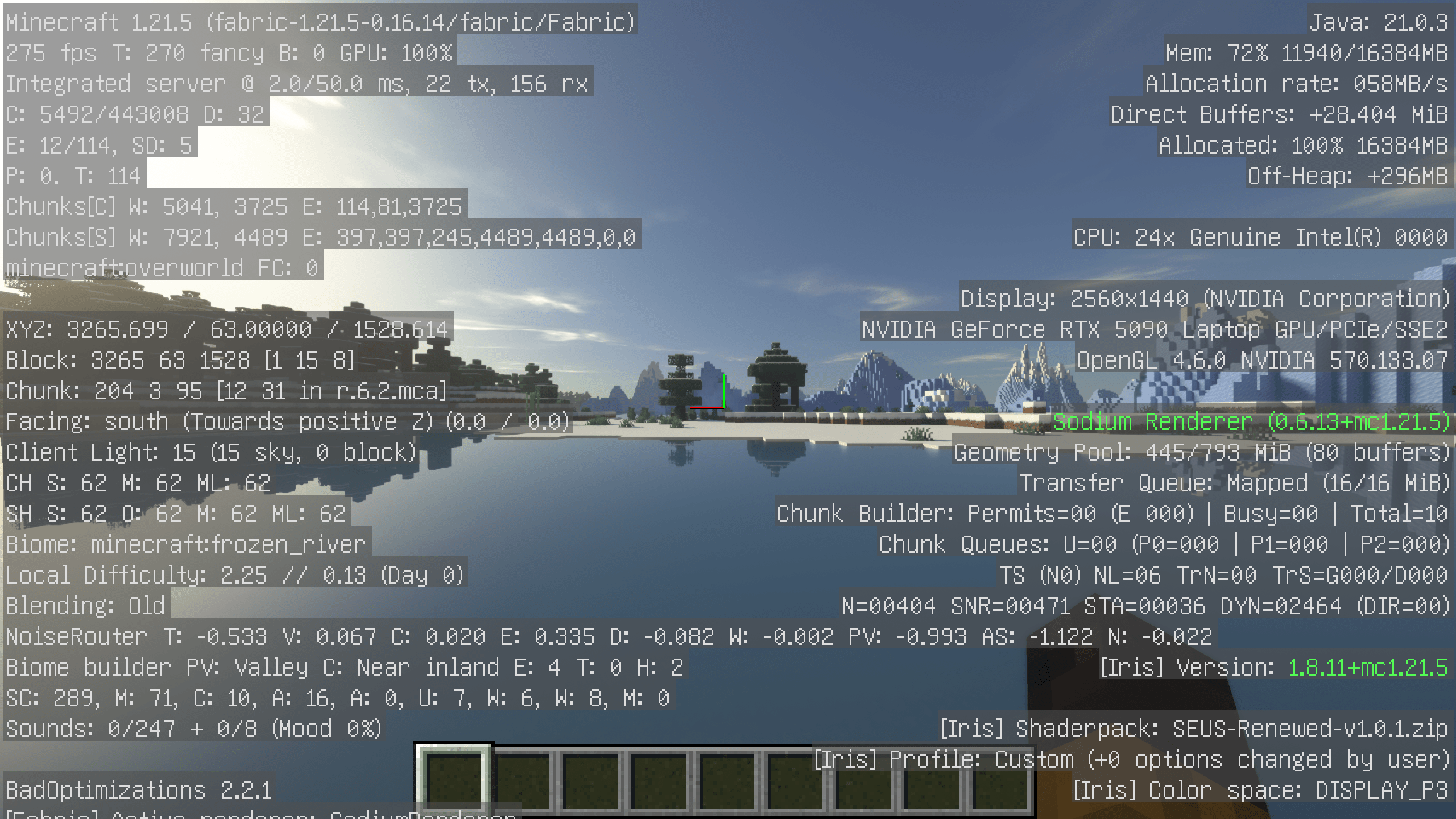
Project description from Modrinth.
Mods in Better Optimization 26.3
Open any mod on Modpacks.ch to check its files and dependencies.
alternate-current-mc26.3-1.9.0.jar SHA-1
1316efc4195fbf152f8521542bc2435bd588ddb6 · Modrinth version nSBWPz6x · Project link unavailable Server onlyasync-fabric-0.2.5+alpha-26.3.jar SHA-1
bde225ad18d305d4a4d3e51a09c17b1de7be38e2 · Modrinth version gcduhoHv · Project link unavailable Server onlyBadOptimizations-2.4.1-26.3-fabric.jar SHA-1
4cc25ce6217326ff14169f5358921773297e9475 · Modrinth version Sp0ctspw · Project link unavailable Client onlyc2me-fabric-mc26.3-0.4.2-alpha.0.90.jar SHA-1
dc8666e40bb04cef88628f66964130890ad44488 · Modrinth version ODMLK8M9 · Project link unavailable Side not labelledChunky-Fabric-1.5.3.jar SHA-1
fc1f2f374c5c82117599071ed18b6ef9bba2c7fb · Modrinth version 4Eotm6ov · Project link unavailable Side not labelledcloth-config-fabric-26.3.159.jar SHA-1
9a5cce069380a2047250831dcb19f4ef1b15872d · Modrinth version fg2uyxOW · Project link unavailable Side not labelledcullleaves-fabric-4.1.2+26.3.jar SHA-1
ff792771822c8844fd699493db1fc078611c1acd · Modrinth version jqOVPlQ8 · Project link unavailable Client onlyentity_model_features-3.3.11-26.3-fabric.jar SHA-1
9c11805cc34153fd89cb9fecf78be2b5a803b373 · Modrinth version N7d5LddE · Project link unavailable Client onlyentity_texture_features-7.2.5-26.3-fabric.jar SHA-1
c4d8d0f47a2ab15091f47a1d74336a119ab5f1b1 · Modrinth version O8J3sxxp · Project link unavailable Client onlyentityculling-fabric-1.11.3-mc26.3.jar SHA-1
45f47f7a067f5efd733a32767dc3d1d770678b2a · Modrinth version X1g3VhTx · Project link unavailable Client onlyfabric-api-0.162.0+26.3.jar SHA-1
273cd2dcbd92d1559edcc91c9f23fee47f6ff93f · Modrinth version v2j28coa · Project link unavailable Side not labelledferritecore-9.0.0-fabric.jar SHA-1
eac76ff0f3753422c61b2c44487d0d195d88d4bc · Modrinth version d5ddUdiB · Project link unavailable Side not labelledGnetum-4.6.3+26.3-fabric.jar SHA-1
d6237dced5a4a92a295872d3077ebc786d394471 · Modrinth version F4CsYAnb · Project link unavailable Client onlyImmediatelyFast-Fabric-1.17.1+26.3.jar SHA-1
f565bbeb201f2305e81761429d3f1f47e1c3a321 · Modrinth version 3MP9UR23 · Project link unavailable Client onlyiris-fabric-1.11.7+mc26.3.jar SHA-1
fa03640ba1e4ef2f7ae3619c6373a06e46d0ba2c · Modrinth version vTN4NRGW · Project link unavailable Client onlyjasione-1.0.9+26.1.2-fabric.jar SHA-1
d5056e60d62e2416ea0ea7267694212574ddd4a0 · Modrinth version kbKBk4b3 · Project link unavailable Side not labelledlithium-fabric-0.26.2+mc26.3.jar SHA-1
dd5a4ec2c68d7601d8bce9076f789c55a5f8bef3 · Modrinth version xS0Q8LSi · Project link unavailable Side not labelledmodernfix-5.27.20-build.2.jar SHA-1
b63337e801fbf2cb420a049d69220c56e083f514 · Modrinth version pa9cAfYg · Project link unavailable Side not labelledmodmenu-21.0.0.jar SHA-1
66ec40f1cd0c037ddca2b5fc6b4b976d479c18e8 · Modrinth version kyy7dbrZ · Project link unavailable Client onlyMouseTweaks-fabric-mc26.3-2.31.jar SHA-1
65c0f5588900e7ade476164ec4915bfab52c129a · Modrinth version LeMuMhLv · Project link unavailable Client onlyno-telemetry-1.10.0.jar SHA-1
3d52342f5825d01dda6661ef7116cdbacbe49746 · Modrinth version cBEkQM9c · Project link unavailable Client onlyobe+26.3-1.1.50.jar SHA-1
ee840202aef02cdfea8cd1a918672cf78b75debd · Modrinth version nmIzJcIn · Project link unavailable Client onlyquick-pack-fabric-1.5.1+26.3.jar SHA-1
4873321d649c3f1fae1ea1308c506777d4d3cbe1 · Modrinth version 6LPWDWD1 · Project link unavailable Side not labelledreeses-sodium-options-fabric-2.2.5+mc26.3.jar SHA-1
305aa813172358eb5e95d0a7af02a44326261226 · Modrinth version EfchygKx · Project link unavailable Client onlyrrls-5.2.8+mc.26.3.jar SHA-1
2b86b92f9c3ad773f5c7d751cee0512ebaccaf60 · Modrinth version CAVJGGfj · Project link unavailable Client onlyScalableLux-fabric-mc26.3-0.3.0-alpha.0.6-all.jar SHA-1
d51dcbe901452a1cb378139ca351009254e7ab0d · Modrinth version g4eqNSKd · Project link unavailable Side not labelledservercore-fabric-1.5.20+26.3.jar SHA-1
ec5fdf4798e29e483fa861dead101b0d9d6d72cb · Modrinth version LCG1Bm84 · Project link unavailable Server onlysodium-extra-fabric-0.9.4+mc26.3.jar SHA-1
ff2056f222b751fe161123e71e55afd5b2f41da4 · Modrinth version te2y9qZn · Project link unavailable Client onlysodium-fabric-0.9.2+mc26.3.jar SHA-1
9acfe851e36f4fb27d7c5baa224e8bd4e0334283 · Modrinth version bAZQdGpg · Project link unavailable Client onlyworldedit-mod-7.4.6-beta-02.jar SHA-1
7b10411d204e7a26c39af7654ae914ea830cd89b · Modrinth version E7sbeRFx · Project link unavailable Side not labelledPick your setup
Better Optimization by Minecraft version and loader
Choose the version and loader you play, then open the matching release.
Minecraft version
26.2
1 loader buildMinecraft version
26.1.2
1 loader buildMinecraft version
1.21.11
1 loader buildMade local changes? Try them in a copied instance before touching a world you care about.
Recent files
Better Optimization versions and loaders
Fabric 0.19.526.38.0.312+7 release
Fabric26.2 release
Fabric26.1.2 release
Fabric1.21.11 release
Looking for an older file? The official Modrinth project page is in Resources.
 modpack
 Modrinth · Minecraft
macOS Metal
Double your framerate with the power of Metal API
 modpack
 Modrinth · Minecraft
Sackpack
Modpack designed for a more enjoyable SMP experience.
 modpack
 CurseForge · Minecraft
Noclip - The Backrooms
A liminal backrooms experience based on escape the backrooms made by fancy, it consists of 16 different levels of the backrooms, also containing 3 secret sub-levels, have fun :D