Minecraft version
Back to modpacks 
Modrinth · Minecraft modpack
Inside the Trailer
Experience Minecraft as if you were inside the trailers
Choose a version Pick your version below, then grab the matching file.
Quick answer
Which Inside the Trailer release matches Quilt?
Best match for your filters Inside the Trailer 1.3.0 for 1.20.1
Game version 1.20.1
Loader Quilt
Inside the Trailer 1.3.0 for 1.20.1 is a complete pack release for 1.20.1 with Quilt. Install it as its own launcher instance. If the creator publishes a separate server file, make sure it names this exact pack release. Could not safely read this pack file.
Pack setup
How should I set up Inside the Trailer for players and a server?
Use Inside the Trailer 1.3.0 for 1.20.1 as the pack version. Install the pack as its own launcher instance. The creator’s listing does not name a separate server file, so check the release notes before setting up a dedicated server. Do not upload the ordinary client folder blindly.
Client instance Install Inside the Trailer 1.3.0 for 1.20.1
Dedicated server setup Match Inside the Trailer 1.3.0 for 1.20.1
Pack loader Quilt
A pack is a matched client and server setup, not one mod with an install-side label. Keep its release, loader, manifest and overrides together.
What are the server requirements for Inside the Trailer?
Inside the Trailer 1.3.0 for 1.20.1 on Quilt. The pack contents and setup notes below stay tied to that release.
The selected pack release is Inside the Trailer 1.3.0 for 1.20.1. That file is for Minecraft 1.20.1 with Quilt. We could not safely count the mods in this release. The creator’s listing does not name a separate server file. Check their notes before using one, and do not upload an ordinary client folder or rebuild the pack mod by mod. A file count cannot tell us the right RAM, CPU or storage; size the server for the players and world you actually run.
About this project
What kind of pack is Inside the Trailer?
Enter the Minecraft trailers | Only in Theaters your PC.
Inside the Trailer aims to bring vanilla Minecraft as close as possible to the atmosphere and feel of Minecraft trailers, so that you really feel like you're inside one.
This is done by modifying the visuals, audio, animations and other minor aspects, without adding any changes to the gameplay and thus keeping the modpack client-side, meaning you can use it on your favorite servers, even if it doesn't have the modpack installed.
Gameplay footage
All the gameplay footage is available on the Gallery tab.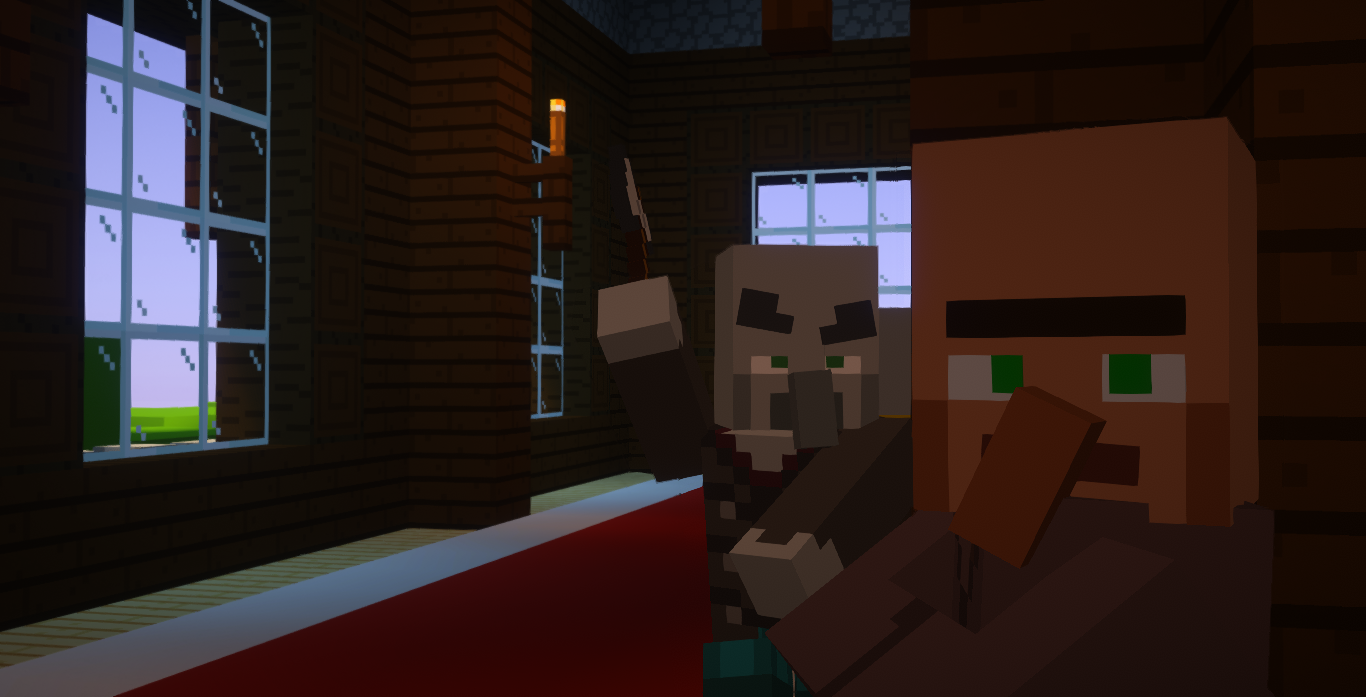
Features
The following list of features applies to the latest version of the modpack (2.0.0):
★ Main
- Shaders with customized by hand settings to make the gameplay as similar as possible to the Minecraft trailers
- Textures inspired by the trailers
- 88% of mobs with animations inspired by the trailers
- Great performance
👁 Visual
- New particles for ambience, cave dust and others
- New water effects (splashes, droplets, ripples, waterfall clouds and mist, ...)
- Bubble particles in the water rise to the surface of the water and pop
- Chests open underwater emit bubbles
Glow squids hypnotize (attract the cursor)(temporarily removed in 2.0.0)- First-person camera more realistic (toggleable)
- You can see your body on first-person view (toggleable by pressing F6)
- Screen shakes effects (for explosions, Warden roars and sonic booms, Ravager roars and Ender Dragon roars)
- Snow under the trees
- Cloud formations similar to those in trailers
- Soul fire appears correctly when a player is on fire
- Arrows with 2D model similarly to the trailers
Mobs don't flash red when hitted, as in the trailers(temporarily removed in 2.0.0)- Fluids fade in the void
- Animated chunk generation
♫ Audio
- Sounds physics
- New ambient and footstep sounds
- New sound effects when opening interfaces, moving items in inventories, changing the active hotbar slot, dropping items, typing in chat, earning achievements...
- More Villager speech sounds
〰 Animations
- Player with more animations
- Animations for block placement inspired by the trailers
- Animations for block breaking
- Eating animations
- Boats,
chestsand minecarts with animations Doors, gates, trapdoors and levers with animations(temporarily removed in 1.1.0)- Interfaces with animations when opened and closed
- Items are animated when carried and hovered over in the inventory
- Falling blocks are rotated to the direction they're falling towards
☰ Other
- Dynamic hotbar, allowing an appreciation of the game's visuals (toggleable by pressing H)
- Enhanced 3rd person view
- Main Menu background is now an animation, based on the Minecraft official videos outro
- Animated intro when you enter the game, based on the official Mojang Studios logo animation
- Fish swim in schools
- Better bossbars textures
- Armor is rendered in first-person view
- Details about armor in the armor bar
- Potency indicator and countdown overlay in status effect icons
- Controller support
- LAN servers can be opened for anyone you want
- Chat is animated and has new features such as being able to copy messages.
- Messages are indicated with player heads
- Resource packs, datapacks, servers and worlds are now draggable
- Searchable keybinds
- OptiFine capes support
- Z-fighting fixes
- And more...
In addition to the shaders, other mods have their configurations customized by hand to better fit the modpack.
Inside the Trailer is currently only available on Modrinth. Don't download it from another source.
Project description from Modrinth.
Pick your setup
Inside the Trailer by Minecraft version and loader
Choose the version and loader you play, then open the matching release.
Minecraft version
1.20.1
2 loader buildsMade local changes? Try them in a copied instance before touching a world you care about.
Recent files
Inside the Trailer versions and loaders
Quilt1.20.1 release
Quilt1.20.1 release
Quilt1.20.1 release
Quilt1.20.1 release
Looking for an older file? The official Modrinth project page is in Resources.
 modpack
 CurseForge · Minecraft
An MC Adventure: Dysfunctional Edition
BigChadGuys Plus with extra stuff
 modpack
 Modrinth · Minecraft
Turtle's Auxiliar Modpack
26.2 stable - A liteweight, optimize and auxiliar for Vanilla Minecraft's performance Modpack, For Fabric and Quilt!
 modpack
 Modrinth · Minecraft
Arcomua Cloth
A beautiful and high-performance modpack with lots of optimizations, utilities and QoLs to the vanilla. No content mods and gameplay modifications.