Minecraft version
Back to modpacks 
Modrinth · Minecraft modpack
GFB Lite
Trimmed down version of GFB Vanilla Utilities, performance enhancement, immersive features - general use client-side modpack Designed for GFB Network
Choose a version Pick your version below, then grab the matching file.
Quick answer
Which GFB Lite release should I use?
Latest stable file GFB Lite 2.3.0
Game version 1.20.1
Loader Fabric 0.14.22
GFB Lite 2.3.0 is a complete pack release for 1.20.1 with Fabric 0.14.22. Install it as its own launcher instance. If the creator publishes a separate server file, make sure it names this exact pack release. 42 mods in this pack file.
Pack setup
How should I set up GFB Lite for players and a server?
Use GFB Lite 2.3.0 as the pack version. Install the pack as its own launcher instance. The creator’s listing does not name a separate server file, so check the release notes before setting up a dedicated server. Do not upload the ordinary client folder blindly.
Client instance Install GFB Lite 2.3.0
Dedicated server setup Match GFB Lite 2.3.0
Pack loader Fabric 0.14.22
A pack is a matched client and server setup, not one mod with an install-side label. Keep its release, loader, manifest and overrides together.
Referenced mods 42
Client only 0
Server only 0
Not labelled 42
These numbers come from the pack file you chose. “Not labelled” means we don’t know which side it belongs on—not that it is safe everywhere. The file count is not a RAM estimate.
What are the server requirements for GFB Lite?
GFB Lite 2.3.0. Change the pack release and its contents or setup may change too.
The selected pack release is GFB Lite 2.3.0. That file is for Minecraft 1.20.1 with Fabric 0.14.22. It contains 42 mod projects. The creator’s listing does not name a separate server file. Check their notes before using one, and do not upload an ordinary client folder or rebuild the pack mod by mod. A file count cannot tell us the right RAM, CPU or storage; size the server for the players and world you actually run.
About this project
What kind of pack is GFB Lite?
GFB Lite
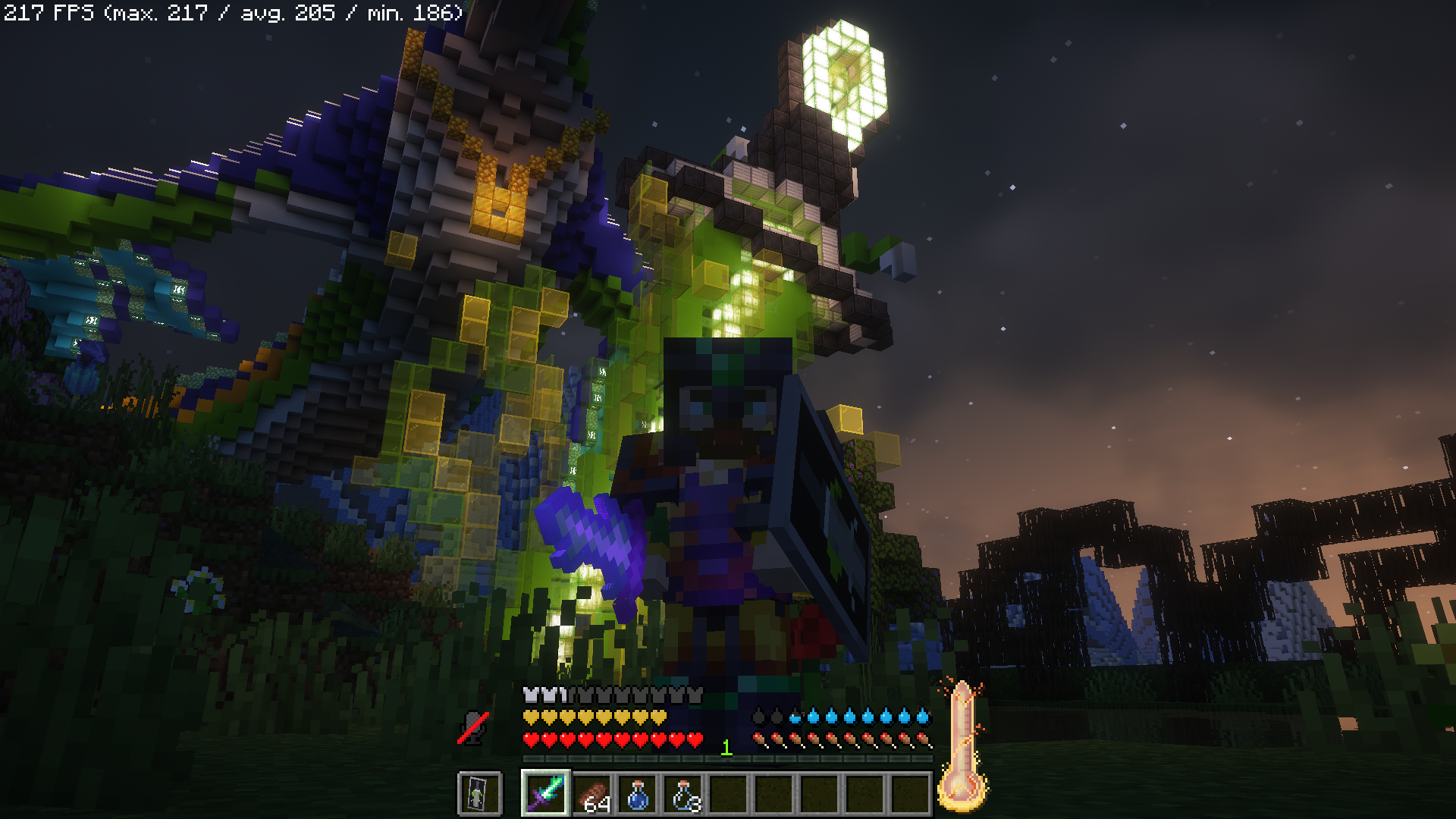
Included Shaders -- Complimentary Reimagined 2. Thank you to EminGTR for permission
Press K to activate shaders
Trimmed down version of GFB Vanilla
https://modrinth.com/modpack/gfb-vanilla
This is a general utility and performance enhancement modpack with many features.
It was designed to be the official client side modpack for GFB Network, but it is well suited for any single player or multiplayer experience that allows the included mods. If you use this pack on GFB Network, it adds many integrated features with our vanilla servers. Some supported features include proximity voice chat, itemswapper for creative builds, and Litematica for easily constructing complex builds in survival.
Server IP: GreenFlameblade.com
Discord: https://discord.gg/jD6ud6B9Vr
Key Binds
C -> Zoom (scroll to zoom further)
Z -> Zoom Minimap
M -> World Map
R -> Itemswapper
X -> Emote Wheel
V -> Mute Proximity Voicechat
J -> Voicechat settings
K -> Toggle shaders
**** -> Toggle chest search bar
Extra Credits
Complimentary Reimagined 2 Shaders
Some Major Features
Audio and Visual Enhancements
- Realistic sound physics with echoes and muffling (works with proximity voicechat)
- Ambient surroundings adds lots of environmental sounds such as birds and wind
- Advanced texture options such as connected textures and Optifine-like features
- Included shaders by EminGTR
Proximity Voicechat
- Speak to other players on compatible servers using proximity voice chat with realistic sound raytracing
Project description from Modrinth.
Pick your setup
GFB Lite by Minecraft version and loader
Choose the version and loader you play, then open the matching release.
Made local changes? Try them in a copied instance before touching a world you care about.
Recent files
GFB Lite versions and loaders
Fabric 0.14.221.20.18.0.312+7 release
Fabric1.20.1 release
Looking for an older file? The official Modrinth project page is in Resources.
 modpack
 CurseForge · Minecraft
Ashen Realms SMP
This is a Dark Fantasy RPG modpack
 modpack
 CurseForge · Minecraft
lots of gun
adds guns and a lot of guns
 modpack
 CurseForge · Minecraft
Dragons Of ARK
((Recommended RAM: 6–8 GB))Welcome to Isle of Dragons! Step into a world where dragons rule the skies and adventure waits beyond every island. Isle of Dragons is a Minecraft modpack created for our HTTYD-inspired roleplay experience