Minecraft version
Back to modpacks 
Modrinth · Minecraft modpack
SBModernized (SkyBlock)
Experience Hypixel SkyBlock with optimization, beauty, and quality-of-life
Choose a version Pick your version below, then grab the matching file.
Quick answer
Which SBModernized (SkyBlock) release should I use?
Latest stable file SBModernized 2.0.0
Game version 1.21.10
Loader Fabric 0.18.4
SBModernized 2.0.0 is a complete pack release for 1.21.10 with Fabric 0.18.4. Install it as its own launcher instance. If the creator publishes a separate server file, make sure it names this exact pack release. 57 mods in this pack file.
Pack setup
How should I set up SBModernized (SkyBlock) for players and a server?
Use SBModernized 2.0.0 as the pack version. Install the pack as its own launcher instance. The creator’s listing does not name a separate server file, so check the release notes before setting up a dedicated server. Do not upload the ordinary client folder blindly.
Client instance Install SBModernized 2.0.0
Dedicated server setup Match SBModernized 2.0.0
Pack loader Fabric 0.18.4
A pack is a matched client and server setup, not one mod with an install-side label. Keep its release, loader, manifest and overrides together.
Referenced mods 57
Client only 36
Server only 1
Not labelled 20
These numbers come from the pack file you chose. “Not labelled” means we don’t know which side it belongs on—not that it is safe everywhere. The file count is not a RAM estimate.
What are the server requirements for SBModernized (SkyBlock)?
SBModernized 2.0.0. Change the pack release and its contents or setup may change too.
The selected pack release is SBModernized 2.0.0. That file is for Minecraft 1.21.10 with Fabric 0.18.4. It contains 57 mod projects. The creator’s listing does not name a separate server file. Check their notes before using one, and do not upload an ordinary client folder or rebuild the pack mod by mod. A file count cannot tell us the right RAM, CPU or storage; size the server for the players and world you actually run.
About this project
What kind of pack is SBModernized (SkyBlock)?
[ PROJECT DISCONTINUED ]
I've left Skyblock and don't plan on maintaining this modpack. The license is just a slightly modified MIT License, you can use this project however you like.
SBModernized
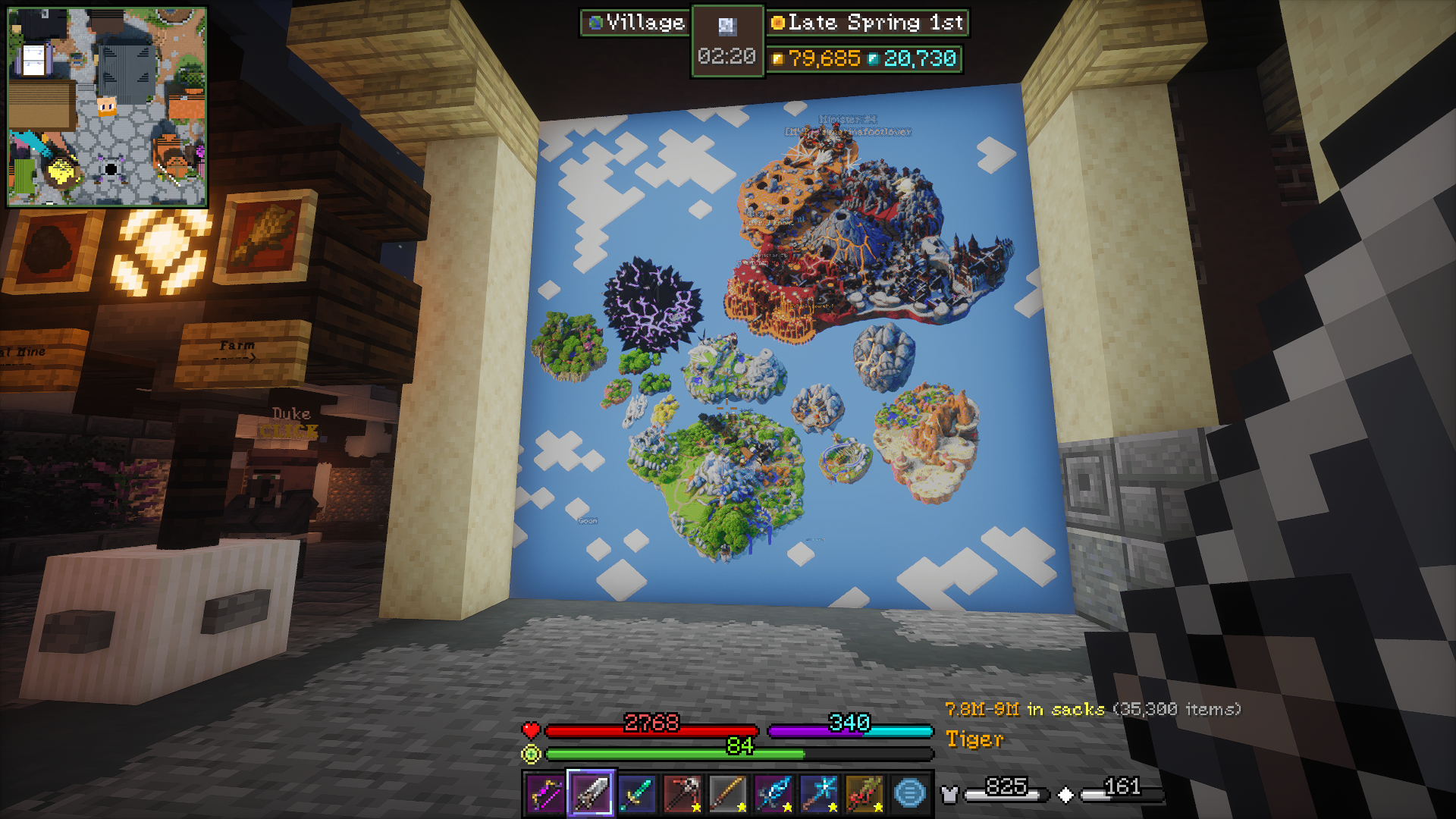
A modpack designed specifically for Hypixel SkyBlock on modern versions.
Goodbye, 1.8.9, you will be missed...
The SBModernized mod-pack will be developed over time to be optimized, pretty, and modifiable.
Bellow is a list of all mods and resource-packs that are purely visual which you may disable, from most potential performance impact to least (not everyone has a great PC).
Purely Cosmetic Mods and Resource-Packs
Note: Iris Shaders is not included as the shaders are disabled by default in-game.
High Performance Impact
- Detailed Animations (res)
- Sound Physics Remastered
- Particular Reforged
- Particle Rain
Partial Performance Impact
- Bobby
- Cool Rain
- Visuality
- Essential
- FA: Spiders (res)
- Furfsky Reborn (res)
- SkyCubed
Miniscular Performance Impact
- AmbientSounds
- Better Clouds
- Chat Heads
- FancyMenu
- Model Gap Fix
- Mod Menu
- Sodium Extra
How to Use
This modpack is intended to be out-of-box play, but here I'll have helpful tips and potential issues you may run into.
Requirements
- Memory:
- [Minimum] 6 GB RAM (3 GB Allocated)
- [Recommended] 12 GB RAM (6 GB Allocated)
- Storage: 1 GB available storage
Setup
- Open this page in the Modrinth App or Prism Launcher and install your desired version of the pack.
- Set allocated memory to at least 2.5 GB, or use the recommended settings. Be sure to not set it too high and that third-party applications aren't taking too much of your memory (common culprits are browsers and Discord).
- Modrinth App:
Gear Icon > Java and Memory > Memory allocated - Prism Launcher:
Edit > Settings > Java > Memory - 2560 MB Minimum Allocated
- 6-8 GB RAM: 3 GB Allocated
- 12-16 GB RAM: 6 GB Allocated
- 24-32 GB RAM: 8 GB Allocated
- Modrinth App:
- You can also set a custom window size or set fullscreen if desired, then start the game.
- Before joining Hypixel, you should go to
Options > Resource Packs, optionally enabled/disable any you like or dislike, then clickDoneto be sure all the resource packs load properly. - You can change some settings before starting, but to change certain settings involving UI for mods like Skyblocker, SkyHanni, etc. you must join Hypixel SkyBlock.
Now you should be ready to just play! If you are playing in a resolution other than 1920x1080 you can change the UI as you go, referring to the below tips if needed.
Resource Packs
It's recommended that you keep all the packs as-is, but here are the purposes of some of the packs.
- FurfSky Reborn, Sophie's Enchant Books, and Arkudii's Detailed Skyblock are all highly recommended (if you have poor performance, please try disabling other visual mods or packs first). FurfSky is one of the largest SkyBlock item resource packs with textures for almost every custom item in SkyBlock. Sophie's Enchant Books help distinguish enchantment books' textures, making organization much easier. Arkudii's Detailed Skyblock is smaller, but adds some additional improvements to the environments that I believe will be well appreciated.
- FreshAnimations and its add-ons are for more lively mob animations. Pretty well optimized and should work fine in most situations. This is purely preference.
- Detailed Animations has beautiful player animations, which also apply to NPCs and some enemies. Not as optimized as other packs, disable if needed.
- Crops & Foliage Variations is for prettier crops. May have a performance hit on the garden or farm, but it seems to be well optimized.
- Serified Font is another preference thing. Has no performance impact and functions perfectly in all the UIs, and to some may look a lot better than Vanilla.
Try to keep the resource packs in their default order.
Visuals & Audio
Resolution
Because SBModernized was made for 1920x1080 monitors and optimized for my mid-level PC, other resolutions and PCs may need many changes to the HUD and graphics settings.
There will be screenshots of different areas of the game with notes on which parts of the HUD are from what mods.
Shaders
They work with a good PC; not high-end level but better than most.
If the shaders don't run well for you, I recommend primarily playing with them off, then toggling the shaders with K when you want some nicer scenery while Fishing, Foraging, or Hunting.
Clouds
For optimization, clouds are disabled on all the default shaders and we instead use Better Clouds, which still look good without being taxing on performance.
Sound Physics
One included mod, Sound Physics, will not be for everyone. Set Friendly Mob and Hostile Mob sounds to 40%, then disable Sound Physics if you don't like the audio (you can do this in the config or in the modrinth content menu).
User-Interface
SkyHanni: Use key Backslash in-game to modify some of the hud. This will likely need lots of editing if you use a resolution other than 1920x1080. It's UI includes the Custom Scoreboard, Sacks value display, location pathing, and more.
SkyBlocker: Use command /widget to modify SkyBlocker's Tablist widgets and some of its hud. Also /skyblocker for several other options, including /skyblocker bars for customizing the bars above the hotbar.
SkyCubed: Use command /skycubed to access SkyCubed's settings. You can also drag its map and info display (box with current time) by opening chat.
Controls
Common Keybinds: Go to Options > Controls > Key Binds then use the search bar to find specific binds or browse all.
SkyBlocker Shortcuts: Use command /skyblocker shortcuts then scroll down to change any keybinds you wish to, including adding or removing any (note: press 'Esc' after setting any keybind).
Below are some notable keybinds (_all command binds are in SkyBlocker).
- M: Open Map (Skycubed)
- Left Alt (hold): Show tab secondary view (Skyblocker)
- C: Equipment Menu
/equipment - G: Bags Menu
/bags - H: Hunting Box
/huntingbox - B: Booster Cookie Menu
/boostercookie - U: Wardrobe Menu
/wardrobe - I: Storage Menu
/storage - P: Pets Menu
/pets - Backslash (\): Modify Skyhanni HUD
- Numpad 0: Warp Menu
/warp - Numpad Period: Warp to Hub
/hub
See all default keybinds in the Default Options config
More Info
Please report any issues you have to the GitHub page with details on how they may have occured, how to recreate the issue, what configs you've modified, etc. Please be sure you're on the latest version, that the issue isn't already submitted, and that the issue isn't exclusive to a single mod (in which case you must open an issue on the mod's page not SBM's).
Project description from Modrinth.
Mods in SBModernized 2.0.0
Open any mod on Modpacks.ch to check its files and dependencies.
AmbientSounds_FABRIC_v6.3.1_mc1.21.10.jar SHA-1
f1e7c239202077b893053a9a2659bc370f06d3ab · Modrinth version 9UZcOpFp · Project link unavailable Client onlyarchitectury-18.0.8-fabric.jar SHA-1
6df5474fa07d4c1225ee625ecdd7b958a9f5c2b5 · Modrinth version 9eRDsZKH · Project link unavailable Side not labelledArmor_Hud-3.0-1.21.10.jar SHA-1
4b87dbe5537f8f425db12f75a0b6a09b611bc4d3 · Modrinth version nrxWwgoj · Project link unavailable Client onlyBadOptimizations-2.4.1-1.21.10.jar SHA-1
1afd5c9c6a1d5970285d1b08af1fa6c7585842dc · Modrinth version dOFYYhIv · Project link unavailable Client onlybalm-fabric-1.21.10-21.10.11.jar SHA-1
6a7a8d104453aeceae8eb0a76944f64b32810665 · Modrinth version 9HjDG5Uj · Project link unavailable Side not labelledbetter-clouds-1.11.1-alpha+1.21.9-fabric.rev.e63efe2.jar SHA-1
2f116ee039159f3388887c899d9195d5105a5065 · Modrinth version P2WbcGkt · Project link unavailable Client onlychat_heads-1.2.0-fabric-1.21.9.jar SHA-1
676dda820664ea8146de8bd0d172df160d5d6046 · Modrinth version wVCxUI4s · Project link unavailable Client onlychatpatches-8.0-alpha.7+1.21.10-fabric.jar SHA-1
d5f4692d5292109a0f8b1eea9d41763b484fd4e5 · Modrinth version D36wvTmc · Project link unavailable Client onlycloth-config-20.0.149-fabric.jar SHA-1
c86e380bdac24e4ecdd148558e9d4ddf32c86059 · Modrinth version qMxkrrmq · Project link unavailable Side not labelledConfigManager-fabric-1.21.x-1.1.1.jar SHA-1
9ea08cbfeca54a94afb92edf8b1b95396fb48129 · Modrinth version 1gNhkJ1O · Project link unavailable Server onlyControlling-fabric-1.21.10-28.0.2.jar SHA-1
ace0dea512824afb5870e3222fec6cfa291bf411 · Modrinth version FEy417jo · Project link unavailable Client onlycoolrain-1.3.1-1.21.10.jar SHA-1
bbf383462e815a6986c28f3a35acded76338fcaf · Modrinth version 4X997uit · Project link unavailable Side not labelledCreativeCore_FABRIC_v2.14.7_mc1.21.9.jar SHA-1
34fd748a8ddc319316f15023805e0592a6981709 · Modrinth version w3HjbqwI · Project link unavailable Side not labelledcwb-fabric-3.0.0+mc1.21.5.jar SHA-1
b663eb9a8238be3cd71173e39b6f9d01d0948c1d · Modrinth version wXhtL4fb · Project link unavailable Client onlydefaultoptions-fabric-1.21.10-21.10.1.jar SHA-1
d42dfd18b508085daccd1948c172790baec7da6c · Modrinth version gRtw5ugo · Project link unavailable Client onlydynamic-fps-3.11.4+minecraft-1.21.9-fabric.jar SHA-1
912c582475c5671d71487e23762a2db290ceb666 · Modrinth version mc61L2WN · Project link unavailable Client onlyentity_model_features_1.21.9-fabric-3.0.11.jar SHA-1
53e9e49cb52ce337b4e833222e8df976067b8a0c · Modrinth version QAiZMgOn · Project link unavailable Client onlyentity_texture_features_1.21.9-fabric-7.0.8.jar SHA-1
77c8fbe264ed02696ed1f3021daa427de49210a3 · Modrinth version gXx0WqTS · Project link unavailable Client onlyentityculling-fabric-1.9.5-mc1.21.10.jar SHA-1
4c866322b6c5e0781bbf709d3216381de234ee89 · Modrinth version zwBaFdjH · Project link unavailable Client onlyEssential_1-3-10-4_fabric_1-21-10.jar SHA-1
e0447e1342c80a3a110aec0fbd04f501dcd54cbc · Modrinth version t9nNPgPA · Project link unavailable Client onlyfabric-api-0.138.4+1.21.10.jar SHA-1
0345c20b71007521a25b393091adeb45328d7c57 · Modrinth version tV4Gc0Zo · Project link unavailable Side not labelledfabric-language-kotlin-1.13.8+kotlin.2.3.0.jar SHA-1
05fe02fe61232c4ddea4059e8103281424d5a2bd · Modrinth version N6D3uiZF · Project link unavailable Side not labelledfancymenu_fabric_3.8.2_MC_1.21.10.jar SHA-1
cf2ffda9a5ac1bd0016b0d7790cba7ff269b718c · Modrinth version wQfYaY3H · Project link unavailable Side not labelledferritecore-8.1.0-fabric.jar SHA-1
fbc854f0a30657a0f8b4a5c79ce6580f3f8fbea9 · Modrinth version bPLllEgi · Project link unavailable Side not labelledFirmament-43.0.0+mc1.21.10.jar SHA-1
969fe55357f0bd3a597e77f4b0d91506faeb5033 · Modrinth version LTrDSXXB · Project link unavailable Client onlyForgeConfigAPIPort-v21.10.1+mc1.21.10-Fabric.jar SHA-1
1335a32984357a39d9c8cf5faba9e9b5c3e1f80d · Modrinth version IKHTwwTv · Project link unavailable Side not labelledGamma-Utils-2.4.9+mc1.21.10.jar SHA-1
855c88cf0a01aa97f9b92368f71babc943e816d7 · Modrinth version QA7Jdm3C · Project link unavailable Client onlyImmediatelyFast-Fabric-1.13.5+1.21.10.jar SHA-1
4c51b05f08693df1636945b3823d122c432b7757 · Modrinth version ntac1Na0 · Project link unavailable Client onlyiris-fabric-1.9.7+mc1.21.10.jar SHA-1
f96d48791a372edb0fa3adfc80848c4f27eae737 · Modrinth version a98UkgML · Project link unavailable Client onlykonkrete_fabric_1.9.13_MC_1.21.10.jar SHA-1
b6d89fe7f542c7f05bb6a7a4c6573225f255a284 · Modrinth version kLTIGlRD · Project link unavailable Side not labelledlibjf-3.19.4+backport.jar SHA-1
f7173c5b7ab3cc6e9b1b9851bd77c245ee11c8c3 · Modrinth version sMCcYngo · Project link unavailable Side not labelledlithium-fabric-0.20.1+mc1.21.10.jar SHA-1
7d44f5da9c690bbf1bd6d65c1acc81db5cf7f8c6 · Modrinth version NsswKiwi · Project link unavailable Side not labelledmelody_fabric_1.0.14_MC_1.21.10.jar SHA-1
46e439abfe66794c18bb9d4a9c857d0b00da29df · Modrinth version 4nd52KsY · Project link unavailable Client onlymidnightlib-fabric-1.9.2+1.21.10.jar SHA-1
bc1380e91496319504c20d3d41e31a758ad6f6cb · Modrinth version VoGY1DpA · Project link unavailable Side not labelledmodelfix-1.21.10-1.12-fabric.jar SHA-1
6902ab0bc41ee2db516b61667a8998dc4045dc2f · Modrinth version WzvHpi86 · Project link unavailable Client onlymodmenu-16.0.0.jar SHA-1
55994722875c4b071b31dcb6f3c9cba8818f3391 · Modrinth version QuU0ciaR · Project link unavailable Client onlymoreculling-fabric-1.21.9-1.5.0-beta.2.jar SHA-1
3ab31aec861c6bcade87f7e9317d1ca2ac7a19f3 · Modrinth version nASRyMbu · Project link unavailable Client onlyMouseTweaks-fabric-mc1.21.9-2.29.jar SHA-1
e6816dd7a2f61deca930c6787a04b74afb91249f · Modrinth version ULOi34Uh · Project link unavailable Client onlypacketfixer-fabric-3.3.4-1.21.10.jar SHA-1
a45c91155f7dc5c6ffab5039d13f7a1f80e64e8f · Modrinth version MFMXBzuX · Project link unavailable Side not labelledparticlerain-4.0.0-beta.5+1.21.9-fabric.jar SHA-1
8be8511c121e542bc0f0b6cd1ca366e0095d303c · Modrinth version CfVqj6qx · Project link unavailable Client onlyparticular-1.21.10-Fabric-1.3.1.jar SHA-1
67e091a739e98133c22dc7702909fd679a8f73c7 · Modrinth version OyXZoFkA · Project link unavailable Client onlyplaceholder-api-2.8.2+1.21.10.jar SHA-1
bbdc920ecff993148cd6e81a208536132245ce40 · Modrinth version qxjzQ9xY · Project link unavailable Side not labelledpuzzle-fabric-2.3.0+1.21.10.jar SHA-1
6a78af39c841e7970db263f164a857ba6580ace7 · Modrinth version cCPOJCl5 · Project link unavailable Client onlyreeses-sodium-options-fabric-1.8.6+mc1.21.10.jar SHA-1
55db55556d81a3b68f8f1d08a74ab00c127f3886 · Modrinth version nUGhyPwZ · Project link unavailable Client onlyResourcePackOverrides-v21.10.1-mc1.21.10-Fabric.jar SHA-1
3de80e26a77b1fc232f7bdbea61f52aff04a4c97 · Modrinth version p4jNAqPH · Project link unavailable Client onlyrespackopts-4.14.0.jar SHA-1
129fdfbec24d1324099eebf3caa11fa764c0168e · Modrinth version 77bvDS07 · Project link unavailable Side not labelledRoughlyEnoughItems-21.9.813-fabric.jar SHA-1
53b64099d314ceb1044f0cb1caadbadc38d79e51 · Modrinth version UqNkL18H · Project link unavailable Side not labelledSearchables-fabric-1.21.10-1.0.2.jar SHA-1
8280f0f5421ff13de052a413b88dadef7a50b540 · Modrinth version tV7Ai2Tq · Project link unavailable Client onlyskyblocker-6.0.0-beta.2+1.21.10.jar SHA-1
895f52735c0b6783d6dc8dec87ec8f569d7e5a9f · Modrinth version lB9Cu1qr · Project link unavailable Client onlySkyCubed-1.8.1-1.21.10.jar SHA-1
9595af349fd3e39388feaa79ca4e45280680be59 · Modrinth version NlailQnE · Project link unavailable Client onlySkyHanni-6.16.0-mc1.21.10.jar SHA-1
7072cd17f195f46aa004cd79ba62f74760a6d73f · Modrinth version 44ACBilB · Project link unavailable Client onlysodium-extra-fabric-0.7.1+mc1.21.10.jar SHA-1
c5243648eda711f87febe22f0ecbe86323541b1c · Modrinth version 8CGTW5B3 · Project link unavailable Client onlysodium-fabric-0.7.3+mc1.21.10.jar SHA-1
1c3ffa862d9fa4479abf67a88527907d60237248 · Modrinth version sFfidWgd · Project link unavailable Client onlysound-physics-remastered-fabric-1.21.10-1.5.1.jar SHA-1
d769c66cfc403d2efc25a25867e68e923bdb2e42 · Modrinth version pDo1ElL2 · Project link unavailable Side not labelledtooltip-scroll-1.5.1+1.21.10.jar SHA-1
cf4adde9c92d15f1817ee6126ee794633ea1ca9e · Modrinth version gBczTI9h · Project link unavailable Client onlyvisuality-0.7.11+1.21.9.jar SHA-1
0829e54722ffa7fa6d91ecca22907755c9d30829 · Modrinth version Dn8vJ9j6 · Project link unavailable Client onlyyet_another_config_lib_v3-3.8.2+1.21.10-fabric.jar SHA-1
7c629ee66648c8b28f51b29ddff22fea79fc6cfb · Modrinth version skcT0J9K · Project link unavailable Side not labelledPick your setup
SBModernized (SkyBlock) by Minecraft version and loader
Choose the version and loader you play, then open the matching release.
Minecraft version
1.21.8
1 loader buildMade local changes? Try them in a copied instance before touching a world you care about.
Recent files
SBModernized (SkyBlock) versions and loaders
Fabric 0.18.41.21.108.0.312+7 release
Fabric1.21.8 release
Fabric1.21.8 release
Fabric1.21.8 release
Fabric1.21.8 release
Fabric1.21.8 release
Fabric1.21.8 release
Fabric1.21.8 release
Looking for an older file? The official Modrinth project page is in Resources.
 modpack
Modrinth · Minecraft
Dungeons & Crafting
Jump into a world of Swords, Sorcery, and Exploration with a Vanilla+ feel!
 modpack
CurseForge · Minecraft
Realms Collide Eternal
A challenging RPG modpack
 modpack
CurseForge · Minecraft
Cobblemon Kestramon - Free Cinematic Pokemon Server (Story, Talking NPCs, Animated Battles, Raids, Gyms)
Free Cobblemon 1.8.4 Pokemon server, always updated | Cinematic story & NPCs who really talk | Animated battle intros | Gyms, Tier 1-7 Raids, Mega Evolution | Boss Tower & Battle Maison | Events, GTS, Booster Packs | Join mc.kestramon.com