Minecraft version
Back to modpacks 
Modrinth · Minecraft modpack
Fastly Optimised
A modpack to enhance the performance of Pojavlauncher, MojoLauncher, Amethyst Launcher, Pojav Zenith Horizon (Zalith Launcher), Zalith Launcher2, Hello Launcher, FoldCraft Launcher, SolCraft Launcher and Low-End-PCs.
Choose a version Pick your version below, then grab the matching file.
Quick answer
Which Fastly Optimised release matches 1.21.9 NeoForge?
beta file [1.21.9] Fastly Optimised+NEOFORGE(Sodium)
Game version 1.21.9
Loader NeoForge 21.9.16-beta
[1.21.9] Fastly Optimised+NEOFORGE(Sodium) is a complete pack release for 1.21.9 with NeoForge 21.9.16-beta. Install it as its own launcher instance. If the creator publishes a separate server file, make sure it names this exact pack release. For this loader, use Java 21. 7 mods in this pack file.
Pack setup
How should I set up Fastly Optimised for players and a server?
Use [1.21.9] Fastly Optimised+NEOFORGE(Sodium) as the pack version. Install the pack as its own launcher instance. The creator’s listing does not name a separate server file, so check the release notes before setting up a dedicated server. Do not upload the ordinary client folder blindly.
Client instance Install [1.21.9] Fastly Optimised+NEOFORGE(Sodium)
Dedicated server setup Match [1.21.9] Fastly Optimised+NEOFORGE(Sodium)
Pack loader NeoForge 21.9.16-beta
Java version Java 21
A pack is a matched client and server setup, not one mod with an install-side label. Keep its release, loader, manifest and overrides together.
Referenced mods 7
Client only 0
Server only 0
Not labelled 7
These numbers come from the pack file you chose. “Not labelled” means we don’t know which side it belongs on—not that it is safe everywhere. The file count is not a RAM estimate.
What are the server requirements for Fastly Optimised?
[1.21.9] Fastly Optimised+NEOFORGE(Sodium) on 1.21.9 NeoForge. The pack contents and setup notes below stay tied to that release.
The selected pack release is [1.21.9] Fastly Optimised+NEOFORGE(Sodium). That file is for Minecraft 1.21.9 with NeoForge 21.9.16-beta. This NeoForge setup needs Java 21. It contains 7 mod projects. The creator’s listing does not name a separate server file. Check their notes before using one, and do not upload an ordinary client folder or rebuild the pack mod by mod. A file count cannot tell us the right RAM, CPU or storage; size the server for the players and world you actually run.
About this project
What kind of pack is Fastly Optimised?
A modpack for fps boosting.
Supports Pojavlauncher,SolCraft Launcher,Amythest Launcher,MojoLauncher,Zalith Launcher,Zalith Launcher 2,Pojav-Glow-Worm,Hello Launcher,FoldCraft Launcher and Low-End-PCs
I made the modpack especially Pojavlauncher
Needs to use LTW renderer,Zink renderer,Krypton renderer and MobileGlues renderer.
Includes FPS Boosting
Includes Performance Boosting
Included Mods
- AppleSkin
- Dynamic Fps
- Entity-Culling
- Fabric Api
- Fabric Language Kotlin
- FerriteCore
- Immediately-Fast
- Lithium
- Mod-Menu
- YetAnothetConfigLib
- Zume
- Zoomify
Major FPS Mods
There are many FPS Boost mods are like:
- Optifine with Optifabric
- Canvas Renderer
- Sodium
- Rubidium
- Embeddium
- Vulkan Mod
Supports almost every Optifine Features
Required
If you are playing Pojavlauncher,Zalith Launcher,FoldCraft Launcher
You'll need to use LTW,MobileGlues,Krypton or Zink Renderer
From PC's? You'll don't need that
Important (Sodium)
Using Sodium less then 1.16.5 Will require Krypton or Zink Renderer.
Important VulkanMod)
Vulkan Mod for Version 1.21.11 requires 0.1.0 library to run. Upper version will work without libraries. Recommended Using Amethyst,Zalith,Zalith2 for running Vulkan version 1.21.11 or up. Using Vulkan Mod 1.21.11 or more will require Vulkan 1.2 and Vulkan Dynamic Rendering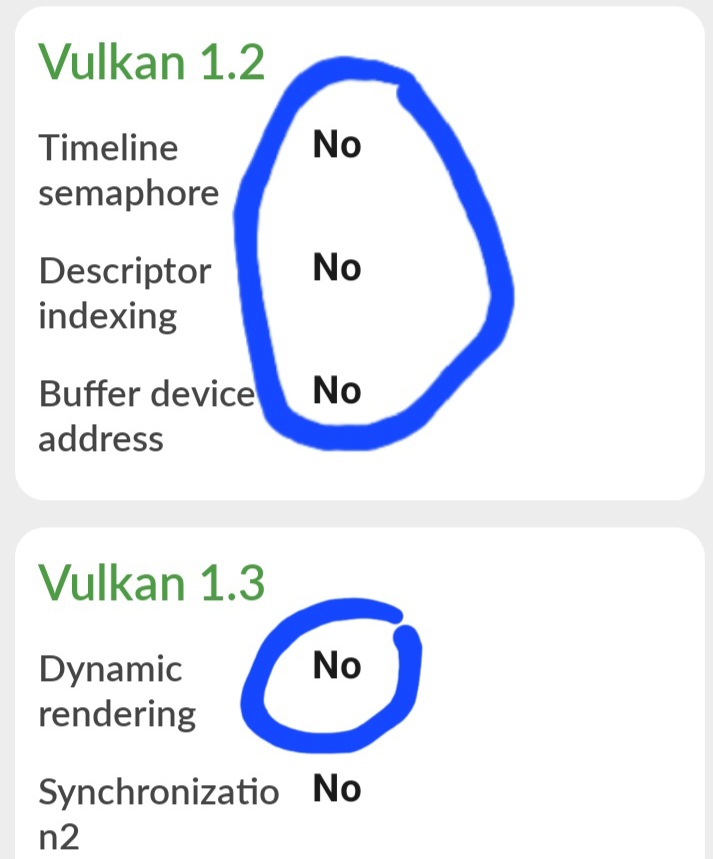
(Picture from DevCheck)
It is a device which doesn't support Vulkan 1.2 and Vulkan Dynamic Rendering. So It wont run Vulkan mod.
for Vulkan Mod 1.21.10, you need luck and at least Vulkan 1.1 to run Some device can run this mod without Vulkan 1.0. Vulkan Android Libraries 0.2.0 or 0.1.0 to run
Project description from Modrinth.
Pick your setup
Fastly Optimised by Minecraft version and loader
Choose the version and loader you play, then open the matching release.
Minecraft version
26.2
4 loader buildsForge [26.2] Fastly Optimised+FORGE{OpenGL} 0
stable files
· 1 total · 18 Jun 2026Fabric v2[26.1.2] Fastly Optimised+FABRIC(Sodium){OpenGL} 1
stable file
· 3 total · 18 Jun 2026Quilt [26.2] Fastly Optimised+QUILT(Sodium){OpenGL} 1
stable file
· 1 total · 11 Jul 2026NeoForge [26.2] Fastly Optimised+NEOFORGE(Sodium){OpenGL} 0
stable files
· 1 total · 17 Jun 2026
Minecraft version
26.1.2
4 loader buildsForge [26.1.2] Fastly Optimised+FORGE 0
stable files
· 1 total · 22 May 2026Fabric [26.1.2] Fastly Optimised+FABRIC(Vulkan-Mobile)read changelog 2
stable files
· 2 total · 28 May 2026Quilt [26.1.2] Fastly Optimised+QUILT(Sodium) 1
stable file
· 1 total · 22 May 2026NeoForge [26.1.2] Fastly Optimised+NEOFORGE(Sodium) 1
stable file
· 1 total · 22 May 2026
Minecraft version
26.1.1
4 loader buildsForge [26.1.1] Fastly Optimised+FORGE 0
stable files
· 1 total · 28 May 2026Fabric [26.1.1] Fastly Optimised+FABRIC(Vulkan-Mobile)read changelog 2
stable files
· 2 total · 28 May 2026Quilt [26.1.1] Fastly Optimised+QUILT(Sodium) 1
stable file
· 1 total · 27 May 2026NeoForge [26.1.1] Fastly Optimised+NEOFORGE(Sodium) 1
stable file
· 1 total · 28 May 2026
Minecraft version
26.1
4 loader buildsForge [26.1.1] Fastly Optimised+FORGE 0
stable files
· 1 total · 28 May 2026Fabric [26.1] Fastly Optimised+QUILT(Vulkan-Mobile)read changelog 2
stable files
· 2 total · 28 May 2026Quilt [26.1] Fastly Optimised+QUILT(Sodium) 1
stable file
· 1 total · 28 May 2026NeoForge [26.1.1] Fastly Optimised+NEOFORGE(Sodium) 1
stable file
· 1 total · 28 May 2026
Minecraft version
25w14craftmine
1 loader buildMinecraft version
24w14potato
1 loader buildMinecraft version
1.21.11
4 loader buildsForge [1.21.11] Fastly Optimised+FORGE 0
stable files
· 1 total · 5 Mar 2026Fabric [1.21.11] Fastly Optimised+FABRIC(Vulkan-Mobile)read changelog 2
stable files
· 2 total · 29 May 2026Quilt [1.21.11] Fastly Optimised+QUILT(Sodium) 0
stable files
· 1 total · 5 Mar 2026NeoForge [1.21.11] Fastly Optimised+NEOFORGE(Sodium) 0
stable files
· 1 total · 5 Mar 2026
Minecraft version
1.21.10
4 loader buildsForge [1.21.10] Fastly Optimised+FORGE(Optifine) 1
stable file
· 2 total · 28 May 2026Fabric [1.21.10] Fastly Optimised+FABRIC(Vulkan-Mobile) 3
stable files
· 3 total · 28 May 2026Quilt [1.21.10] Fastly Optimised+QUILT(Sodium) 0
stable files
· 1 total · 5 Mar 2026NeoForge [1.21.10] Fastly Optimised+NEOFORGE(Sodium) 1
stable file
· 1 total · 5 Mar 2026
Minecraft version
1.21.9
4 loader buildsForge [1.21.9] Fastly Optimised+FORGE 0
stable files
· 1 total · 28 May 2026Fabric [1.21.9] Fastly Optimised+FABRIC(Vulkan-Mobile) 0
stable files
· 2 total · 28 May 2026Quilt [1.21.9] Fastly Optimised+QUILT(Sodium) 0
stable files
· 1 total · 28 May 2026NeoForge [1.21.9] Fastly Optimised+NEOFORGE(Sodium) 0
stable files
· 1 total · 28 May 2026
Minecraft version
1.21.8
4 loader buildsForge [1.21.8] Fastly Optimised+FORGE(Optifine) 0
stable files
· 1 total · 29 May 2026Fabric [1.21.8] Fastly Optimised+FABRIC(Sodium) 0
stable files
· 1 total · 4 Dec 2025Quilt [1.21.8] Fastly Optimised+QUILT(Sodium) 1
stable file
· 1 total · 29 May 2026NeoForge [1.21.8] Fastly Optimised+NEOFORGE(Sodium) 1
stable file
· 1 total · 29 May 2026
Minecraft version
1.21.7
4 loader buildsForge [1.21.7] Fastly Optimised+FORGE 0
stable files
· 1 total · 29 May 2026Fabric [1.21.7] Fastly Optimised+FABRIC(Sodium) 0
stable files
· 1 total · 4 Dec 2025Quilt [1.21.7] Fastly Optimised+QUILT(Sodium) 1
stable file
· 1 total · 29 May 2026NeoForge [1.21.7] Fastly Optimised+NEOFORGE(Sodium) 1
stable file
· 1 total · 29 May 2026
Showing the newest 12 of 20 game versions. Older files are in the list below.
Made local changes? Try them in a copied instance before touching a world you care about.
Recent files
Fastly Optimised versions and loaders
NeoForge 21.9.16-beta1.21.98.0.312+7 beta
Looking for an older file? The official Modrinth project page is in Resources.
 modpack
 CurseForge · Minecraft
VitalityCraft – Vanilla Essentials [New 26.1.2]
Vitality Craft enhances your Minecraft experience with essential mods that introduce new biomes, objects, mobs, and performance improvements. Dive into a more diverse and challenging world while enjoying smoother gameplay with optimized performance.
 modpack
 CurseForge · Minecraft
Best Vanilla World 2 - New Vanilla 26.1.2!
Experience a better Minecraft journey with new adventures, diverse biomes, powerful creatures, and advanced crafting systems that elevate your game.
 modpack
 CurseForge · Minecraft
ChillCraft - CC1
Just a Chill modpack | Shaders | Distant Horizons | The best for your Minecraft phase | Enhanced Vanilla | Optimized