Minecraft version
Back to modpacks 
Modrinth · Minecraft modpack
Fastly Optimised
A modpack to enhance the performance of Pojavlauncher, MojoLauncher, Amethyst Launcher, Pojav Zenith Horizon (Zalith Launcher), Zalith Launcher2, Hello Launcher, FoldCraft Launcher, SolCraft Launcher and Low-End-PCs.
Choose a version Pick your version below, then grab the matching file.
Quick answer
Which Fastly Optimised release matches 26.2 NeoForge?
beta file [26.2] Fastly Optimised+NEOFORGE(Sodium){OpenGL}
Game version 26.2
Loader NeoForge 26.2.0.1-beta
[26.2] Fastly Optimised+NEOFORGE(Sodium){OpenGL} is a complete pack release for 26.2 with NeoForge 26.2.0.1-beta. Install it as its own launcher instance. If the creator publishes a separate server file, make sure it names this exact pack release. 12 mods in this pack file.
Pack setup
How should I set up Fastly Optimised for players and a server?
Use [26.2] Fastly Optimised+NEOFORGE(Sodium){OpenGL} as the pack version. Install the pack as its own launcher instance. The creator’s listing does not name a separate server file, so check the release notes before setting up a dedicated server. Do not upload the ordinary client folder blindly.
Client instance Install [26.2] Fastly Optimised+NEOFORGE(Sodium){OpenGL}
Dedicated server setup Match [26.2] Fastly Optimised+NEOFORGE(Sodium){OpenGL}
Pack loader NeoForge 26.2.0.1-beta
A pack is a matched client and server setup, not one mod with an install-side label. Keep its release, loader, manifest and overrides together.
Referenced mods 12
Client only 8
Server only 1
Not labelled 3
These numbers come from the pack file you chose. “Not labelled” means we don’t know which side it belongs on—not that it is safe everywhere. The file count is not a RAM estimate.
What are the server requirements for Fastly Optimised?
[26.2] Fastly Optimised+NEOFORGE(Sodium){OpenGL} on 26.2 NeoForge. The pack contents and setup notes below stay tied to that release.
The selected pack release is [26.2] Fastly Optimised+NEOFORGE(Sodium){OpenGL}. That file is for Minecraft 26.2 with NeoForge 26.2.0.1-beta. It contains 12 mod projects. The creator’s listing does not name a separate server file. Check their notes before using one, and do not upload an ordinary client folder or rebuild the pack mod by mod. A file count cannot tell us the right RAM, CPU or storage; size the server for the players and world you actually run.
About this project
What kind of pack is Fastly Optimised?
A modpack for fps boosting.
Supports Pojavlauncher, SolCraft Launcher, Amythest Launcher, MJLauncher, MojoLauncher, Zalith Launcher, Droid Bridge Launcher, Turtle Launcher, Battly Launcher, CS Launcher, Hyper Launcher, Zalith Launcher 2, Pojav-Glow-Worm, Copper Launcher, Hello Launcher, FoldCraft Launcher and Low-End-PCs
I made the modpack especially Pojavlauncher
Needs to use LTW renderer,Zink renderer,Krypton renderer and MobileGlues renderer.
Includes FPS Boosting
Includes Performance Boosting
Included Mods
- AppleSkin
- Dynamic Fps
- Entity-Culling
- Fabric Api
- Fabric Language Kotlin
- FerriteCore
- Immediately-Fast
- Lithium
- Mod-Menu
- YetAnothetConfigLib
- Zume
- Zoomify
Major FPS Mods
There are many FPS Boost mods are like:
- Optifine with Optifabric/Optifineoforge
- Canvas Renderer
- Sodium
- Rubidium
- Embeddium
- Vulkan Mod
For Optifine
Some device might have problem koading it
Important (VulkanMod)
Some Android doesn't support VulkanMod
You will need Vulkan Api support 1.2 (for 1.20 to 1.21.10) and Vulkan 1.2 with Dynamic Rendering Support (for 1.21.11 and up)
Vulkan Mod for Version 1.21.11 requires 0.1.0 library to run. Upper version will work without libraries. Recommended Using Amethyst,Zalith,Zalith2 for running Vulkan version 1.21.11 or up. Using Vulkan Mod 1.21.11 or more will require Vulkan 1.2 and Vulkan Dynamic Rendering
Required
If you are playing Pojavlauncher,Zalith Launcher,FoldCraft Launcher
You'll need to use LTW,MobileGlues,Krypton or Zink Renderer
From PC's? You'll don't need that
Important (Sodium/Rubidium/Embeddium)
Using Sodium less then 1.16.5 Will require Krypton or Zink Renderer.
For Some device (mostly samsung), Sodium deesn't work (Just doesn't)
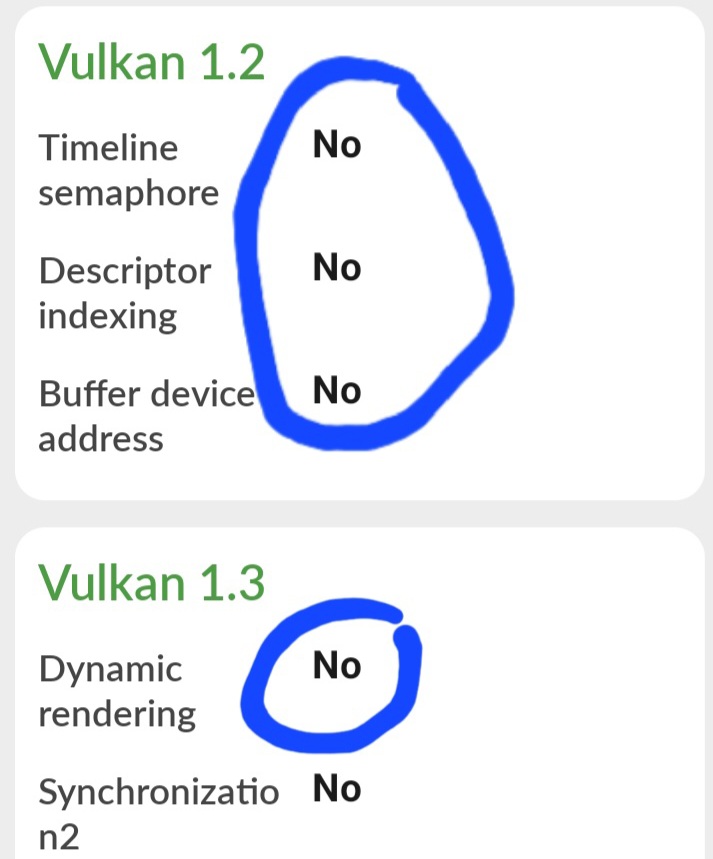
(Picture from DevCheck)
It is a device which doesn't support Vulkan 1.2 and Vulkan Dynamic Rendering. So It wont run Vulkan mod.
for Vulkan Mod 1.21.10, you need luck and at least Vulkan 1.1 to run Some device can run this mod without Vulkan 1.0. Vulkan Android Libraries 0.2.0 or 0.1.0 to run
Project description from Modrinth.
Mods in [26.2] Fastly Optimised+NEOFORGE(Sodium){OpenGL}
Open any mod on Modpacks.ch to check its files and dependencies.
BadOptimizations-2.4.1-26.2-forge.jar SHA-1
1c20191b8dcce3442039f1466d1a18d1feb431f7 · Modrinth version IDYkXahy · Project link unavailable Optional Client onlyClumps-neoforge-26.2-26.2.1.jar SHA-1
afb2dff9ca5a0415606b0cae92c8ca04b2c9bf80 · Modrinth version FPYWjnnE · Project link unavailable Optional Side not labelledCrashAssistant-neoforge-26.2-1.11.10.jar SHA-1
37e6778cf021365dca2e26b0cd2152b1ebadcee1 · Modrinth version S4tJ6bt2 · Project link unavailable Optional Client onlydynamic-fps-3.11.9+minecraft-26.2.0-neoforge.jar SHA-1
32dfe949d65c30b963c52595a2eef69ab22a2fa5 · Modrinth version NIDCSqrK · Project link unavailable Optional Client onlyfast-ip-ping-v1.0.11-mc26.1.2.jar SHA-1
6b69eaa6323da9f7933206d55cdb09ea3299cde3 · Modrinth version H7KycYXE · Project link unavailable Optional Client onlyKsyxis-1.4.3.jar SHA-1
6f4b2ea7827da8136bdf436457a2ba3fcdb2120e · Modrinth version kL32PN9Q · Project link unavailable Optional Server onlylithium-neoforge-0.25.0+mc26.2.jar SHA-1
d80b5cc65d41dd1845537c2431e2e45258f529c1 · Modrinth version QeEyF9xT · Project link unavailable Optional Side not labelledpuzzle-neoforge-2.3.1+26.2.jar SHA-1
fef50cb6af91dbfdc5df64d0400d8a5a355f4f18 · Modrinth version chCN1n3A · Project link unavailable Optional Client onlyreeses-sodium-options-neoforge-2.0.5+mc26.2.jar SHA-1
c120e009937b619dba765d3059596adace541136 · Modrinth version eWnglTHU · Project link unavailable Optional Client onlyScalableLux-0.2.1+neoforge.729d9d3-all.jar SHA-1
df202004ea9f83e2feb97c9deab29122f8197fd6 · Modrinth version I6jcny72 · Project link unavailable Optional Side not labelledsodium-extra-neoforge-0.8.8+mc26.2.jar SHA-1
ebb8e012a497c0d8b0e05abe667581709e77c69d · Modrinth version yAgfZ6To · Project link unavailable Optional Client onlysodium-neoforge-0.9.0+mc26.2.jar SHA-1
87343ae58926df08a73138c681320d9c71bba429 · Modrinth version 5dWEDeL4 · Project link unavailable Optional Client onlyPick your setup
Fastly Optimised by Minecraft version and loader
Choose the version and loader you play, then open the matching release.
Minecraft version
26.4-snapshot-9
1 loader buildMinecraft version
26.4-snapshot-8
1 loader buildMinecraft version
26.4-snapshot-7
1 loader buildMinecraft version
26.4-snapshot-6
1 loader buildMinecraft version
26.4-snapshot-5
1 loader buildMinecraft version
26.4-snapshot-4
1 loader buildMinecraft version
26.4-snapshot-3
1 loader buildMinecraft version
26.4-snapshot-2
1 loader buildMinecraft version
26.4-snapshot-1
1 loader buildMinecraft version
26.3-snapshot-1
1 loader buildMinecraft version
26.3
4 loader buildsForge [26.3] Fastly Optimised+FORGE(Sodium){OpenGL} 2
stable files
· 4 total · 19 Nov 2026Fabric v2[26.3] Fastly Optimised+FABRIC(Sodium){OpenGL} 2
stable files
· 3 total · 27 Oct 2026Quilt [26.3] Fastly Optimised+QUILT(Sodium){OpenGL} 1
stable file
· 1 total · 18 Sept 2026NeoForge [26.3] Fastly Optimised+NEOFORGE(Sodium){OpenGL} 1
stable file
· 1 total · 17 Sept 2026
Showing the newest 12 of 34 game versions. Older files are in the list below.
Made local changes? Try them in a copied instance before touching a world you care about.
Recent files
Fastly Optimised versions and loaders
NeoForge 26.2.0.1-beta26.28.0.312+7 beta
Looking for an older file? The official Modrinth project page is in Resources.
 modpack
Modrinth · Minecraft
QoL Client
Lighting fast performance and Quality of Life, all in a convenient and completely client-side package.
 modpack
Modrinth · Minecraft
Optimized Core
This is a modpack core that optimizes the game. Mainly meant as a base for your own modpack/instance. It only contains optimization mods and for this reason it achives the BEST performance of any modpack!
 modpack
Modrinth · Minecraft
Great FPS
Great FPS is a lightweight Fabric optimization modpack designed to dramatically improve Minecraft performance, reduce lag, and boost FPS on low-end PCs while preserving the vanilla gameplay experience.