Minecraft version
Back to modpacks 
Modrinth · Minecraft modpack
Optidium
A Modpack focused on performance while using OptiFine's most crucial features.
Choose a version Pick your version below, then grab the matching file.
Quick answer
Which Optidium release should I use?
Latest stable file Optidium 1.19.4 v2-40r
Game version 1.19.4
Loader Fabric 0.16.14
Optidium 1.19.4 v2-40r is a complete pack release for 1.19.4 with Fabric 0.16.14. Install it as its own launcher instance. If the creator publishes a separate server file, make sure it names this exact pack release. 36 mods in this pack file.
Pack setup
How should I set up Optidium for players and a server?
Use Optidium 1.19.4 v2-40r as the pack version. Install the pack as its own launcher instance. The creator’s listing does not name a separate server file, so check the release notes before setting up a dedicated server. Do not upload the ordinary client folder blindly.
Client instance Install Optidium 1.19.4 v2-40r
Dedicated server setup Match Optidium 1.19.4 v2-40r
Pack loader Fabric 0.16.14
A pack is a matched client and server setup, not one mod with an install-side label. Keep its release, loader, manifest and overrides together.
Referenced mods 36
Client only 25
Server only 0
Not labelled 11
These numbers come from the pack file you chose. “Not labelled” means we don’t know which side it belongs on—not that it is safe everywhere. The file count is not a RAM estimate.
What are the server requirements for Optidium?
Optidium 1.19.4 v2-40r. Change the pack release and its contents or setup may change too.
The selected pack release is Optidium 1.19.4 v2-40r. That file is for Minecraft 1.19.4 with Fabric 0.16.14. It contains 36 mod projects. The creator’s listing does not name a separate server file. Check their notes before using one, and do not upload an ordinary client folder or rebuild the pack mod by mod. A file count cannot tell us the right RAM, CPU or storage; size the server for the players and world you actually run.
About this project
What kind of pack is Optidium?
What is Optidium?🔎
Optidium is a modpack that gives you high performance even on potato PCs. This is achieved by using performance mods such as the infamous sodium mod and immediatlyFast. This modpack favours performance rather than QoL. It features strong support for older versions of Minecraft like 1.19.4 and 1.18.2 with the most updated mods!
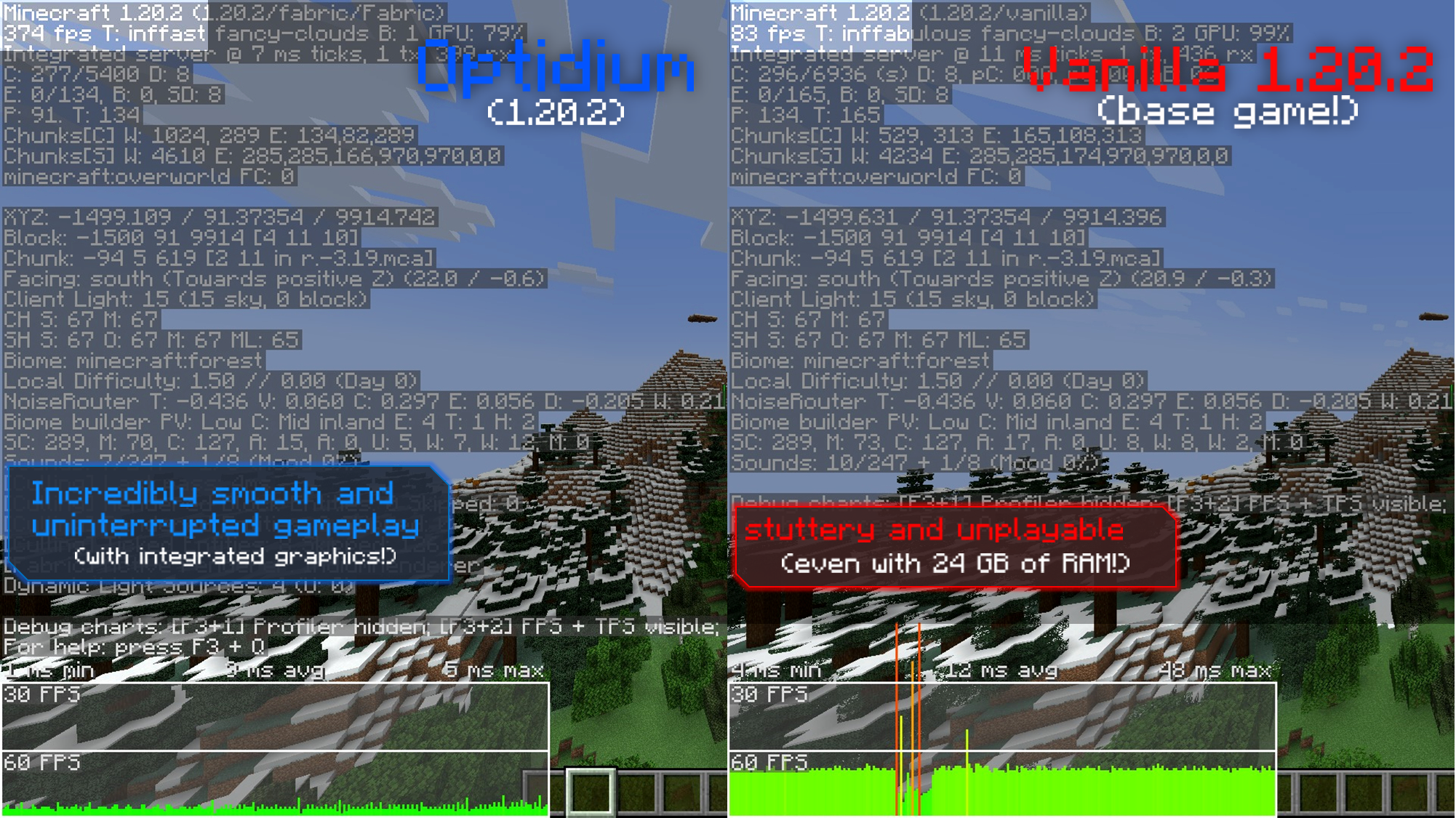
Taken on an Optiplex 7060 (Low end PC) specs can be found here
Why is it called Optidium? 🎇
Optidium is called Optidium because it uses Sodium and but uses features from OptiFine, such as the zoom feature and connected textures. Sodium often boosts performance better than OptiFine on most PCs as they use a much newer way to render objects which greatly improves frame rates and stuttering while fixing many graphical issues.
Does Optidium support shaders? 💡
Optidium does support shaders as it uses Iris. Iris uses a method known as Shadow Frustum Culling to reduce the cost of one of a shader's major performance limiters which is of course shadows, and this allows iris to run better than OptiFine's built in shaders on most PCs
Optidium vs some of the best Modpacks for Fps 🏅
Taken on an Optiplex 7060 (Low end PC) specs can be found here. No shaders are used and performance varies between devices. These were taken on 1.20.1.
| Modpack | Biome | FPS (Avg.) |
|---|---|---|
| Optidium | Desert | 213-227 Fps (Fluctuation) |
| Sodium + | Desert | 133-160 Fps (Fluctuation) |
| Boosted Fps | Desert | 183-195 Fps (Fluctuation) |
| Simply Optimized (SO) | Desert | 210-218 Fps (Fluctuation) |
| Modpack | Biome | FPS (Avg.) |
|---|---|---|
| Optidium | Jungle | 158-161 Fps (Fluctuation) |
| Sodium + | Jungle | 108-114 (Fluctuation) |
| Boosted Fps | Jungle | 134 Fps (No Fluctuation) |
| Simply Optimized (SO) | Jungle | 120-136 Fps (Fluctuation) |
| Modpack | Biome | FPS (Avg.) |
|---|---|---|
| Optidium | Dark Forest | 202-217 Fps (Fluctuation) |
| Sodium + | Dark Forest | 125-136 Fps (Fluctuation) |
| Boosted Fps | Dark Forest | 166-182 Fps ( Fluctuation) |
| Simply Optimized (SO) | Dark Forest | 179-182 Fps (Fluctuation) |
Have any suggestion or issues with my modpack? Just post it on GitHub through here. Not all mods will be used on all versions of Optidium and some other mods might be used in the future Quick specs: List of mods that are used 📜
All tests taken on a Optiplex 7060 SFF
Project description from Modrinth.
Pick your setup
Optidium by Minecraft version and loader
Choose the version and loader you play, then open the matching release.
Minecraft version
1.21
1 loader buildMinecraft version
1.20.4
1 loader buildMinecraft version
1.20.3
1 loader buildMinecraft version
1.20.2
1 loader buildMinecraft version
1.20.1
1 loader buildMinecraft version
1.19.4
1 loader buildMinecraft version
1.18.2
1 loader buildMade local changes? Try them in a copied instance before touching a world you care about.
Recent files
Optidium versions and loaders
Fabric 0.16.141.19.48.0.312+7 release
Fabric1.21.5 release
Fabric1.21.5 beta
Fabric1.21 release
Fabric1.20.4 release
Fabric1.20.3 release
Fabric1.20.1 release
Fabric1.19.4 release
Fabric1.18.2 release
Fabric1.20.2 release
Fabric1.20.1 release
Fabric1.19.4 release
Looking for an older file? The official Modrinth project page is in Resources.
 modpack
 Modrinth · Minecraft
Sachi's fps Client
This pack is a general mix of performance and QoL mods that are completely client side allowing for great performance even on low end laptops.
 modpack
 Modrinth · Minecraft
Mx Boost
This is Modpack by Mx inspire, personal fps + basic utility modpack . You can use this to increase your fps .
 modpack
 Modrinth · Minecraft
TNIF (TECHNOLOGICAL INFECTION)
This modpack features many technology mods with the main threat being a fungal infection.