
 mod
mod CurseForge · Hytale
RivRavs's Lombax Arsenal
A fan-made Hytale mod inspired by the Ratchet & Clank universe that adds Lombax-style weapons, crates, bolts, and technology to the game.
CurseForge · Hytale mod
A cross-server portal mod. Place a portal block, set the destination in a GUI, and let players walk through to transfer between servers.
Quick answer
We could not find enough file information to pick a stable Hytale setup for ServerPortals.
Where it goes
Do not install it as a separate client mod. Enable it on the world host—the local server in singleplayer or the dedicated server in multiplayer.
Put Hytale mods on the world host or dedicated server. Singleplayer runs a local server too; Hytale does not use separate client mods.
Choose a release before relying on this list.
This file does not give us a dependency list. Check the creator notes before installing.
This file does not list any required or optional project dependencies. Check the creator notes before changing an existing world.
Before you install it
We could not pick a file, so treat this as a checklist—not a compatibility promise.
We could not pick a stable file here. Check the game version and loader on the official project page before installing anything.
This file does not give us a dependency list. Check the creator notes before installing.
Do not install it as a separate client mod. Enable it on the world host—the local server in singleplayer or the dedicated server in multiplayer.
There is no download page for this exact file. Open the project page in Resources and choose the matching release there.
About this project
A cross-server portal mod. Place a portal block, set the destination, and let players walk through to transfer between servers. Perfect for server networks and hub servers.
No configuration files needed. Each portal stores its destination address in block metadata. Just place the latest ServerPortals-x.x.x.jar in your server's mods/ directory.
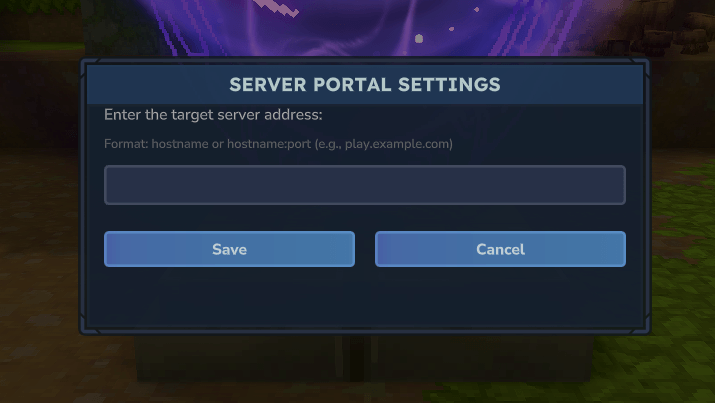
/giveportal command orPlace a portal in the world
Interact with the portal (F key) to open the configuration GUI
Enter the target server address (e.g., play.example.com)
Click Save
Walk into a configured portal to be transferred to the target server.
Portals without a configured address do nothing when entered.
/giveportal: Gives you the Create Server Portal itemserverportals.portal.create: Allows creating server portals and using /giveportalPlayers without this permission cannot open the portal settings GUI or use the /giveportal command. They can still use existing portals to transfer to other servers.
Our Hytale Server Docker image installs and updates CurseForge mods automatically.
Project description from CurseForge.
Recent files
No release information is currently available.
Looking for an older file? The official CurseForge project page is in Resources.
modA fan-made Hytale mod inspired by the Ratchet & Clank universe that adds Lombax-style weapons, crates, bolts, and technology to the game.
 mod
modAdds a brand-new Labyrinth Dimension featuring a vast desert surface and an endless maze stretching deep below. Discover unique locations and face a variety of dangerous new enemies as you explore its depths!
 mod
modPlotSquared-style plot world for Hytale: claim & protect plots, merge any shape, per-plot weather/time, trust/visitor rights, transfer, plus creature & liquid anti-grief — all via a clickable /plot menu.