
Hytale version
Back to mods 
CurseForge · Hytale mod
Items Magnet
Increase items pickup range and attraction speed.
Choose a version Pick your version below, then grab the matching file.
Quick answer
Which Items Magnet release should I use?
Latest stable file PJ-HyperPickup-1.2.6.jar
Game version 0.6
Mod system Built-in Hytale mod system
Items Magnet PJ-HyperPickup-1.2.6.jar targets 0.6. Do not install it as a separate client mod. Enable it on the world host—the local server in singleplayer or the dedicated server in multiplayer. No required dependencies listed for this file.
Where it goes
Where should Items Magnet be installed in Hytale?
Do not install it as a separate client mod. Enable it on the world host—the local server in singleplayer or the dedicated server in multiplayer.
Separate client mod Not supported
World host / dedicated server Required
Mod system for this release Built-in Hytale mod system
Required install it here Optional supported, not mandatory Not supported do not install here Source doesn’t say do not assume
Put Hytale mods on the world host or dedicated server. Singleplayer runs a local server too; Hytale does not use separate client mods.
What else does Items Magnet PJ-HyperPickup-1.2.6.jar need?
PJ-HyperPickup-1.2.6.jar. Change the file and its required mods may change too.
This file does not list any required mods. Do not add a library just because a different file uses it.
This file does not list any required or optional project dependencies. Check the creator notes before changing an existing world.
Before you install it
Add Items Magnet without breaking your instance.
Built for Items Magnet PJ-HyperPickup-1.2.6.jar. Pick another file and the loader, install side or required mods may change.
- 01
Stick to this file
Use PJ-HyperPickup-1.2.6.jar. It targets 0.6; another release may target a different game build or dependency set.
- 02
Bring the mods it needs
This file does not list any required mods. Do not add a library just because a different file uses it.
- 03
Enable it on the world host
Do not install it as a separate client mod. Enable it on the world host—the local server in singleplayer or the dedicated server in multiplayer.
- 04
Pick the file you checked
Use the “Get this file” button beside PJ-HyperPickup-1.2.6.jar. It opens that exact file at the source.
About this project
What does Items Magnet add?
A Hytale mod that increases item pickup range and speed.
✅ Features
- Extended Pickup Range: Collect items from further away.
- Adjustable Speed: Control how fast items fly towards you.
- Toggleable: Enable or disable the mod on the fly with a simple command.
- Configuration Persistence: Your settings (range, speed, and enabled status) are automatically saved to a config file and restored on server restart.
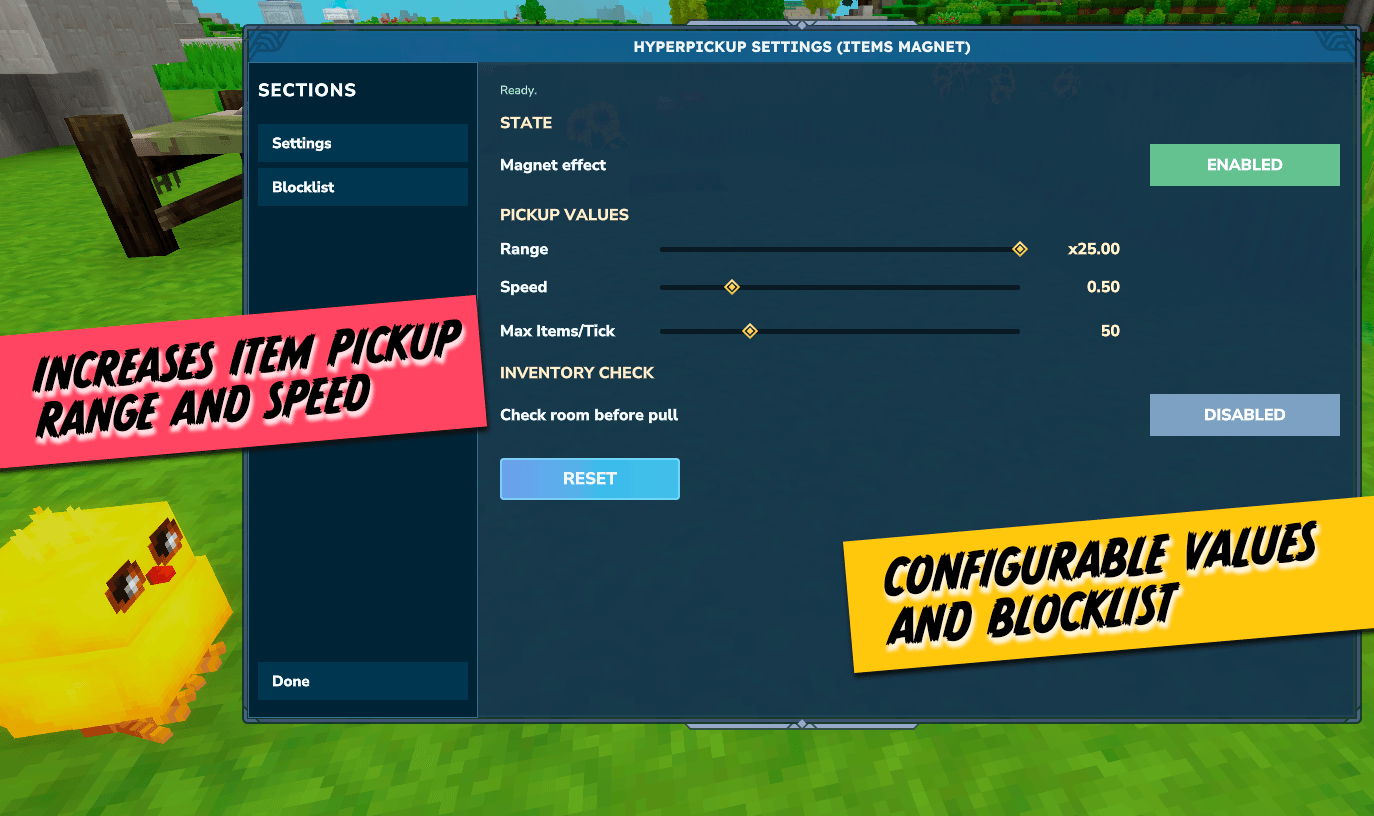
💻 Commands
Usage
- Toggle Mod Turns the magnet functionality on or off.
/hp toggle
- Set Pickup Range Adjusts the radius around the player where items will be attracted.
- Min:
1.0x(Default Hytale range) - Max:
25.0x - Default:
5.0x
- Min:
/hp range <value>
Example: /hp range 5.0
- Set Pickup Speed Adjusts the velocity at which items travel towards the player.
- Min:
0.25(Slow float) - Max:
1.5(Fast zip) - Default:
1.0
- Min:
/hp speed <value>
Example: /hp speed 1.0
- Check Status Running the main command without arguments (or with invalid ones) will display the current status and values.
/hp
⚠️ You may need to activate op with /op self to use this mod's commands

Project description from CurseForge.
Pick your setup
Items Magnet releases for each Hytale build.
Choose the version and loader you play, then open the matching release.
Hytale version
0.5
1 loader buildCheck the dependencies, then try the file in a copied instance before changing a world you care about.
Recent files
Items Magnet releases and Hytale builds
PJ-HyperPickup-1.2.6.jar
9 Sept 2026
Client Not supported Server Required Dependencies No extras listed Listed on Project page
Check the 0.6 setup 0.6 release
PJ-HyperPickup-1.2.5.jar
27 Aug 2026
Client Not supported Server Required Dependencies No extras listed Listed on Project page
Check the 0.6 setup 0.6 release
PJ-HyperPickup-1.2.4.jar
15 Aug 2026
Client Not supported Server Required Dependencies No extras listed Listed on Project page
Check the 0.5 setup 0.5 release
PJ-HyperPickup-1.2.3.jar
31 Jul 2026
Client Not supported Server Required Dependencies No extras listed Listed on Project page
Check the 0.5 setup 0.5 release
PJ-HyperPickup-1.2.2.jar
20 Jul 2026
Client Not supported Server Required Dependencies No extras listed Listed on Project page
Check the 0.5 setup 0.5 release
PJ-HyperPickup-1.2.1.jar
4 Jul 2026
Client Not supported Server Required Dependencies No extras listed Listed on Project page
Check the 0.5 setup 0.5 release
PJ-HyperPickup-1.2.0.jar
11 Jun 2026
Client Not supported Server Required Dependencies No extras listed Listed on Project page
Check the 0.5 setup 0.5 release
PJ-HyperPickup-1.1.9.jar
26 May 2026
Client Not supported Server Required Dependencies No extras listed Listed on Project page
Check the 0.5 setup 0.5 release
PJ-HyperPickup-1.1.8.jar
21 May 2026
Client Not supported Server Required Dependencies No extras listed Listed on Project page
Check the setup PJ-HyperPickup-1.1.7.jar
2 May 2026
Client Not supported Server Required Dependencies No extras listed Listed on Project page
Check the setup PJ-HyperPickup-1.1.6.jar
22 Apr 2026
Client Not supported Server Required Dependencies No extras listed Listed on Project page
Check the setup PJ-HyperPickup-1.1.5.jar
16 Apr 2026
Client Not supported Server Required Dependencies No extras listed Listed on Project page
Check the setup Looking for an older file? The official CurseForge project page is in Resources.
 mod
mod CurseForge · Hytale
Glowing armors
Adds glowing and light emitting variants for standard armors
 mod
mod CurseForge · Hytale
Hyper Furnace
Speed up the furnace with upgrade tiers that also add more input and output slots!
 mod
mod CurseForge · Hytale
Paxels
Versatile paxel multi-tools combining pickaxe and hatchet properties