Alec's Tamework!
Mob taming framework and asset patcher. Breeding, traits, leveling, tame management UI, easier interaction chains, capture/spawn items that store metadata, ownership/tamed status, lots of behavior components and more!
CurseForge · Hytale mod
Configure is a utility library that allows plugins to easily make a GUI for the configs.
Quick answer
We could not find enough file information to pick a stable Hytale setup for Configure.
Where it goes
Do not install it as a separate client mod. Enable it on the world host—the local server in singleplayer or the dedicated server in multiplayer.
Put Hytale mods on the world host or dedicated server. Singleplayer runs a local server too; Hytale does not use separate client mods.
Choose a release before relying on this list.
This file does not give us a dependency list. Check the creator notes before installing.
This file does not list any required or optional project dependencies. Check the creator notes before changing an existing world.
Before you install it
We could not pick a file, so treat this as a checklist—not a compatibility promise.
We could not pick a stable file here. Check the game version and loader on the official project page before installing anything.
This file does not give us a dependency list. Check the creator notes before installing.
Do not install it as a separate client mod. Enable it on the world host—the local server in singleplayer or the dedicated server in multiplayer.
There is no download page for this exact file. Open the project page in Resources and choose the matching release there.
About this project
Configure parses a given codec for a config and generates a UI for that codec. To use it, just wrap your config in this plugin's WrappedConfig class and register it. You should only access your config via this wrapped config. E.g.
wrappedConfig = new WrappedConfig<>( PartyConfig.CODEC, withConfig(PartyConfig.CODEC), new ConfigMetadata("PartyChat"));registerConfig(wrappedConfig);
Then, users will see your mod show up when they run /config.
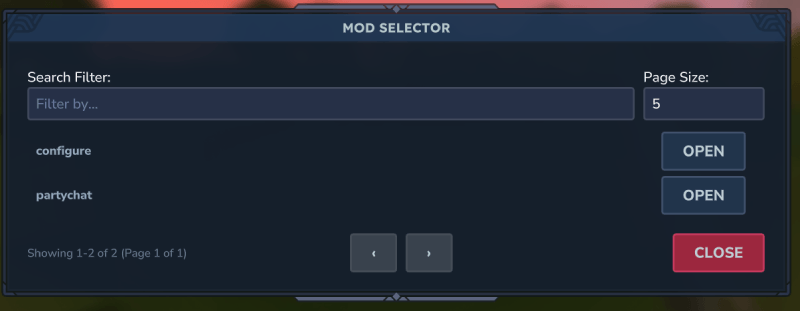
Editing a mod looks like
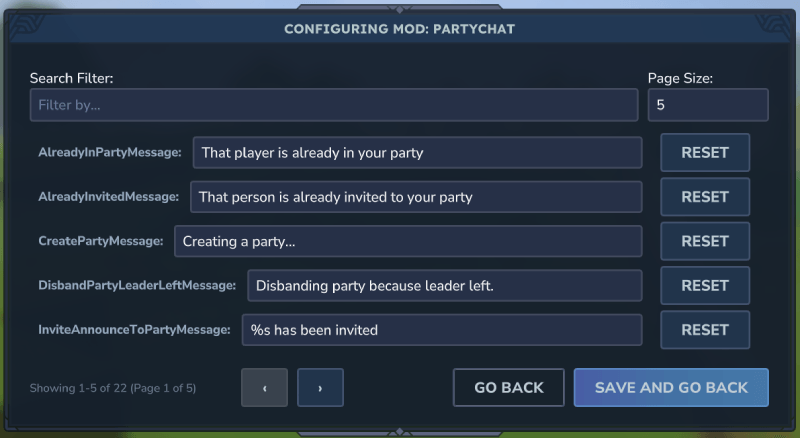
\
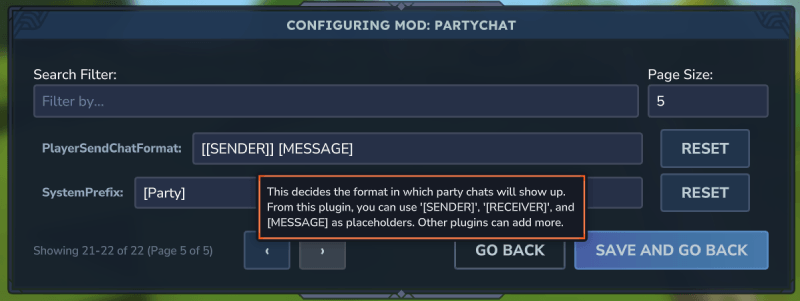
You can add documentation to your codec entries so that they show up as a tooltip. E.g.
.append( new KeyedCodec<>("PlayerSendChatFormat", BuilderCodec.STRING), PartyConfig::setPlayerSendChatFormat, PartyConfig::getPlayerSendChatFormat).documentation("This decides the format in which party chats will show up. From this plugin, " + "you can use '[SENDER]', '[RECEIVER]', and [MESSAGE] as placeholders. Other plugins can " + "add more.").add()
Which will show up like
> Note: Instead of accessing the config directly, you should use the WrappedConfig#read method. E.g.
config.read(c -> c.getSystemPrefix())// orconfig.read(PartyConfig::getSystemPrefix)
This ensures you are accessing the config in a thread safe way. If the config is saved, the plugin will safely use the new values.
Project description from CurseForge.

Recent files
No release information is currently available.
Looking for an older file? The official CurseForge project page is in Resources.