Quick answer
Which Swap Server release should I use?
We could not find enough file information to pick a stable Hytale setup for Swap Server.
Where it goes
Where should Swap Server be installed in Hytale?
Do not install it as a separate client mod. Enable it on the world host—the local server in singleplayer or the dedicated server in multiplayer.
Separate client mod Not supported
World host / dedicated server Required
Mod system for this release Built-in Hytale mod system
Required install it here Optional supported, not mandatory Not supported do not install here Source doesn’t say do not assume
Put Hytale mods on the world host or dedicated server. Singleplayer runs a local server too; Hytale does not use separate client mods.
What else does Swap Server need?
Choose a release before relying on this list.
This file does not give us a dependency list. Check the creator notes before installing.
This file does not list any required or optional project dependencies. Check the creator notes before changing an existing world.
Before you install it
Add Swap Server without breaking your instance.
We could not pick a file, so treat this as a checklist—not a compatibility promise.
- 01
Stick to this file
We could not pick a stable file here. Check the game version and loader on the official project page before installing anything.
- 02
Bring the mods it needs
This file does not give us a dependency list. Check the creator notes before installing.
- 03
Enable it on the world host
Do not install it as a separate client mod. Enable it on the world host—the local server in singleplayer or the dedicated server in multiplayer.
- 04
Pick the file you checked
There is no download page for this exact file. Open the project page in Resources and choose the matching release there.
About this project
What does Swap Server add?
Swap_Server
Description
Swap_Server is a Hytale server plugin that provides a user-friendly User Interface (UI) for players to easily switch between servers.
Instead of remembering complex commands, players can simply open a menu and click "Join". Administrators have access to an enhanced version of the UI to manage the server list directly from the game.
Features
- Visual Interface: No more chat commands for navigation. Everything is done via a UI.
- One-Click Teleport: Players can join servers instantly by clicking a "Join" button.
- In-Game Management: Administrators can add and delete servers using the UI.
- Real-Time Updates: Changes to the server list are immediately reflected.
Commands
There is only one main command for everyone:
- Command:
/sws
- Description: Opens the Swap Server UI.
Note: This command generates no permissions by default, but the UI adapts based on the player's roles.
Permissions
The plugin uses a single permission node to distinguish between normal players and administrators.
swapserver.admin: Grants access to the Admin UI (Add/Delete servers).
- Without this permission, players see the standard "Player Mode" UI.
User Interface
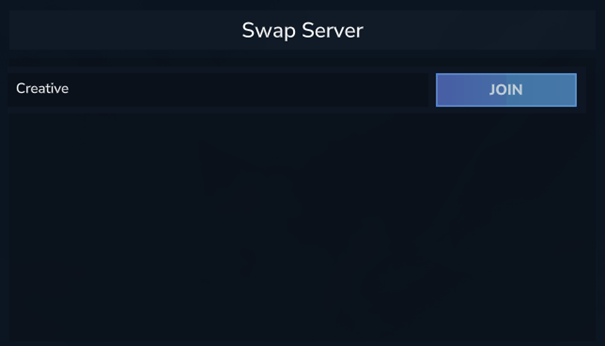
Player Mode
Requirements: None
Players can view the list of available servers and click JOIN to teleport.
Admin Mode
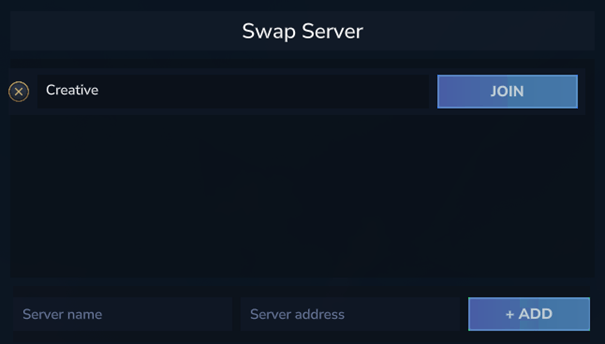
Requirements: swapserver.admin permission
Administrators see an extended interface.
- Add Server: A form at the bottom allows inputting a Name and IP/Port to add a new server.
- Delete Server: Each server entry has a DELETE button to remove it from the list.
Installation
- Place the plugin jar in your server's
mods or plugins folder.
- Ensure the configuration folder
mods/Swap_Server/data is writable.
- Start your server.
- Grant yourself
swapserver.admin to configure the initial server list.
Project description from CurseForge.
Recent files
Swap Server releases and Hytale builds
No release information is currently available.
 mod
mod