Hytale version
Back to mods 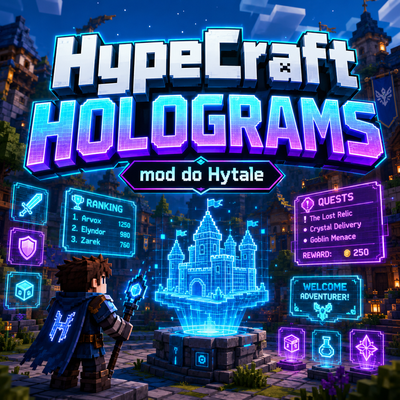
CurseForge · Hytale mod
HypeCraft Holograms
Adding Holograms in to game, Works with Update 5 servers.
Choose a version Pick your version below, then grab the matching file.
Quick answer
Which HypeCraft Holograms release should I use?
Latest stable file hc-holograms-1.0.0.jar
Game version 0.5
Mod system Built-in Hytale mod system
HypeCraft Holograms hc-holograms-1.0.0.jar targets 0.5. Do not install it as a separate client mod. Enable it on the world host—the local server in singleplayer or the dedicated server in multiplayer. No required dependencies listed for this file.
Where it goes
Where should HypeCraft Holograms be installed in Hytale?
Do not install it as a separate client mod. Enable it on the world host—the local server in singleplayer or the dedicated server in multiplayer.
Separate client mod Not supported
World host / dedicated server Required
Mod system for this release Built-in Hytale mod system
Required install it here Optional supported, not mandatory Not supported do not install here Source doesn’t say do not assume
Put Hytale mods on the world host or dedicated server. Singleplayer runs a local server too; Hytale does not use separate client mods.
What else does HypeCraft Holograms hc-holograms-1.0.0.jar need?
hc-holograms-1.0.0.jar. Change the file and its required mods may change too.
This file does not list any required mods. Do not add a library just because a different file uses it.
This file does not list any required or optional project dependencies. Check the creator notes before changing an existing world.
Before you install it
Add HypeCraft Holograms without breaking your instance.
Built for HypeCraft Holograms hc-holograms-1.0.0.jar. Pick another file and the loader, install side or required mods may change.
- 01
Stick to this file
Use hc-holograms-1.0.0.jar. It targets 0.5; another release may target a different game build or dependency set.
- 02
Bring the mods it needs
This file does not list any required mods. Do not add a library just because a different file uses it.
- 03
Enable it on the world host
Do not install it as a separate client mod. Enable it on the world host—the local server in singleplayer or the dedicated server in multiplayer.
- 04
Pick the file you checked
Use the “Get this file” button beside hc-holograms-1.0.0.jar. It opens that exact file at the source.
About this project
What does HypeCraft Holograms add?
HypeCraft Holograms
HypeCraft Holograms is a powerful and easy-to-use hologram mod for Hytale servers. It allows server owners to create clean, floating holograms with text, items, blocks, images, animations, interactions, and developer API support.
The mod is designed for modern Hytale servers and works with servers running Hytale Update 5.
Features
- Create persistent and temporary holograms
- Multi-line hologram text support
- Item, block, entity/model, and image hologram lines
- Per-line positioning with XYZ offsets
- Interactive hologram lines with configurable hitboxes
- Built-in actions such as player commands, console commands, and messages
- Animation system with keyframes, looping, autoplay, and easing
- Image support with runtime reload
- Per-player rendering support
- Optional PlaceholderAPI integration
- Developer API for creating and managing holograms from other mods
Commands
All commands are available under /hologram with the shorter alias /holo.
/holo create <id>- create a new hologram/holo delete <id>- delete a hologram/holo list- list all holograms/holo move <id>- move a hologram to your position/holo teleport <id>- teleport to a hologram/holo addline <id> --text="..."- add a new line/holo setline <id> <line> --text="..."- edit a line/holo removeline <id> <line>- remove a line/holo save- save holograms/holo reload- reload the configuration/holo respawn- respawn holograms/holo stats- view runtime statistics
Line Formats
Text:Welcome to spawnItem:item:<itemId>[:scale[:pitch:yaw:roll]]Block:block:<blockTypeId>[:scale[:pitch:yaw:roll]]Entity/Model:entity:<modelId>[:scale[:pitch:yaw:roll]]Image:image:<imageId>[:scale[:pitch:yaw:roll]]
Interactions
Hologram lines can be made interactive. You can configure the hitbox size, collision type, hint text, and action.
player-command:<command>console-command:<command>message:<text>
Animations
HypeCraft Holograms includes a flexible animation system. You can create animations, add keyframes, assign animations to specific hologram lines, and play or stop them at runtime.
Images
The mod supports image holograms. Place your images in the input folder, reload them, and use them directly inside hologram lines.
/holo image reload
/holo image list
/holo image path
Optional Placeholder Support
When PlaceholderAPI is installed, placeholders can be rendered per player, making holograms useful for stats, rankings, player information, and dynamic server displays.
Installation
- Download the HypeCraft Holograms mod.
- Place the file inside your server
mods/folder. - Start or restart your Hytale server.
- Configure the mod if needed.
- Use
/holo createto create your first hologram.
Compatibility
This mod is compatible with Hytale servers running Update 5.
Important Note
Hytale nameplates currently do not fully expose rich text formatting for holograms, so advanced color and style formatting may be limited until the game provides better support.
Project description from CurseForge.
Pick your setup
HypeCraft Holograms releases for each Hytale build.
Choose the version and loader you play, then open the matching release.
Check the dependencies, then try the file in a copied instance before changing a world you care about.
Recent files
HypeCraft Holograms releases and Hytale builds
hc-holograms-1.0.0.jar
29 May 2026
Client Not supported Server Required Dependencies No extras listed Listed on Project page
Check the 0.5 setup 0.5 release
Looking for an older file? The official CurseForge project page is in Resources.
 mod
mod CurseForge · Hytale
Fullmetal Labyrinth
Adds a brand-new Labyrinth Dimension featuring a vast desert surface and an endless maze stretching deep below. Discover unique locations and face a variety of dangerous new enemies as you explore its depths!
 mod
mod CurseForge · Hytale
MMO Skills Stations Pack
Enhances the sawmill from the RPG Stations mod and adds rich NPC driven questlines. Also adds a woodcutters MMO Armor set.
 mod
mod CurseForge · Hytale
pillows n' plushies
weaponised femboy body pillows (dakimakura), cozy cushion blocks, plushie characters, silly fumo, futon bed, lain onesie mage robes (kigurumi), pillow hexstaff + hexbook + glyph guide for hexcode magic via patchly! anime ref: astolfo, ferris, rimuru, lain!