Hytale version
Back to mods 
CurseForge · Hytale mod
Prefabs hub
Lets players upload their own local Hytale prefabs to the server through a linked Discord bot, where each submission is validated and queued for staff review before becoming a placeable server prefab.
Choose a version Pick your version below, then grab the matching file.
Quick answer
Which Prefabs hub release should I use?
Latest stable file prefabs-hub v0.2.2 (20260605-025350)
Game version 0.5
Mod system Built-in Hytale mod system
Prefabs hub prefabs-hub v0.2.2 (20260605-025350) targets 0.5. Do not install it as a separate client mod. Enable it on the world host—the local server in singleplayer or the dedicated server in multiplayer. No required dependencies listed for this file.
Where it goes
Where should Prefabs hub be installed in Hytale?
Do not install it as a separate client mod. Enable it on the world host—the local server in singleplayer or the dedicated server in multiplayer.
Separate client mod Not supported
World host / dedicated server Required
Mod system for this release Built-in Hytale mod system
Required install it here Optional supported, not mandatory Not supported do not install here Source doesn’t say do not assume
Put Hytale mods on the world host or dedicated server. Singleplayer runs a local server too; Hytale does not use separate client mods.
What else does Prefabs hub prefabs-hub v0.2.2 (20260605-025350) need?
prefabs-hub v0.2.2 (20260605-025350). Change the file and its required mods may change too.
This file does not list any required mods. Do not add a library just because a different file uses it.
This file does not list any required or optional project dependencies. Check the creator notes before changing an existing world.
Before you install it
Add Prefabs hub without breaking your instance.
Built for Prefabs hub prefabs-hub v0.2.2 (20260605-025350). Pick another file and the loader, install side or required mods may change.
- 01
Stick to this file
Use prefabs-hub v0.2.2 (20260605-025350). It targets 0.5; another release may target a different game build or dependency set.
- 02
Bring the mods it needs
This file does not list any required mods. Do not add a library just because a different file uses it.
- 03
Enable it on the world host
Do not install it as a separate client mod. Enable it on the world host—the local server in singleplayer or the dedicated server in multiplayer.
- 04
Pick the file you checked
Use the “Get this file” button beside prefabs-hub v0.2.2 (20260605-025350). It opens that exact file at the source.
About this project
What does Prefabs hub add?
PrefabsUploader
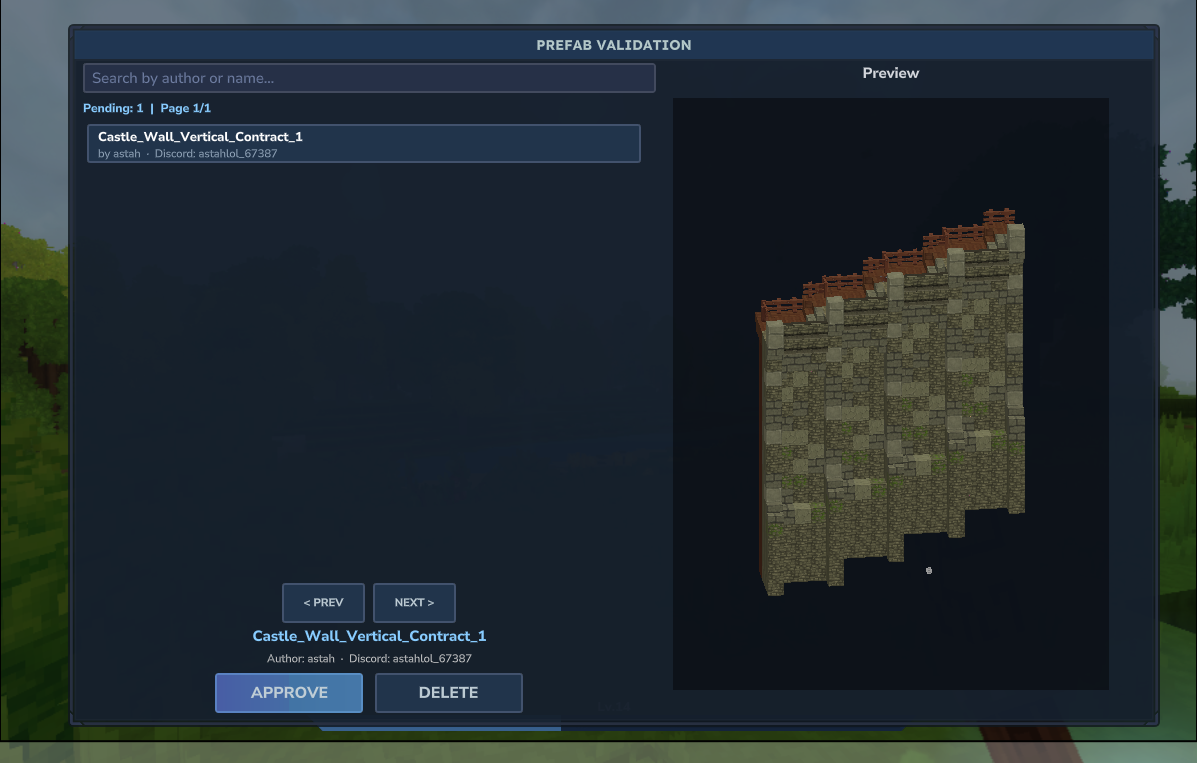 Let your players send their own builds to your Hytale server — safely. PrefabsUploader lets players upload prefabs (
.prefab.json) straight from Discord. Your staff reviews each one in-game (with a live 3D preview) and, once approved, it becomes a placeable server prefab. No FTP, no file access, no trust required.
Why?
Players build amazing things in the Asset Editor — but getting those builds onto a live server normally means giving people file access or doing it by hand. PrefabsUploader turns that into a simple, moderated pipeline:
Player exports a prefab → drops it in Discord → staff approves in-game → it's live.
Every upload is validated and queued for review, so nothing lands on your world without a human saying "yes".
How it works
   PLAYER (Hytale)          DISCORD (bot)              STAFF (Hytale)
 ─────────────────       ────────────────           ─────────────────
  /pu link        ─────►  links account
  /pu import      ─────►  opens a private thread
        drops .prefab.json in the thread ─────►  queued for review
                                                 /pu validate  ◄─────
                                                 preview + Approve/Reject
        ◄───────── result (DM) ──────────────────────── approved → live
- Pair once. A server admin installs the Discord bot and pairs the server with a one-time code.
- Players link. Each player links their Hytale account to their Discord account (one time).
- Upload.
/pu importopens a private Discord thread (or a DM, if threads aren't available) where the player drops their.prefab.json. - Review. Staff runs
/pu validatein-game to browse the queue, preview each prefab in 3D, and Approve or Reject. - Live. Approved prefabs are written to the server's prefab storage, ready to place.
Features
- 🧩 Player-driven uploads — builds come in from Discord, no file access needed.
- 🔎 In-game review queue with live 3D preview and one-click Approve / Reject.
- 🔗 Account linking — ties a Hytale player to a Discord user so uploads are attributable.
- 🧵 Private upload threads — each player gets their own thread; DM fallback if the bot can't open one.
- 🛡️ Validation & whitelist — size limits, block-count limits, and entity rejection before anything is saved.
- 🌍 Bilingual — Portuguese (pt-BR) and English, chosen automatically (Discord guild language for bot messages, server language in-game).
- ⚙️ Simple setup — three slash commands and you're done.
- 🔔 Result notifications — uploaders are told on Discord when their prefab is approved or rejected.
Setup (server admin)
1. Install the Discord bot into your Discord server (invite link provided in-game / by the hub).
2. Pair the server. In Hytale:
/pu config setup
You'll get a pairing code. On Discord, run:
/setup server <code>
3. Pick the uploads channel. On Discord, in the channel you want (or pass one):
/setup uploads            # uses the current channel
/setup uploads #prefabs    # or choose a channel
4. Set your Discord invite (required) so players can join to upload:
/setup invite https://discord.gg/your-server
Without it, players who aren't already in your Discord get an in-game message saying the invite isn't configured yet.
That's it — the in-game "please configure" broadcast stops once you're paired.
Configuration (config.properties)
The plugin reads its settings from:
mods/ProjectAtlasia_PrefabsUploader/config.properties
It's created automatically on first run, fully commented. Changing a value requires a server restart (Hytale has no hot-reload).
| Key | What it does |
|---|---|
hub.address |
The hub the plugin connects to. Comes preset to the official hub — leave it unless you self-host. |
hub.tls |
true in production (TLS), false for a local plaintext hub. |
hub.insecure |
true connects via TLS without validating the certificate — DEV only, keep false. |
pair.message |
false turns off the in-game "please pair me" broadcast (commands keep working). |
discord.invite.url |
Your Discord invite shown in-game so players can join. Required for players to join — set it here or with /setup invite (that one wins). Until it's set, players who aren't in your Discord are told the invite isn't configured yet. |
server.id |
Stable identity of this server, generated once — do not change it. |
auth.token |
Issued automatically during pairing. Do NOT share it — it authenticates your server with the hub. |
🔐
server.idandauth.tokenare managed for you. Treatauth.tokenlike a password.
For players
Link your account (one time):
/pu link
Then on Discord:
/link <code>
You'll get an in-game confirmation when it's done.
Upload a prefab:
/pu import
The bot opens a private thread (or DMs you) — just drop your exported .prefab.json there. You'll be notified when staff reviews it.
For staff
Open the review UI in-game:
/pu validate
- Browse the pending queue, search, and select a card to preview the build in 3D.
- Approve → validated and saved as a server prefab.
- Reject → removed from the queue (the uploader is notified).
Commands
| Command | Where | Who | What |
|---|---|---|---|
/pu config setup |
In-game | Admin | Generates a pairing code |
/pu config pair-message <on/off> |
In-game | Admin | Toggles the "please pair" broadcast |
/pu link |
In-game | Player | Links your Discord account |
/pu import |
In-game | Player | Opens your upload thread/DM |
/pu validate |
In-game | Staff | Opens the review queue + preview |
/setup server <code> |
Discord | Admin | Pairs the server |
/setup uploads [channel] |
Discord | Admin | Sets the uploads channel |
/setup invite <url> |
Discord | Admin | Sets your Discord invite |
/link <code> |
Discord | Player | Completes account linking |
Aliases:
/prefabs-uploaderand/puare the same command.
Permissions
Every in-game command is gated by a permission node, so you decide who can upload, link, and review:
| Permission node | Grants |
|---|---|
projectatlasia.prefabsuploader.command.import |
/pu import — open your upload thread/DM (players) |
projectatlasia.prefabsuploader.command.link |
/pu link — link your Discord account (players) |
projectatlasia.prefabsuploader.command.validate |
/pu validate — open the review queue (staff) |
projectatlasia.prefabsuploader.command.prefabsuploader.config.setup |
/pu config setup — generate the pairing code (admin) |
projectatlasia.prefabsuploader.command.prefabsuploader.config.pair-message |
/pu config pair-message — toggle the pairing broadcast (admin) |
Typical setup: grant import + link to your default player group, and the rest to staff/admins. Grant projectatlasia.prefabsuploader.command.* to give a role everything at once.
(The Discord-side /setup * commands are gated by Discord's own Manage Server / Administrator permission, not by these nodes.)
Where your files live (and where they don't)
PrefabsUploader stores nothing until you approve it:
- 🤖 The Discord bot stores no files. It only keeps a small pointer to your Discord message.
- 🗑️ Delete it from Discord, and the submission is gone. If a player removes their
.prefab.jsonmessage before staff reviews it, the submission can no longer be fetched and is dropped — re-upload to try again. - 🔁 The hub is just a proxy. Nothing is persisted on it; it never keeps a copy of your prefab.
- 💾 It's only written to your server when an admin approves it — that's the single moment a prefab becomes a real file on your machine.
- 📦 Max file size: 5 MB. This can be raised — visit our Discord support channel to request a higher limit.
Safety
Built to keep a public upload path from becoming an attack surface:
- Nothing is auto-placed. Every prefab waits for human approval.
- Validation on approval — size cap, block-count cap, and entities are rejected (prefabs are blocks only).
- Rate-limited everywhere (per player, per channel, per IP) to stop spam and brute-force.
- Authenticated — the server authenticates with Hytale; the integration uses a per-server token.
- No file access — players never touch your server's filesystem; uploads ride through Discord's CDN and are downloaded only at review time.
If the bot can't reach a player (missing permissions / strict privacy settings), it tells them in-game how to fix it instead of failing silently.
Requirements
- A Hytale server.
- A Discord server where you can add a bot (Manage Server / Administrator).
- Players need a Discord account and to be a member of your Discord.
Roadmap
Planned features:
- 🛡️ Claim / anti-raid integration — hook into claim and anti-raid plugins (aiming for broad, plugin-agnostic support) so prefabs can only be placed in areas the player is allowed to build in.
- 📤 In-game export (the reverse path) — select a coordinate range in-game and export it as a prefab, instead of only importing from Discord.
Languages
🇧🇷 Português (pt-BR) · 🇺🇸 English — selected automatically. Bot messages follow your Discord server's language; in-game messages follow your Hytale server's language.
Open-source plugin (GPL-3.0). Built by ProjectAtlasia.
Project description from CurseForge.
Pick your setup
Prefabs hub releases for each Hytale build.
Choose the version and loader you play, then open the matching release.
Check the dependencies, then try the file in a copied instance before changing a world you care about.
Recent files
Prefabs hub releases and Hytale builds
prefabs-hub v0.2.2 (20260605-025350)
5 Jun 2026
Client Not supported Server Required Dependencies No extras listed Listed on Project page
Check the 0.5 setup 0.5 release
prefabs-hub v0.2.0 (20260604-091432)
4 Jun 2026
Client Not supported Server Required Dependencies No extras listed Listed on Project page
Check the 0.5 setup 0.5 release
prefabs-hub-0.1.0-20260603-163000.jar
3 Jun 2026
Client Not supported Server Required Dependencies No extras listed Listed on Project page
Check the 0.5 setup Looking for an older file? The official CurseForge project page is in Resources.
 mod
mod CurseForge · Hytale
Vandoria - Contract Board+ Economy
Vandoria Contract Board+ adds a complete profession-based contract system to Hytale.
 mod
mod CurseForge · Hytale
Alec's Animal Husbandry! - Taming, Breeding, Mounts, Combat Pets, Leveling, Hunger, Thirst, and more!
Tame, breed, care for, fight with, level up and more all vanilla animals. Train beasts as combat pets, breed livestock for the best harvesting efficiency, and so much more!
 mod
mod CurseForge · Hytale
Alec's Tamework!
Mob taming framework and asset patcher. Breeding, traits, leveling, tame management UI, easier interaction chains, capture/spawn items that store metadata, ownership/tamed status, lots of behavior components and more!