CurseForge · Hytale mod
ServerAutoMessages- 0.5.6 Update
🔥For Update 5 🔥 bold, italic, monospace, hex color, clickable link, nested formatting, for example and more
Quick answer
Which ServerAutoMessages- 0.5.6 Update release should I use?
We could not find enough file information to pick a stable Hytale setup for ServerAutoMessages- 0.5.6 Update.
Where it goes
Where should ServerAutoMessages- 0.5.6 Update be installed in Hytale?
Do not install it as a separate client mod. Enable it on the world host—the local server in singleplayer or the dedicated server in multiplayer.
Put Hytale mods on the world host or dedicated server. Singleplayer runs a local server too; Hytale does not use separate client mods.
What else does ServerAutoMessages- 0.5.6 Update need?
Choose a release before relying on this list.
This file does not give us a dependency list. Check the creator notes before installing.
This file does not list any required or optional project dependencies. Check the creator notes before changing an existing world.
Before you install it
Add ServerAutoMessages- 0.5.6 Update without breaking your instance.
We could not pick a file, so treat this as a checklist—not a compatibility promise.
- 01
Stick to this file
We could not pick a stable file here. Check the game version and loader on the official project page before installing anything.
- 02
Bring the mods it needs
This file does not give us a dependency list. Check the creator notes before installing.
- 03
Enable it on the world host
Do not install it as a separate client mod. Enable it on the world host—the local server in singleplayer or the dedicated server in multiplayer.
- 04
Pick the file you checked
There is no download page for this exact file. Open the project page in Resources and choose the matching release there.
About this project
What does ServerAutoMessages- 0.5.6 Update add?


✨ ServerAutoMessages
ServerAutoMessages is a lightweight Java 25 mod for Hytale servers that automatically broadcasts configurable messages to all online players.
It is designed for server announcements, tips, reminders, links, Discord invites, rules and community messages.
Features
- Automatic broadcast messages
- Global interval mode with round-robin order
- Individual interval mode per message
- Reload command without server restart
- Text formatting support
Text Formatting Support
You can use the following formatting tags inside your messages:
<b>text</b>
Bold text
<i>text</i>
Italic text
<m>/help</m>
Monospace / command style text
<color:#FF0000>Red</color>
Hex color text
<link:https://discord.gg/>Discord</link>
Clickable link
Nested formatting is also supported:
<b><color:#FF0000>bold red</color></b>
Commands
Main command:
/servermessages
Aliases:
/smessages
/sam
/automessages
/am
Subcommands
/servermessages status
Shows the current status of the message system.
/servermessages list
Lists all configured messages.
/servermessages preview
Previews configured messages.
/servermessages reload
Reloads the configuration without restarting the server.
Permissions
Operators usually have access depending on your server permission setup.
serverautomessages.command.use
serverautomessages.command.reload
serverautomessages.command.preview
Configuration
Config file location:
mods/CommunityTools_ServerAutoMessages/server-auto-messages.json
Example Configuration
{
  "GlobalIntervalSeconds": 0,
  "Messages": [
    {
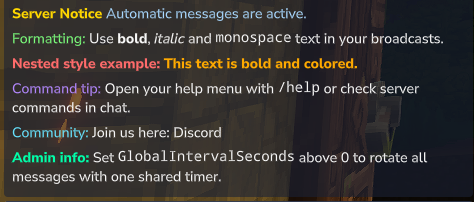
      "Message": "<b><color:#FFD700>Server Notice</color></b> <color:#A8D8FF>Automatic messages are active.</color>",
      "IntervalSeconds": 300
    },
    {
      "Message": "<color:#7CFF7C>Formatting:</color> Use <b>bold</b>, <i>italic</i> and <m>monospace</m> text in your broadcasts.",
      "IntervalSeconds": 420
    },
    {
      "Message": "<b><color:#FF6B6B>Nested style example:</color></b> <b><color:#FFAA00>This text is bold and colored.</color></b>",
      "IntervalSeconds": 540
    },
    {
      "Message": "<color:#B388FF>Command tip:</color> Open your help menu with <m>/help</m> or check server commands in chat.",
      "IntervalSeconds": 660
    },
    {
      "Message": "<color:#66E3FF>Community:</color> Join us here: <link:https://discord.gg/your-server>Discord</link>",
      "IntervalSeconds": 780
    },
    {
      "Message": "<b><color:#00FFAA>Admin info:</color></b> Set <m>GlobalIntervalSeconds</m> above 0 to rotate all messages with one shared timer.",
      "IntervalSeconds": 900
    }
  ]
}
Global Interval Mode
Set GlobalIntervalSeconds to a value greater than 0 to send all messages with one shared timer in round-robin order.
Example:
{
  "GlobalIntervalSeconds": 300
}
When global interval mode is enabled, each message's IntervalSeconds value is ignored.
Individual Interval Mode
Set GlobalIntervalSeconds to 0 to use individual intervals for every message.
Example:
{
  "GlobalIntervalSeconds": 0
}
In this mode, every message uses its own IntervalSeconds value.
Notes
- Use
/servermessages reloadafter editing the config. - No server restart is required after config changes.
- Make sure your JSON file is valid.
- Replace the example Discord invite link with your own server invite.
🙌 Inspiration
This mod was inspired by AutoMessages and HyMenu.
❤️ Support
If you enjoy this mod, consider leaving a ⭐ on CurseForge!
🔗 Check Out My Other Hytale Projects
Take a look at my other Hytale mods and projects here:
👉 DerFriesn CurseForge Projects
Project description from CurseForge.
Recent files
ServerAutoMessages- 0.5.6 Update releases and Hytale builds
No release information is currently available.
Looking for an older file? The official CurseForge project page is in Resources.