Hytale version
Back to mods 
CurseForge · Hytale mod
Writable Signs
Allow players to write short custom text on existing signs directly in-game
Choose a version Pick your version below, then grab the matching file.
Quick answer
Which Writable Signs release should I use?
Latest stable file WritableSigns-1.0.1.jar
Game version 0.5
Mod system Built-in Hytale mod system
Writable Signs WritableSigns-1.0.1.jar targets 0.5. Do not install it as a separate client mod. Enable it on the world host—the local server in singleplayer or the dedicated server in multiplayer. No required dependencies listed for this file.
Where it goes
Where should Writable Signs be installed in Hytale?
Do not install it as a separate client mod. Enable it on the world host—the local server in singleplayer or the dedicated server in multiplayer.
Separate client mod Not supported
World host / dedicated server Required
Mod system for this release Built-in Hytale mod system
Required install it here Optional supported, not mandatory Not supported do not install here Source doesn’t say do not assume
Put Hytale mods on the world host or dedicated server. Singleplayer runs a local server too; Hytale does not use separate client mods.
What else does Writable Signs WritableSigns-1.0.1.jar need?
WritableSigns-1.0.1.jar. Change the file and its required mods may change too.
This file does not list any required mods. Do not add a library just because a different file uses it.
This file does not list any required or optional project dependencies. Check the creator notes before changing an existing world.
Before you install it
Add Writable Signs without breaking your instance.
Built for Writable Signs WritableSigns-1.0.1.jar. Pick another file and the loader, install side or required mods may change.
- 01
Stick to this file
Use WritableSigns-1.0.1.jar. It targets 0.5; another release may target a different game build or dependency set.
- 02
Bring the mods it needs
This file does not list any required mods. Do not add a library just because a different file uses it.
- 03
Enable it on the world host
Do not install it as a separate client mod. Enable it on the world host—the local server in singleplayer or the dedicated server in multiplayer.
- 04
Pick the file you checked
Use the “Get this file” button beside WritableSigns-1.0.1.jar. It opens that exact file at the source.
About this project
What does Writable Signs add?
W ritableSigns
Allows players to write short custom text on existing signs directly in-game.
This mod adds a simple and clean way to personalize signs without changing their original style. Players can interact with supported signs, enter a short message, and use them for decoration, labeling, directions, or small notes in their builds.
Supported signs
WritableSigns allows players to write on any vanilla sign, including Crude and Temple sign variants.
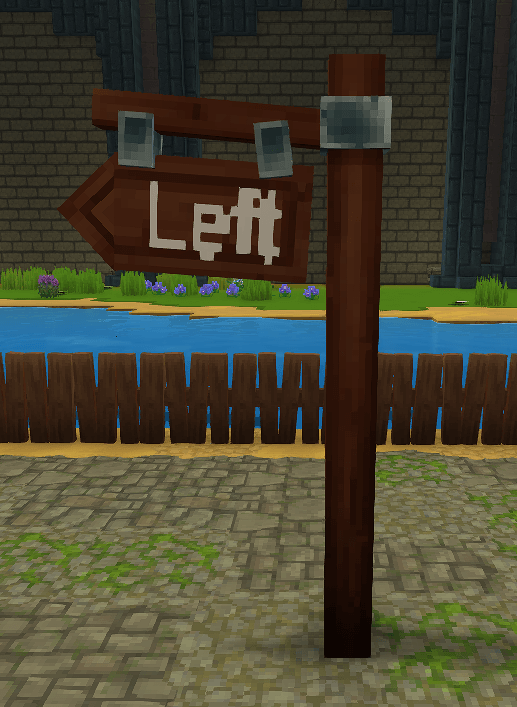
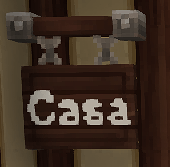
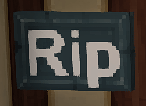
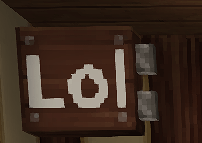
Additionally
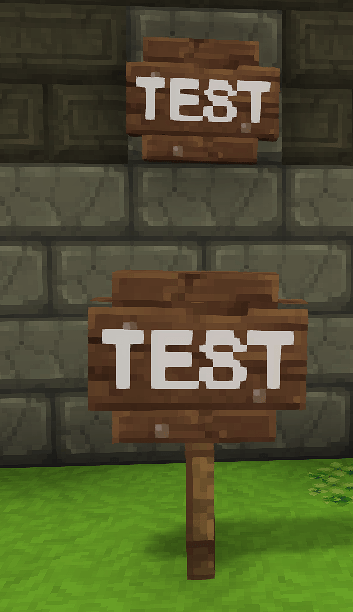
You can place the Furniture_Crude_Sign on a wall or on the ground. When placed on the ground, it will appear on a support, similar to how it works in Minecraft, as it should.
 Features
- Write custom text on existing signs
- Edit supported signs directly in-game
- Simple one-field sign editor
- Supports short messages of up to 8 characters (the 1.0.1 supports until 34!)
- Keeps the original look and placement style of the signs
- Designed to feel natural and lightweight
Notes
This mod is intended for decoration, organization, and small in-world messages.
Are you looking for a server to join? Join Hyspain today — a fantasy server featuring a leveling system, a complex economy, factions with kingdoms and races, dungeons, and much more!
IP: play.hyspain.net
Discord: https://discord.gg/hyspain
Build your own empire or join an existing one, and start writing your story. The struggle for the throne will shape the fate of the world. 
Project description from CurseForge.
Pick your setup
Writable Signs releases for each Hytale build.
Choose the version and loader you play, then open the matching release.
Check the dependencies, then try the file in a copied instance before changing a world you care about.
Recent files
Writable Signs releases and Hytale builds
WritableSigns-1.0.1.jar
7 Jun 2026
Client Not supported Server Required Dependencies No extras listed Listed on Project page
Check the 0.5 setup 0.5 release
WritableSigns-1.0.0.jar
6 Jun 2026
Client Not supported Server Required Dependencies No extras listed Listed on Project page
Check the 0.5 setup 0.5 release
Looking for an older file? The official CurseForge project page is in Resources.
 mod
mod CurseForge · Hytale
Subcaverna
Subcaverna is a custom world mod with its own resources, fauna and flora. It is a persistent world that is accessible with custom portal
 mod
mod CurseForge · Hytale
Better Shop/Auction/OfferHouse
The all-in-one Hytale economy: Shop, Auction House & Offer Board. Dynamic pricing, stacking boosts, in-game admin, exploit-proof sell loop, hot-reload. Auto-plugs into EconomySystem, Ecotale, PJ-Money, Coins and all VaultUnlocked compatible plugins!
 mod
mod CurseForge · Hytale
Alec's Tamework!
Mob taming framework and asset patcher. Breeding, traits, leveling, tame management UI, easier interaction chains, capture/spawn items that store metadata, ownership/tamed status, lots of behavior components and more!