
Hytale version
Back to mods 
CurseForge · Hytale mod
Fantastic Ghost Block Remover
👻Automatically detects and safely removes ghost blocks on Hytale servers.👻
Choose a version Pick your version below, then grab the matching file.
Quick answer
Which Fantastic Ghost Block Remover release should I use?
Latest stable file FantasticGhostBlockRemover.jar
Game version 0.7
Mod system Built-in Hytale mod system
Fantastic Ghost Block Remover FantasticGhostBlockRemover.jar targets 0.7. Do not install it as a separate client mod. Enable it on the world host—the local server in singleplayer or the dedicated server in multiplayer. No required dependencies listed for this file.
Where it goes
Where should Fantastic Ghost Block Remover be installed in Hytale?
Do not install it as a separate client mod. Enable it on the world host—the local server in singleplayer or the dedicated server in multiplayer.
Separate client mod Not supported
World host / dedicated server Required
Mod system for this release Built-in Hytale mod system
Required install it here Optional supported, not mandatory Not supported do not install here Source doesn’t say do not assume
Put Hytale mods on the world host or dedicated server. Singleplayer runs a local server too; Hytale does not use separate client mods.
What else does Fantastic Ghost Block Remover FantasticGhostBlockRemover.jar need?
FantasticGhostBlockRemover.jar. Change the file and its required mods may change too.
This file does not list any required mods. Do not add a library just because a different file uses it.
This file does not list any required or optional project dependencies. Check the creator notes before changing an existing world.
Before you install it
Add Fantastic Ghost Block Remover without breaking your instance.
Built for Fantastic Ghost Block Remover FantasticGhostBlockRemover.jar. Pick another file and the loader, install side or required mods may change.
- 01
Stick to this file
Use FantasticGhostBlockRemover.jar. It targets 0.7; another release may target a different game build or dependency set.
- 02
Bring the mods it needs
This file does not list any required mods. Do not add a library just because a different file uses it.
- 03
Enable it on the world host
Do not install it as a separate client mod. Enable it on the world host—the local server in singleplayer or the dedicated server in multiplayer.
- 04
Pick the file you checked
Use the “Get this file” button beside FantasticGhostBlockRemover.jar. It opens that exact file at the source.
About this project
What does Fantastic Ghost Block Remover add?



👻 FantasticGhostBlockRemover - Updare 0.6
FantasticGhostBlockRemover is a small but very useful server-side maintenance tool for Hytale servers.
/fgbr autocheck true
Automatic checking is now enabled by default on fresh installs, so when an outdated decor/furniture mod has to be removed, Ghost Block Remover can automatically detect and clean up the leftover unknown blocks as those areas are loaded. No more hunting down every single leftover block manually. 👻🧹 The mod can detect, list, manually remove and automatically clean up ghost blocks in loaded world areas. This mod is especially useful after Hytale updates, removed mods, changed block IDs, broken custom blocks or world generation issues where old blocks no longer exist correctly on the server. 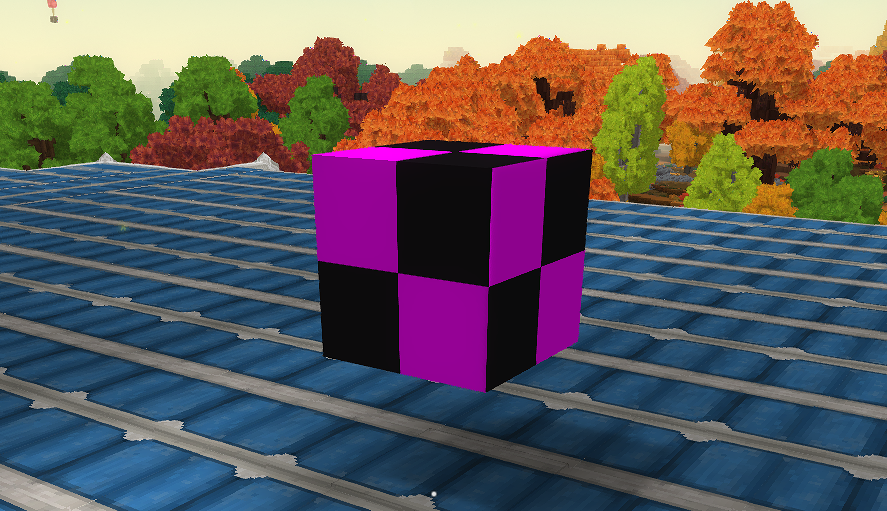
Summary
Automatically detects and removes broken ghost blocks from loaded Hytale server chunks.
✨ Features
- ✔️ Scan loaded chunks around the player
- ✔️ Detect unknown, broken or invalid blocks
- ✔️ List detected ghost blocks
- ✔️ Remove detected ghost blocks manually
- ✔️ Replace ghost blocks manually
- ✔️ Automatic ghost block checking
- ✔️ Automatic ghost block removal
- ✔️ Queue-based auto scan system
- ✔️ Configurable scan radius
- ✔️ Configurable auto-remove limits
- ✔️ Console notifications
- ✔️ Admin permission support
- ✔️ Hytale 0.5.6 compatible
- ✔️ Java 25 compatible
- ✔️ Server-side only
🆕 Update 1.0.17 - Auto Cleanup Hotfix
Version 1.0.17 fixes the automatic ghost block cleanup system for Hytale 0.5.6. The mod now uses a safer queue-based system for automatic checking, but when AutoRemove is enabled, detected ghost blocks are removed automatically again. This means admins no longer have to manually run:
/fgbr remove all
every time ghost blocks are detected.
⚠️ Important Config Notice
If you updated from an older version, please check your config file. The most important setting is:
"ReplacementBlock": "Empty"
Do not use:
"hytale:air"
For Hytale ghost block cleanup, Empty is the correct replacement value. If your config was created by an older broken version, either delete the old config and let the mod create a new one, or manually update it. Config file:
fantastic-ghost-block-remover.json
✅ Recommended Config for Live Servers
{
  "Enabled": true,
  "RemoveReplacementBlock": "Empty",
  "Scan": {
    "ManualRadiusChunks": 5,
    "MinY": 0,
    "MaxYExclusive": 256
  },
  "AutoCheck": {
    "Enabled": true,
    "InitialRadiusChunks": 4,
    "QueueMaxChunks": 512,
    "WorkerIntervalMillis": 2000,
    "ChunksPerRun": 2
  },
  "AutoRemove": {
    "Enabled": true,
    "Mode": "safe",
    "MaxBlocksPerScan": 10,
    "RequireDoubleCheck": false,
    "NotifyConsole": true,
    "ReplacementBlock": "Empty"
  }
}
Important values
"AutoCheck": {
  "Enabled": true
}
Enables automatic scanning of loaded chunks.
"AutoRemove": {
  "Enabled": true
}
Enables automatic removal of detected ghost blocks.
"ReplacementBlock": "Empty"
This is required for properly clearing broken ghost blocks.
"RequireDoubleCheck": false
Recommended for automatic cleanup. Older versions could detect ghost blocks but only remove them after a manual remove command when double-check was enabled.
🧹 What are Ghost Blocks?
Ghost blocks are blocks that still exist in the world data but are no longer valid on the server. This can happen when:
- A mod was removed
- A block ID changed after an update
- A world was generated with an older mod version
- Hytale changed internal block handling
- A custom block no longer exists
- A chunk loaded with outdated or broken block data
These blocks can sometimes appear as pink/black blocks, broken blocks, invisible blocks, invalid blocks or cause issues when loading areas. 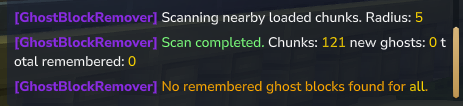
⚙️ Commands
Scan for ghost blocks
/fgbr scan
Scans the loaded chunks around you for ghost blocks.
List detected ghost blocks
/fgbr list
Shows all currently detected ghost blocks.
Remove ghost blocks manually
/fgbr remove <block_id|all>
Example:
/fgbr remove all
Removes detected ghost blocks manually.
Replace ghost blocks manually
/fgbr replace <block_id|all> <replacement>
Example:
/fgbr replace all Empty
Replaces detected ghost blocks with another block. For ghost block cleanup, Empty is recommended.
Enable or disable automatic checking
/fgbr autocheck <true|false>
Example:
/fgbr autocheck true
Enables or disables automatic ghost block checking.
Show mod status
/fgbr status
Shows the current mod status and settings.
Reload config
/fgbr reload
Reloads the config file.
Clear ghost block cache
/fgbr clear
Clears the currently remembered ghost block cache.
🔁 Command Aliases
You can also use:
/fantasticghost
/fgbr
/ghostclean
/ghostblockremover
🤖 How Automatic Cleanup Works
The automatic cleanup system only works in loaded chunks. It does not scan your entire world at once. When a chunk is loaded, the mod queues it for a background scan. The worker then checks a small number of chunks per interval and removes detected ghost blocks if AutoRemove is enabled. Default recommended timing:
"WorkerIntervalMillis": 2000,
"ChunksPerRun": 2,
"MaxBlocksPerScan": 10
This means:
Every 2 seconds, the worker processes up to 2 queued chunks.
Up to 10 ghost blocks can be removed per scan.
This is slower than a full-world scan, but much safer for live servers.
🧭 Scan Range
By default, the manual scan checks a radius around the player. Example:
5 chunks radius = 11 x 11 chunks = 121 chunks
This means the mod scans a large area around you, but not the entire world at once. The automatic system also works only in loaded areas and does not scan your entire world instantly.
🔐 Permissions
Recommended LuckPerms permissions:
ghostblockremover.command.use
ghostblockremover.command.admin
Example:
/lp group admin permission set ghostblockremover.command.use true
/lp group admin permission set ghostblockremover.command.admin true
📁 Config
The config file is created automatically:
fantastic-ghost-block-remover.json
If you have problems after updating, please delete the old config once and let the mod generate a fresh one. Then make sure these values are enabled:
"AutoCheck": {
  "Enabled": true
},
"AutoRemove": {
  "Enabled": true,
  "ReplacementBlock": "Empty"
}
⚠️ Important Notes
This mod does not scan your entire world instantly. It only scans loaded areas to keep the server safe and stable. For manual cleanup, use:
/fgbr scan
/fgbr list
/fgbr remove all
For automatic cleanup, make sure this is enabled:
/fgbr autocheck true
And check your config:
"AutoCheck": {
  "Enabled": true
},
"AutoRemove": {
  "Enabled": true,
  "ReplacementBlock": "Empty"
}
Always test the mod on a backup or test server before using it on your main world.
✅ Compatibility
- Hytale 0.5.6
- Java 25
- Server-side usage
- Designed for admin and server maintenance
🙌 Inspiration
This mod was inspired by GhostBlockRemover.
❤️ Support
If you enjoy this mod, consider leaving a ⭐ on CurseForge!
🔗 Check Out My Other Hytale Projects
Take a look at my other Hytale mods and projects here: 👉 DerFriesn CurseForge Projects
Tale-World German Community 
- IP: play.tale-world.com
- https://tale-world.com/
Project description from CurseForge.
Pick your setup
Fantastic Ghost Block Remover releases for each Hytale build.
Choose the version and loader you play, then open the matching release.
Hytale version
0.6
1 loader buildHytale version
0.5
1 loader buildCheck the dependencies, then try the file in a copied instance before changing a world you care about.
Recent files
Fantastic Ghost Block Remover releases and Hytale builds
FantasticGhostBlockRemover.jar
24 Oct 2026
Client Not supported Server Required Dependencies No extras listed Listed on Project page
Check the 0.7 setup 0.7 release
FantasticGhostBlockRemover-1.0.28-Hytale-0.7.2.jar
15 Oct 2026
Client Not supported Server Required Dependencies No extras listed Listed on Project page
Check the 0.7 setup 0.7 release
FantasticGhostBlockRemover-1.0.27-Hytale-0.6.8-AUTO-CLEANUP.jar
21 Sept 2026
Client Not supported Server Required Dependencies No extras listed Listed on Project page
Check the 0.6 setup 0.6 release
FantasticGhostBlockRemover-Hytale-0.6.4.jar
10 Sept 2026
Client Not supported Server Required Dependencies No extras listed Listed on Project page
Check the 0.6 setup 0.6 release
FantasticGhostBlockRemover-1.0.24-Hytale-0.6.3-FIXED.jar
3 Sept 2026
Client Not supported Server Required Dependencies No extras listed Listed on Project page
Check the 0.6 setup 0.6 release
FantasticGhostBlockRemover-0.5.8.jar
16 Aug 2026
Client Not supported Server Required Dependencies No extras listed Listed on Project page
Check the 0.5 setup 0.5 release
FantasticGhostBlockRemover-0.5.7.jar
22 Jul 2026
Client Not supported Server Required Dependencies No extras listed Listed on Project page
Check the 0.5 setup 0.5 release
GhostBlockRemover-FIX.jar
24 Jun 2026
Client Not supported Server Required Dependencies No extras listed Listed on Project page
Check the 0.5 setup 0.5 release
FantasticGhostBlockRemover
9 Jun 2026
Client Not supported Server Required Dependencies No extras listed Listed on Project page
Check the 0.5 setup 0.5 release
Looking for an older file? The official CurseForge project page is in Resources.
 mod
mod CurseForge · Hytale
Discord Fantastic V6 RPG Levelin - Endless LVL
✅ Endless LVL - RPG Leveling ✅ Console Bridge ✅ Emojis ✅ Join and leave messages - Server start and stop messages - Webhook chat with player names
 mod
mod CurseForge · Hytale
Ghoastbreaker
The ultimate Ghost Block Removal Tool for Hytale!
 mod
mod CurseForge · Hytale
FantasticQuickSleep
🌙 A lightweight and configurable sleep system that lets Hytale servers skip the night when enough players are sleeping.