
Hytale version
Back to mods 
CurseForge · Hytale mod
Weapon Visualization V2 💥 Smithing Stones Support
💥Smithing Stones 💥Socket Reforge💥Visual weapon enhancement effects for Socket Reforge upgrades, making powerful weapons stand out with unique glows and auras.
Choose a version Pick your version below, then grab the matching file.
Quick answer
Which Weapon Visualization V2 💥 Smithing Stones Support release should I use?
Latest stable file Weapon-visualization-1.0.6-Hytale-0.7.2-APPEARANCE-DEDUP-FIX.jar
Game version 0.7
Mod system Built-in Hytale mod system
Weapon Visualization V2 💥 Smithing Stones Support Weapon-visualization-1.0.6-Hytale-0.7.2-APPEARANCE-DEDUP-FIX.jar targets 0.7. Do not install it as a separate client mod. Enable it on the world host—the local server in singleplayer or the dedicated server in multiplayer. No required dependencies listed for this file.
Where it goes
Where should Weapon Visualization V2 💥 Smithing Stones Support be installed in Hytale?
Do not install it as a separate client mod. Enable it on the world host—the local server in singleplayer or the dedicated server in multiplayer.
Separate client mod Not supported
World host / dedicated server Required
Mod system for this release Built-in Hytale mod system
Required install it here Optional supported, not mandatory Not supported do not install here Source doesn’t say do not assume
Put Hytale mods on the world host or dedicated server. Singleplayer runs a local server too; Hytale does not use separate client mods.
What else does Weapon Visualization V2 💥 Smithing Stones Support Weapon-visualization-1.0.6-Hytale-0.7.2-APPEARANCE-DEDUP-FIX.jar need?
Weapon-visualization-1.0.6-Hytale-0.7.2-APPEARANCE-DEDUP-FIX.jar. Change the file and its required mods may change too.
This file does not list any required mods. Do not add a library just because a different file uses it.
This file does not list any required or optional project dependencies. Check the creator notes before changing an existing world.
Before you install it
Add Weapon Visualization V2 💥 Smithing Stones Support without breaking your instance.
Built for Weapon Visualization V2 💥 Smithing Stones Support Weapon-visualization-1.0.6-Hytale-0.7.2-APPEARANCE-DEDUP-FIX.jar. Pick another file and the loader, install side or required mods may change.
- 01
Stick to this file
Use Weapon-visualization-1.0.6-Hytale-0.7.2-APPEARANCE-DEDUP-FIX.jar. It targets 0.7; another release may target a different game build or dependency set.
- 02
Bring the mods it needs
This file does not list any required mods. Do not add a library just because a different file uses it.
- 03
Enable it on the world host
Do not install it as a separate client mod. Enable it on the world host—the local server in singleplayer or the dedicated server in multiplayer.
- 04
Pick the file you checked
Use the “Get this file” button beside Weapon-visualization-1.0.6-Hytale-0.7.2-APPEARANCE-DEDUP-FIX.jar. It opens that exact file at the source.
About this project
What does Weapon Visualization V2 💥 Smithing Stones Support add?

Update V2
This update improves compatibility with SmithingStones.
Changes
- Added optional SmithingStones support.
- SRO Weapon Visualization can now detect SmithingStones refinement levels.
- Added support for reading
Refinement.levelmetadata. - Added a suppressor option for SmithingStones' own glow effects, so the SRO weapon effects can be displayed correctly.
- Existing SocketReforge detection remains supported.
- Improved weapon detection for more weapon types.
Notes
If SmithingStones' own glow still overrides the effects, disable the refinement glow effect in the SmithingStones config or enable the suppressor option in the config.
💬Weapon Visualization
Overview
Weapon Visualization V1.0.1
Fixed
- Fixed asset loading issues that could prevent the game from starting.
- Removed remaining external asset dependencies.
- Improved compatibility with Socket Reforge.
- Cleaned up unused visual effect assets.
Notes
This update includes a cleaned and optimized asset package. The mod no longer requires additional weapon effect packs to function correctly.
Recommended
If you are updating from an older test version:
Stop the game/server.
Delete the old Weapon Visualization configuration folder:
config/SRO-Weapon-visualization
Remove any previous test builds of Weapon Visualization.
Install the new version.
Start the game/server again.
A fresh configuration file will be generated automatically on first startup.
Features
- Silkroad Online inspired weapon enhancement effects.
- Visual glow progression based on Socket Reforge upgrade levels.
- Lightweight and optimized asset package.
- Multiplayer compatible.
- Fully configurable.
Thank you for testing and supporting the project!
Bring Silkroad-inspired weapon enhancement visuals to Hytale!
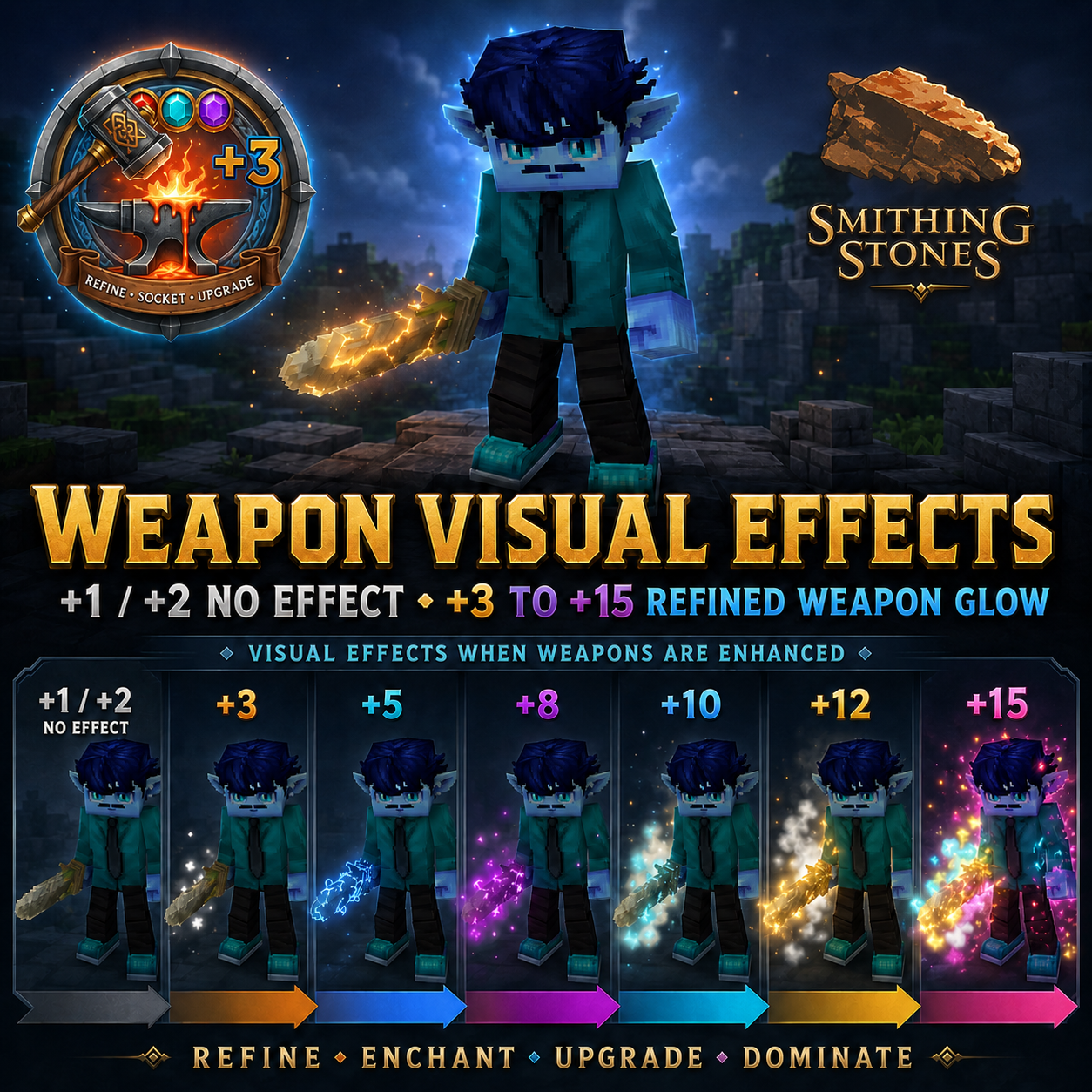
SRO Weapon Visualization adds visual effects to weapons upgraded with Socket Reforge. As your weapon becomes stronger, it gains unique glow colors and special visual effects that make powerful equipment stand out.
This mod is purely visual and does not change gameplay balance.
Features
- Automatic Socket Reforge level detection
- Unique visual effects for upgraded weapons
- Custom glow colors and enhancement auras
- Legendary endgame visuals
- Lightweight and server-friendly
- Supports dual daggers
- Highly configurable for future customization
Enhancement Effects
+3
Purple / Pink Energy Effect
+5
Blue Energy Effect
+10
Advanced Weapon Aura
+12
Enhanced Legendary Aura
+15
Golden Legendary Effect
All other upgrade levels use matching glow colors without additional particle effects.
Requirements
Required
- Socket Reforge --> Download here <--
Optional Not a must
- Simple Enchantments --> Download here <--
Inspiration
This mod was heavily inspired by the weapon enhancement system from Silkroad Online.
Back in the day, seeing a weapon glow at +5, +7, +9 or even +15 was something special. Players could instantly recognize powerful equipment just by looking at it.
As a long-time Silkroad Online player, I always wanted that same feeling in Hytale. SRO Weapon Visualization is my attempt to bring a piece of that nostalgia into the game.
Thank you to the developers of Socket Reforge for creating an amazing foundation that made this project possible.
Silkroad Online: https://www.joymax.com/silkroad/
Performance
- Low CPU usage
- Minimal memory impact
- No world generation changes
- No database required
Compatibility
Designed for modern Hytale server versions and compatible with most weapon and equipment mods.
Credits
Created by DerFriesn
Inspired by Silkroad Online and classic MMORPG weapon enhancement systems.
❤️ Support
If you enjoy this mod, consider leaving a ⭐ on CurseForge!
🔗 Check Out My Other Hytale Projects
Take a look at my other Hytale mods and projects here:
👉 DerFriesn CurseForge Projects
Tale-World German Community 
- IP: play.tale-world.com
- Website: https://tale-world.com/
Project description from CurseForge.
Pick your setup
Weapon Visualization V2 💥 Smithing Stones Support releases for each Hytale build.
Choose the version and loader you play, then open the matching release.
Hytale version
0.6
1 loader buildHytale version
0.5
1 loader buildCheck the dependencies, then try the file in a copied instance before changing a world you care about.
Recent files
Weapon Visualization V2 💥 Smithing Stones Support releases and Hytale builds
Weapon-visualization-1.0.6-Hytale-0.7.2-APPEARANCE-DEDUP-FIX.jar
18 Oct 2026
Client Not supported Server Required Dependencies No extras listed Listed on Project page
Check the 0.7 setup 0.7 release
Weapon-visualization-1.0.5-Hytale-0.7.2-PARTICLE-FIX.jar
18 Oct 2026
Client Not supported Server Required Dependencies No extras listed Listed on Project page
Check the 0.7 setup 0.7 release
Weapon-visualization-0.6.8-UPDATE.jar
10 Oct 2026
Client Not supported Server Required Dependencies No extras listed Listed on Project page
Check the 0.6 setup 0.6 release
Weapon-visualization-0.5.7.jar
22 Jul 2026
Client Not supported Server Required Dependencies No extras listed Listed on Project page
Check the 0.5 setup 0.5 release
SRO-Weapon-visualization-Smithing Stones-V2.jar
22 Jun 2026
Client Not supported Server Required Dependencies No extras listed Listed on Project page
Check the 0.5 setup 0.5 release
Weapon-visualization_0.5.6_Update.jar
18 Jun 2026
Client Not supported Server Required Dependencies No extras listed Listed on Project page
Check the 0.5 setup 0.5 release
Weapon-visualization-FIX-delete-config.jar
14 Jun 2026
Client Not supported Server Required Dependencies No extras listed Listed on Project page
Check the 0.5 setup 0.5 release
Looking for an older file? The official CurseForge project page is in Resources.
 mod
mod CurseForge · Hytale
Living World Events
A world that's truly alive: unexpected events, epic bosses and treasures waiting to be won.
 mod
mod CurseForge · Hytale
[SNIP3's] Food Pack
[SNIP3’s] Food Pack is currently in development and will receive frequent updates. It enhances your Hytale food experience by adding new foods and ingredients.
 mod
mod CurseForge · Hytale
HyperPickaxes (Auto-repair, vein mining, smelting...)
Adds Vein, Smelting, Silktouch and Fortune variants for the pickaxes.