Hytale version
Back to mods 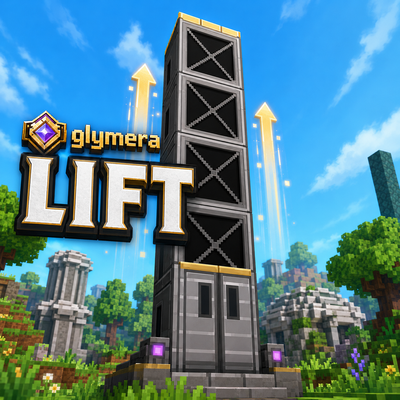
CurseForge · Hytale mod
GlymeraLift
Build real elevators from a single block. Stack it, click the door, ride smoothly up or down - a genuine physical transport, no teleporting, no snapping. Directional doors, hands-free upright ride, any height.
Choose a version Pick your version below, then grab the matching file.
Quick answer
Which GlymeraLift release should I use?
Latest stable file GlymeraLift-3.0.0.jar
Game version 0.6
Mod system Built-in Hytale mod system
GlymeraLift-3.0.0.jar targets 0.6. Do not install it as a separate client mod. Enable it on the world host—the local server in singleplayer or the dedicated server in multiplayer. No required dependencies listed for this file.
Where it goes
Where should GlymeraLift be installed in Hytale?
Do not install it as a separate client mod. Enable it on the world host—the local server in singleplayer or the dedicated server in multiplayer.
Separate client mod Not supported
World host / dedicated server Required
Mod system for this release Built-in Hytale mod system
Required install it here Optional supported, not mandatory Not supported do not install here Source doesn’t say do not assume
Put Hytale mods on the world host or dedicated server. Singleplayer runs a local server too; Hytale does not use separate client mods.
What else does GlymeraLift-3.0.0.jar need?
GlymeraLift-3.0.0.jar. Change the file and its required mods may change too.
This file does not list any required mods. Do not add a library just because a different file uses it.
This file does not list any required or optional project dependencies. Check the creator notes before changing an existing world.
Before you install it
Add GlymeraLift without breaking your instance.
Built for GlymeraLift-3.0.0.jar. Pick another file and the loader, install side or required mods may change.
- 01
Stick to this file
Use GlymeraLift-3.0.0.jar. It targets 0.6; another release may target a different game build or dependency set.
- 02
Bring the mods it needs
This file does not list any required mods. Do not add a library just because a different file uses it.
- 03
Enable it on the world host
Do not install it as a separate client mod. Enable it on the world host—the local server in singleplayer or the dedicated server in multiplayer.
- 04
Pick the file you checked
Use the “Get this file” button beside GlymeraLift-3.0.0.jar. It opens that exact file at the source.
About this project
What does GlymeraLift add?
GlymeraLift - Smooth Physical Elevators
Build real elevators from a single block. Stack the block, click the door, and ride smoothly up or down - a genuine physical transport, no teleporting, no jerky snapping. Step in, ride, step out.
What is GlymeraLift?
GlymeraLift turns a simple stacked block into a working elevator shaft. Place the Glymera Lift block in a vertical column and the plugin automatically turns the top and bottom into elevator doors - the rest becomes the shaft. Walk up to a door, press use (F), and you are carried smoothly to the other end and stepped out onto the floor.
The ride is a real physical movement - your character actually travels through the shaft, standing upright the whole way. It is not a teleport and it does not stutter.
Pure server-side plugin - no client mod required.
Highlights
- One block, whole elevator - stack the Lift block; the ends become doors automatically (minimum 4 blocks tall)
- Smooth physical ride - carried up or down with fluid motion, never a teleport or a snap
- Ride standing, hands free - you stay centred and upright; controls are locked during the ride so you never drift into a wall
- Directional doors - the door faces the way you were looking when you placed it, and you are stepped out through that side; the texture shows the front
- Ceiling-aware exit - the plugin measures the headroom at your destination and lifts you exactly as high as it fits, so tight platforms work too
- Two-way - press use on the bottom door to go up, the top door to go down
- Auto-forming - break or extend the column and the doors re-form themselves; split a column and you get two independent elevators
- Any height - from a 4-block hop to a full tower
How To Use
- Craft the Glymera Lift block (see recipe below) or grab it from the creative menu.
- Stack it in a straight vertical column, at least 4 blocks tall.
- The top two and bottom two blocks turn into doors automatically.
- Press use (F) on a door - you ride to the other end and step out.
Face the direction you want the door to open while placing the block - the door front (and your exit) points that way.
Crafting Recipe
| Input | Bench | Output |
|---|---|---|
| 2x Iron Bar | Workbench | 4x Glymera Lift |
Configuration
Generated at first startup: plugins/GlymeraLift/config.json
| Setting | Default | Description |
|---|---|---|
rideSpeed |
4.5 |
Vertical travel speed in blocks per second |
enterSpeed |
3.0 |
Speed of the pull-in and step-out movement |
exitClearance |
0.45 |
How far above floor level you are lifted before stepping out (auto-capped to the available headroom) |
maxColumnHeight |
128 |
Safety limit for how tall a single elevator column can be |
maxRideMs |
60000 |
Absolute safety timeout for a ride, in milliseconds |
rotationOffset |
0 |
Calibration 0-3: rotate the door-front direction a quarter turn if it ever points the wrong way |
Installation
- Place
GlymeraLift-1.0.0.jarin your server'smods/folder - Start (or restart) the server
- Done!
Made with care by Glymera for the Hytale community
Project description from CurseForge.
Pick your setup
GlymeraLift releases for each Hytale build.
Choose the version and loader you play, then open the matching release.
Hytale version
0.5
1 loader buildCheck the dependencies, then try the file in a copied instance before changing a world you care about.
Recent files
GlymeraLift releases and Hytale builds
GlymeraLift-3.0.0.jar
18 Sept 2026
Client Not supported Server Required Dependencies No extras listed Listed on Project page
Check the 0.6 setup 0.6 release
GlymeraLift-2.0.0.jar
28 Aug 2026
Client Not supported Server Required Dependencies No extras listed Listed on Project page
Check the 0.6 setup 0.6 release
GlymeraLift-1.0.0.jar
7 Jul 2026
Client Not supported Server Required Dependencies No extras listed Listed on Project page
Check the 0.5 setup 0.5 release
Looking for an older file? The official CurseForge project page is in Resources.