
Hytale version
Back to mods 
CurseForge · Hytale mod
Server Messenger – Private Messages GUI
Persistent private messages with a clean GUI for Hytale servers.
Choose a version Pick your version below, then grab the matching file.
Quick answer
Which Server Messenger – Private Messages GUI release should I use?
Latest stable file HytaleMessenger-0.5.7.jar
Game version 0.5
Mod system Built-in Hytale mod system
Server Messenger – Private Messages GUI HytaleMessenger-0.5.7.jar targets 0.5. Do not install it as a separate client mod. Enable it on the world host—the local server in singleplayer or the dedicated server in multiplayer. No required dependencies listed for this file.
Where it goes
Where should Server Messenger – Private Messages GUI be installed in Hytale?
Do not install it as a separate client mod. Enable it on the world host—the local server in singleplayer or the dedicated server in multiplayer.
Separate client mod Not supported
World host / dedicated server Required
Mod system for this release Built-in Hytale mod system
Required install it here Optional supported, not mandatory Not supported do not install here Source doesn’t say do not assume
Put Hytale mods on the world host or dedicated server. Singleplayer runs a local server too; Hytale does not use separate client mods.
What else does Server Messenger – Private Messages GUI HytaleMessenger-0.5.7.jar need?
HytaleMessenger-0.5.7.jar. Change the file and its required mods may change too.
This file does not list any required mods. Do not add a library just because a different file uses it.
This file does not list any required or optional project dependencies. Check the creator notes before changing an existing world.
Before you install it
Add Server Messenger – Private Messages GUI without breaking your instance.
Built for Server Messenger – Private Messages GUI HytaleMessenger-0.5.7.jar. Pick another file and the loader, install side or required mods may change.
- 01
Stick to this file
Use HytaleMessenger-0.5.7.jar. It targets 0.5; another release may target a different game build or dependency set.
- 02
Bring the mods it needs
This file does not list any required mods. Do not add a library just because a different file uses it.
- 03
Enable it on the world host
Do not install it as a separate client mod. Enable it on the world host—the local server in singleplayer or the dedicated server in multiplayer.
- 04
Pick the file you checked
Use the “Get this file” button beside HytaleMessenger-0.5.7.jar. It opens that exact file at the source.
About this project
What does Server Messenger – Private Messages GUI add?



Hytale Messenger
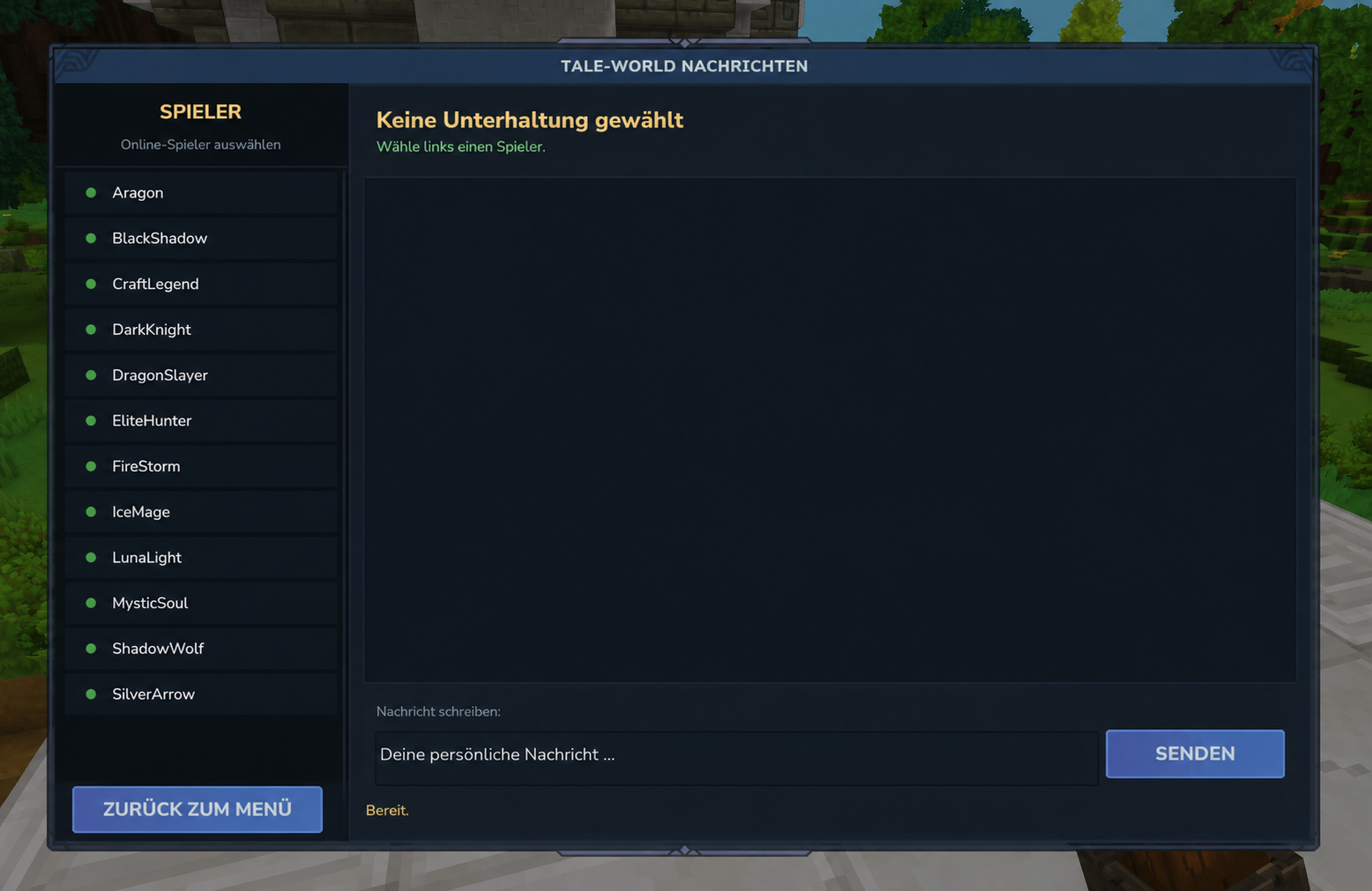
**Hytale Messenger** adds a clean private messaging interface to Hytale servers.
Players can open the messenger with /pm, select another online player and send private messages without using the public chat.
Messages and conversations are stored permanently and remain available after a server restart.
Features
- Private messaging GUI
- Open the messenger with
/pm - Available to every player without additional permissions
- Online player selection
- Persistent message history
- Messages remain saved after server restarts
- Clean and easy-to-use interface
- Customizable language file
- Server owners can translate every menu text
- No dependency on another menu mod
Command
/pm
❤️ Support
If you enjoy this mod, consider leaving a ⭐ on CurseForge!
You can also support my work here:
🔗 Check Out My Other Hytale Projects
Take a look at my other Hytale mods and projects here:
👉 DerFriesn CurseForge Projects
Tale-World German Community 
Tale-World is my German Hytale community server project.
- IP:
play.tale-world.com - Website: https://tale-world.com/
- Discord: https://discord.gg/qJqGKBMgM8
Come join the community, test the mod, give feedback and help shape the future of Tale-World.
Project description from CurseForge.
Pick your setup
Server Messenger – Private Messages GUI releases for each Hytale build.
Choose the version and loader you play, then open the matching release.
Check the dependencies, then try the file in a copied instance before changing a world you care about.
Recent files
Server Messenger – Private Messages GUI releases and Hytale builds
HytaleMessenger-0.5.7.jar
22 Jul 2026
Client Not supported Server Required Dependencies No extras listed Listed on Project page
Check the 0.5 setup 0.5 release
HytaleMessenger-1.1.0.jar
22 Jul 2026
Client Not supported Server Required Dependencies No extras listed Listed on Project page
Check the 0.5 setup 0.5 release
Looking for an older file? The official CurseForge project page is in Resources.
 mod
mod CurseForge · Hytale
Arcane Storage Nexus
Tired of rummaging through dozens of chests across your base, but don't want to risk data loss because of mod? Then this is for you. Using standard Hytale storage to create a searchable storage system without the risk of a mod deleting your stuff.
 mod
mod CurseForge · Hytale
Vitja's Helper (Item Guide, Recipes & Loot)
An in-game item guide with recipes, loot sources, item stats, crafting trees and pinned material lists.
 mod
mod CurseForge · Hytale
ReservedSlots
A Hytale mod, intended for server owners, to be able to reserve slots for VIP + STAFF players, using a permission.