Hytale version
Back to mods 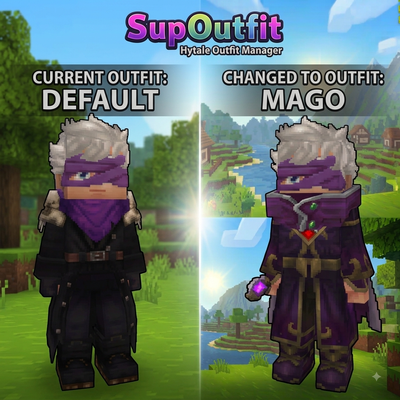
CurseForge · Hytale mod
SupOutfit
Server-side outfit management system with commands and custom UI support.
Choose a version Pick your version below, then grab the matching file.
Quick answer
Which SupOutfit release should I use?
Latest stable file SupOutfit-1.0.0.jar
Game version 0.5
Mod system Built-in Hytale mod system
SupOutfit-1.0.0.jar targets 0.5. Do not install it as a separate client mod. Enable it on the world host—the local server in singleplayer or the dedicated server in multiplayer. No required dependencies listed for this file.
Where it goes
Where should SupOutfit be installed in Hytale?
Do not install it as a separate client mod. Enable it on the world host—the local server in singleplayer or the dedicated server in multiplayer.
Separate client mod Not supported
World host / dedicated server Required
Mod system for this release Built-in Hytale mod system
Required install it here Optional supported, not mandatory Not supported do not install here Source doesn’t say do not assume
Put Hytale mods on the world host or dedicated server. Singleplayer runs a local server too; Hytale does not use separate client mods.
What else does SupOutfit-1.0.0.jar need?
SupOutfit-1.0.0.jar. Change the file and its required mods may change too.
This file does not list any required mods. Do not add a library just because a different file uses it.
This file does not list any required or optional project dependencies. Check the creator notes before changing an existing world.
Before you install it
Add SupOutfit without breaking your instance.
Built for SupOutfit-1.0.0.jar. Pick another file and the loader, install side or required mods may change.
- 01
Stick to this file
Use SupOutfit-1.0.0.jar. It targets 0.5; another release may target a different game build or dependency set.
- 02
Bring the mods it needs
This file does not list any required mods. Do not add a library just because a different file uses it.
- 03
Enable it on the world host
Do not install it as a separate client mod. Enable it on the world host—the local server in singleplayer or the dedicated server in multiplayer.
- 04
Pick the file you checked
Use the “Get this file” button beside SupOutfit-1.0.0.jar. It opens that exact file at the source.
About this project
What does SupOutfit add?
SupOutfit
Manage your character appearances with an easy-to-use outfit system for Hytale.
SupOutfit allows players to save, organize, and switch between different outfit presets. Create different looks for exploration, roleplay, events, or any situation where you want to quickly change your character's appearance.
Features
Outfit Management
- Save your current appearance as an outfit preset
- Switch between saved outfits instantly
- Browse your saved outfits through a custom interface
- Equip outfits with a single click
- Delete unwanted outfit presets
Custom Interface
SupOutfit includes a dedicated wardrobe interface built with Hytale's Custom UI system.
Features:
- Visual outfit browser
- Interactive equip and delete buttons
- Persistent player outfit storage
Commands
| Command | Description |
|---|---|
/supoutfit browser |
Opens the wardrobe interface |
/supoutfit save <name> |
Saves your current outfit |
/supoutfit delete <name> |
Deletes a saved outfit |
Use Cases
SupOutfit is useful for:
- Roleplay servers
- MMORPG-style servers
- Adventure servers
- Players who use multiple character styles
Create different appearances for different roles, factions, events, or adventures.
Roadmap
Planned features:
- Outfit limits and configuration options
- Permission support
- Improved wardrobe UI
- Additional outfit management features
- More server customization options
Project description from CurseForge.
Pick your setup
SupOutfit releases for each Hytale build.
Choose the version and loader you play, then open the matching release.
Check the dependencies, then try the file in a copied instance before changing a world you care about.
Recent files
SupOutfit releases and Hytale builds
SupOutfit-1.0.0.jar
11 Aug 2026
Client Not supported Server Required Dependencies No extras listed Listed on Project page
Check the 0.5 setup 0.5 release
Looking for an older file? The official CurseForge project page is in Resources.
 mod
mod CurseForge · Hytale
Fullmetal Labyrinth
Adds a brand-new Labyrinth Dimension featuring a vast desert surface and an endless maze stretching deep below. Discover unique locations and face a variety of dangerous new enemies as you explore its depths!
 mod
mod CurseForge · Hytale
Towns And Nations
Towns And Nations is a Hytale plugin that lets players create, manage, and expand towns and nations with territory control, alliances, and strategic warfare.
 mod
mod CurseForge · Hytale
PJ Hyper Crossbows
Improved crossbows with more ammunition and damage, and they also retain loaded ammunition.