Hytale version
Back to mods 
CurseForge · Hytale mod
SMPack
This pack has 12 new Ores, Blocks and Ingots
Choose a version Pick your version below, then grab the matching file.
Quick answer
Which SMPack release should I use?
Latest stable file SMOrePack-1.0.1.zip
Game version 0.6
Mod system Built-in Hytale mod system
SMPack SMOrePack-1.0.1.zip targets 0.6. Do not install it as a separate client mod. Enable it on the world host—the local server in singleplayer or the dedicated server in multiplayer. No required dependencies listed for this file.
Where it goes
Where should SMPack be installed in Hytale?
Do not install it as a separate client mod. Enable it on the world host—the local server in singleplayer or the dedicated server in multiplayer.
Separate client mod Not supported
World host / dedicated server Required
Mod system for this release Built-in Hytale mod system
Required install it here Optional supported, not mandatory Not supported do not install here Source doesn’t say do not assume
Put Hytale mods on the world host or dedicated server. Singleplayer runs a local server too; Hytale does not use separate client mods.
What else does SMPack SMOrePack-1.0.1.zip need?
SMOrePack-1.0.1.zip. Change the file and its required mods may change too.
This file does not list any required mods. Do not add a library just because a different file uses it.
This file does not list any required or optional project dependencies. Check the creator notes before changing an existing world.
Before you install it
Add SMPack without breaking your instance.
Built for SMPack SMOrePack-1.0.1.zip. Pick another file and the loader, install side or required mods may change.
- 01
Stick to this file
Use SMOrePack-1.0.1.zip. It targets 0.6; another release may target a different game build or dependency set.
- 02
Bring the mods it needs
This file does not list any required mods. Do not add a library just because a different file uses it.
- 03
Enable it on the world host
Do not install it as a separate client mod. Enable it on the world host—the local server in singleplayer or the dedicated server in multiplayer.
- 04
Pick the file you checked
Use the “Get this file” button beside SMOrePack-1.0.1.zip. It opens that exact file at the source.
About this project
What does SMPack add?
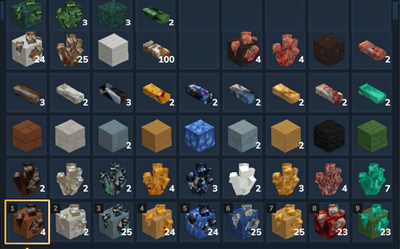
These two were added as part of SMOrePack-1.0.1 release:
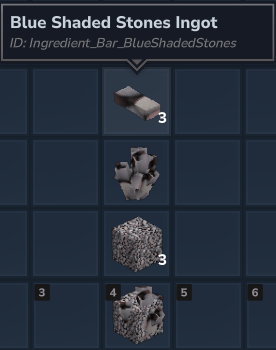
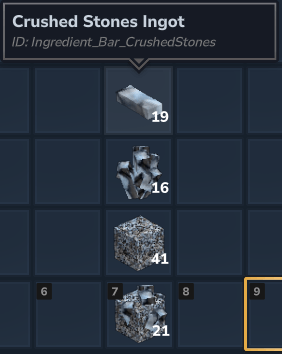
This is a Hytale ModPack that includes a 14 new Ores, Blocks and Ingots. All items are available in Creative mode only at the moment. Automatically generating the blocks into biomes is not (yet) included.
Ore Names from Top Left to Bottom Right
Jade Nephrite, Siderite, Cinnabar
Scheelite, Arsenopyrite, Torbernite, Orpiment, Chalcopyrite, Galena, Hutchinsonite, Painite & Malachite
Blue Shaded Stones & Crushed Stones
While these blocks are not autogenerated in the world, they can still be used as Rewards (Voting) and given to users with the /give command or place them anywhere in the world for players to break and retrieve them. Works great with HyVote mod.
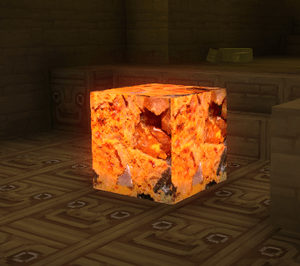
Additional Blocks included: Malachite and Orpiment Lightsource blocks.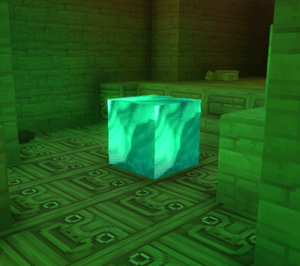
One additional item is the cross pointer to replace the tiny little dot so you always know what you are pointing at (without squinting your eyes). :-)
While there are NO dependencies, I do recommend using Blocchio - WAILA type plugin so that pointing at all blocks/items will show their names. If you want to place any of the blocks for players to mine from, you can install BlockRegen so that you can choose which block gets regenerated when broken.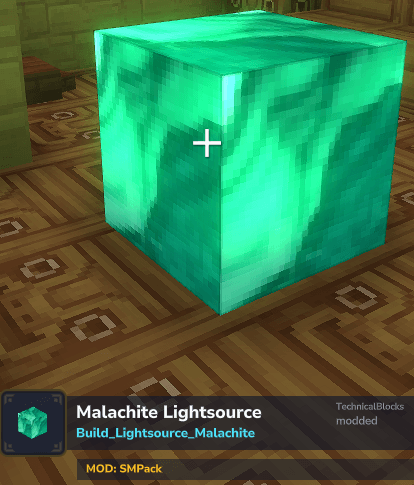
Project description from CurseForge.
Pick your setup
SMPack releases for each Hytale build.
Choose the version and loader you play, then open the matching release.
Check the dependencies, then try the file in a copied instance before changing a world you care about.
Recent files
SMPack releases and Hytale builds
SMOrePack-1.0.1.zip
22 Sept 2026
Client Not supported Server Required Dependencies No extras listed Listed on Project page
Check the 0.6 setup 0.6 release
SMPack
10 Sept 2026
Client Not supported Server Required Dependencies No extras listed Listed on Project page
Check the 0.6 setup 0.6 release
Looking for an older file? The official CurseForge project page is in Resources.