Hytale version
Back to mods 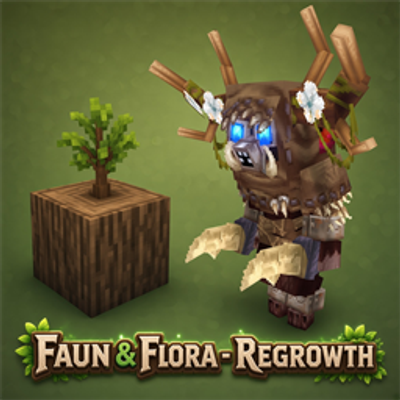
CurseForge · Hytale mod
Faun & Flora - Regrowth
adds a natural response to deforestation and a regrowth system for trees, wild plants, mushrooms...
Choose a version Pick your version below, then grab the matching file.
Quick answer
Which Faun & Flora - Regrowth release should I use?
Latest stable file faun-flora-regrowth-1.0.7
Game version 0.6
Mod system Built-in Hytale mod system
Faun & Flora - Regrowth faun-flora-regrowth-1.0.7 targets 0.6. Do not install it as a separate client mod. Enable it on the world host—the local server in singleplayer or the dedicated server in multiplayer. No required dependencies listed for this file.
Where it goes
Where should Faun & Flora - Regrowth be installed in Hytale?
Do not install it as a separate client mod. Enable it on the world host—the local server in singleplayer or the dedicated server in multiplayer.
Separate client mod Not supported
World host / dedicated server Required
Mod system for this release Built-in Hytale mod system
Required install it here Optional supported, not mandatory Not supported do not install here Source doesn’t say do not assume
Put Hytale mods on the world host or dedicated server. Singleplayer runs a local server too; Hytale does not use separate client mods.
What else does Faun & Flora - Regrowth faun-flora-regrowth-1.0.7 need?
faun-flora-regrowth-1.0.7. Change the file and its required mods may change too.
This file does not list any required mods. Do not add a library just because a different file uses it.
This file does not list any required or optional project dependencies. Check the creator notes before changing an existing world.
Before you install it
Add Faun & Flora - Regrowth without breaking your instance.
Built for Faun & Flora - Regrowth faun-flora-regrowth-1.0.7. Pick another file and the loader, install side or required mods may change.
- 01
Stick to this file
Use faun-flora-regrowth-1.0.7. It targets 0.6; another release may target a different game build or dependency set.
- 02
Bring the mods it needs
This file does not list any required mods. Do not add a library just because a different file uses it.
- 03
Enable it on the world host
Do not install it as a separate client mod. Enable it on the world host—the local server in singleplayer or the dedicated server in multiplayer.
- 04
Pick the file you checked
Use the “Get this file” button beside faun-flora-regrowth-1.0.7. It opens that exact file at the source.
About this project
What does Faun & Flora - Regrowth add?
Faun & Flora - Regrowth adds a natural response to deforestation and a regrowth system for trees, wild plants, mushrooms, flowers, and bushes. The goal is to keep the world alive without turning the server into a heavy world-scanning system: the mod only records blocks that were actually harvested or broken and regrows them after the configured time. Available in all languages
The Faun
The Faun is a forest-bound creature. When a player cuts down many trees in a short time, the Faun may appear near that player as nature's response. By default, the Faun appears when a player cuts 15 trees within a 5 minute window. After appearing, there is a 1 hour cooldown to prevent repeated spawns in quick succession. When it dies, the Faun releases a burst of natural energy: nearby cut trees can return immediately by planting and accelerating saplings around the area where it died.
Faun Drops
When defeated, a Faun can drop:
- Organic_Fertilize: 3 to 5 unitsr
Organic Fertilizer
The Organic_Fertilizer item is a natural fertilizer for trees. It can be used on saplings and young trees to greatly speed up growth. It is useful for manually restoring forests or accelerating trees that were just planted by the mod's regrowth system.
Default recipe:
- 10x Ingredient_Poop
- 10x Ingredient_Life_Essenc
- 5x Vegetables resource
- Tier 3 farming bench
Tree Regrowth
When a real tree is cut down, the mod tries to detect whether it was actually a tree and not just wood blocks placed by a player. To do this, it checks the trunk, ground, canopy, and nearby leaves. This prevents cases like a manually placed vertical wood column creating a sapling after being broken. By default, the tree sapling appears after 60 real minutes. The system also ignores trunks placed by players, so wooden builds do not enter the regrowth system.
Wild Plant, Flower, And Mushroom Regrowth
Configured wild plants, flowers, mushrooms, and other harvestable blocks can grow back automatically after being harvested. By default, this regrowth happens after 60 real minutes. Food crops planted on tilled farmland are not treated as wild plants. The intent is to avoid interfering with the game's normal farming system.
Bush And Plant_Crop Regrowth
The mod also has a separate list for bushes and similar blocks, including IDs with Bush and Plant_Crop. By default, they grow back after 60 real minutes. If the support block below the plant or bush is removed, the pending record is discarded. This prevents the mod from repeatedly trying to regrow something in a location that no longer exists.
Sickle Use
If a player harvests or breaks plants, bushes, mushrooms, or flowers using any Sickle, that block is not added to the regrowth file. This allows players to clear areas with a sickle without everything growing back later. Trees are not affected by this rule.
Configuration Files
On first run, the mod creates configuration files in the plugin data folder. These files are only created if they do not already exist. If you edit any of them, the mod will not overwrite your changes on the next restart. Created files: config.json trees.json plants.json bush.json
trees.json, plants.json, and bush.json control which IDs participate in each regrowth system.
config.json
Default file:{ "treeRegrowthEnabled": true, "treeSaplingDelayMinutes": 60, "faunTreeCutThreshold": 15, "faunTreeCutWindowMinutes": 5, "faunSpawnCooldownMinutes": 60, "plantRegrowthEnabled": true, "plantRegrowthDelayMinutes": 60, "bushRegrowthEnabled": true, "bushRegrowthDelayMinutes": 60 }
Options
treeRegrowthEnabled Enables or disables tree regrowth.treeSaplingDelayMinutes Time, in real minutes, for a sapling to appear after a valid tree is cut.faunTreeCutThreshold Number of trees a player must cut within the configured window for the Faun to appear.faunTreeCutWindowMinutes Time, in real minutes, during which the mod counts the player's cut trees to decide whether the Faun should appear.faunSpawnCooldownMinutes Cooldown time, in real minutes, after the Faun appears. Use 0 to remove the cooldown.plantRegrowthEnabled Enables or disables regrowth for wild plants, flowers, mushrooms, and other blocks listed in plants.json.plantRegrowthDelayMinutes Time, in real minutes, for wild plants to grow back.bushRegrowthEnabled Enables or disables regrowth for bushes and blocks listed in bush.json.bushRegrowthDelayMinutes Time, in real minutes, for configured bushes and Plant_Crop blocks to grow back.
Commands
/ff reload Reloads the files: config.json trees.json plants.json bush.json
Use this command after editing settings or ID lists, without restarting the server.
Server Notes
Timers are based on real time and continue working after a server restart. If a plant, mushroom, or bush was harvested and the server restarts before regrowth, the mod keeps the record and respects the remaining time. The system is designed to be lightweight: it does not scan the whole world. Only harvested block positions and actually cut trees are tracked.
Project description from CurseForge.
Pick your setup
Faun & Flora - Regrowth releases for each Hytale build.
Choose the version and loader you play, then open the matching release.
Check the dependencies, then try the file in a copied instance before changing a world you care about.
Recent files
Faun & Flora - Regrowth releases and Hytale builds
faun-flora-regrowth-1.0.7
14 Sept 2026
Client Not supported Server Required Dependencies No extras listed Listed on Project page
Check the 0.6 setup 0.6 release
Looking for an older file? The official CurseForge project page is in Resources.