Hytale version
Back to mods 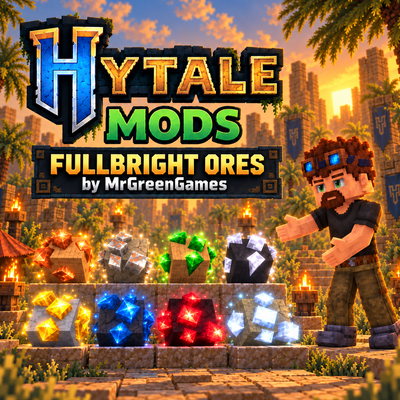
CurseForge · Hytale mod
Fullbright Ores
Makes vanilla and compatible modded Hytale ores Fullbright for easier visibility, including supported ore item models. Automatically detects compatible modded ores on load, while preserving original textures and avoiding cave-light spill.
Choose a version Pick your version below, then grab the matching file.
Quick answer
Which Fullbright Ores release should I use?
Latest stable file MGG-Fullbright-Ores-1.0.0.jar
Game version 0.6
Mod system Built-in Hytale mod system
Fullbright Ores MGG-Fullbright-Ores-1.0.0.jar targets 0.6. Do not install it as a separate client mod. Enable it on the world host—the local server in singleplayer or the dedicated server in multiplayer. No required dependencies listed for this file.
Where it goes
Where should Fullbright Ores be installed in Hytale?
Do not install it as a separate client mod. Enable it on the world host—the local server in singleplayer or the dedicated server in multiplayer.
Separate client mod Not supported
World host / dedicated server Required
Mod system for this release Built-in Hytale mod system
Required install it here Optional supported, not mandatory Not supported do not install here Source doesn’t say do not assume
Put Hytale mods on the world host or dedicated server. Singleplayer runs a local server too; Hytale does not use separate client mods.
What else does Fullbright Ores MGG-Fullbright-Ores-1.0.0.jar need?
MGG-Fullbright-Ores-1.0.0.jar. Change the file and its required mods may change too.
This file does not list any required mods. Do not add a library just because a different file uses it.
This file does not list any required or optional project dependencies. Check the creator notes before changing an existing world.
Before you install it
Add Fullbright Ores without breaking your instance.
Built for Fullbright Ores MGG-Fullbright-Ores-1.0.0.jar. Pick another file and the loader, install side or required mods may change.
- 01
Stick to this file
Use MGG-Fullbright-Ores-1.0.0.jar. It targets 0.6; another release may target a different game build or dependency set.
- 02
Bring the mods it needs
This file does not list any required mods. Do not add a library just because a different file uses it.
- 03
Enable it on the world host
Do not install it as a separate client mod. Enable it on the world host—the local server in singleplayer or the dedicated server in multiplayer.
- 04
Pick the file you checked
Use the “Get this file” button beside MGG-Fullbright-Ores-1.0.0.jar. It opens that exact file at the source.
About this project
What does Fullbright Ores add?
Fullbright Ores
Fullbright Ores makes Hytale's ores much easier to spot by rendering the actual ore material at full brightness while leaving the surrounding stone and environment unchanged.
The mod also applies Fullbright rendering to compatible ore item models and automatically looks for supported modded ores when the world loads.
Commands
No commands required.
Fullbright Ores works automatically once the mod is enabled.
Features
- Fullbright Vanilla Ores
- Fullbright Ore Item Models
- Automatic Modded Ore Detection
- Preserves Original Hytale Ore Textures
- Does Not Illuminate Surrounding Blocks
- Optional Ore Block Crafting Recipes
- Dedicated Ore Blocks Workbench Tab
- Automatic Ore Discovery on Startup
- Multiplayer Friendly
- Lightweight Runtime Changes
- Clean Removal With No World Residue
Why Fullbright Ores?
Ores can sometimes be difficult to distinguish in dark caves, shadowed areas, or against similar-looking stone.
Fullbright Ores improves ore visibility by applying Fullbright rendering directly to the ore portions of supported blocks.
Unlike mods that turn ores into light sources, Fullbright Ores does not light up the surrounding cave or recolor nearby blocks. The host stone remains normally lit while the ore itself stays clearly visible.
The original Hytale ore textures and models are preserved, keeping the ores recognizable and consistent with the game's normal visual style.
Modded Ore Support
Fullbright Ores automatically scans the loaded game assets for potential compatible ores when the world starts.
Supported modded ores can automatically receive the same Fullbright treatment as Hytale's vanilla ores without requiring individual compatibility patches.
The mod looks for ore-style block and item definitions, categories, models, and texture paths when identifying compatible content.
Modded ores still need to use a compatible 3D Hytale block or item model for Fullbright rendering to be applied.
Ore Items
Fullbright rendering is not limited to ores placed in the world.
Compatible 3D ore item models are also rendered using Fullbright shading, allowing dropped and held ore items to remain clearly visible.
Inventory icons generated separately by Hytale are not modified.
Ore Block Recipes
Fullbright Ores can optionally add crafting recipes for supported ore blocks.
When enabled, compatible recipes are placed inside a dedicated:
Ore Blocks
Workbench category using a native Hytale ore icon.
Ore block recipes can be disabled in the mod configuration if you only want the Fullbright rendering features.
Installation
Place the mod in your Hytale mods folder:
AppData\Roaming\Hytale\UserData\Mods
Enable Fullbright Ores in your world's mod settings and load into the world.
No additional setup or commands are required.
Notes
Fullbright Ores modifies supported ore rendering at runtime and does not replace blocks in your world, create helper entities, or leave behind custom blocks or lighting data.
Removing the mod and restarting the world returns supported ores to their normal Hytale rendering.
Fullbright affects the brightness of the ore material itself. It does not cause ores to cast light into surrounding blocks.
Automatic modded ore support depends on the structure of the other mod's assets. Unusual or completely custom rendering systems may require dedicated compatibility.
Consider following MrGreenGames if you enjoy this mod! 💚
🟢 Feel free to use this mod in your modpacks and videos! If you feature the mod in a video or showcase, linking back to the original mod page in your description is greatly appreciated, but not required.
🔴 Please do not redistribute or repurpose the mod. You may not reupload the mod to other websites, launchers, or platforms, nor reuse its models, textures, data, or other assets in separate projects.
Do not place the mod behind ad-based or redirect services such as AdFly, and do not sell the mod or include it in any paid modpack.
💚 This mod is intended to remain free and accessible to everyone.
Project description from CurseForge.
Pick your setup
Fullbright Ores releases for each Hytale build.
Choose the version and loader you play, then open the matching release.
Check the dependencies, then try the file in a copied instance before changing a world you care about.
Recent files
Fullbright Ores releases and Hytale builds
MGG-Fullbright-Ores-1.0.0.jar
17 Sept 2026
Client Not supported Server Required Dependencies No extras listed Listed on Project page
Check the 0.6 setup 0.6 release
Looking for an older file? The official CurseForge project page is in Resources.