Hytale version
Back to mods 
CurseForge · Hytale mod
Biome Selector
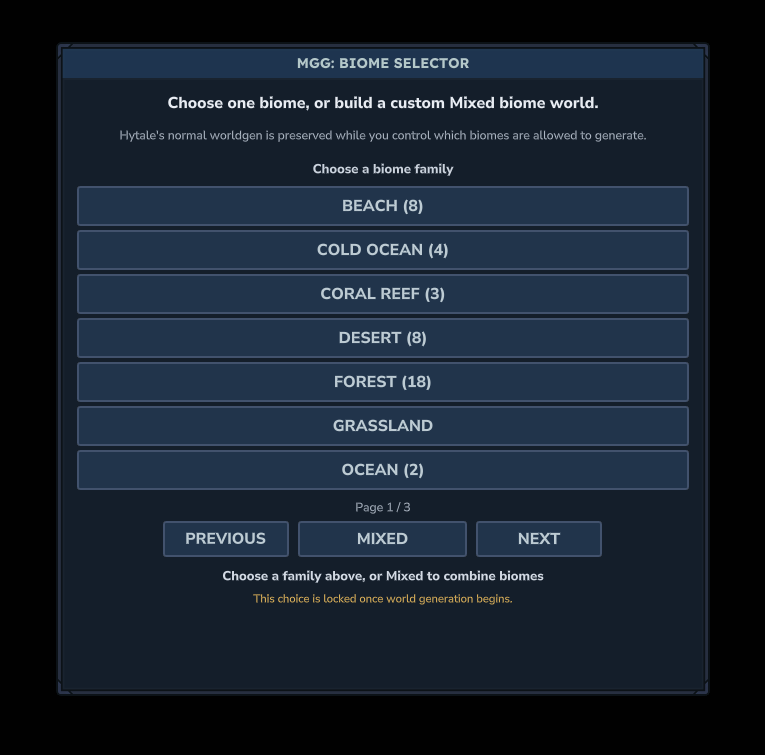
Choose one Hytale biome or combine multiple biomes into a custom Mixed world while preserving native terrain, foliage, structures, and biome identity. Use /biomeselector to view your active biome setup anytime.
Choose a version Pick your version below, then grab the matching file.
Quick answer
Which Biome Selector release should I use?
Latest stable file MGG-Biome-Selector-1.0.0.jar
Game version 0.6
Mod system Built-in Hytale mod system
Biome Selector MGG-Biome-Selector-1.0.0.jar targets 0.6. Do not install it as a separate client mod. Enable it on the world host—the local server in singleplayer or the dedicated server in multiplayer. No required dependencies listed for this file.
Where it goes
Where should Biome Selector be installed in Hytale?
Do not install it as a separate client mod. Enable it on the world host—the local server in singleplayer or the dedicated server in multiplayer.
Separate client mod Not supported
World host / dedicated server Required
Mod system for this release Built-in Hytale mod system
Required install it here Optional supported, not mandatory Not supported do not install here Source doesn’t say do not assume
Put Hytale mods on the world host or dedicated server. Singleplayer runs a local server too; Hytale does not use separate client mods.
What else does Biome Selector MGG-Biome-Selector-1.0.0.jar need?
MGG-Biome-Selector-1.0.0.jar. Change the file and its required mods may change too.
This file does not list any required mods. Do not add a library just because a different file uses it.
This file does not list any required or optional project dependencies. Check the creator notes before changing an existing world.
Before you install it
Add Biome Selector without breaking your instance.
Built for Biome Selector MGG-Biome-Selector-1.0.0.jar. Pick another file and the loader, install side or required mods may change.
- 01
Stick to this file
Use MGG-Biome-Selector-1.0.0.jar. It targets 0.6; another release may target a different game build or dependency set.
- 02
Bring the mods it needs
This file does not list any required mods. Do not add a library just because a different file uses it.
- 03
Enable it on the world host
Do not install it as a separate client mod. Enable it on the world host—the local server in singleplayer or the dedicated server in multiplayer.
- 04
Pick the file you checked
Use the “Get this file” button beside MGG-Biome-Selector-1.0.0.jar. It opens that exact file at the source.
About this project
What does Biome Selector add?
▶ Click image to see showcase
Commands
/biomeselector - Opens the selector before generation, or displays the active biome setup after the world has been created.
Features
- Single Biome Worlds
- Custom Mixed Biome Worlds
- Choose From Hytale's Natural Biomes
- Easy Biome Family Browsing
- Multi-Biome Checkbox Selection
- Seeded Regional Biome Distribution
- Native Hytale Terrain and Biome Details
- Smoothed Biome Transitions
- Ocean, Shore, and Land Support
- Automatic Active Biome Summary
- Clean First-Run Setup GUI
What Is Biome Selector?
Biome Selector lets you control which biomes are allowed to generate in a Hytale world.
Choose a single biome for a focused themed world, or use Mixed mode to combine multiple biomes into one custom world.
The mod keeps Hytale's normal terrain generation, materials, foliage, structures, and biome identity while controlling which biomes can appear.
Mixed Biome Worlds
Mixed mode allows you to select several biomes from a scrollable checklist.
Biome Selector then distributes them across the world using seeded regions, creating varied custom worlds without simply dividing the map into large sections.
Very different biome combinations may create dramatic terrain transitions, especially when combining oceans, wastes, mountains, or other extreme terrain types.
Active Biomes
A short summary of the world's active biome configuration is shown automatically after loading into the generated world.
You can display it again at any time with:
/biomeselector
Installation
Place the mod in:
AppData\Roaming\Hytale\UserData\Mods
Enable Biome Selector for your world and load in.
The setup menu will appear automatically before normal world generation begins.
Compatibility
Hytale >=0.6.7 <0.7.0
Notes
Your biome selection is locked once world generation begins.
Biome Selector is designed primarily for new worlds so it can control generation from the start.
Consider following MrGreenGames if you enjoy this mod! 💚
🟢 Feel free to use this mod in your modpacks and videos!
If you feature the mod in a video or showcase, linking back to the original mod page is appreciated, but not required.
🔴 Please do not redistribute or repurpose the mod.
Do not reupload the mod, reuse its code or assets in separate projects, place it behind ad-based links, sell it, or include it in paid modpacks.
💚 This mod is intended to remain free and accessible to everyone.
Project description from CurseForge.
Pick your setup
Biome Selector releases for each Hytale build.
Choose the version and loader you play, then open the matching release.
Check the dependencies, then try the file in a copied instance before changing a world you care about.
Recent files
Biome Selector releases and Hytale builds
MGG-Biome-Selector-1.0.0.jar
20 Sept 2026
Client Not supported Server Required Dependencies No extras listed Listed on Project page
Check the 0.6 setup 0.6 release
Looking for an older file? The official CurseForge project page is in Resources.