CurseForge · Hytale mod
Server Inventory Sync
Hytale multi-server inventory sync with safe profile sharing and custom ItemQuality protection.
Quick answer
Which Server Inventory Sync release should I use?
We could not find enough file information to pick a stable Hytale setup for Server Inventory Sync.
Where it goes
Where should Server Inventory Sync be installed in Hytale?
Do not install it as a separate client mod. Enable it on the world host—the local server in singleplayer or the dedicated server in multiplayer.
Put Hytale mods on the world host or dedicated server. Singleplayer runs a local server too; Hytale does not use separate client mods.
What else does Server Inventory Sync need?
Choose a release before relying on this list.
This file does not give us a dependency list. Check the creator notes before installing.
This file does not list any required or optional project dependencies. Check the creator notes before changing an existing world.
Before you install it
Add Server Inventory Sync without breaking your instance.
We could not pick a file, so treat this as a checklist—not a compatibility promise.
- 01
Stick to this file
We could not pick a stable file here. Check the game version and loader on the official project page before installing anything.
- 02
Bring the mods it needs
This file does not give us a dependency list. Check the creator notes before installing.
- 03
Enable it on the world host
Do not install it as a separate client mod. Enable it on the world host—the local server in singleplayer or the dedicated server in multiplayer.
- 04
Pick the file you checked
There is no download page for this exact file. Open the project page in Resources and choose the matching release there.
About this project
What does Server Inventory Sync add?
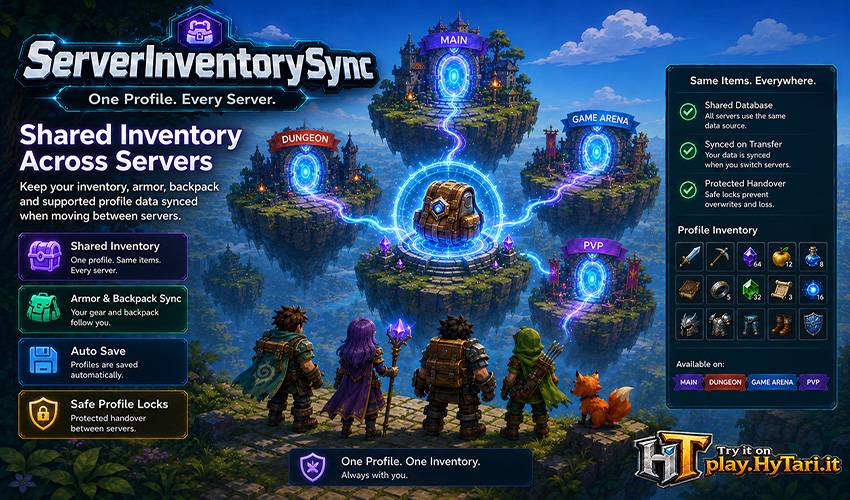
🎒 SERVER INVENTORY SYNC
Keep player inventories and supported profile data synchronized safely across multiple Hytale servers.
INVENTORY SYNC • PLAYER PROFILES • MULTI-SERVER • QUALITY PROTECTION
ServerInventorySync is designed for Hytale networks where players need to keep the same inventory and supported progression data while moving between servers.
Instead of synchronizing only a small collection of slots, it uses a database-backed player profile system, allowing compatible profile data to follow the player across your network.
FEATURES
MULTI-SERVER INVENTORY SYNC
Keep player inventory data consistent across multiple connected Hytale servers.
SAFE PROFILE REPLACEMENT
The latest shared player profile can be loaded and applied automatically on the destination server.
MORE THAN BASIC INVENTORY
Compatible profile data can include main inventory, armor, backpacks, expanded inventory sections, progression data and other supported profile information.
ITEMQUALITY PROTECTION
Custom ItemQuality identities are preserved across server transfers. Missing qualities can safely fall back to Common while retaining their original identity for later restoration.
DATABASE-BACKED SYNCHRONIZATION
All connected servers use a shared MariaDB database to access the latest saved player profile.
LOCK & DUPLICATION PROTECTION
Database locking helps prevent simultaneous profile access, outdated data, missing items and duplicated equipment.
AUTOMATIC SAVING
Player profiles can be saved automatically at configurable intervals to keep shared data up to date.
OPTIMIZED WORLD CHANGES
Changing worlds on the same server avoids unnecessary profile reloads and lock acquisition without resetting the existing autosave schedule.
MODDED PROFILE SUPPORT
Compatible data stored inside the player profile by other mods can travel with the player instead of being limited to vanilla inventory slots.
CONFIGURABLE MESSAGES
Customize loading, locked-profile and retry messages shown while synchronization is taking place.
NO PROXY REQUIRED
Synchronization works directly between your Hytale servers and the shared database.
ONE PROFILE ACROSS YOUR NETWORK
When a player moves to another server, ServerInventorySync retrieves the latest shared profile and applies it on the destination.
SURVIVAL • Dungeons • Instances • Arenas
HUBS • Minigames • Modded Servers • Other Network Destinations
Players can move through your network without maintaining a completely separate inventory on every server.
ONE PLAYER. ONE PROFILE. EVERY SERVER.
ITEMQUALITY PROTECTION
Modded servers can use custom ItemQuality definitions with different internal mappings.
ServerInventorySync preserves the item's semantic quality identity rather than relying only on its local mapping.
If a quality is unavailable on the destination server, the item can temporarily use Common while retaining the original quality information. When that quality becomes available again, it can be restored automatically.
PRESERVE THE QUALITY IDENTITY — NOT JUST ITS LOCAL MAPPING.
SAFE SYNCHRONIZATION
A shared profile should never be modified by two servers at the same time.
ServerInventorySync uses database locking to protect profiles while they are being loaded or saved.
World changes on the same server are handled separately from full server transfers, avoiding unnecessary reloads while preserving the normal autosave cycle.
LOAD THE LATEST PROFILE. PROTECT IT DURING TRANSFER. KEEP EVERY SERVER CONSISTENT.
PERFECT FOR
MULTI-SERVER NETWORKS • Survival + Dungeon setups • Shared progression
HUB NETWORKS • Arenas • Minigames • Modded Servers • Multi-World Environments
ANY NETWORK WHERE PLAYERS SHOULD KEEP THE SAME ITEMS AND SUPPORTED PROFILE DATA.
SIMPLE MULTI-SERVER SETUP
Install ServerInventorySync on every server that should share player profiles.
Configure each server with the same MariaDB database and give every server its own unique serverId.
ServerInventorySync then handles profile saving, locking and loading automatically as players move through the network.
Shared MariaDB database required
Server-side • Multi-server ready • No proxy required
No scoreboard or chat plugin required
⭐ READY FOR SERVER ROUTER
ServerInventorySync is fully standalone and can be used independently.
If your network grows, ServerRouter includes the same InventorySync system together with additional tools such as:
SERVER ROUTING • Commands & Portals • Live Server Status
NETWORK PLAYER LISTS • Cross-Server Chat • Network Events • Shared Inventory
Already using ServerInventorySync? Your existing MariaDB database and saved player profiles are compatible with ServerRouter's integrated InventorySync system, so you can upgrade without resetting player inventories or converting the profile database.
Do not run standalone ServerInventorySync and ServerRouter's integrated InventorySync simultaneously.
View ServerRouter on BuiltByBit
START WITH SHARED INVENTORIES. EXPAND INTO A COMPLETE SERVER NETWORK.
ONE PLAYER. ONE INVENTORY. EVERY SERVER.
Keep player equipment, custom qualities and supported profile data together across your Hytale network.
Project description from CurseForge.
Recent files
Server Inventory Sync releases and Hytale builds
No release information is currently available.
Looking for an older file? The official CurseForge project page is in Resources.