Hytale version
Back to mods 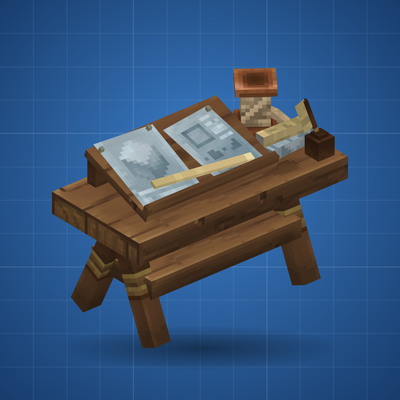
CurseForge · Hytale mod
Hytematica
A Survival friendly prefab building aid
Choose a version Pick your version below, then grab the matching file.
Quick answer
Which Hytematica release should I use?
Latest stable file Hytematica-1.0-0.7.3.jar
Game version 0.7
Mod system Built-in Hytale mod system
Hytematica-1.0-0.7.3.jar targets 0.7. Do not install it as a separate client mod. Enable it on the world host—the local server in singleplayer or the dedicated server in multiplayer. No required dependencies listed for this file.
Where it goes
Where should Hytematica be installed in Hytale?
Do not install it as a separate client mod. Enable it on the world host—the local server in singleplayer or the dedicated server in multiplayer.
Separate client mod Not supported
World host / dedicated server Required
Mod system for this release Built-in Hytale mod system
Required install it here Optional supported, not mandatory Not supported do not install here Source doesn’t say do not assume
Put Hytale mods on the world host or dedicated server. Singleplayer runs a local server too; Hytale does not use separate client mods.
What else does Hytematica-1.0-0.7.3.jar need?
Hytematica-1.0-0.7.3.jar. Change the file and its required mods may change too.
This file does not list any required mods. Do not add a library just because a different file uses it.
This file does not list any required or optional project dependencies. Check the creator notes before changing an existing world.
Before you install it
Add Hytematica without breaking your instance.
Built for Hytematica-1.0-0.7.3.jar. Pick another file and the loader, install side or required mods may change.
- 01
Stick to this file
Use Hytematica-1.0-0.7.3.jar. It targets 0.7; another release may target a different game build or dependency set.
- 02
Bring the mods it needs
This file does not list any required mods. Do not add a library just because a different file uses it.
- 03
Enable it on the world host
Do not install it as a separate client mod. Enable it on the world host—the local server in singleplayer or the dedicated server in multiplayer.
- 04
Pick the file you checked
Use the “Get this file” button beside Hytematica-1.0-0.7.3.jar. It opens that exact file at the source.
About this project
What does Hytematica add?
Hytematica
Bring your blueprints to life in Hytale survival.
Inspired by Litematica, Hytematica lets you build from blueprints without doing the building for you. Choose a prefab, set up your Architect's Tripod, and follow a holographic projection as you gather materials and place every block yourself.
How to Use
1. Craft a Drafting Table
Craft one at a Workbench under the Crafting category.
Recipe:
- 4 Any Tree Log
- 2 Plant Fiber
- 1 Charcoal
2. Craft an Architect's Tripod
Craft one at the Drafting Table under the Architecture category.
Recipe:
- 3 Any Tree Log
- 2 Copper Ingot
- 1 Blue Crystal Shards
- 4 Plant Fiber
- 1 Charcoal
Tip: Both crafting benches can use materials stored in nearby chests, just like other crafting benches.
3. Choose a Blueprint
Place the tripod and interact with it to browse or search the blueprint library. Select a prefab and press Project this blueprint to get started.
4. Start Building
Interact with the tripod again to open its control panel. From there, you can move, rotate, or mirror your blueprint, view individual layers, switch to a bird's-eye view, and check which materials you still need.
Building at a Glance
- Missing blocks appear as holograms.
- Incorrect blocks are outlined in red.
- Correctly placed blocks disappear from the projection.
No automatic building or free blocks. Just a blueprint to follow and a project to bring to life.
Blueprint Library
Hytematica comes with a large selection of prefabs and supports custom blueprints, too.
- Around 9,300 built-in Hytale prefabs
- Prefabs saved on your server
- Prefabs from other installed mods
- Custom
.prefab.jsonfiles
To add your own blueprints, place your .prefab.json files in:
mods/Hytematica/blueprints/
Installation
Single-player
Install Hytematica through the in-game mod browser.
Open your world's settings and enable Hytematica under Mods.
Each world has its own mod settings, so you'll need to enable it separately for any existing worlds you want to use it in.
Dedicated server
Place
Hytematica-<version>.jarin your server'smods/folder.Start the server.
Compatibility
Built for Hytale 0.7 (0.7.2 and later). Future game updates may require an update to Hytematica.
Commands
Most features are available through the tripod's control panel, but commands are available for more direct control.
/bp and /hytematica are shortcuts for /blueprints.
| Command | Description |
|---|---|
/blueprints stake info |
View progress and remaining materials for your nearest tripod |
/blueprints stake rotate |
Rotate the blueprint by 90° (--ccw for the opposite direction) |
/blueprints stake mirror |
Mirror the blueprint (none, X, or Z) |
/blueprints stake nudge <x> <y> <z> |
Move the blueprint along the X, Y, and Z axes |
/blueprints stake layer up / down / all |
Navigate layers or show the entire blueprint |
/blueprints give |
Give yourself an Architect's Tripod (admin) |
/blueprints list / info <id> |
List blueprints or view a blueprint's dimensions and materials (admin) |
/blueprints reload |
Reload the blueprint library (admin) |
Configuration: mods/Hytematica/config.json
Looking for Artists
I'd love to replace the AI-generated assets with original artwork from the Hytale community.
I'm looking for artists interested in creating:
- A Drafting Table model
- An Architect's Tripod model
- Item icons
- A logo and banner
Models should be created in Blockbench as .blockymodel files and match Hytale's art style.
Contributors will be credited! If you'd like to help, send me a message or leave a comment.
AI Disclosure
Hytematica was created with AI assistance. Claude (by Anthropic) wrote the code and this description, and generated the initial models, textures, icon, and banner. I came up with the concept, directed development, and play-tested the mod.
I'm hoping to work with community artists to replace the generated assets with original artwork over time.
Feedback & Suggestions
Found a bug, have a feature idea, or want to contribute? Leave a comment on CurseForge or send me a message. Feedback is always welcome!
Thanks for checking out Hytematica. Happy building!
Project description from CurseForge.
Pick your setup
Hytematica releases for each Hytale build.
Choose the version and loader you play, then open the matching release.
Check the dependencies, then try the file in a copied instance before changing a world you care about.
Recent files
Hytematica releases and Hytale builds
Hytematica-1.0-0.7.3.jar
21 Oct 2026
Client Not supported Server Required Dependencies No extras listed Listed on Project page
Check the 0.7 setup 0.7 release
Hytematica-0.1.0
20 Oct 2026
Client Not supported Server Required Dependencies No extras listed Listed on Project page
Check the 0.7 setup 0.7 release
Looking for an older file? The official CurseForge project page is in Resources.