Hytale version
Back to mods 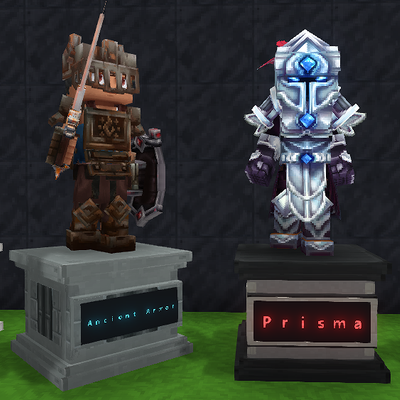
CurseForge · Hytale mod
ArmorX
Bring your armories, castles, shops, and trophy rooms to life with customizable character displays!
Choose a version Pick your version below, then grab the matching file.
Quick answer
Which ArmorX release should I use?
Latest stable file ArmorX-1.12.1
Game version 0.7
Mod system Built-in Hytale mod system
ArmorX-1.12.1 targets 0.7. Do not install it as a separate client mod. Enable it on the world host—the local server in singleplayer or the dedicated server in multiplayer. No required dependencies listed for this file.
Where it goes
Where should ArmorX be installed in Hytale?
Do not install it as a separate client mod. Enable it on the world host—the local server in singleplayer or the dedicated server in multiplayer.
Separate client mod Not supported
World host / dedicated server Required
Mod system for this release Built-in Hytale mod system
Required install it here Optional supported, not mandatory Not supported do not install here Source doesn’t say do not assume
Put Hytale mods on the world host or dedicated server. Singleplayer runs a local server too; Hytale does not use separate client mods.
What else does ArmorX-1.12.1 need?
ArmorX-1.12.1. Change the file and its required mods may change too.
This file does not list any required mods. Do not add a library just because a different file uses it.
This file does not list any required or optional project dependencies. Check the creator notes before changing an existing world.
Before you install it
Add ArmorX without breaking your instance.
Built for ArmorX-1.12.1. Pick another file and the loader, install side or required mods may change.
- 01
Stick to this file
Use ArmorX-1.12.1. It targets 0.7; another release may target a different game build or dependency set.
- 02
Bring the mods it needs
This file does not list any required mods. Do not add a library just because a different file uses it.
- 03
Enable it on the world host
Do not install it as a separate client mod. Enable it on the world host—the local server in singleplayer or the dedicated server in multiplayer.
- 04
Pick the file you checked
Use the “Get this file” button beside ArmorX-1.12.1. It opens that exact file at the source.
About this project
What does ArmorX add?
🛡️ ArmorX
✨ Your gear deserves a spotlight!
Bring your armories, castles, shops, and trophy rooms to life with customizable character displays!
🎒 Drag, Drop & Display
Press F to open a stand’s inventory. Drag in armor, weapons, shields, and other items—or drag them back out to retrieve them.
🎭 Show Your Character
Choose a male or female character, or enter a Hytale player name to copy their appearance—even if they have never joined your server. Restore the original look with Reset Appearance.
🗿 Build Your Perfect Statue
Freeze your display with Statue Mode, choose from 10 poses, and fine-tune the head, arms, and legs with individual bend, turn, and tilt sliders.
⚔️ Strike a Pose
Display a sword and shield together. Keep the shield at the character’s side or raise it into a blocking stance.
🪵 Pick Your Pedestal
Finish your creation with a Concrete, Mixed Wood, Metal, or White Marble base, complete with a front nameplate.
🌈 Make It Personal
Add colorful overhead text, adjust its height, or place it on the base’s nameplate with adjustable text size.
💾 Keep Your Creations
Equipment, skins, poses, bases, facing, and text settings save with each stand.
🌐 Remote skin lookup requires internet access to PlayerDB. Unavailable cosmetics use compatible defaults.
🎮 Designed for Hytale 0.7.x
Project description from CurseForge.
Pick your setup
ArmorX releases for each Hytale build.
Choose the version and loader you play, then open the matching release.
Check the dependencies, then try the file in a copied instance before changing a world you care about.
Recent files
ArmorX releases and Hytale builds
ArmorX-1.12.1
24 Oct 2026
Client Not supported Server Required Dependencies No extras listed Listed on Project page
Check the 0.7 setup 0.7 release
Looking for an older file? The official CurseForge project page is in Resources.
 mod
CurseForge · Hytale
Living World Events
A world that's truly alive: unexpected events, epic bosses and treasures waiting to be won.
 mod
CurseForge · Hytale
RAX Western Arsenal
A true Western weapon pack for Hytale featuring custom revolvers, rifles and shotguns with unique models, aiming, ammo and reload mechanics.
 mod
CurseForge · Hytale
[SNIP3's] Food Pack
[SNIP3’s] Food Pack is currently in development and will receive frequent updates. It enhances your Hytale food experience by adding new foods and ingredients.